-
Notifications
You must be signed in to change notification settings - Fork 36
Project Labels and Columns in Pages #410
New issue
Have a question about this project? Sign up for a free GitHub account to open an issue and contact its maintainers and the community.
By clicking “Sign up for GitHub”, you agree to our terms of service and privacy statement. We’ll occasionally send you account related emails.
Already on GitHub? Sign in to your account
Open
danciaclara
wants to merge
5
commits into
master
Choose a base branch
from
project-labels
base: master
Could not load branches
Branch not found: {{ refName }}
Loading
Could not load tags
Nothing to show
Loading
Are you sure you want to change the base?
Some commits from the old base branch may be removed from the timeline,
and old review comments may become outdated.
Open
Changes from all commits
Commits
Show all changes
5 commits
Select commit
Hold shift + click to select a range
File filter
Filter by extension
Conversations
Failed to load comments.
Loading
Jump to
Jump to file
Failed to load files.
Loading
Diff view
Diff view
There are no files selected for viewing
This file contains hidden or bidirectional Unicode text that may be interpreted or compiled differently than what appears below. To review, open the file in an editor that reveals hidden Unicode characters.
Learn more about bidirectional Unicode characters
This file contains hidden or bidirectional Unicode text that may be interpreted or compiled differently than what appears below. To review, open the file in an editor that reveals hidden Unicode characters.
Learn more about bidirectional Unicode characters
This file contains hidden or bidirectional Unicode text that may be interpreted or compiled differently than what appears below. To review, open the file in an editor that reveals hidden Unicode characters.
Learn more about bidirectional Unicode characters
This file contains hidden or bidirectional Unicode text that may be interpreted or compiled differently than what appears below. To review, open the file in an editor that reveals hidden Unicode characters.
Learn more about bidirectional Unicode characters
| Original file line number | Diff line number | Diff line change |
|---|---|---|
| @@ -0,0 +1,44 @@ | ||
| --- | ||
| title: Project labels | ||
| description: Organize and categorize projects across your workspace with reusable labels. | ||
| --- | ||
|
|
||
| # Tag projects with Labels <Badge type="info" text="Pro" /> | ||
|
|
||
| Project labels let you categorize projects across your workspace by team, function, priority, or any custom classification. Labels are defined at the workspace level and can be applied to any project. A project can have multiple labels. | ||
|
|
||
| ## Create project labels | ||
|
|
||
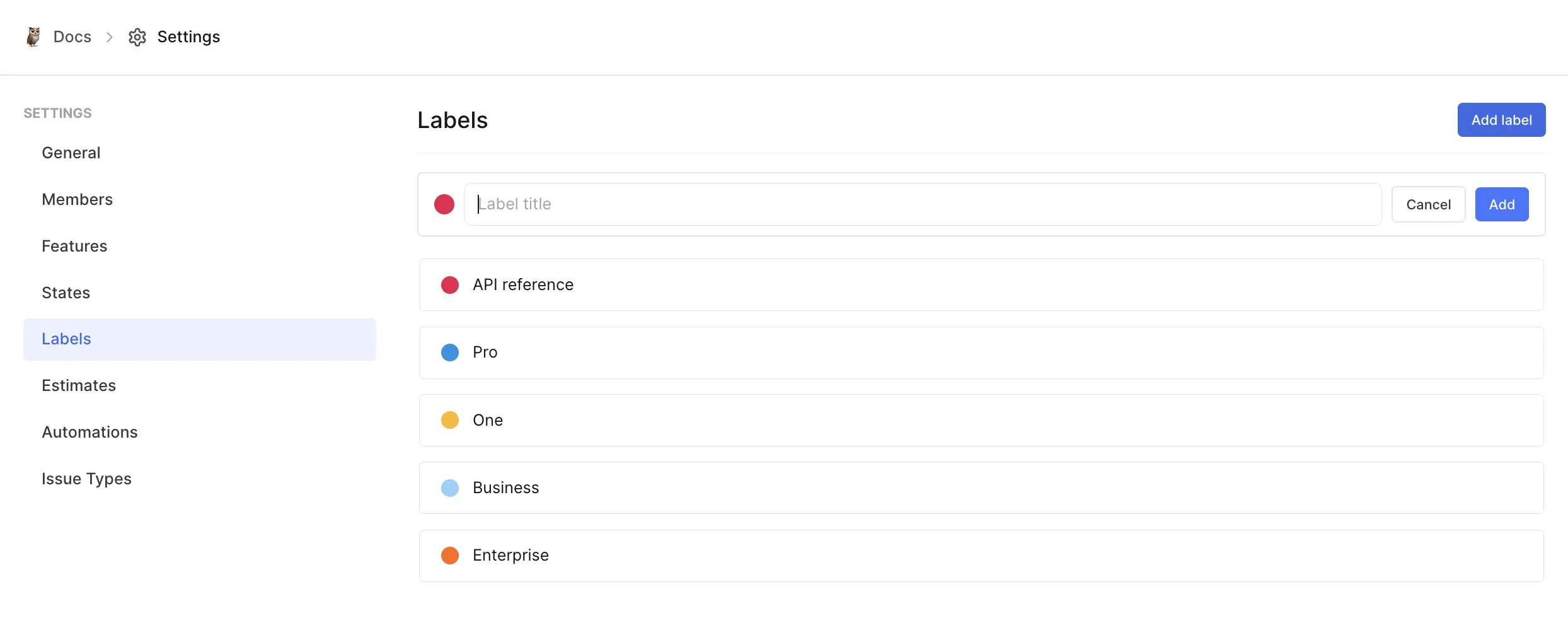
| 1. Go to **Workspace Settings → Projects**. | ||
| 2. Click the **Project labels** tab. | ||
| 3. Click **Add label**. | ||
| 4. Enter a label name and choose a color. | ||
| 5. Click **Add**. | ||
|
|
||
|  | ||
|
|
||
| You can also create labels directly from the label picker when assigning them to a project. | ||
|
|
||
| ## Group projects by labels | ||
|
|
||
| In Board and List layouts, you can group projects by their labels: | ||
|
|
||
| - Each label appears as its own column or group. | ||
| - Projects appear under their assigned labels. | ||
| - Projects without labels appear in a **No Label** group. | ||
|
|
||
| This makes it easier to scan and manage projects by custom categories. | ||
|
|
||
| ## Edit and delete labels | ||
|
|
||
| **Edit a label:** | ||
| 1. Go to **Workspace Settings → Projects → Project labels**. | ||
| 2. Click the **…** icon on the label and select **Edit label**. | ||
| 3. Update the name or color and click **Update**. | ||
|
|
||
| **Delete a label:** | ||
| 1. Click the **…** icon on the label and select **Delete**. | ||
|
|
||
| ::: warning | ||
| Deleting a label removes it from all projects that had it assigned. | ||
| ::: |
This file contains hidden or bidirectional Unicode text that may be interpreted or compiled differently than what appears below. To review, open the file in an editor that reveals hidden Unicode characters.
Learn more about bidirectional Unicode characters
Oops, something went wrong.
Add this suggestion to a batch that can be applied as a single commit.
This suggestion is invalid because no changes were made to the code.
Suggestions cannot be applied while the pull request is closed.
Suggestions cannot be applied while viewing a subset of changes.
Only one suggestion per line can be applied in a batch.
Add this suggestion to a batch that can be applied as a single commit.
Applying suggestions on deleted lines is not supported.
You must change the existing code in this line in order to create a valid suggestion.
Outdated suggestions cannot be applied.
This suggestion has been applied or marked resolved.
Suggestions cannot be applied from pending reviews.
Suggestions cannot be applied on multi-line comments.
Suggestions cannot be applied while the pull request is queued to merge.
Suggestion cannot be applied right now. Please check back later.
There was a problem hiding this comment.
Choose a reason for hiding this comment
The reason will be displayed to describe this comment to others. Learn more.
Update the alt text to match the new image.
Line 14 now points to the work item labels hero, but the alt text still says "Project labels". That makes the fallback text and screen-reader description misleading.
Suggested fix
📝 Committable suggestion
🤖 Prompt for AI Agents