György Noémi, Hegedüs Enikő, Tóth Máté
Csapó Krisztián, Csürke Gábor
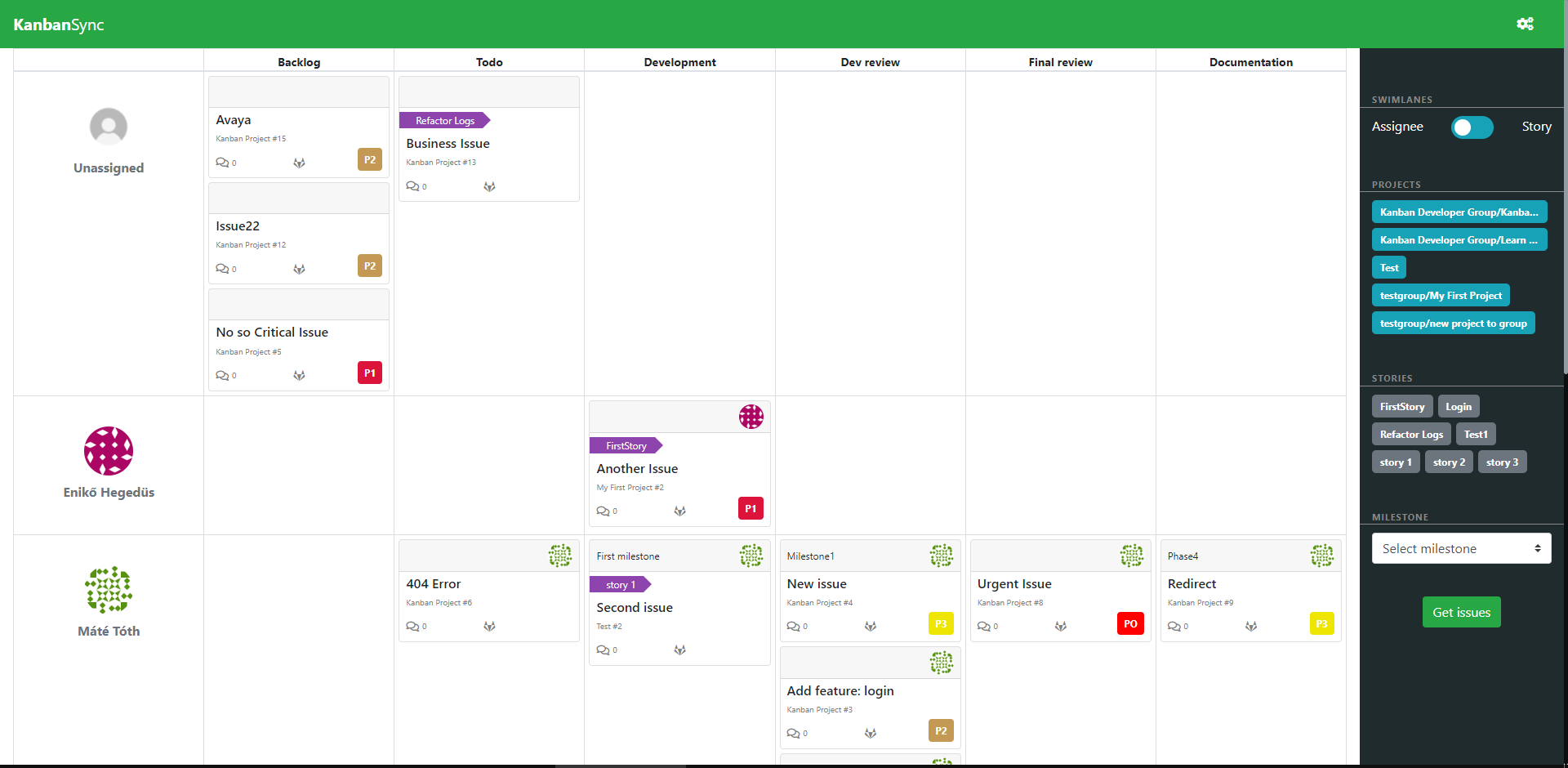
This application is a kanban board. The board displays gitlab issue cards, showing the title, assignee, project, story,
milestone, priority of the issue, and some other information.
The columns of the board are the statuses of the issues. Horizontally there are swimlanes, which optionally can be the
assignees or the stories of the issues.
The statuses, stories and priorities are actually stored in the labels of a story as described below in the configuration part.
Issues can be filtered by project, milestone and story. If no story or/and milestone is selected then every issue will be shown, even possibly those which do not have a story or/and milestone.
The gitlab page of the issues can be reached by clicking on the gitlab logo on the issues. The statuses and the assignees of issues can be directly changed from the board by the drag and drop function of the issues.
Our application uses the OAuth2 protocol to access GitLab resources on the user’s behalf. We use the Authorization code flow as described here: https://docs.gitlab.com/ee/api/oauth2.html.
We use graphQL API to get datas from gitlab and modify them (https://docs.gitlab.com/ee/api/graphql/).
This is the backend of the application, which is a Spring application. The frontend is written React.
This is the frontend remote repository: https://github.com/tothmate911/A38-Kanban-development-Frontend.
For instant test usage of the application please go to the following page: http://34.139.217.62:3000
After the auto-redirecting to Gitlab authentication platform give these credentials:
- Username: tothmate316
- Password: kanban1!
If you are asked to Authorize the configured GitLab Application to use the account, then please authorize it.
(Please note that you will not be able to assign an issue to a user who is not a member of the issue's project.)
Clone this repository and the frontend repository to your local computer. Make sure that the two downloaded directories are on the same level.
First you need to add a new application to GitLab. You may add the application to your own GitLab server, or you can create an application here: https://gitlab.com/-/profile/applications
- The Redirect URI should be this: <your_frontend_url>/getToken.
(For example: https://34.139.217.62:3000/getToken) - The scopes of the application should be api.
- After creating the application you should be able to see your Application ID and Secret, which you will need later.
Please find this file: A38-Kanban-development/docker-compose-local.yml. Please set your proper backend and frontend urls in the environment variables. You may delete a build sections from this file, in which case the images will not be build locally, but pulled form dockerhub.
services:
  backend:
    image: tothmate911/kanban-backend:latest
    build:
      context: '.'
      dockerfile: 'Dockerfile'
    ports:
      - '8080:8080'
    environment:
      - frontend.url=http://localhost:3000
      - gitlabServer.url=https://gitlab.com
  frontend:
    image: tothmate911/kanban-frontend:latest
    build:
      context: '../A38-Kanban-development-Frontend'
      dockerfile: 'Dockerfile'
    ports:
      - '3000:3000'
    environment:
      - REACT_APP_GITLAB_SERVER=https://gitlab.com
      - REACT_APP_GITLAB_APP_ID=c04bee74901923d61dac82e59e01861637f9487fdefab1430e88a1a57e79c3ce
      - REACT_APP_GITLAB_APP_SECRET=gloas-57080126ab5d94ab864a64967bcde389dd3f923a0435013c7dd8f35be27d4a09
      - REACT_APP_APPLICATION=http://localhost:3000
- REACT_APP_SERVER=http://localhost:8080In this file set your predefined properties in a Json file.
Prerequisites:
- Docker and docker compose installed
- Frontend has to accessible under A38-Kanban-development-Frontend/ and be on the same level with the current directory
- (There is no need to have pre-built jars, the dockerfile in backend takes care of that.)
If he above points are met:
- Hit
docker compose -f docker-compose-local.yml up --buildthis will build the docker images from the specified docker files based on thedocker-compose-local.ymland spin up the application stack. - Visit
localhost:3000(To change the host see the docker-compose.yml configuration) - The
--buildoptions forces a rebuild every time it is issued. If images are already build simply hitdocker compose -f docker-compose-local.yml up
If you want to run the docker compose process in the background just pass the -d option to docker compose command.
{
  "storyPrefix": "story:",  //this should be your own story prefix

  "priorities": [
    {
      "title": "KB[priority][70][P3]",  //this is the label title of one of your priority labels on gitlab
      "display": "P3"   //this is what you want to display on the kanban board,
                        // that corresponds to the above given priority label title
    }
  ],

  "statuses": [
    {
      "title": "KB[stage][00][Backlog]",    //this is the label title of one of your status labels on gitlab
      "display": "Backlog"     //this is what you want to display on the kanban board,
                               // that corresponds to the above given status label title
    }
  ]

}