


Uy, Kape! is a coffee-ordering system for coffee prosumers who want to give visitors to their home a fancy online ordering system with professional branding. All menu items are free, the intent is to give the coffee barista a way to track guest orders based on what is available at home for the day.
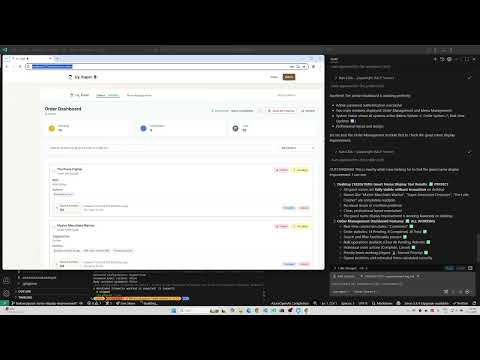
This app is 100% vibe coded! using Claude Code and GitHub Copilot. We do this mostly by following the plan-implement-run pattern.
The prompts and skills in this repo are designed to be cross-compatible with both Claude Code and GitHub Copilot. This starts with writing a task objective in scratch.md and then running /1-plan with the requirements.
For more details, read the VIBE CODING GUIDE.
- Logo Integration: Official "Uy, Kape!" logo throughout the application
- Responsive Design: Logo adapts seamlessly across desktop, tablet, and mobile devices
- Brand Consistency: Cohesive visual identity with logo + text combinations
- Coffee-Themed Styling: Enhanced color palette matching the brand logo
- Welcome Page: Coffee-themed interface for visitors
- Menu Display: Browse available beverages and customizations
- Order Placement: Simple and intuitive ordering process
- Real-time Updates: Live menu availability and status
- Menu Management: Complete control over coffee shop menu
- Drink categories (Coffee, Tea, Specialty, etc.)
- Individual beverages with pricing and descriptions
- Customization options (Size, Milk type, Add-ons)
- Real-time synchronization across all admin interfaces
- Order Management: Track and fulfill customer orders
- Administrative Tools: User management and system configuration
- Real-time Synchronization: Live updates across all connected devices
- Password Protection: Secure access to admin features with configurable bypass options
- Responsive Design: Works seamlessly on desktop, tablet, and mobile
- Accessibility: Full keyboard navigation and screen reader support
- Offline Support: Basic functionality when internet is unavailable
- Configurable Authentication: Optional guest password bypass for development and testing
Uy, Kape! is built with modern web technologies optimized for performance and real-time collaboration:
- Frontend: React 18 + TypeScript + Vite + Tailwind CSS
- Database: Supabase (PostgreSQL with real-time subscriptions)
- Testing: Vitest + React Testing Library
- Hosting: Vercel with Node.js 20.x runtime
📋 View Complete Technology Stack Documentation →
For detailed version information, architectural decisions, and configuration details, see the comprehensive technology stack documentation.
- Node.js (version 20 or higher)
- npm (comes with Node.js)
-
Clone the repository:
git clone <repository-url>
cd uy-kape
-
Install dependencies:
npm install
-
Environment Configuration:
-
Create development environment:
cp .env.example .env -
Optional for testing:
cp .env.test.local.example .env.test.local -
Optional: Configure guest password bypass for development:
# Set to 'true' to bypass guest password requirement
VITE_GUEST_BYPASS_PASSWORD=false
-
-
Start the development server:
npm run dev
-
Open your browser:
- Navigate to
http://localhost:5173(or the port shown in the terminal)
- Navigate to
Guest Interface:
- Default landing page provides the guest ordering experience
- Password protection can be bypassed for development by setting
VITE_GUEST_BYPASS_PASSWORD=true - No authentication required for browsing and ordering when bypass is enabled
Barista Admin Interface:
- Navigate to
/baristaor click "Barista Login" from the welcome page - Enter the admin password (configurable in environment variables)
- Access the menu management system and order tracking tools
Menu Management:
- From the Barista Module, click "Menu Management"
- Manage drink categories, beverages, and customization options
- Changes sync in real-time across all connected devices
npm run dev- Start the development server with hot reloadnpm run build- Build the project for productionnpm run preview- Preview the production build locallynpm run lint- Run ESLint to check code qualitynpm run ping-database- Manually ping the database to keep it active
This project uses a Supabase database on a free plan, which automatically disables after 7 days of inactivity. To prevent this, a GitHub Actions workflow runs daily to keep the database active by executing simple SELECT queries on the drinks and orders tables.
The automated workflow requires the following secrets to be configured in your GitHub repository (Settings → Secrets and variables → Actions):
SUPABASE_URL: Your Supabase project URLSUPABASE_ANON_KEY: Your Supabase anonymous key (safe for read-only operations)
You can manually trigger the workflow from the GitHub Actions tab, or run the script locally:
# Option 1: Use environment variables directly
export SUPABASE_URL=your_url
export SUPABASE_ANON_KEY=your_key
npm run ping-database

# Option 2: Create a .env file in the scripts directory
cp scripts/.env.example scripts/.env
# Edit scripts/.env with your credentials
npm run ping-database
The workflow also supports manual triggering via the GitHub Actions "workflow_dispatch" event for testing purposes.