Secure your AI models before deployment. Static scanner that detects malicious code, potential backdoor indicators, and security vulnerabilities in ML model files — without ever loading or executing them.




Full Documentation | Usage Examples | Supported Formats
Models download from untrusted registries, pass through CI, and end up running in production. Traditional SAST tools do not look at pickle opcodes, HDF5 group layouts, ONNX proto graphs, or TensorFlow SavedModel signatures — ModelAudit does:
- Scan statically. No model is ever loaded, unpickled, or executed.
- Cover the formats you actually ship. 40+ scanners spanning pickle, PyTorch, SafeTensors, ONNX, TensorFlow, Keras, GGUF, archives, and configs.
- Fit into CI. Machine-readable output (JSON, SARIF), strict mode, exit codes, and selectable scanners.
- Surface coverage limits. Recognized scanners report bounded-analysis gaps such as truncated reads or exhausted budgets instead of presenting them as fully covered results.
Comparable tools: picklescan (pickle only, Python-based), fickling (pickle only, AST-based), modelscan (pickle + TensorFlow + Keras subset). ModelAudit is broader in coverage and ships a native Rust pickle engine via its companion package modelaudit-picklescan.
Requires Python 3.10-3.13
pip install "modelaudit[all]"

# Scan a file or directory
modelaudit model.pkl
modelaudit ./models/

# Export results for CI/CD
modelaudit model.pkl --format json --output results.json
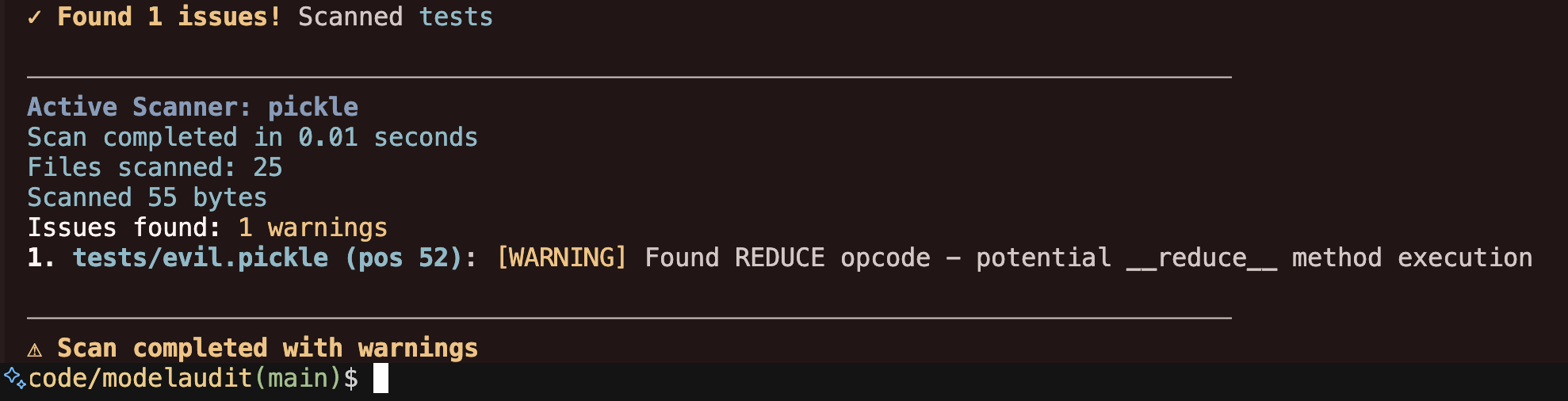
$ modelaudit suspicious_model.pkl
Files scanned: 1 | Issues found: 2 critical, 1 warning
1. suspicious_model.pkl (pos 28): [CRITICAL] Malicious code execution attempt
Why: Contains os.system() call that could run arbitrary commands
2. suspicious_model.pkl (pos 52): [WARNING] Dangerous pickle deserialization
Why: Could execute code when the model loads
- Code execution attacks in Pickle, PyTorch, NumPy, and Joblib files
- Potential backdoor indicators — suspicious weight patterns, anomalous tensors, or hidden-code signals
- Embedded secrets — API keys, tokens, and credentials in model weights or metadata
- Network indicators — URLs, IPs, and socket usage that could enable data exfiltration
- Archive exploits — path traversal, symlink attacks in ZIP/TAR/7z files
- Unsafe ML operations — Lambda layers, custom ops, TorchScript/JIT, template injection
- Supply chain risks — tampering, license violations, suspicious configurations
ModelAudit includes 45 registered scanners covering model, archive, and configuration formats:
| Format | Extensions | Risk |
|---|---|---|
| Pickle | .pkl, .pickle, .dill |
HIGH |
| PyTorch | .pt, .pth, .ckpt, .bin |
HIGH |
| Joblib | .joblib |
HIGH |
| NumPy | .npy, .npz |
HIGH |
| R Serialized | .rds, .rda, .rdata, signature-valid renamed workspace artifacts |
HIGH |
| TensorFlow | .pb, .meta, SavedModel dirs |
MEDIUM |
| Keras | .h5, .hdf5, .keras |
MEDIUM |
| ONNX | .onnx |
MEDIUM |
| CoreML | .mlmodel, structurally valid renamed artifacts |
LOW |
| MXNet | *-symbol.json, *-NNNN.params, structurally valid renamed symbol JSON |
LOW |
| NeMo | .nemo, renamed archives with root config |
MEDIUM |
| CNTK | .dnn, .cmf, signature-valid renamed artifacts |
MEDIUM |
| RKNN | .rknn, signature-valid artifacts under non-conflicting renamed suffixes |
MEDIUM |
| Torch7 | Serialized artifacts (.t7, .th, .net or renamed) |
HIGH |
| CatBoost | .cbm |
MEDIUM |
| XGBoost | .bst, .model, .json, .ubj, extensionless UBJSON |
MEDIUM |
| LightGBM | .lgb, .lightgbm, .model, signature-valid renamed artifacts |
MEDIUM |
| Llamafile | Executable wrappers (.llamafile, .exe, extensionless or renamed) |
MEDIUM |
| TorchServe | .mar |
HIGH |
| SafeTensors | .safetensors |
LOW |
| GGUF/GGML | .gguf, .ggml, .ggmf, .ggjt, .ggla, .ggsa, signature-valid renamed artifacts |
LOW |
| JAX/Flax | .msgpack, .flax, .orbax, .jax, .checkpoint, .orbax-checkpoint |
LOW |
| TFLite | .tflite, signature-valid artifacts under non-conflicting renamed suffixes |
LOW |
| ExecuTorch | .ptl, .pte, signature-valid standalone artifacts under non-conflicting renamed suffixes |
LOW |
| TensorRT | .engine, .plan, .trt |
LOW |
| PaddlePaddle | .pdmodel, .pdiparams |
LOW |
| OpenVINO | .xml |
LOW |
| Skops | .skops |
HIGH |
| PMML | .pmml |
LOW |
| Compressed Wrappers | .gz, .bz2, .xz, .lz4, .zlib |
MEDIUM |
Plus scanners for ZIP, TAR, 7-Zip, OCI layers, Jinja2 templates, JSON/YAML metadata, manifests, model cards, text files, and RAR recognition. RAR archives are reported as unsupported/fail-closed instead of being skipped.
Structurally valid TensorFlow SavedModel and MetaGraph protobufs are also recognized when renamed to non-model suffixes.
CoreML models can also be recognized when renamed, with incomplete coverage reported explicitly.
SafeTensors files with oversized but plausible framing are retained for bounded, inconclusive analysis under
otherwise unclaimed suffixes such as .jpg.
Structurally plausible Flax/JAX MessagePack checkpoints are also recognized when renamed to non-model suffixes;
renamed structures that cannot be fully classified are reported as incomplete coverage.
Structured JAX/Orbax JSON checkpoint metadata is likewise recognized when renamed; oversized ambiguous
candidates are reported as incomplete coverage; observable security patterns in the bounded inspected prefix may
still be reported conservatively.
View complete format documentation
Scan models directly from remote registries and cloud storage:
# Hugging Face
modelaudit https://huggingface.co/gpt2
modelaudit hf://microsoft/DialoGPT-medium

# Cloud storage
modelaudit s3://bucket/model.pt
modelaudit gs://bucket/models/

# MLflow registry
modelaudit models:/MyModel/Production

# JFrog Artifactory (files and folders)
# Auth: export JFROG_API_TOKEN=...
modelaudit https://company.jfrog.io/artifactory/repo/model.pt
modelaudit https://company.jfrog.io/artifactory/repo/models/

# DVC-tracked models
modelaudit model.dvcHF_TOKENfor private Hugging Face repositoriesAWS_ACCESS_KEY_ID/AWS_SECRET_ACCESS_KEY(and optionalAWS_SESSION_TOKEN) for S3GOOGLE_APPLICATION_CREDENTIALSfor GCSMLFLOW_TRACKING_URIfor MLflow registry accessJFROG_API_TOKENorJFROG_ACCESS_TOKENfor JFrog Artifactory- Store credentials in environment variables or a secrets manager, and never commit tokens/keys.
# Broad scanner coverage (recommended; excludes the TensorFlow runtime and platform-specific TensorRT)
pip install "modelaudit[all]"

# Core only (static scanners, pickle, NumPy, archives, manifests, metadata)
pip install modelaudit

# Specific frameworks (TensorFlow installs on Python 3.11-3.12; ONNX installs on Python 3.10-3.12)
pip install "modelaudit[tensorflow,pytorch,h5,onnx,safetensors]"

# CI/CD environments
pip install "modelaudit[all-ci]"

# On Python 3.11-3.12, add TensorFlow only when you need runtime-dependent checkpoint or weight analysis
pip install "modelaudit[all,tensorflow]"

# Docker
docker run --rm -v "$(pwd)":/app ghcr.io/promptfoo/modelaudit:latest model.pkl
The ONNX extra, including the ONNX portion of modelaudit[all], is packaged for Python 3.10-3.12.
Primary commands:
modelaudit [PATHS...]                           # Default scan command
modelaudit scan [OPTIONS] PATHS...              # Explicit scan command
modelaudit scan --list-scanners                 # List scanner IDs for targeted scans
modelaudit metadata [OPTIONS] PATH              # Extract model metadata safely (no deserialization by default)
modelaudit doctor [--show-failed]               # Diagnose scanner/dependency availability
modelaudit debug [--json] [--verbose]           # Environment and configuration diagnostics
modelaudit cache [stats|clear|cleanup] [OPTIONS]
Common scan options:
--format {text,json,sarif}   Output format (default: auto-detected)
--output FILE                Write results to file
--strict                     Fail on warnings, scan all file types, strict license validation
--sbom FILE                  Generate CycloneDX SBOM
--stream                     Process files one-by-one; remote downloads are deleted after scanning
--max-size SIZE              Size limit (e.g., 10GB)
--timeout SECONDS            Override scan timeout
--dry-run                    Preview what would be scanned
--verbose / --quiet          Control output detail
--blacklist PATTERN          Additional patterns to flag
--no-cache                   Disable result caching
--cache-dir DIR              Set cache directory for downloads and scan results
--progress                   Force progress display
--scanners LIST              Only run selected scanners (IDs/classes; comma-separated or repeated)
--exclude-scanner NAME       Exclude a scanner from the active set (comma-separated or repeated)
--list-scanners              List scanner IDs, class names, extensions, and dependencies
Targeted scanner selection:
# Discover scanner IDs and class names
modelaudit scan --list-scanners
modelaudit scan --list-scanners --format json

# Run only selected scanners
modelaudit scan ./models --scanners pickle,tf_savedmodel
modelaudit scan ./model.pkl --scanners PickleScanner

# Run the default scanner set except a noisy or slow scanner
modelaudit scan ./models --exclude-scanner weight_distribution

# For container formats, include both the container scanner and nested scanner
modelaudit scan ./archive.zip --scanners zip,pickle
--scanners starts from an explicit allowlist. --exclude-scanner subtracts scanners from either that allowlist or the default scanner set. Scanner selection is reflected in JSON output under scanner_selection.
For remote folders, ModelAudit narrows downloads by selected scanner extensions when safe. Content-based renamed-wrapper routing applies after acquisition; scan a direct file URL when repository filenames may be intentionally misleading.
# Human-readable summary (safe default: no model deserialization)
modelaudit metadata model.safetensors

# Machine-readable output
modelaudit metadata ./models --format json --output metadata.json

# Focus only on security-relevant metadata fields
modelaudit metadata model.onnx --security-only
--trust-loaders enables scanner metadata loaders that may deserialize model content. Only use this on trusted artifacts in isolated environments.
0: No security issues detected1: Security issues detected2: Scan errors
ModelAudit includes telemetry for product reliability and usage analytics.
- Collected metadata can include command usage, scan timing, scanner/file-type usage, issue severity/type aggregates, sanitized model names/references, and coarse metadata like file extension/domain.
- URL telemetry strips userinfo, query strings, and fragments from model references. Avoid putting credentials in model names, file names, or artifact paths when telemetry is enabled.
- Model files are scanned locally and ModelAudit does not upload model binary contents as telemetry events.
- Telemetry is disabled automatically when
CI=trueis set orIS_TESTING=trueis set, and in editable development installs by default. Events that are sent from other CI providers (TeamCity, CodeBuild, Bitbucket Pipelines, Jenkins) are tagged withisRunningInCi=trueso they can be filtered downstream. - The anonymous user identifier is stored in
~/.promptfoo/promptfoo.yamlfor cross-tool correlation with Promptfoo. Existing IDs from~/.modelaudit/user_config.jsonare migrated on first run after upgrade.
Opt out explicitly with either environment variable:
export PROMPTFOO_DISABLE_TELEMETRY=1
# or
export NO_ANALYTICS=1
To opt in during editable/development installs:
export MODELAUDIT_TELEMETRY_DEV=1# JSON for CI/CD pipelines
modelaudit model.pkl --format json --output results.json
# SARIF for code scanning platforms
modelaudit model.pkl --format sarif --output results.sarif- Run
modelaudit doctor --show-failedto list unavailable scanners and missing optional deps. - Run
modelaudit debug --jsonto collect environment/config diagnostics for bug reports. - Use
modelaudit cache cleanup --max-age 30to remove stale cache entries safely. - If
pipinstalls an older release, verify Python is supported (python --version; ModelAudit supports Python 3.10-3.13). - For additional troubleshooting and cloud auth guidance, see:
- Full docs — setup, configuration, and advanced usage
- Usage examples — CI/CD integration, remote scanning, SBOM generation
- Supported formats — detailed scanner documentation
- Support policy — supported Python/OS versions and maintenance policy
- Security model and limitations — what ModelAudit does and does not guarantee
- Compatibility matrix — file formats vs optional dependencies
- Scanner selection — targeted scanner allowlists and exclusions
- Metadata extraction guide — safe metadata workflows and
--trust-loadersguidance - Offline/air-gapped guide — secure operation without internet access
- Troubleshooting — run
modelaudit doctor --show-failedto check scanner availability
modelaudit-picklescan— the standalone Rust-backed pickle scanner used by ModelAudit's pickle, PyTorch, ExecuTorch, and PyTorch-ZIP scanners. Install it directly if you only need pickle analysis (as a library, not a CLI) and do not want the full scanner bundle.
Do not open public issues for suspected vulnerabilities. See SECURITY.md for coordinated disclosure.
Issues, feature requests, and PRs are welcome. See CONTRIBUTING.md.
MIT License — see LICENSE for details.