



This repository is used as the example for the following articles:
- Distributed Transactions in Microservices with Kafka Streams and Spring Boot - how to implement distributed transaction based on the SAGA pattern with Spring Boot and Kafka Streams
- Deep Dive into Saga Transactions with Kafka Streams and Spring Boot - how to implement distributed transaction based on the SAGA pattern with Spring Boot and fully Kafka Streams
KStreamandKTable. You need to switch to the streams-full branch.
There are three microservices:
order-service - it sends Order events to the Kafka topic and orchestrates the process of a distributed transaction
payment-service - it performs local transaction on the customer account basing on the Order price
stock-service - it performs local transaction on the store basing on number of products in the Order
Here's the diagram with our architecture:
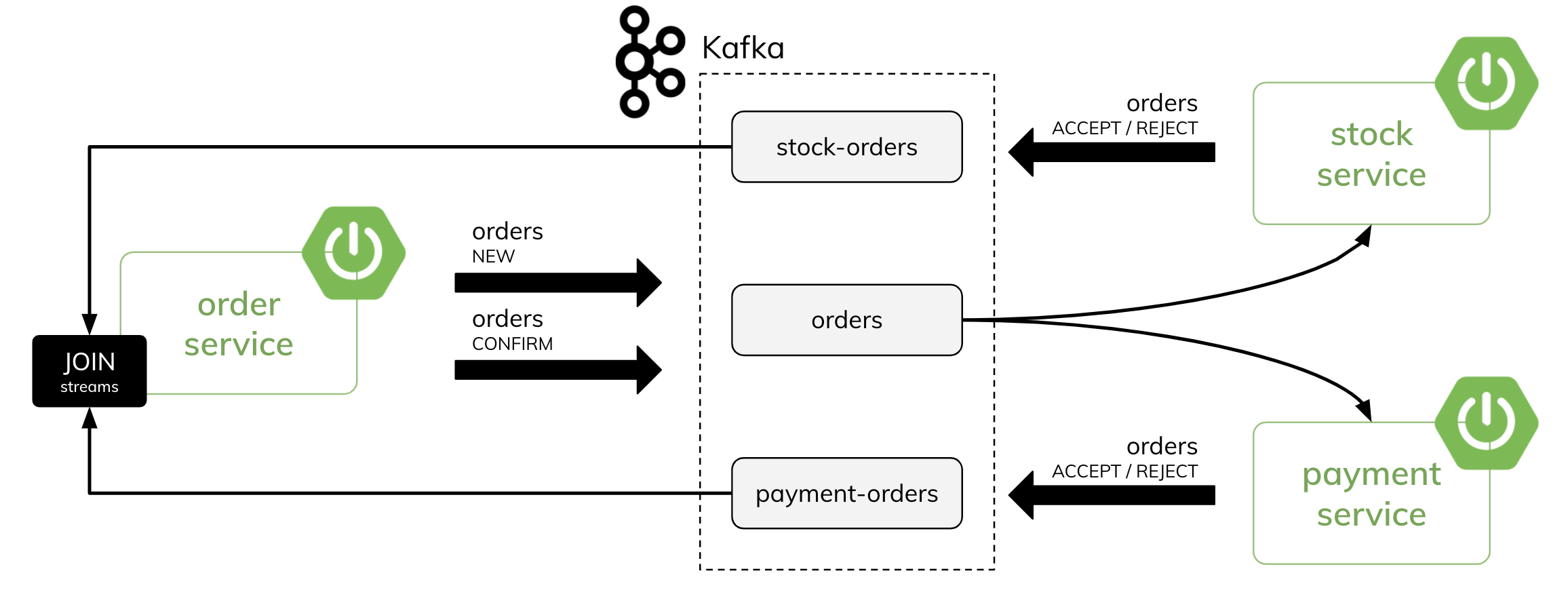
(1) order-service send a new Order -> status == NEW
(2) payment-service and stock-service receive Order and handle it by performing a local transaction on the data
(3) payment-service and stock-service send a reponse Order -> status == ACCEPT or status == REJECT
(4) order-service process incoming stream of orders from payment-service and stock-service, join them by Order id and sends Order with a new status -> status == CONFIRMATION or status == ROLLBACK or status == REJECTED
(5) payment-service and stock-service receive Order with a final status and "commit" or "rollback" a local transaction make before
- Java: JDK 21 (set as Project SDK in your IDE)
- Maven: Latest version installed
- Git: For cloning the repository
This is the best option for development and testing. You'll run Kafka locally and then start each microservice.
- Download Kafka 3.8.0 from Apache Kafka Downloads
- Extract the archive to a folder, e.g.,
C:\kafka - Verify the installation by checking for
bin\windows\andconfig\directories
Zookeeper is required for Kafka to coordinate brokers and manage metadata.
- Open PowerShell and navigate to your Kafka directory:
cd C:\kafka
- Start Zookeeper:
.\bin\windows\zookeeper-server-start.bat .\config\zookeeper.properties - Keep this terminal open. You should see logs indicating Zookeeper is running on port 2181.
In a new PowerShell terminal, navigate to your Kafka directory:
cd C:\kafkaStart the Kafka broker:
.\bin\windows\kafka-server-start.bat .\config\server.propertiesKeep this terminal open. You should see logs indicating Kafka is running on localhost:9092.
-
Clone the repository:
git clone https://github.com/piomin/sample-spring-kafka-microservices.git
cd sample-spring-kafka-microservices
-
Build all modules (from the project root directory):
mvn clean install
Open three separate PowerShell terminals from the project root directory:
Terminal 1 - Start Order Service:
cd order-service
mvn spring-boot:run
The service will start on http://localhost:8080
Terminal 2 - Start Payment Service:
cd payment-service
mvn spring-boot:run
Terminal 3 - Start Stock Service:
cd stock-service
mvn spring-boot:run
All three services should connect to Kafka on localhost:9092 and show startup logs without errors.
Once all services are running, you can test the APIs using Postman.
- Download Postman
- Create a POST request to
http://localhost:8080/orderswith JSON body:{ "customerId": 1, "productId": 1, "productCount": 2, "price": 100 } - Create a POST request to
http://localhost:8080/orders/generate(no body) - Create a GET request to
http://localhost:8080/orders
Simply open your browser and navigate to:
http://localhost:8080/orders
- When you create/generate an order, the
order-servicepublishes an event to Kafka - The
payment-serviceandstock-serviceconsume the order events and process local transactions - The services send response events back to Kafka
- The
order-servicejoins and aggregates responses to determine final order status (CONFIRMED, REJECTED, etc.) - You can see logs in each terminal showing the event flow and processing
- Kafka connection error: Ensure Zookeeper and Kafka are running on ports 2181 and 9092 respectively
- Port already in use: Check if another app is using port 8080 or 9092. Stop it or modify
server.portinapplication.yml - ClassNotFoundException in stock-service: Ensure
jackson-databinddependency is uncommented instock-service/pom.xml - Service startup issues: Check logs in each terminal for detailed error messages
You can easily run all the apps on Docker with Spring Boot support for: (a) Testcontainers (b) Docker Compose
Go to the order-service directory and execute:
$ mvn clean spring-boot:test-runThen go to the payment-service directory and execute:
$ mvn clean spring-boot:test-runFinally go to the stock-service directory and execute:
$ mvn clean spring-boot:test-runYou will have three apps running with a single shared Kafka running on Testcontainers.
First build the whole project and images with the following command:
$ mvn clean package -DskipTests -Pbuild-imageThen, from the project root directory, start all services:
$ docker-compose upYou will have Kafka, order-service, payment-service, and stock-service running in Docker containers.