


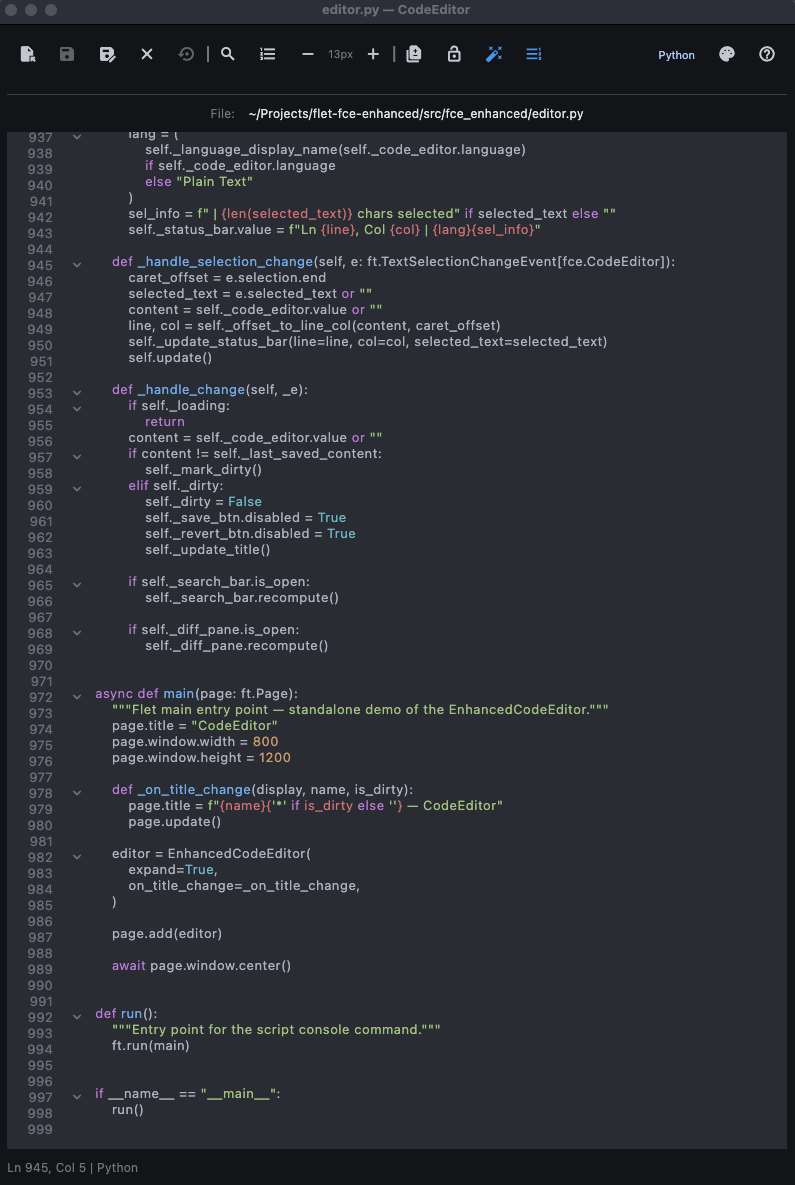
An enhanced Flet CodeEditor control with file I/O, search/replace, syntax highlighting, and theme selection.
Built on top of flet-code-editor, adding a full-featured editing experience you can drop into any Flet app or run standalone. This project was created to explore and showcase what's possible with Flet — building a desktop-quality code editor entirely in Python.
pip install fce-enhancedOr with uv:
uv add fce-enhancedgit clone https://github.com/oktl/flet-fce-enhanced.git
cd flet-fce-enhanced
uv sync
source .venv/bin/activate
pre-commit install # optional, for developmentuvx fce-enhanced # open with an empty editor
uvx fce-enhanced path/to/file.py # open a specific file on launchDuring development:
flet run src/fce_enhanced/editor.py                     # open with an empty editor
flet run src/fce_enhanced/editor.py path/to/file.py # open a specific file on launchEnhancedCodeEditor is a standard ft.Column subclass — add it to any Flet page or layout just like any other control.
import flet as ft
from fce_enhanced import EnhancedCodeEditor


def main(page: ft.Page):
    page.title = "My Editor"
    editor = EnhancedCodeEditor(expand=True)
    page.add(editor)


ft.run(main)import flet as ft
import flet_code_editor as fce
from fce_enhanced import EnhancedCodeEditor
def main(page: ft.Page):
page.title = "My Editor"
def on_title_change(display_path, name, is_dirty):
page.title = f"{name}{'*' if is_dirty else ''} — My Editor"
page.update()
editor = EnhancedCodeEditor(
language=fce.CodeLanguage.JAVASCRIPT,
value="console.log('hello');",
code_theme=fce.CodeTheme.MONOKAI,
on_title_change=on_title_change,
ruff_on_save=False, # disable ruff (only applies to Python files)
expand=True,
)
page.add(editor)
ft.run(main)| Parameter | Type | Default | Description |
|---|---|---|---|
language |
CodeLanguage |
PLAINTEXT |
Initial syntax highlighting language |
value |
str |
"# New file\n" |
Initial editor content |
show_toolbar |
bool |
True |
Show the file I/O toolbar |
show_status_bar |
bool |
True |
Show the line/column status bar |
show_gutter |
bool |
True |
Show the line-number gutter |
register_keyboard_shortcuts |
bool |
True |
Register global keyboard shortcuts |
autocomplete |
bool |
True |
Enable autocomplete |
autocomplete_words |
list[str] |
None |
Custom autocomplete suggestions |
code_theme |
CodeTheme |
ATOM_ONE_DARK |
Syntax highlighting theme |
text_style |
TextStyle |
None |
Text style for editor content |
gutter_style |
GutterStyle |
None |
Style for the line number gutter |
on_title_change |
callable |
None |
Callback (display_path, name, is_dirty) — fires on file open/close, save, and dirty-state changes. display_path is the home-relative path (e.g. ~/projects/foo.py) or "untitled". |
ruff_on_save |
bool |
True |
Auto-format Python files with ruff on save |
Any additional keyword arguments are passed through to ft.Column.
editor.value           # current editor content (str)
editor.current_path    # path of open file, or None
editor.dirty           # True if there are unsaved changes
editor.language        # current CodeLanguage
editor.code_editor     # the underlying fce.CodeEditor control
editor.search_bar # the SearchReplaceBar controlThe package also exports these utilities from fce_enhanced:
| Export | Description |
|---|---|
SearchReplaceBar |
Reusable search/replace control |
open_file() / save_file() |
Async platform-aware file dialogs |
language_for_path() |
Detect CodeLanguage from a file path |
EXTENSION_TO_LANGUAGE |
Dict mapping file extensions to CodeLanguage |
THEMES / DEFAULT_THEME / theme_display_name() |
Theme utilities |
main() / run() |
Entry points for standalone mode |
- File operations — Open, Save, Save As, Close, and Revert to Saved with unsaved-changes confirmation
- Native file dialogs — AppleScript dialogs on macOS (with extension filtering), Flet's built-in FilePicker on other platforms
- Search & Replace — Find toolbar with match counting, case sensitivity toggle, whole word matching, prev/next navigation (Enter navigates to next match), Replace and Replace All
- Command Palette — Searchable list of all available commands; type to filter (Cmd+Shift+P / Ctrl+Shift+P)
- Theme Selector — 80+ built-in syntax highlighting themes via a searchable dialog (type to filter)
- Go to Line — Jump to a specific line number (Cmd+G / Ctrl+G)
- Read-Only Mode — Toggle editing lock (Cmd+L / Ctrl+L)
- Font Size Controls — Increase/decrease font size (Cmd+= / Cmd+-)
- Language Selector — Choose syntax highlighting language from a searchable dialog (type to filter); auto-detected on file open, and Save As defaults to the matching file extension
- Language Detection — Automatic syntax highlighting for 40+ file extensions
- Dirty-File Tracking — Visual indicator for unsaved changes
- Diff Pane — Toggleable unified diff view showing changes since last save, with green/red syntax coloring (Cmd+D / Ctrl+D)
- Gutter Toggle — Show or hide the line-number gutter (Shift+Cmd+G / Ctrl+Shift+G)
- Ruff on Save — Auto-runs
ruff check --fixandruff formaton.pyfiles; silently skips if ruff is not installed (no error). Remaining lint warnings are shown in a snackbar, and the editor auto-reloads the formatted content. Toggleable from the toolbar - Status Bar — Line, column, language, and selection info
| Action | macOS | Windows / Linux |
|---|---|---|
| Open File | ⌘O | Ctrl+O |
| Save | ⌘S | Ctrl+S |
| Save As | ⇧⌘S | Ctrl+Shift+S |
| Close File | ⌘W | Ctrl+W |
| Revert to Saved | ⇧⌘R | Ctrl+Shift+R |
| Find | ⌘F | Ctrl+F |
| Find and Replace | ⌥⌘F | Ctrl+H |
| Toggle Diff | ⌘D | Ctrl+D |
| Toggle Gutter | ⇧⌘G | Ctrl+Shift+G |
| Go to Line | ⌘G | Ctrl+G |
| Toggle Read-Only | ⌘L | Ctrl+L |
| Increase Font Size | ⌘+ | Ctrl++ |
| Decrease Font Size | ⌘- | Ctrl+- |
| Command Palette | ⇧⌘P | Ctrl+Shift+P |
| Help | F1 | F1 |
| Close Search Bar | Esc | Esc |
Contributions are welcome! See CONTRIBUTING.md for guidelines.
MIT
Code style is enforced with ruff via pre-commit hooks:
pre-commit run --all-filesRun tests:
pytest- Flet — Build multi-platform apps in Python powered by Flutter
- flet-code-editor — Code editor control for Flet with syntax highlighting
- ruff — Fast Python linter and formatter