api-gateway-serviceproject established by combination of the following services and features
 * api-gateway
 * notification-service
 * openai-service
 * payment-service
 * service-registry
 * spring-config-server
 * student-service
 * swagger-application
 * Spring Cloud Gateway
 * SpringDoc Swagger
 * Event Driven Architecture with RabbitMQ
 * Event Driven Architecture with Apache Kafka (notification-service)
 * micrometer-tracing dependencies to track the logs
 * OpenTelemetry (OTLP) export for metrics, traces, and logs to Grafana LGTM stack
 * Postman collection to test by using Postman
 * Keycloak integration is completed under the payment-service
 * Feign Client secure call with Keycloak integration is completed under the student-service
 * MDC was added to improve logging between microservices
 * Google reCAPTCHA was added to secure endpoint calls
 * HCaptcha repo migration is completed under the student-service
 * openai-service repo migration is completed
 * Spring Cloud Eureka Server and Client integrations are completed with service-registry repo
 * KubernetesDeploymentGuide.md is added
 * Spring Config Server integration is completed with git version control
 * notification-service with Email, SMS (DummySms), Push (Firebase FCM + SSE) and Kafka-based notification support
 * Configurable security permitted paths via application.yml (gateway-service.security.permitted-paths)
 * Multi-application Firebase push notification support in notification-service
- To get a local copy up and running please follow these steps
- Followings should be installed and links for how to install them
- Java 25 or higher How to install Java
- Set
JAVA_HOMEto 25 ->export JAVA_HOME=$(/usr/libexec/java_home -v 25)
- Set
- Maven How to install Maven
- Docker How to install Docker
- Postman can be installed (OPTIONAL), follow how to import postman collection to import files that are under the postman_collection folder
- Create a new secret key via this url, copy the value, and add it
as
YOUR_API_KEY_HEREvalue in the .env
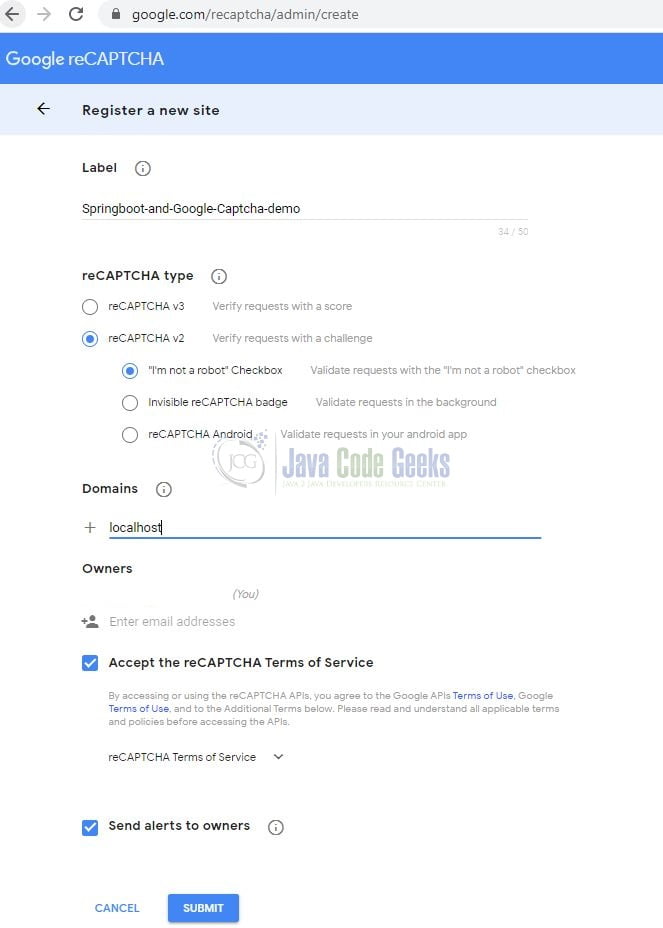
- Google reCAPTCHA installation (OPTIONAL)
- Log in to the https://www.google.com/recaptcha/admin/create
- Fill the necessary fields.
- This url can guide you
- Copy
SITE_KEYandSECRET_KEYand add them into related fields that are in the .env
- HCaptcha integration was implemented in 4 different ways in HCaptchaController.java (OPTIONAL)
- Java 25 or higher How to install Java
- Clone the repo
git clone https://github.com/musabbozkurt/api-gateway-service.git
-
Run all services
- (OPTION 1)
- Run
docker-compose --profile start_application up -d --buildcommand in the docker-compose.yml directory
- Run
- (OPTION 2)
- Enable spring.docker.compose property and just run ApiGatewayApplication.java to install RabbitMQ, PostgreSQL and Keycloak
- Run
mvn clean installormvn clean packageor./mvnw clean installor./mvnw clean packagecommand under each service's directory - Run
mvn spring-boot:runcommand under each service's directory
- (OPTION 1)
- Log in to http://localhost:9090/admin with
username:adminandpassword:adminCreate realm--> Import payment-service-realm-export.jsonClients-->payment-service-->Credentials-->Regeneratecopy the value and add it asPAYMENT_CLIENT_SECRET_ENVvalue in the .envUsers-->Add user-->Username-->payment-service-userUsers-->payment-service-user-->Credentials-->Set passwordtotestand turn offTemporarytoggleUsers-->payment-service-user-->Role Mapping-->Assign roleaddadminrole- Restart
student-serviceto fetchPAYMENT_CLIENT_SECRET
-
Additional information to access endpoints, swagger and actuator
- Swagger: http://localhost:8080/swagger-ui.html
- Open
Swagger--> selectPayment Servicedefinition --> ClickAuthorize- Enter the following credentials into the pop-up window
username:payment-service-userpassword:testclient_id:payment-serviceclient_secret:PAYMENT_CLIENT_SECRET_ENVvalue in the .env

- Click
Authorizeto get token - Click
Closeand test the services
- Enter the following credentials into the pop-up window
- Open
- Actuator: http://localhost:8080/actuator
- Eureka: http://localhost:8761/
- RabbitMQ Management: http://localhost:15673/ with
username:guestandpassword:guest - PostgreSQL:
jdbc:postgresql://localhost:5433/postgreswithusername:postgresandpassword:postgres - Redis: http://localhost:6379/
- RedisInsight: http://localhost:5540/
- Zipkin: http://localhost:9411/
- Grafana: http://localhost:3001/ with
username:adminandpassword:admin - Kafka UI: http://localhost:9999/
- spring-config-server
- Health: http://localhost:8888/actuator/health
- Config for swagger-application: http://localhost:8888/swagger-application/development/main
- Mailpit UI: http://localhost:8025/
- username: admin
- password: admin
- Mailpit is a local SMTP server for testing email sending functionality without actually sending emails to real addresses. It captures and displays emails sent by the application, allowing developers to verify email content and functionality during development.
- Swagger: http://localhost:8080/swagger-ui.html

- Kubernetes Deployment Guide (OPTIONAL)