Display resource commands in VS Code extension tree view#17698
Display resource commands in VS Code extension tree view#17698shivamgoel008 wants to merge 17 commits into
Conversation


Add support for displaying resource commands (both enabled and disabled)
as child items under each resource in the Aspire extension tree view.

Changes:
- Backend: Add State property to ResourceCommandJson and map all
  API-visible commands including disabled ones in ResourceSnapshotMapper
- Extension: Register executeResourceCommandItem command and add
  CommandsGroupItem/ResourceCommandItem tree elements
- Tests: Update ResourceSnapshotMapperTests to verify both enabled
  and disabled commands are included
 shivamgoel008
requested review from
JamesNK,
adamint,
davidfowl and
mitchdenny
as code owners
shivamgoel008
requested review from
JamesNK,
adamint,
davidfowl and
mitchdenny
as code owners

|
🚀 Dogfood this PR with:
curl -fsSL https://raw.githubusercontent.com/microsoft/aspire/main/eng/scripts/get-aspire-cli-pr.sh | bash -s -- 17698Or
iex "& { $(irm https://raw.githubusercontent.com/microsoft/aspire/main/eng/scripts/get-aspire-cli-pr.ps1) } 17698" |

|
video, image? |

|
Yes, please include both! |

 adamint
left a comment
adamint
left a comment
adamint
left a comment
There was a problem hiding this comment.
Reviewed by three parallel agents focused on architecture and logical correctness. The PR is small and the tree-view scaffolding is structurally sound, but the mapper widening has wider blast radius than the title suggests and the consumer side doesn't handle the full state vocabulary. Findings ordered by impact.
Blockers / High
Hiddencommand state leaks through and renders as actionable.ResourceCommandStatehas three values (Enabled,Disabled,Hidden) persrc/Aspire.Hosting/ApplicationModel/CustomResourceSnapshot.cs:330, andAuxiliaryBackchannelRpcTarget.cs:920stringifies the enum. The new mapper filter only checks visibility, and the consumer checkstate !== 'Disabled'treats"Hidden"as enabled, so a Hidden command with the default"UI, Api"visibility now gets a run icon, aresourceCommand:enabledcontext value, and a single-clickexecuteResourceCommandItembinding. Concrete regression:src/Aspire.Hosting/ApplicationModel/ParameterProcessor.cs:296marks the Save command Hidden until a value is set — the tree view will now render it as a clickable Run before the parameter has any value. (Inline comments on the mapper filter and the TS check.)- CodeLens provider now lights up Disabled/Hidden custom commands as actionable lenses.
extension/src/editor/AspireCodeLensProvider.ts:308-324iteratesresource.commandsand registers a CodeLens for every non-standard command — previously safe because the backend only emitted Enabled commands. After this PR, every custom command (Disabled or Hidden) becomes a clickable lens in the AppHost source file invokingaspire-vscode.codeLensResourceAction. The CodeLens provider was not updated in this PR; this is a regression to a feature outside the PR's stated scope.
Medium
- Mapper relaxation silently changes the wire contract for every consumer, not just the new tree view:
DescribeCommand.cs:213,260(aspire describeJSON / watch NDJSON),ExportCommand.cs:244(archive), andMcp/Tools/ListResourcesTool.cs:91(the MCP tool surfacing resources to LLM clients). None of those consumers were updated to interpret the newstatefield, so they will treat disabled/hidden commands as if they were available. Consider either gating the widening behind a parameter (includeDisabledCommands) that only the VS Code path opts into, or updating every consumer in tandem and documenting the contract change. - Single-click execution diverges from issue #17667 and is dangerous for destructive commands. The issue explicitly says “Users would still need to right-click or double-click to execute the command.” Setting
this.commandonResourceCommandItemfires on a single primary click (including arrow-key navigation in some VS Code configurations), with no confirmation dialog. Commands likestop,restart, drop-database, etc. will fire on accidental click. The right-click menu entry added inpackage.jsonis sufficient on its own. (Inline comment on thethis.commandblock.) executeResourceCommandquick-pick picker is now silently regressed. Same root cause as #3 — the legacy right-click → "Execute resource command" picker atAspireAppHostTreeProvider.ts:851-881enumeratesObject.entries(commands)with no state filter; it previously relied on the producer's implicit filter. After this PR, users see disabled and hidden commands in the picker without visual distinction and selecting them will fail server-side. Filter bycmd.state === 'Enabled'(or visually mark disabled entries) before adding to the quick-pick.- Inconsistency: CLI command picker still uses the strict filter at
src/Aspire.Cli/Commands/ResourceCommand.cs:242(IsCommandAvailableToApi), while the JSON contract no longer does. The CLI picker (aspire resource <name>) hides disabled commands, the VS Code tree shows them greyed, and the MCP tool sees them as actionable — three different views of the sameResourceSnapshotMapperoutput. Pick one model and apply it consistently. - Backward compat (old extension + new CLI) regresses existing users. Users who upgrade the CLI without updating the extension hit the regressions in #2 and #5 even without the new tree-view feature. There's no backchannel version negotiation that would let an older client opt back into Enabled-only payloads. At minimum, validate the previously-shipped extension does not silently execute disabled commands; ideally, gate the widened mapper behind a capability flag or accept-and-document in release notes.
Low
Statedocstring omitsHiddenand the new mapper comment claims "exclude hidden" even though the code does not filter on state. Both make finding #1 easy to miss in review. Consider documenting all three values and introducing aKnownCommandStateconstants class parallel toKnownCommandVisibility. (Inline on the docstring and the mapper comment.)vscode.l10n.t('(disabled)')is inlined rather than declared inextension/src/loc/strings.ts. The repo's AGENTS.md states new localized strings must live in bothpackage.nls.jsonandsrc/loc/strings.ts. Functionally fine (still localized at runtime), but invisible to anyone auditing the localization surface. (Inline.)- No extension-side tests were added for
CommandsGroupItem,ResourceCommandItem, thestate !== 'Disabled'branch, the single-clickthis.commandwiring, or the newexecuteResourceCommandItemhandler. The C# test only asserts on the in-memory mapped object, not on JSON round-trip through the source-generated context. The home for these isextension/src/test/appHostTreeView.test.ts.
Verified safe (not flagged)
- Tree-item id paths (
:commands,:command:<name>) are unique vs:health-checksand other sibling group ids. viewItem == resourceCommand:enabledexact-match is correct; no regex elsewhere falsely matches it.commandNamevsselected.labelare equivalent at the_runResourceCommandboundary (the existing picker also uses the dictionary key as the label).getChildrenparity in workspace and global view modes is correctly maintained.displayName ?? commandNamewhitespace handling is consistent with the backend mapper'sIsNullOrWhiteSpacenormalization.commandsLabelis correctly localized in bothpackage.nls.jsonandloc/strings.ts.aspire-vscode.executeResourceCommandItemis correctly hidden from the command palette viamenus.commandPalette.when: false.- Secret-redaction parity (
commandArguments.containsSecret) is preserved through the new handler. ResourceCommandJsonisinternal sealed; no public-API or.ats.txtbaseline impact.- No
.verified.*snapshot files capture serializedCommandsJSON, so addingStatedoesn't break Verify baselines. - No
NuGet.config/global.json/package.jsonruntime-deps /yarn.lockchanges that would violate guardrails.

|
What does it look like? Can you add some screenshots? |


Co-authored-by: Copilot <223556219+Copilot@users.noreply.github.com>
|
Final VSIX validation screenshots from a real VS Code Insiders window driven by Playwright CLI: Resource commands expanded
Enabled command context menu
Validated that enabled and disabled commands render, disabled commands are non-executable, enabled commands expose the context-menu action, and single-clicking a command item does not invoke the CLI. |
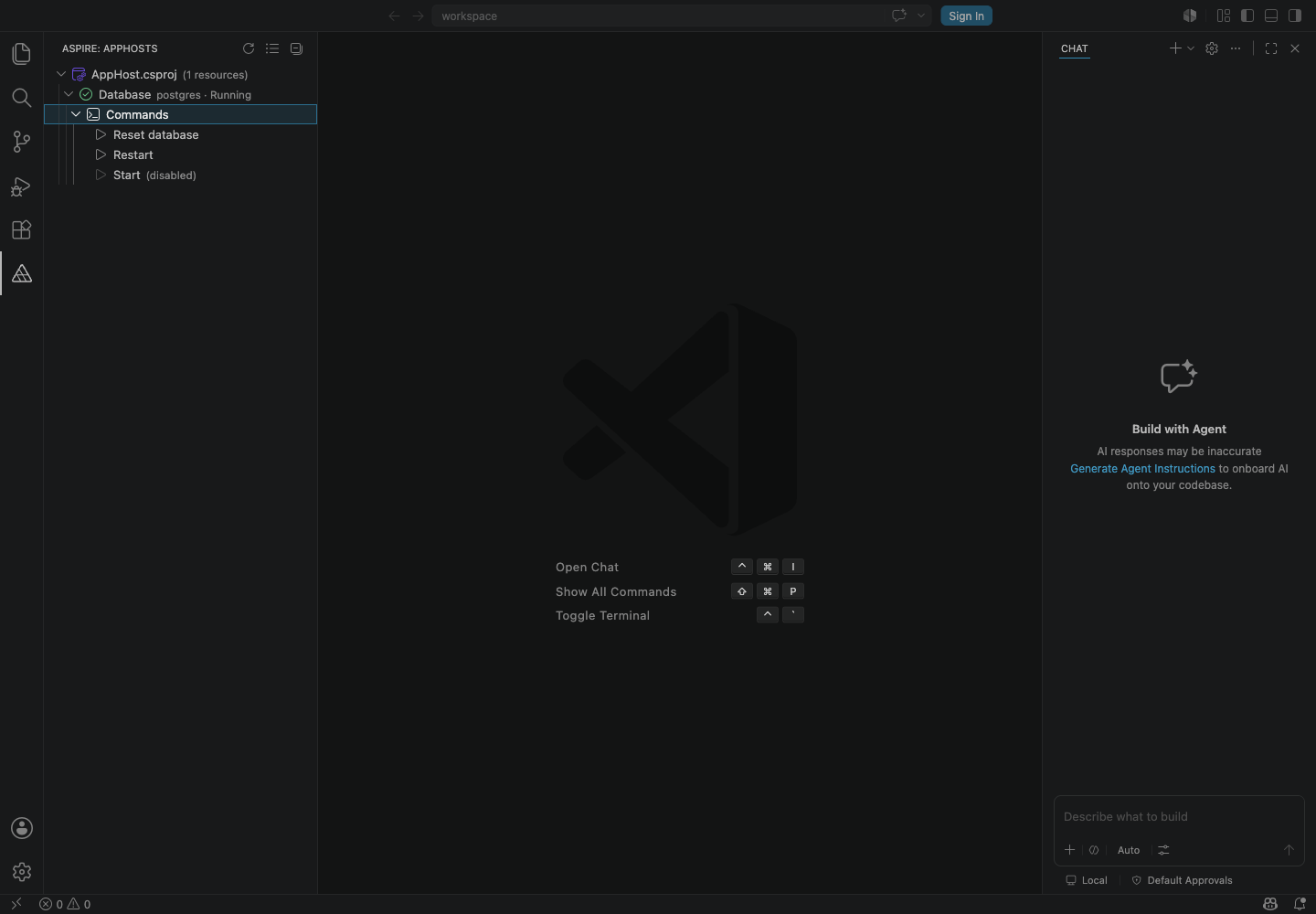
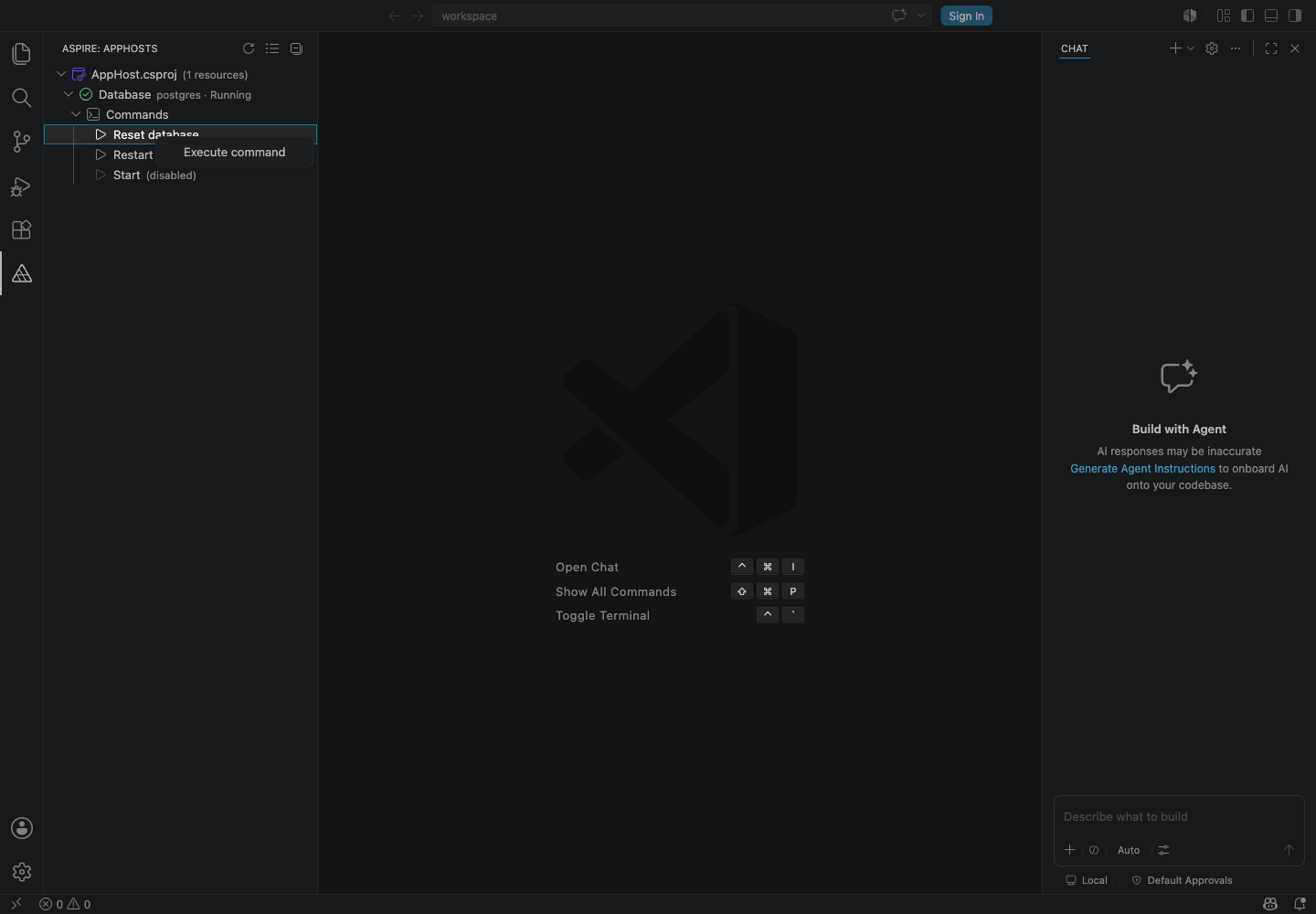
Co-authored-by: Copilot <223556219+Copilot@users.noreply.github.com>
Co-authored-by: Copilot <223556219+Copilot@users.noreply.github.com>
Co-authored-by: Copilot <223556219+Copilot@users.noreply.github.com>
Co-authored-by: Copilot <223556219+Copilot@users.noreply.github.com>
Co-authored-by: Copilot <223556219+Copilot@users.noreply.github.com>
Co-authored-by: Copilot <223556219+Copilot@users.noreply.github.com>
Co-authored-by: Copilot <223556219+Copilot@users.noreply.github.com>
Co-authored-by: Copilot <223556219+Copilot@users.noreply.github.com>
…iew-fixes

# Conflicts:
#	.github/workflows/extension-release.yml
adamint
left a comment
adamint
left a comment
There was a problem hiding this comment.
Final review: no issues found after extension, CLI, and workflow review.
Co-authored-by: Copilot <223556219+Copilot@users.noreply.github.com>

|
@microsoft-github-policy-service agree |
Co-authored-by: Copilot <223556219+Copilot@users.noreply.github.com>
|
Do NOT merge until 13.4 is released |
 adamint
added
NO-MERGE
adamint
added
NO-MERGE
Replace locale-dependent error-text parsing with capability detection through 'aspire config info --json'. Add a 'describe-include-disabled-commands.v1' capability token to the CLI and refactor the extension's getConfigInfo free function into a ConfigInfoProvider class with success caching, in-flight de-duplication, and a hasCapability helper.
Resource command tree items all used the 'run' play icon because the CLI command JSON carries no icon name. Add getResourceCommandIcon to map well-known lifecycle command names (start->play, stop->debug-stop, restart->debug-restart, rebuild->tools) to distinct Codicons, falling back to 'run' for custom commands and tinting disabled commands with disabledForeground.
The play/stop Codicons render with intrinsic green/red theming that is visually distracting in the tree. Force a neutral icon.foreground color for enabled commands so all command glyphs share a consistent gray tone.
Redact secret command argument defaults from serialized resource command JSON and filter resource command tree items to UI-visible commands.

Co-authored-by: Copilot <223556219+Copilot@users.noreply.github.com>
|
What happens if there are no commands? I would expect the top level "Commands" item isn't visible |
Right, commands is not shown in that case. 
here, store-shipping has no commands |
|
pushed a couple small follow-ups:
@shivamgoel008 thank you for the contribution! I went ahead and fixed up the branch, I hope you don't mind 😄 |
4 participants


Add support for displaying resource commands (both enabled and disabled) as child items under each resource in the Aspire extension tree view.
Changes:
Description
Please include a summary of the changes and the related issue. Please also include relevant motivation and context. List any dependencies that are required for this change.
Resolves #17667
Checklist
<remarks />and<code />elements on your triple slash comments?