
轻量的 Telegram 图床机器人,用于在聊天中快速上传图片并返回可直接使用的链接(Plain / Markdown / BBCode)。
基于 python-telegram-bot + requests,支持 SQLite 本地持久化用户 token。
@lhl_images_bot 同款 Lsky Pro+ v2 付费版 Bot 请前往:https://shop.lhl.one/store/telegram-bot/lsky-pro-v2-bot
✅ 目前对接的图床有:LskyPro兰空图床 (开源版v1v2)
✅ 登录(支持邮箱+密码获取 Token,或直接粘贴 Bearer Token —— 视实现版本而定)
✅ 查看账户信息 (/me)
✅ 设置默认存储策略(或每次选择)
✅ 发送图片自动上传并返回Plain URL/Markdown/BBcode
✅ 本地 SQLite 存储用户 token 与默认策略
TODO:
- LskyPro+ v2收费版已经写好了,准备合并中
- 支持多图床
- 支持对接多个同种图床
- 支持管理员在Telegram上配置图床 ...
git clone --depth 1 https://github.com/lhl77/ImgTGBot
cd ImgTGBot
python3 -m pip install -r requirements.txt在项目根目录创建 config.json,示例:
{
  "bot_name": "ImgTGBot",
  "bot_token": "xxxx:xxxxxxxxxxxxxxxxxxxxxxxxxxxxxxxxxxx",
  "lsky_api_base": "https://YOUR_DOMAIN/api/v1"
}
说明:
bot_token: Telegram Bot Token
lsky_api_base: 图床 API 基址(例如 https://img.lhl.one/api/v1)
在项目目录下:
python bot.py若打包为可执行文件,请确保 config.json 与可执行文件同目录。
建议使用Supervisor,pm2或systemctl运行
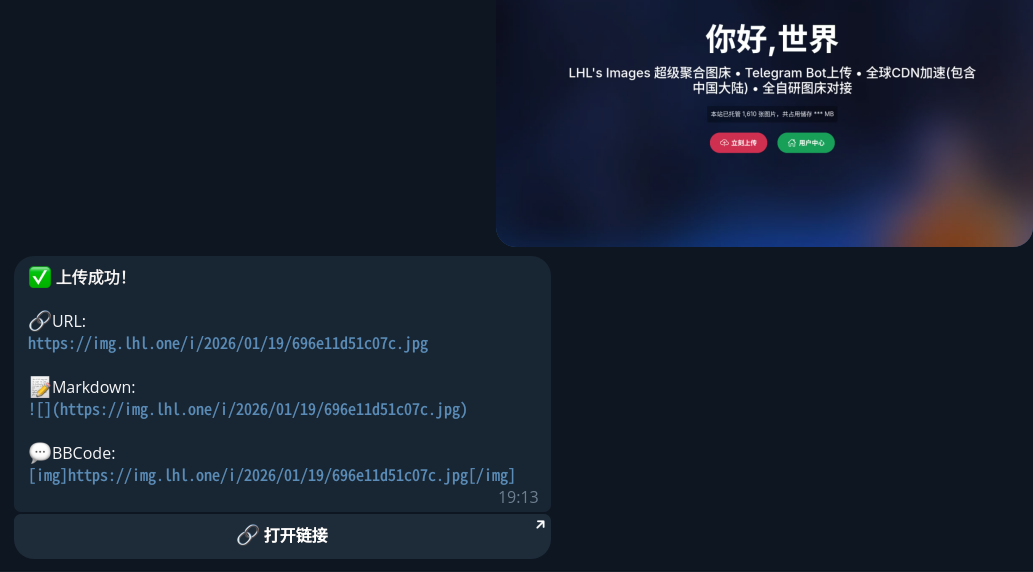
上传成功后机器人会以回复方式(尽量回复原图消息)返回:
- Plain 链接
- Markdown 用法示例(
或服务端返回的 markdown) - BBCode 用法示例(
[img]<url>[/img]或服务端返回的 bbcode)
本项目使用 SQLite 保存用户 token 与默认策略。数据库在模块导入时自动初始化。
聚合图床 LHL's Images 学生免费使用,聚合了SM.MS Premium,去不图床,Claw OSS,OOXX,R2,Imgur,Github等多种图床
欢迎在 Issues 中反馈问题或提交 PR。