


Restore natural colors in underwater images and videos. Corrects the blue/green color cast caused by water absorbing red light.
- Color correction for underwater images and videos
- Two correction modes: fast hue-shift algorithm or Deep SESR neural network
- GUI application with real-time preview
- CLI for batch processing
- Cross-platform: Windows, Linux
Download from Releases:
| Version | Description |
|---|---|
| Dive Color Corrector | Full version with Deep SESR neural network (~100MB) |
| Dive Color Corrector Lite | Lightweight version, fast algorithm only (~30MB) |
# Lite (GUI only, no neural network)
pip install dive-color-corrector[gui]

# Full (GUI + Deep SESR neural network)
pip install dive-color-corrector[full]git clone https://github.com/kcrkor/dive-color-corrector.git
cd dive-color-corrector
uv venv && source .venv/bin/activate
# Lite
uv pip install -e ".[gui]"
# Full (with SESR)
uv pip install -e ".[gui,sesr]"python -m dive_color_corrector# Single image
python -m dive_color_corrector image input.jpg output.jpg
# Single image with Deep SESR (requires full install)
python -m dive_color_corrector image input.jpg output.jpg --sesr
# Video
python -m dive_color_corrector video input.mp4 output.mp4
# Batch process directory
python -m dive_color_corrector batch ./raw ./corrected
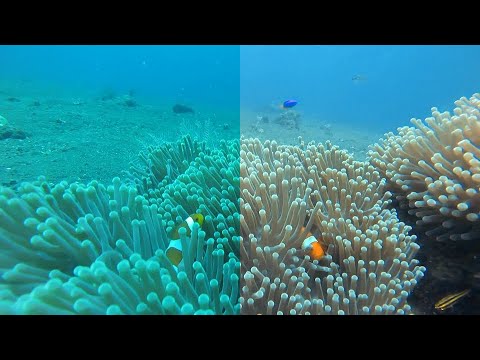
Two correction methods available:
-
Hue-shift (default): Fast algorithm that shifts hue to restore red channel. Best for most underwater photos.
-
Deep SESR (
--sesrflag): Neural network trained on underwater images. Provides super-resolution (2x) and enhanced color correction. Slower but can produce better results for challenging images.
# Install dev dependencies
uv pip install -e ".[dev,gui,sesr]"

# Run tests
pytest tests/

# Run linting
ruff check src tests
mypy srcMIT License - see LICENSE
- Algorithm inspired by nikolajbech/underwater-image-color-correction
- Thanks to bornfree and all contributors