
Interactive CLI for provisioning and configuring the ibl.ai platform on AWS. Handles end-to-end infrastructure creation with Terraform and full application setup with Ansible. Can also bootstrap existing servers (any cloud or bare metal) without Terraform.




Note: This repository contains the installation and infrastructure provisioning guide. Access to the ibl.ai Docker images and platform codebase requires a license. To get started, reach out to our team at ibl.ai/contact.
- Python 3.11+
- uv (recommended) or pip
- Terraform installed and on PATH
- AWS account with EC2, ELB, S3, ACM, Route53, IAM, and STS permissions
- SSH access to the target EC2 instance (key is generated or provided during provisioning)
The following are installed as Python package dependencies when you install iblai-infra-ops:
- ansible-core (>= 2.15) -- used by
iblai infra setupto configure the server - boto3 -- AWS SDK for authentication and resource management
- terraform -- called as a subprocess (must be installed separately, see above)
The setup phase installs and configures the following on the provisioned EC2 instance:
- iblai-cli-ops -- the IBL platform management CLI, cloned and installed inside a pyenv virtualenv on the server. This is a required dependency for all service launches. Note: This is a private repository -- unauthenticated users or those without access will see a 404.
- Docker Engine with docker compose
- pyenv with Python 3.11.8
- AWS CLI v2 for ECR authentication and S3 access
Using uv (recommended):
# Install uv if you don't have it
curl -LsSf https://astral.sh/uv/install.sh | sh

# Clone the repo
git clone git@github.com:iblai/iblai-infra-ops.git
cd iblai-infra-ops

# Create a virtual environment and install
uv venv
source .venv/bin/activate
uv pip install .
For development:
uv pip install -e ".[dev]"Using pip:
pip install .iblai --versionVerify Ansible is available (installed as a dependency):
ansible-playbook --versionVerify Terraform is installed:
terraform --versionRun iblai infra to see all available commands and a getting-started guide.
Before provisioning, verify your AWS credentials have the required permissions:
iblai infra permissions              # Show required IAM policy JSON
iblai infra permissions --check # Dry-run verification against active credentialsiblai infra provisionInteractive wizard that walks you through:
- AWS credentials -- profile, access keys, or environment variables
- Project & compute -- name, environment (dev/staging/prod), instance type, volume size
- Network & SSH -- VPC CIDR, VPN IP for SSH access, SSH key setup
- Domain & certificates -- base domain, Route53 integration, certificate method (ACM, upload, or none)
- Review -- full summary before applying
Terraform runs with real-time progress showing each resource as it's created.
iblai infra setup              # Set up an existing server (any provider, bare metal)
iblai infra setup <name>       # Set up a Terraform-provisioned environment by name
Both paths run the same Ansible playbook. The difference is where the inputs come from:
- With a project name -- auto-populates IP, domain, SSH key, and AWS credentials from the Terraform state
- Without a project name -- prompts for server IP, SSH key, domain, image tags, and credentials interactively. No Terraform required.
The playbook runs 9 sequential roles:
| Role | What it does |
|---|---|
docker |
Installs Docker Engine, docker compose, and apache2-utils |
awscli |
Installs AWS CLI v2 for ECR and S3 access |
python |
Installs pyenv and Python 3.11.8 |
ibl_cli_ops |
Installs iblai-prod-images (which includes iblai-cli-ops and pinned image versions) via uv pip install |
ibl_platform |
Configures base domain, environment, image tags, CORS, RBAC, unified API gateway, and service defaults |
ibl_dm |
Launches iblai-dm-pro (PostgreSQL with pgvector, Redis, Django, Celery, Langfuse, Minio) |
ibl_edx |
Launches iblai-edx-pro (LMS, CMS, MySQL, MongoDB, Redis, Elasticsearch, MFE) |
ibl_spa |
Creates OAuth2 apps, configures and launches Auth, Mentor AI, and Skills AI SPAs |
final_steps |
Reloads proxy, OAuth/OIDC setup, syncs edX with DM, creates super admins, seeds CSRF domains, flows, LLM registry, mentors, and RBAC data |
The setup wizard prompts for:
- Target host IP and SSH key path
- Base domain and environment config
- iblai-cli-ops release tag (image versions are pinned by iblai-prod-images)
- Whether to enable AI features
- OpenAI API key (optional)
- Super admin credentials (username, email, password)
- GitHub PAT and AWS credentials for the VM
iblai infra resetup <name>Re-configures a previously set up environment with a new domain and fresh secrets. Prompts for the new base domain, CLI ops release tag, and credentials. Runs ibl config rotate-secrets to regenerate all secrets, syncs database passwords (PostgreSQL and MySQL), then restarts all services.
Use this when you need to change the domain or rotate credentials on a running environment without reprovisioning the infrastructure.
Simplest way — using a .env file:
cp .env.example .env      # Copy the template
vim .env                   # Fill in your values
iblai infra launch-env     # Review summary, confirm, launch
The CLI reads .env from the current directory, shows a summary of what will be launched, and asks for confirmation before proceeding.
Non-interactive (CI/CD) — using flags:
iblai infra launch \
  --ami-id $AMI_ID \
  --domain $DOMAIN \
  --hosted-zone-id $HOSTED_ZONE_ID \
  --aws-key-id $AWS_ACCESS_KEY_ID \
  --aws-secret-key $AWS_SECRET_ACCESS_KEY \
  --ssh-public-key "$SSH_PUBLIC_KEY" \
  --ssh-key $SSH_KEY_PATH \
  --git-token $GIT_TOKEN \
  --admin-email $ADMIN_EMAIL \
  --admin-password $ADMIN_PASSWORD \
  --vpn-ip $VPN_IP
Fully non-interactive command for CI/CD pipelines (e.g. GitHub Actions). Provisions AWS infrastructure from a pre-built AMI via Terraform, then configures the platform via Ansible — all in one step.
What it does:
- Terraform -- creates VPC, ALB, ACM certificates, Route53 DNS records, and launches EC2 from the specified AMI
- Ansible -- sets domain, rotates secrets, syncs database passwords, restarts all services (DM, edX, SPAs), runs final setup (OAuth, admin creation, data seeding)
Cleanup:
iblai infra destroy <name> # Tears down all Terraform resourcesUsing a .env file:
Copy .env.example to .env, fill in real values, then:
source .env
iblai infra launch \
  --ami-id $AMI_ID \
  --domain $DOMAIN \
  --hosted-zone-id $HOSTED_ZONE_ID \
  --aws-key-id $AWS_ACCESS_KEY_ID \
  --aws-secret-key $AWS_SECRET_ACCESS_KEY \
  --ssh-public-key "$SSH_PUBLIC_KEY" \
  --ssh-key $SSH_KEY_PATH \
  --git-token $GIT_TOKEN \
  --admin-email $ADMIN_EMAIL \
  --admin-password $ADMIN_PASSWORD \
  --vpn-ip $VPN_IP
See iblai infra launch --help for all optional flags (instance type, volume size, region, AI features, etc.).
Update container images and restart services on an existing server or a freshly launched AMI. No infrastructure provisioning, no secret rotation.
Update an existing server:
iblai infra service-update \
  --host 10.0.1.50 \
  --ssh-key ~/.ssh/key.pem \
  --git-token $GIT_TOKEN
Launch from AMI + update + register in ALB target group:
iblai infra service-update \
  --ami-id $AMI_ID \
  --subnet-id $SUBNET_ID \
  --security-group-id $SECURITY_GROUP_ID \
  --target-group-arn $TARGET_GROUP_ARN \
  --key-pair-name $KEY_PAIR_NAME \
  --ssh-key ~/.ssh/key.pem \
  --git-token $GIT_TOKEN \
  --aws-key-id $AWS_ACCESS_KEY_ID \
  --aws-secret-key $AWS_SECRET_ACCESS_KEY
What it does: installs latest iblai-prod-images (new image versions) → edX stop/start → DM update → DM migrations → SPA restart → nginx restart.
iblai infra list                # List all managed environments
iblai infra status <name>       # Show infrastructure details and outputs
iblai infra auth                # Switch AWS credentials
iblai infra destroy <name> # Tear down infrastructure or remove bootstrap projectThe CLI always lets you choose how to authenticate -- it never silently auto-detects credentials. On first use, it walks you through authentication interactively.
Supported methods:
- AWS profiles from
~/.aws/configand~/.aws/credentials(type to filter) - Environment variables (
AWS_ACCESS_KEY_ID+AWS_SECRET_ACCESS_KEY) - Manual entry -- access key + secret key (masked input)
Your session is saved after authentication and reused across commands until you switch credentials or it expires.
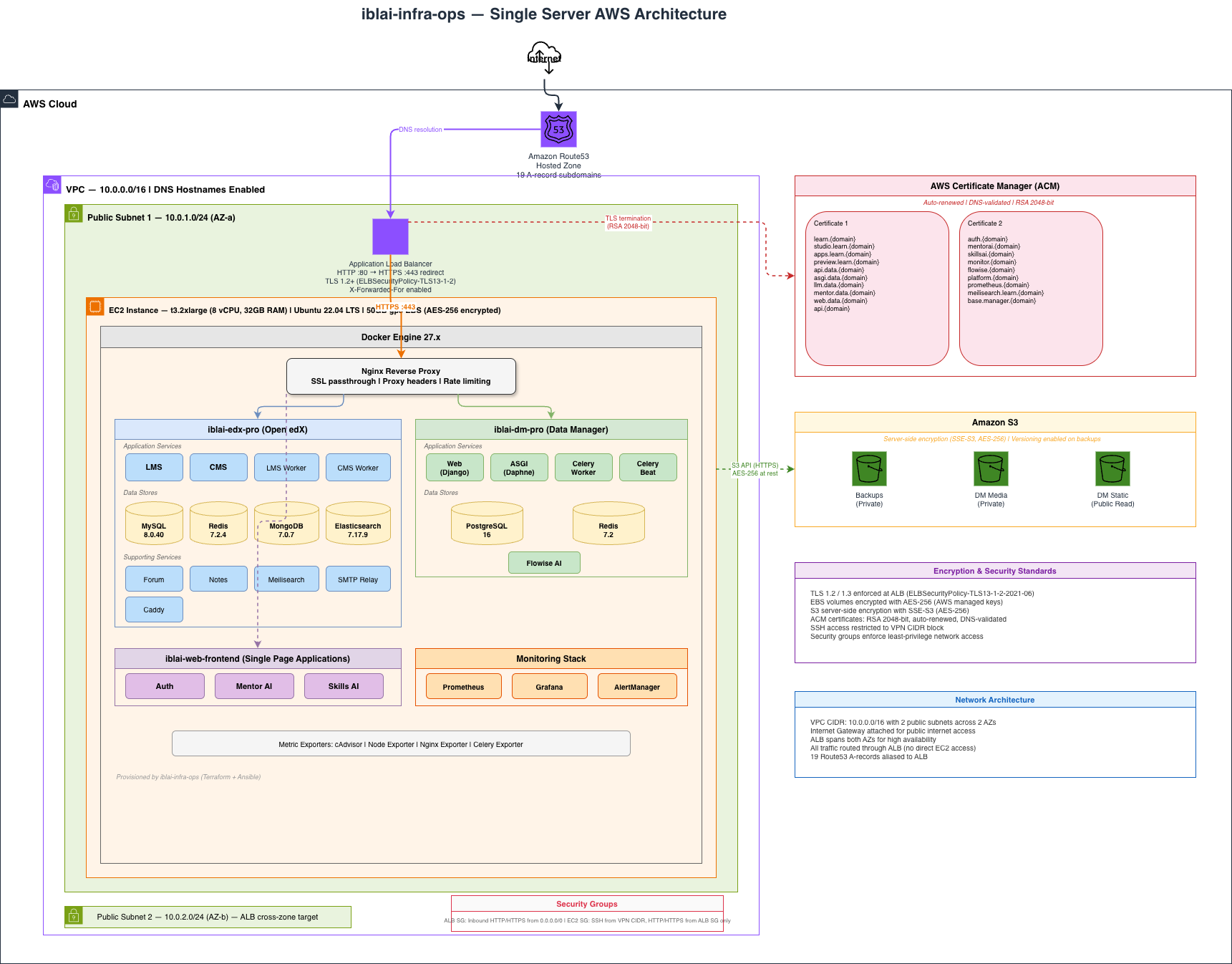
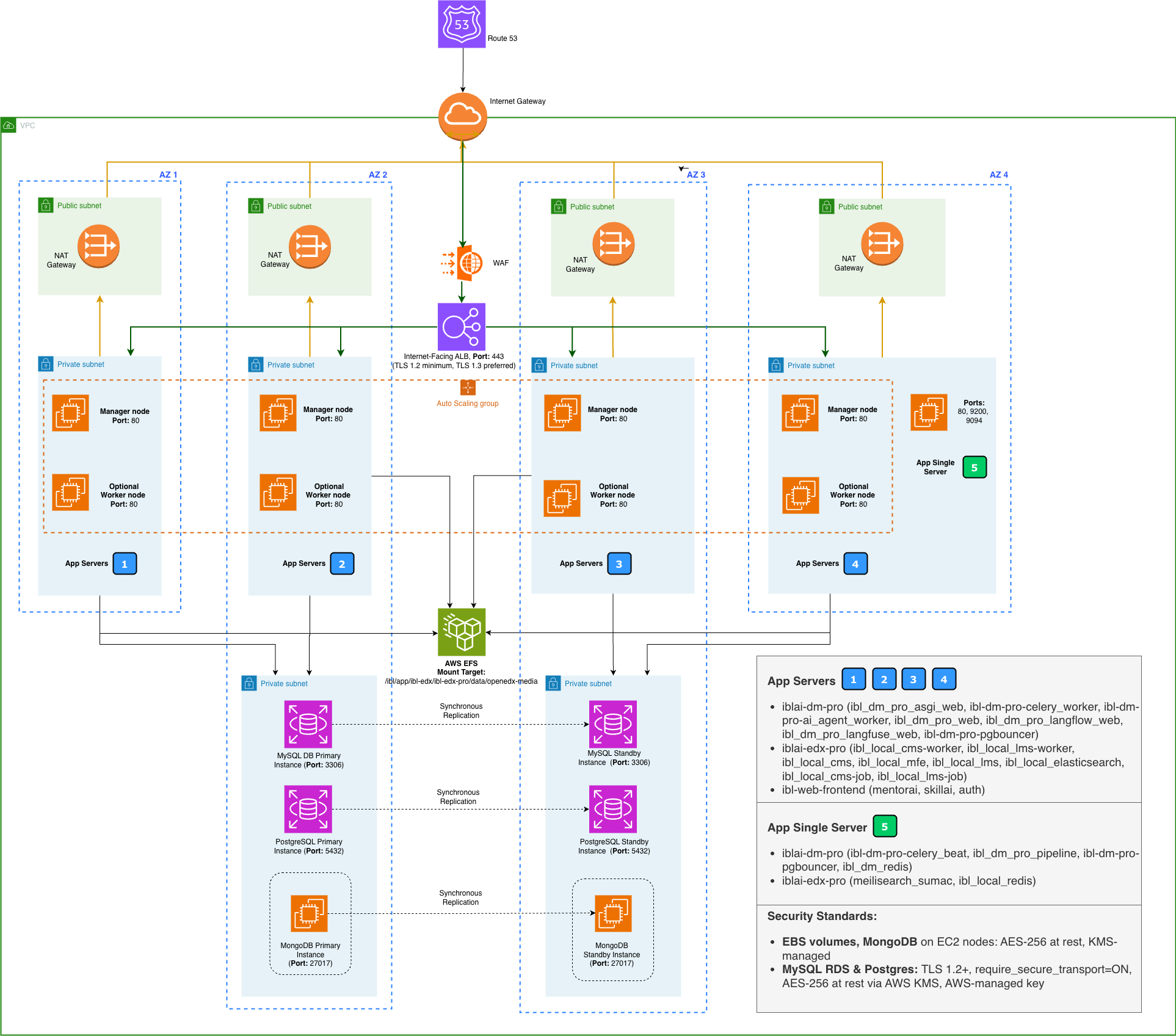
- VPC with 2 public subnets across availability zones (10.0.0.0/16)
- EC2 instance (Ubuntu 22.04) with encrypted EBS volume (AES-256)
- Application Load Balancer with TLS 1.2/1.3 termination
- ACM certificates (RSA 2048-bit, DNS-validated, auto-renewed)
- Security groups (SSH restricted to VPN CIDR, HTTP/HTTPS from ALB only)
- 3 S3 buckets with server-side encryption (backups, media, static)
- Route53 hosted zone with 19 subdomain A-records
- iblai-edx-pro -- LMS, CMS, workers, MySQL 8.0, Redis, MongoDB, Elasticsearch, Forum, Notes, Meilisearch, SMTP relay, Caddy
- iblai-dm-pro -- Django web, ASGI, Celery worker/beat, PostgreSQL 16, Redis, Flowise AI
- iblai-web-frontend -- Auth, Mentor AI, Skills AI single-page applications
- Monitoring -- Prometheus, Grafana, AlertManager, metric exporters
- Nginx reverse proxy
All Terraform state, SSH keys, and project configuration are stored at:
~/.iblai-infra/projects/<project-name>/
uv sync --extra dev
uv run pytest tests/ -v
With coverage:
uv run pytest tests/ --cov=iblai_infra --cov-report=term-missingiblai-infra-ops/
├── src/iblai_infra/
│ ├── cli.py # Typer CLI commands
│ ├── app.py # Application logic
│ ├── models.py # Pydantic models
│ ├── ui.py # Rich terminal UI
│ ├── prompts/ # Interactive questionary prompts
│ ├── providers/ # AWS provider (STS, EC2, S3)
│ ├── terraform/ # Terraform runner and templates
│ │ └── templates/aws/single-server/
│ └── ansible/ # Ansible runner and templates
│ └── templates/single-server/
│ ├── playbook.yml
│ └── roles/ # 9 Ansible roles
├── tests/ # 357 tests
├── docs/ # Architecture diagrams
└── pyproject.toml
Proprietary -- ibl.ai