A complete system for running the Hydra live coding environment inside TouchDesigner with full bidirectional data flow, enabling new generative art workflows.
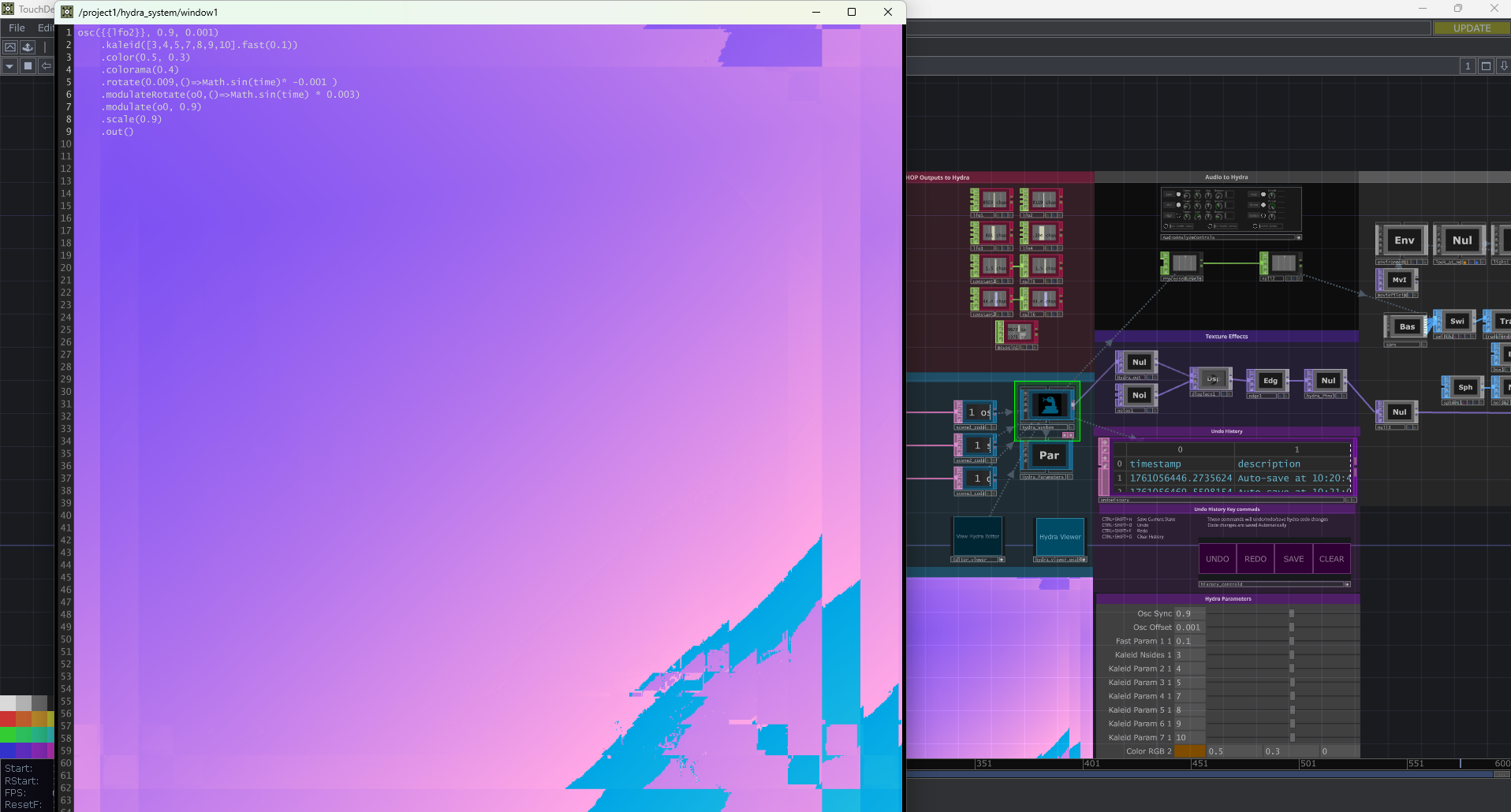
- Hydra Engine: Full Hydra-Synth running in Web Render TOP
- CHOP Integration: Access any TouchDesigner CHOP via
{{chopname.index}}function - Multi-Scene Management: Switch between multiple Hydra code scenes
- Audio Reactivity: Dual audio input (Hydra built-in + TD analysis)
- Multi-Output: 4 independent output buffers (o0-o3)
- Preset System: Save/load complete system states
- Hydra Parameter Creation: Intelligent automatic parameter generation from Hydra code
- Context-aware naming based on function and chain position
- RGB color grouping for unified color pickers
- Instance differentiation for multiple function calls
- Smart filtering of template references and arrow functions
- Bidirectional sync between code and TD parameters
- High-performance with binary search optimization
- Parameter Controls: Slider interface for quick value tweaking
- Open TouchDesigner and load the HydraTD project
- Start Coding: Connect a textDAT to 1 of the 3 scenes in
Hydra Code Examplessection and start editing in the editor window provided below - See Results: Watch the Hydra output in the
Hydra_outTOP or with theHydra Viewerbutton. You can also open the Hydra editor window but clicking theView Hydra Editorbutton for a more traditional Hydra experience.
- Write Hydra Code with numeric values
- Sync click outside the editor to sync automatically
- Adjust Parameters in the HydraParams page
See documentation/HYDRA_PARAMETER_CREATION.md for complete guide.
- TouchDesigner: 2023.11xxx or newer
Edit any scene textDAT in the project comp and connect it to one of the 3 scenes. In auto mode, changes apply immediately:
osc({{lfo1}} * 20, 0.1, {{lfo2}})
  .rotate({{lfo3}}, 0.1)
  .modulate(noise({{lfo4}} * 5))
.out()1. Write code with numeric values:
osc(48, -0.1, 0)
  .color(1.04, 0, -1.1)
  .rotate(3.14, 0.1)
  .out()
2. Adjust sliders in TouchDesigner's HydraParams page The code should auto update after any slider movements.
CHOP Access:
{{chopname.index}}- Access any CHOP channel {{}}{{lfo1}}- LFO1 value{{null1.1}}- Null1 value at index 1{{{{mouse.x}}}}- Mousein1 X value
Output Buffers:
.out(o0)- Main output.out(o1)- Second output.out(o2)- Third output.out(o3)- Fourth output
- Switch Scenes: use key commands or connect an example. see
Hydra code examplessection - Add Scene: Create new Text DAT and connect it to 1 of the 3 scenes
- Sync: Parameter window should automatically on scene change.
CTRL+SHIFT+1/2/3- Switch to scene 1/2/3CTRL+SHIFT+S- Save presetCTRL+SHIFT+L- Load presetCTRL+SHIFT+R- Reload Scene
Presets include:
- All scene codes
- CHOP mappings
- Parameter values (including HydraParams)
- Active outputs
- Apply mode settings
- Open Web Inspector (right-click TOP) to check for JavaScript errors
- Verify HTML template loaded correctly
- Check internet connection for Hydra CDN
- Verify CHOP paths in registry are absolute (e.g.,
/project1/lfo1) - Check CHOP Execute DAT is cooking
- Open Web Inspector console:
console.log(window.tdData)
- Check apply mode (auto vs manual)
- Look for JavaScript syntax errors in Web Inspector
- Try manual apply button
- Wrong values: Run
remove_unused_parameters()thensync_now() - Too many parameters: Check for numbers in arrow functions or templates
- Parameters not updating: Verify correct scene is active in scene_registry
- RGB not grouping: Ensure
.color()or.solid()values are consecutive
- Reduce CHOP update rate in DataBridge
- Disable unused outputs in OutputRouter
- Simplify Hydra code
- Lower Web Render TOP resolution
Complete documentation available in /documentation:
- HYDRA_PARAMETER_CREATION.md - Parameter creation system
- MULTI_OUTPUT_SYSTEM.md - Multi-buffer output guide
- PRESET_SYSTEM.md - Preset save/load system
- CHOP_REFERENCE_SYSTEM.md - Chop Reference System
The project includes example scenes:
- Scene 1: LFO reactive patterns
- Scene 2: Colorful noise with kaleidoscope
- Scene 3: Feedback loop effects
- Web Render TOP: Limited to one Chromium instance per TOP
- WebRTC Latency: Minimum 2-3 frame delay
- CHOP Updates:
executeJavaScript()adds overhead - Platform Differences: Some features vary on Mac/Windows
- Parameter Detection: Cannot detect values in expressions or arrow functions
- GLSL shader injection
- Real-time video recording
- Hydra: https://hydra.ojack.xyz/
- TouchDesigner: https://docs.derivative.ca/
- Project Repository: https://github.com/grinchdubs/Hydra2TD-1.0
This project integrates:
- Hydra-Synth (AGPL-3.0)
- TouchDesigner (Commercial/Educational)
Created for live coding and generative art workflows. Combines the power of Hydra's visual synthesis with TouchDesigner's data processing.
Special thanks to:
- Olivia Jack for Hydra
- Derivative for TouchDesigner
- The generative art community
Version: 1.0 Last Updated: 2025-10-21 Status: Production Ready