An advanced FastAPI application designed to track, monitor, and manage OpenAI batch processing jobs, featuring a modern, interactive dashboard and a full-fledged documentation viewer.
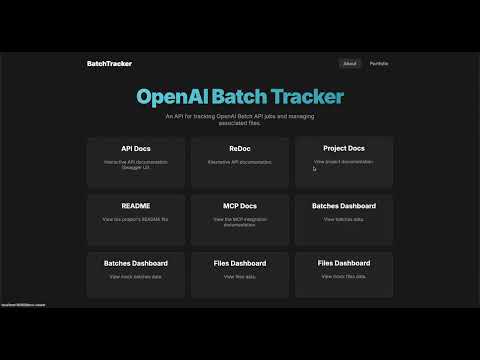
- Modern UI: An interactive, dark-themed homepage for easy navigation.
- Batch & File Dashboards: Separate, detailed dashboards for visualizing mock batch jobs and files.
- Documentation Viewer: An integrated system to render and view project documentation (
/docs) and theLICENSEfile. - Dockerized Environment: Fully containerized with Docker and managed via a
Makefilefor consistent development and production environments. - Robust API: A well-documented API for managing batches and files, built with FastAPI.
- MCP Support: Integrated Model Context Protocol (MCP) for enhanced AI model interaction.
-
Docker & Docker Compose: Required for running the application in a containerized environment.
-
Pyenv
-
Install
pyenvusing the commands below.Click to see installation commands
git clone https://github.com/pyenv/pyenv.git ~/.pyenv
echo 'export PYENV_ROOT="$HOME/.pyenv"' >> ~/.bashrc
echo 'export PATH="$PYENV_ROOT/bin:$PATH"' >> ~/.bashrc
echo -e 'if command -v pyenv 1>/dev/null 2>&1; then\n eval "$(pyenv init -)"\nfi' >> ~/.bashrc
exec "$SHELL"
-
OpenAI Documentation: Familiarity with the OpenAI Batch API is recommended.
This project uses a Makefile to simplify all setup and execution steps.
This method is for running the application directly on your machine without Docker.
-
Set up the Environment: This command creates a virtual environment, installs all dependencies (including development tools), and prepares your local setup.
make dev
-
Configure Environment Variables: Copy the example
.envfile and add your OpenAI API key.cp .env.example .env
Now, edit the
.envfile to include yourOPENAI_API_KEYand any other necessary settings.
This is the recommended approach for a consistent and isolated development environment.
-
Build and Start the Services:
- These commands will build the necessary Docker images and start the development containers in the background.
make docker-build-dev
make docker-up-dev
- Refer other commands to know more about prod development and env.
-
If running locally:
make run-local
- This will start the server at 8000 port.
-
If running with Docker:
- The service is already running after
make docker-up-dev. You can view logs withmake docker-logs-dev. - This will start the server at 8001 port.
- The service is already running after
Once the service is running, visit http://localhost:8000. The homepage will guide you to all available resources, including API documentation and dashboards.
The application provides a comprehensive REST API for managing batch jobs and files. For detailed information on all available endpoints, request bodies, and responses, please refer to the interactive API documentation:
For reference, the resources/ directory contains examples of the input and output file structures used by the OpenAI Batch API. These files can serve as a guide when you are creating your own batch jobs.
We welcome contributions from the community! Whether it's reporting a bug, suggesting a feature, or submitting a pull request, your help is greatly appreciated.
Please read our Contribution Guidelines to get started.
This project is governed by our Code of Conduct. By participating, you are expected to uphold this code.
Thank you for your interest in the OpenAI Batch Tracker. If you have any questions, feel free to open an issue on GitHub. We look forward to your contributions!