


A curated collection of 23+ interactive Vanilla JavaScript mini-apps, featuring a live preview dashboard!
View Live Demo
·
Report Bug
·
Request Feature
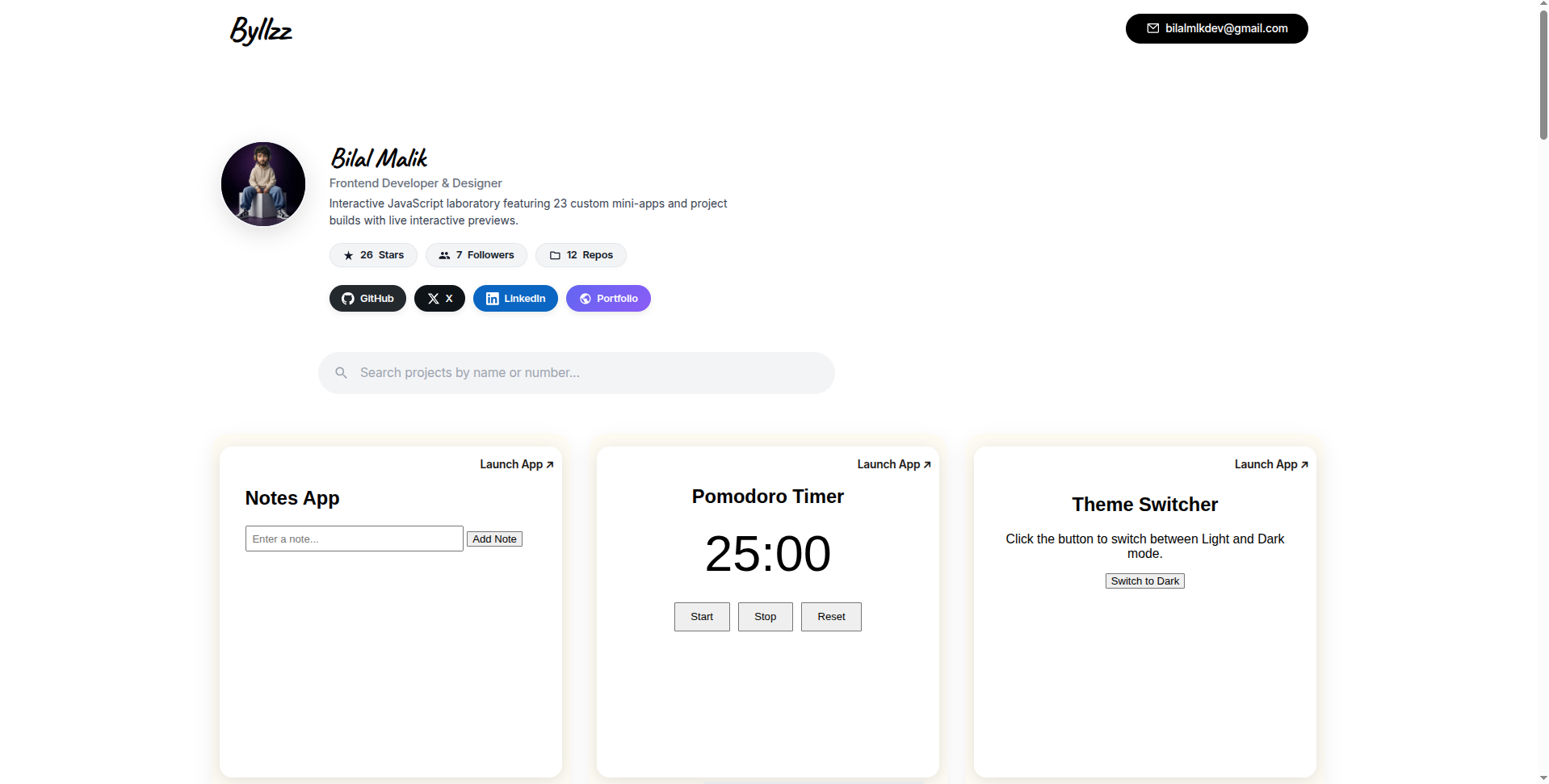
This repository is my personal JavaScript practice playground. I wanted a place to solidify my core front-end skills by building real, usable mini-apps without the clutter of heavy frameworks.
Instead of leaving them scattered on my computer, I created a central Live Preview Dashboard that uses iframes to let you browse, test, and interact with every single app directly in your browser-perfect for beginners looking for project inspiration or developers wanting quick reference demos.
Here's why this repo stands out:
- Zero frameworks: Built entirely with pure HTML, CSS, and vanilla JavaScript (ES6+).
- Modular & Organized: Each project lives in its own numbered folder with exactly two files (
index.htmlandindex.js). - Live Demo ready: Deployed seamlessly on Vercel with a modern Pinterest-style grid layout.
This project is built entirely with modern web technologies-no frameworks, no libraries, just the fundamentals of front-end development.




- HTML5 - Semantic page structure
- CSS3 - Responsive layouts, Flexbox, Grid, and animations
- Vanilla JavaScript (ES6+) - DOM manipulation, APIs, Local Storage, and event handling
- Vercel - Deployment and live hosting
Each project contains only two files:
index.htmlindex.js
JS-Practice-Projects/
│
├── index.html                 # Live Preview Dashboard
├── README.md
├── vercel.json
│
├── 01-github-profile-finder/
│   ├── index.html
│   └── index.js
│
├── 02-weather-app/
│   ├── index.html
│   └── index.js
│
├── 03-todo-app/
│   ├── index.html
│   └── index.js
│
├── ...
│
└── 23-notes-app/
    ├── index.html
    └── index.js
Projects are numbered sequentially (01–23) for easier navigation.
| # | Project | Folder |
|---|---|---|
| 01 | Github Profile Finder | 01-github-profile-finder |
| 02 | Weather App | 02-weather-app |
| 03 | Todo App | 03-todo-app |
| 04 | Digital Clock | 04-digital-clock |
| 05 | Random Quotes | 05-random-quotes |
| 06 | Age Calculator | 06-age-calculator |
| 07 | Countdown Timer | 07-countdown-timer |
| 08 | QR Code Generator | 08-QR-code-gen |
| 09 | Typing Speed Test | 09-typing-speed-test |
| 10 | Tabs Navigation | 10-tabs-navigation |
| 11 | Password Generator | 11-password-generator |
| 12 | Currency Converter | 12-currency-converter |
| 13 | Simple Calculator | 13-simple-calculator |
| 14 | Color Picker | 14-color-picker |
| 15 | Stopwatch | 15-stopwatch |
| 16 | Drawing Board | 16-drawing-board |
| 17 | Custom Modal Popup | 17-custom-modal-popup |
| 18 | Image Slider | 18-image-slider |
| 19 | Form Validator | 19-form-validator |
| 20 | Memory Card Game | 20-memory-card-game |
| 21 | Theme Switcher | 21-theme-switcher |
| 22 | Pomodoro Timer | 22-pomodoro-timer |
| 23 | Notes App | 23-notes-app |
Follow these steps to set up the project on your local machine.
Before you begin, make sure you have:
- A modern web browser (Chrome, Firefox, Edge, or Safari)
- A code editor such as Visual Studio Code (recommended)
- (Optional) The Live Server extension for VS Code for automatic page reloading
git clone https://github.com/byllzz/JS-Practice-Projects.gitcd JS-Practice-ProjectsSince this is a static front-end project, no installation or build process is required.
Option A - Open directly
Simply double-click the root index.html file to open it in your browser.
Option B - Use VS Code Live Server (Recommended)
- Open the project in Visual Studio Code.
- Install the Live Server extension (if you haven't already).
- Right-click
index.html. - Select Open with Live Server.
Your browser will automatically open the dashboard, and any changes you make will reload instantly.
Tip: Live Server provides a smoother development experience with automatic refreshing whenever you save your files.
The main entry point for this project is the root index.html file. Opening it launches the Live Preview Dashboard, where you can browse and explore every JavaScript mini-project from a single page.
- Browse Projects - View all mini-projects in a clean, responsive dashboard.
- Preview Apps - Each project includes a live preview for quick exploration.
- Launch Projects - Click any project card to open the full application in a new browser tab.
- Learn by Example - Explore the source code inside each numbered project folder.
Click to view all 23 projects
- Github Profile Finder
- Weather App
- Todo App
- Digital Clock
- Random Quotes
- Age Calculator
- Countdown Timer
- QR Code Generator
- Typing Speed Test
- Tabs Navigation
- Password Generator
- Currency Converter
- Simple Calculator
- Color Picker
- Stopwatch
- Drawing Board
- Custom Modal Popup
- Image Slider
- Form Validator
- Memory Card Game
- Theme Switcher
- Pomodoro Timer
- Notes App
Want to see everything in action?
👉 Visit the Live Demo linked at the top of this README to explore every project directly in your browser-no installation required.
Contributions are always welcome! Whether you've found a bug, have an idea for a new project, or want to improve the existing code, your help is appreciated.
- Report bugs by opening an issue.
- Suggest new JavaScript mini-project ideas.
- Improve the code, documentation, or UI.
- Help enhance the README or project organization.
- Fork this repository.
- Clone your fork locally.
git clone https://github.com/byllzz/JS-Practice-Projects.git- Create a new feature branch.
git checkout -b feat(your-project)/project-title- Make your changes and commit them.
git commit -m "Add your practice project"- Push your branch.
git push origin feat(your-project)/project-title- Open a Pull Request describing your changes.
If you found this repository helpful:
- Star the repository
- Fork it
- Share it with other developers
Every contribution, no matter how small, helps make this project better.
A big thank you to everyone who has contributed to this project!

Front-End Developer • JavaScript Enthusiast • Open Source Contributor


If you enjoyed this project, consider giving it a ⭐ on GitHub!
MIT License

Copyright (c) 2026 Bilal Malik

Permission is hereby granted, free of charge, to any person obtaining a copy
of this software and associated documentation files (the "Software"), to deal
in the Software without restriction, including without limitation the rights
to use, copy, modify, merge, publish, distribute, sublicense, and/or sell
copies of the Software, and to permit persons to whom the Software is
furnished to do so, subject to the following conditions:

The above copyright notice and this permission notice shall be included in all
copies or substantial portions of the Software.

THE SOFTWARE IS PROVIDED "AS IS", WITHOUT WARRANTY OF ANY KIND, EXPRESS OR
IMPLIED, INCLUDING BUT NOT LIMITED TO THE WARRANTIES OF MERCHANTABILITY,
FITNESS FOR A PARTICULAR PURPOSE AND NONINFRINGEMENT. IN NO EVENT SHALL THE
AUTHORS OR COPYRIGHT HOLDERS BE LIABLE FOR ANY CLAIM, DAMAGES OR OTHER
LIABILITY, WHETHER IN AN ACTION OF CONTRACT, TORT OR OTHERWISE, ARISING FROM,
OUT OF OR IN CONNECTION WITH THE SOFTWARE OR THE USE OR OTHER DEALINGS IN THE
SOFTWARE.