



Wasp in a Box Helpers for Home Assistant
Wasp in a Box is an automation pattern for enclosed rooms (such as bathrooms) that helps determine reliable occupancy while a person remains inside, even if out of range of the motion sensor or being still.
This helper is designed for single occupancy enclosed spaces where the door is shut when occupied, it will not work for multiple occupancy.
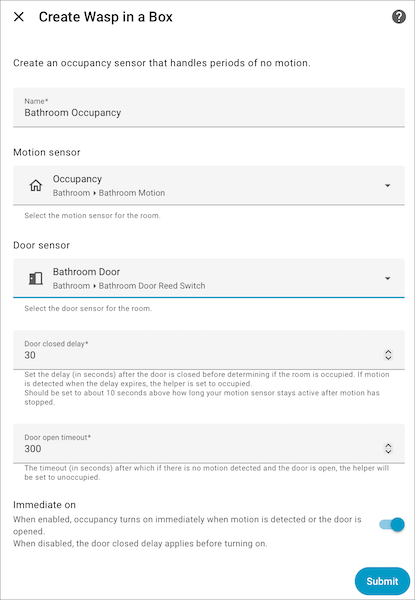
This helper overcomes the limitations of PIR motion sensors, which cannot detect stationary occupants. It requires two sensors:
- Motion sensor - Detects movement in the room
- Door sensor - Monitors door open/closed state
Occupancy logic
- Door opens, then closes
- Motion is detected
- Helper remains "occupied" until the door opens again, or the motion sensor has been unoccupied past the door closed delay period.
Open door detection
If the door is open and the motion sensor has not had motion for the door open timeout period then the room is considered unoccupied.
Quick exit detection
If the door opens then closes and the motion sensor clears within the door closed delay period, the room is considered unoccupied (e.g., someone quickly grabbing something without staying).
Immediate on setting
Control when the helper transitions to "occupied":
- On - Helper becomes occupied immediately when the door is opened or motion is detected (good for lighting automation)
- Off - Helper becomes occupied after the door closes, motion is detected, and the delay period expires (good for fan automation)
Reset action
A reset action is provided that will set the state to unoccupied and cancel any timers.
Please ⭐ this repo if you find it useful


Or search for it within HACS if My Home Assistant does not work for you
Restart Home Assistant
In the HA UI go to "Configuration" -> "Devices & services" -> "Helpers" click "+" and select "Wasp in a Box"
Show detailed instructions
Installation via HACS is recommended, but a manual setup is supported.
- Manually copy custom_components/wasp_in_a_box folder from latest release to custom_components folder in your config folder.
- Restart Home Assistant.
- In the HA UI go to "Configuration" -> "Devices & services" -> "Helpers" click "+" and select "Wasp in a Box"
A new Wasp in a Box helper will be available within Settings/Helpers or click the My link to jump straight there

-
If occupancy clears after you shut the door but are in the room then ensure the door closed delay is set accurately. Too long and there's a chance that a lack of movement will cause it to think the room was quickly exited. For Philips Hue motion sensors I find 25 seconds to be about right but time your sensor by starting a stopwatch when you close the door with no one in the room and watch the Home Assistant sensor to determine the exact time it clears, then add approximately 10 seconds to it.
-
For automating lights I usually have a courtesy/safeguard delay of about a minute or two before I turn off the lights. A trigger within your automation like this adds that delay.
trigger: state
entity_id:
  - binary_sensor.bathroom_occupancy
from:
  - "on"
to:
  - "off"
for:
  hours: 0
  minutes: 2
  seconds: 0
- For advanced automations the state of the motion and door sensors are exposed as attributes within the binary sensor.
