LTR direction for username, email, password and URL fields #3933
Conversation


The print styles change is unnecessary. The form is already hidden in print with the `.comment-form-flex` selector.

Also, the wrong class name was used where the comments title div is closed (above this form).
|
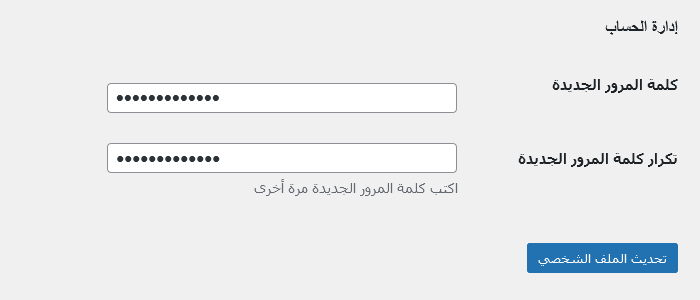
The Install and The Repeat Password fields on the profile screens, which appear when JavaScript is inactive, would not need the special class because they remain
|

|
The following accounts have interacted with this PR and/or linked issues. I will continue to update these lists as activity occurs. You can also manually ask me to refresh this list by adding the Core Committers: Use this line as a base for the props when committing in SVN: To understand the WordPress project's expectations around crediting contributors, please review the Contributor Attribution page in the Core Handbook. |
Test using WordPress PlaygroundThe changes in this pull request can previewed and tested using a WordPress Playground instance. WordPress Playground is an experimental project that creates a full WordPress instance entirely within the browser. Some things to be aware of
For more details about these limitations and more, check out the Limitations page in the WordPress Playground documentation. |

|
Hi @sabernhardt Thanks |
2 participants


Sets all
passwordtype inputs to LTR direction and adds the.ltrclass toforms.cssfor use in the login page. Several fields need theltrclass or another method of setting the direction.Site fields in Arabic
Login pages: username and password
Common login at
wp-login.php, with the password visibility button on the right (as recommended by ierwira)Reset Password
Custom login form using
wp_login_form()in Twenty Sixteen (this adds the direction style inline, but I do not expect anyone would want to override that)Comments: email field
Switching the type from
texttoemailwould solve the direction, but I used the.codeclass instead to match the styling of the URL field. (These could have both theemailtype and the class, too.)Edit Comment
Quick Edit on Comments screen
Post password
Quick Edit on Posts screen
Post metabox (in Classic Editor)
Media: URL fields
Edit from Media Gallery (list mode)
Edit from Media Gallery (grid mode)
Insert an image into a post (I used Classic Editor)
User Profile: username, password and application password
Navigate to your profile page (
/wp-admin/profile.php) or edit another user's profile (/wp-admin/user-edit.php).Editing another user is very similar.
New User: username and password
Network (multisite) fields, in Persian
Activation page: activation key
Set language in Network Settings, and navigate to
/wp-activate.php.Registration page: username and email
Set language in main site's Settings, and make sure the network allows both site and user registrations. Then navigate to
/wp-signup.php.User signup (not logged in, step 1)
Network Site Info: Site Address (URL)
Navigate to
/wp-admin/network/sites.php(if using a mouse, you could hover over the first link under My Sites dropdown, and then click the second link in the sub-menu). Open individual sites, and the first tab will be Info.The main site has a
codeelement to fix the direction.Other sites use the
urltype for their input fields.Network Site Users: username and email
Navigate to the second tab for each Site (main:
/wp-admin/network/site-users.php?id=1), and scroll down to the Add New User form.Network Site Settings: several options are URLs, usernames or emails
Navigate to the fourth tab for each Site (main:
/wp-admin/network/site-settings.php?id=1).This patch adds the
ltrclass to multiple option fields (siteurl,home,admin_email,new_admin_email,mailserver_url,mailserver_login,mailserver_pass,ping_sites,permalink_structure,category_base,tag_base,upload_path,upload_url_path).Main site:
...
...
...
(The upload path options were empty.)
Second site:
Trac ticket: https://core.trac.wordpress.org/ticket/54915
This Pull Request is for code review only. Please keep all other discussion in the Trac ticket. Do not merge this Pull Request. See GitHub Pull Requests for Code Review in the Core Handbook for more details.