



基于YYText
pod 'ZXAgreementLabel'- 将ZXAgreementLabel拖入项目中。
#import "ZXAgreementLabel.h"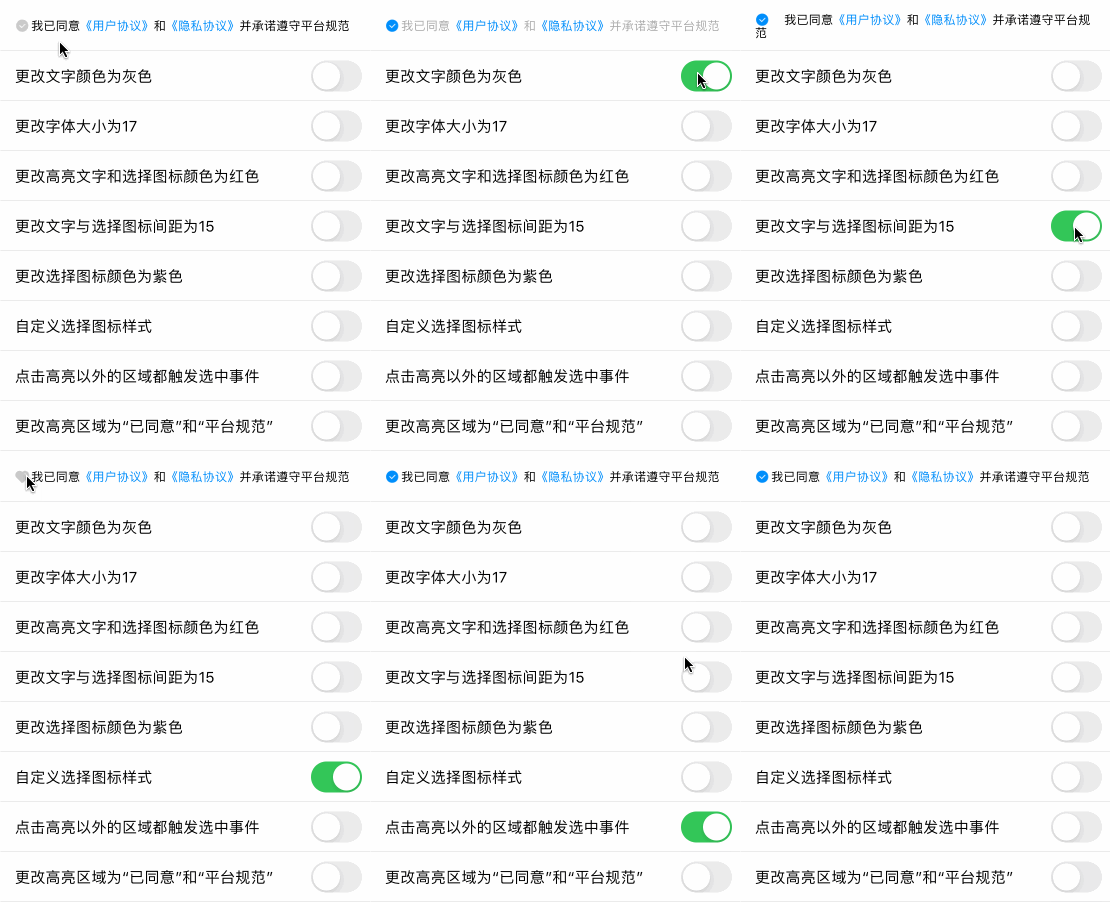
/// 设置AgreementLabel(简约版)
/// @param highlightSubStrs 需要高亮的文字数组
/// @param highlightColor 高亮的文字颜色和选择图标选中时的颜色
/// @param allResponseToChooseIconTapAction 是否允许点击高亮部分以外的区域都触发选中事件,默认为否(当点击选择按钮时才触发)
/// @param highlightTapAction 点击高亮部分文字回调
self.agreementLabel.text = @"我已同意《用户协议》和《隐私协议》并承诺遵守平台规范";
//如果希望默认选中,请添加这一行
self.agreementLabel.zx_selected = YES;
[self.agreementLabel zx_setAgreementWithHighlightSubStrs:@[@"《用户协议》",@"《隐私协议》"] highlightColor:nil allResponseToChooseIconTapAction:NO highlightTapAction:^(NSString * _Nonnull highlightStr, NSRange range) {
NSLog(@"点击了高亮文字--%@",highlightStr);
}];/// 设置AgreementLabel(完整版)
/// @param textColor 文字颜色
/// @param highlightSubStrs 需要高亮的文字数组
/// @param highlightColor 高亮的文字颜色
/// @param highlightBackgroundColor 高亮的文字背景颜色
/// @param chooseIconColor 选择图标未选中时的颜色
/// @param chooseIconSelectedColor 选择图标选中时的颜色
/// @param customChooseIconImage 自定义选择图标未选中时的图片,若不设置则使用默认的图片
/// @param customChooseIconSelectedImage 自定义选择图标选中时的图片,若不设置则使用默认的图片
/// @param spaceToChooseIcon 文字与选择图标的间距
/// @param allResponseToChooseIconTapAction 是否允许点击高亮部分以外的区域都触发选中事件
/// @param highlightTapAction 高亮部分文字点击回调
/// @param chooseIconTapAction 选择图标回调self.agreementLabel.text = @"我已同意《用户协议》和《隐私协议》并承诺遵守平台规范";
[self.agreementLabel zx_setAgreementWithTextColor:[UIColor blackColor] highlightSubStrs:@[@"《用户协议》",@"《隐私协议》"] highlightColor:[UIColor redColor] highlightBackgroundColor:nil chooseIconColor:nil chooseIconSelectedColor:nil customChooseIconImage:nil customChooseIconSelectedImage:nil spaceToChooseIcon:2 allResponseToChooseIconTapAction:YES highlightTapAction:^(NSString * _Nonnull highlightStr, NSRange range) {
NSLog(@"点击了高亮文字--%@",highlightStr);
} chooseIconTapAction:^(BOOL selected, NSRange range) {
NSLog(@"点击了选择图标--%d",selected);
}];self.agreementLabel.textColor = [UIColor lightGrayColor];self.agreementLabel.font = [UIFont systemFontOfSize:17];self.agreementLabel.zx_highlightColor = [UIColor redColor]];self.agreementLabel.zx_highlightBackgroundColor = [UIColor greenColor]];self.agreementLabel.zx_spaceToChooseIcon = 15;self.agreementLabel.zx_chooseIconColor = [UIColor grayColor];self.agreementLabel.zx_chooseIconSelectedColor = [UIColor purpleColor];//设置选择图标未选中时的图片
self.agreementLabel.zx_customChooseIconImage = [UIImage imageNamed:@"heart_icon"];
//设置选择图标选中时的图片
self.agreementLabel.zx_customChooseIconSelectedImage = [UIImage imageNamed:@"heart_icon"];self.agreementLabel.zx_allResponseToChooseIconTapAction = YES;self.agreementLabel.zx_highlightSubStrs = @[@"《用户协议》",@"《隐私协议》"];self.agreementLabel.zx_hideChooseImage = YES;//如果希望默认选中,请在控制器加载时将`zx_selected`设置为YES
self.agreementLabel.zx_selected = YES;