ContentHawk is a set of GitHub agentic workflows auditing markdown based repository contents, such as static sites. The workflows use GitHub Copilot CLI to judge content, raise issues, and create pull requests.
The repo also includes a set of Claude skills for running ContentHawk.
| Skill | Description |
|---|---|
contenthawk-install |
A Claude skill for managing the installation of ContentHawk on your repository. It copies workflows and configuration files, sets up secrets, and more. |
contenthawk-add-campaign |
A Claude skill for kicking off ContentHawk by generating a Campaign snapshot and opening a PR. |
contenthawk-manage-campaigns |
A Claude skill for generating issues and PRs fixing content based on the current campaign. |
Video: Content Hawk - The wingman for updating your Markdown sites (8 min)
Using NPX Skills
run the command below to add the skills to your agent.
npx skills add -g SSWConsulting/SSW.ContentHawkinstall the following skills using the interactive prompt:
/contenthawk-install
/contenthawk-add-campaign
/contenthawk-manage-campaigns
Using the Claude Plugin Marketplace
Run the commands below to add the ssw-consulting Claude plugin marketplace and install the ssw-contenthawk plugin, which includes all three skills.
/plugin marketplace add SSWConsulting/SSW.ContentHawk
/plugin install ssw-contenthawk@ssw-consulting
Then, reload your plugins to ensure the skills load
/reload-plugins- The ContentHawk installer can be downloaded and used as a skill. The instructions below show you how to install the skill from different marketplaces:
Using NPX Skills
- Once you've added the installation skill, you can run it with the command below using your agent of choice. Please note that the skill can be run in your CLI from anywhere. ContentHawk runs the installation over HTTP on a sparse clone of your repository.
/contenthawk-install- Follow along with the installer instructions to complete the setup. The installer will copy the required workflows and configuration files to your repository and set up secrets.
Refer to the manual installation instructions for a step-by-step guide on how to set up ContentHawk without using the installer skill.
You can run the Pipeline by using the skills, triggering the GitHub actions directly, or waiting for scheduled runs to appear.
Note: a Content Campaign must be generated before the other agents will start generating issues and fixing them with PRs.
The pipeline runs in four stages. Run them in order; content-judge-pr is triggered automatically by content-judge, so you only manually run three workflows.
Flow: content-campaign → content-judge → content-judge-pr (auto) → content-fixer
Workflow: content-campaign
Actions → Content Catalog → Run workflow
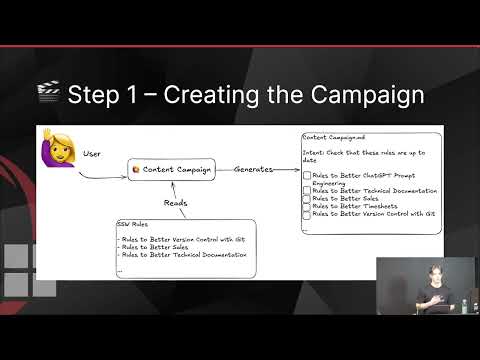
Creates a snapshot of content to audit, a custom label, and opens a pull request.
Next: Merge the “[Content Catalog] ...” PR to main. Note the repo-relative path to the snapshot file (e.g. .github/ContentHawk/TODO/2026-03-05_Snapshot_archive-legacy-rules.md) — you need it for the next steps.
Workflow: content-judge
Actions → Content Judge → Run workflow
Reads the snapshot from main, reviews each file against the intent, and opens labelled issues. When it finishes, it automatically triggers content-judge-pr.
Next: content-judge-pr runs automatically and opens a “[Content Judge] …” PR that updates the snapshot with issue numbers. Merge that PR when ready.
Workflow: content-judge-pr
Triggered by: content-judge when it completes.
Updates the snapshot with issue numbers and opens a PR. You do not run this manually in the normal flow.
Workflow: content-fixer
Actions → Content Fixer → Run workflow
Groups open issues with the label into bundles and opens fix PRs that implement changes and close the linked issues.
Run this after the judge has created issues and you have merged the judge PR. You can run it multiple times as more issues are created or merged.
See development instructions for details.