The extension will automatically open a new window when a match is about to begin, and then close the window when the match has ended.
- Clone or download the repository
- Open Google Chrome and go to
chrome://extensions/ - Turn on Developer mode
- Click on "Load unpacked" and select the folder where you cloned or downloaded the repository
The extension periodically checks for new matches every five minutes and automatically opens a new window when a match is about to begin in less than 15 minutes. Once the match is over, the extension will close the window.
Customize the state of the popup window in the Chrome extension. Choose between "normal", "minimized", or "maximized".

Exclude specific leagues from being opened.

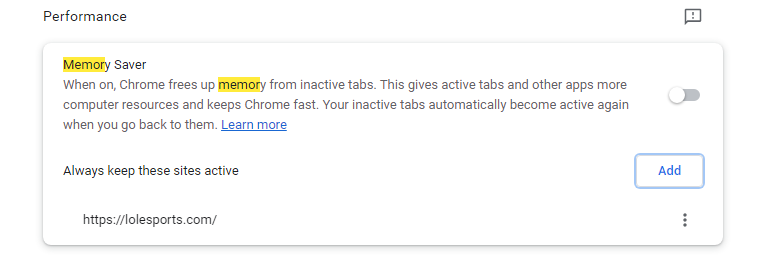
If you have the Memory Saver feature enabled, add lolesports.com to the exclusion:
Feel free to open a pull request if you can help, I have no clue about javascript or chrome extensions so I made this pretty fast so there might be some bugs and shitty code.
This extension is not affiliated with Riot Games or any of its partners. Use it at your own risk.