
An auto director for AMS2 in Python using UDP or AMS2 shared memory.
This is a simplified Auto director that does not rely on SimHub, and uses UDP or Shared Memory. It tracks the smallest gap and the rate of change, selecting those most likely to be racing to be in view.
- Customizable camera dwell.
- Race Position Bonus Factor (Adjust if leaders should show more or less)
- Pit Mode Penalty (People in pits aren't interesting racing)
- Speed Penalty (Less than 5 m/s isn't interesting)
- Leader Cars Ahead Multiplier (Cars within 250m ahead of leader make the leader interesting for blue flagged cars)
- Other Cars Ahead Multiplier (Cars within 250m ahead of this car make this car more interesting)
- Close Racing Max Gap (distance that scoring starts for close racing)
- Start the Auto director.
- Select UDP or Shared Memory.
- Select UDP port if selected.
- Click on a racer in the AMS2 leaderboard.
- Press
Spaceto start Auto directing. - The program presses
Up,Down, andEnterfor you to select cameras. - Press
Spaceto stop Auto directing.
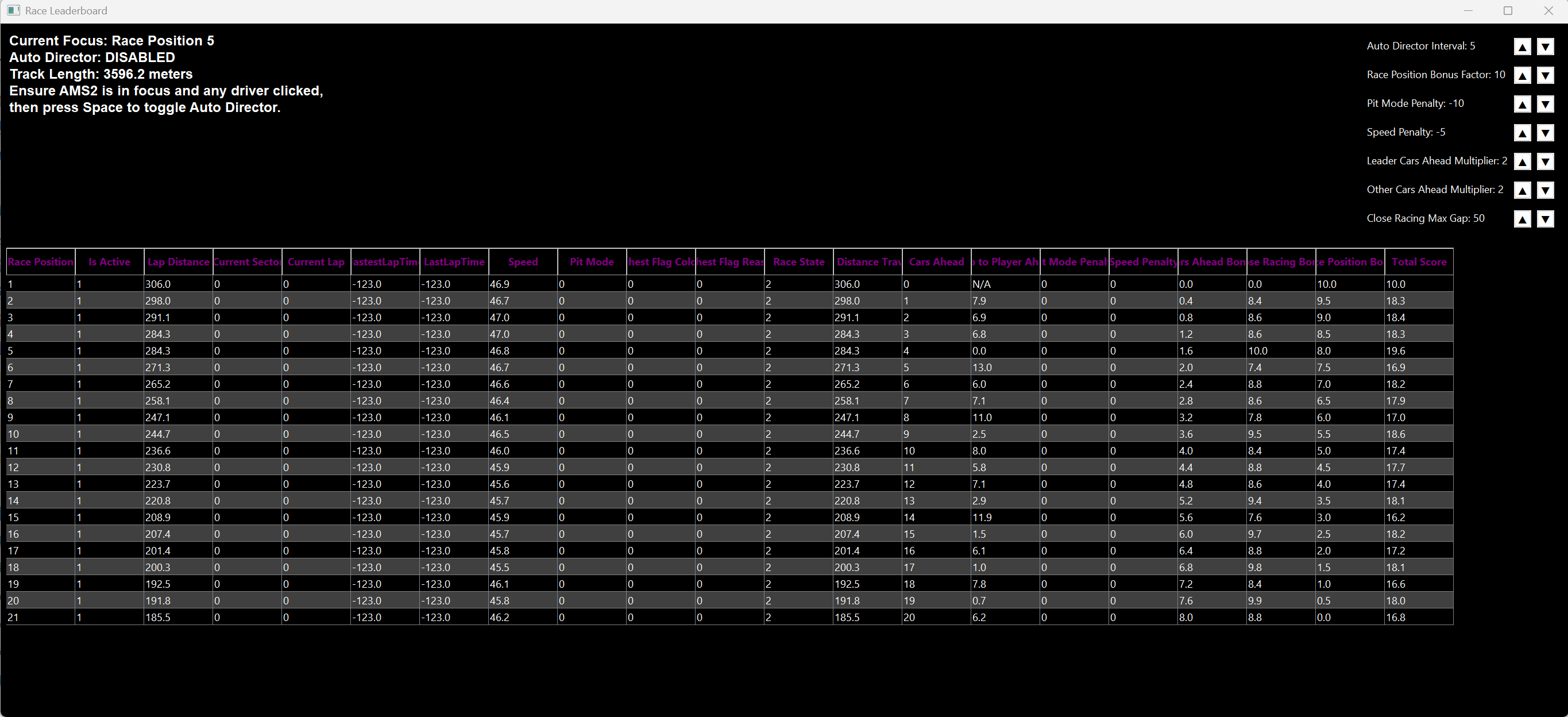
This project is a custom auto-director and leaderboard system for Automobilista 2 (AMS2) racing simulator. It allows for dynamic control of the camera focus during races based on participants' performance metrics, such as speed, gap to the next player, racing position gap to driver ahead, pit status and cars ahead. The system supports both UDP data streaming and shared memory for real-time data acquisition from AMS2.
- Auto Director: Automatically switches camera focus to participants with the most interesting race metrics, such as close racing gaps or significant changes in position.
- Leaderboard Display: Real-time leaderboard that displays essential race statistics like race position, lap times, speed, and gap to the player ahead.
- Data Source Flexibility: Supports both UDP and shared memory for data collection, allowing flexibility depending on your setup.
- Customizable Intervals: Adjustable intervals for camera changes and race position bonuses.
- GUI Interface: A wxPython-based graphical user interface (GUI) for real-time monitoring and control, including a grid to display the leaderboard and control elements to adjust settings on the fly.
-
Start the Application
- Launch the executable file to start the application.
- Upon running the application, you'll be prompted to select the data source:
- for UDP
- for Shared Memory
- After selecting the data source, you can configure the interval between camera changes and the race position bonus factor.
-
Monitor the Race
- The auto director will dynamically focus on the most interesting participant in the race based on the calculated metrics.
- The leaderboard will be updated in real-time both in the GUI and optionally in the console (if dev mode is enabled).
-
Adjust Settings On-The-Fly
- Use the wxPython GUI to adjust the auto director interval and race position bonus factor during the race.
- Toggle auto-director functionality with the
Spacebar.
-
Exit the Application
- Press
ESCto exit the application safely.
- Press
main.exe: The main executable that initializes the auto-director and leaderboard system.
- Data Handling: Handles data acquisition from AMS2 through either UDP or shared memory.
- Leaderboard Update: Processes the data and updates the leaderboard with real-time statistics.
- Auto Director: Automatically shifts the camera focus based on calculated metrics.
- Grid Display: Shows the leaderboard with real-time updates.
- Control Panel: Allows users to adjust key parameters like the auto-director interval and race position bonus factor.
- Shared Memory Issues: Make sure AMS2 is running and correctly configured to share data via shared memory. Replay and driver options offer shared memory.
- UDP Issues: Make sure AMS2 is set up for UDP sharing in Project Cars 2 with a UDP frequency of 3. Using UDP, only one program can access the port, so check if SimHub is using UDP too.
- GUI Display Problems: If the wxPython window appears incorrect, ensure your system supports wxPython and consider running the script in a standard desktop environment.
Contributions are welcome! Please fork the repository and submit a pull request. For major changes, please open an issue first to discuss what you would like to change.
This project is licensed under the CC0 1.0 Universal (CC0 1.0) Public Domain Dedication. See the LICENSE file for details.
- AMS2 Community: For the support and shared knowledge about accessing and utilizing AMS2's telemetry data.
- Rich Library: For providing an amazing library to enhance console output.
- wxPython: For enabling easy GUI development in Python.
By using this software, you acknowledge that it is provided "as is" without warranty of any kind, express or implied. Use at your own risk.