MediaForge is a free, self-hosted, open-source media downloader and media server companion with a modern web UI — download anime from aniworld.to, series from s.to, movies from filmpalast.to and megakino.to, or any direct video/.m3u8 link, then browse, stream and manage everything from one place.
It works as an anime downloader, series & movie downloader, AutoSync / auto-download manager, media library with built-in web player and eBook reader, and integrates with Jellyfin, Plex, Jellyseerr and Overseerr. Runs on Windows, macOS, Linux, Docker and NAS, with multi-user login, OIDC SSO, a REST API and a UI in English, German, Spanish, French and Italian.
Fork of the original AniWorld-Downloader by phoenixthrush, SiroxCW and Tmaster055 — maintained and extended here by TheMRX13 and Domekologe. The legacy CLI has been removed; everything runs through the WebUI.




| WebUI (Landing Page) | WebUI (Auto-Sync) |
|---|---|
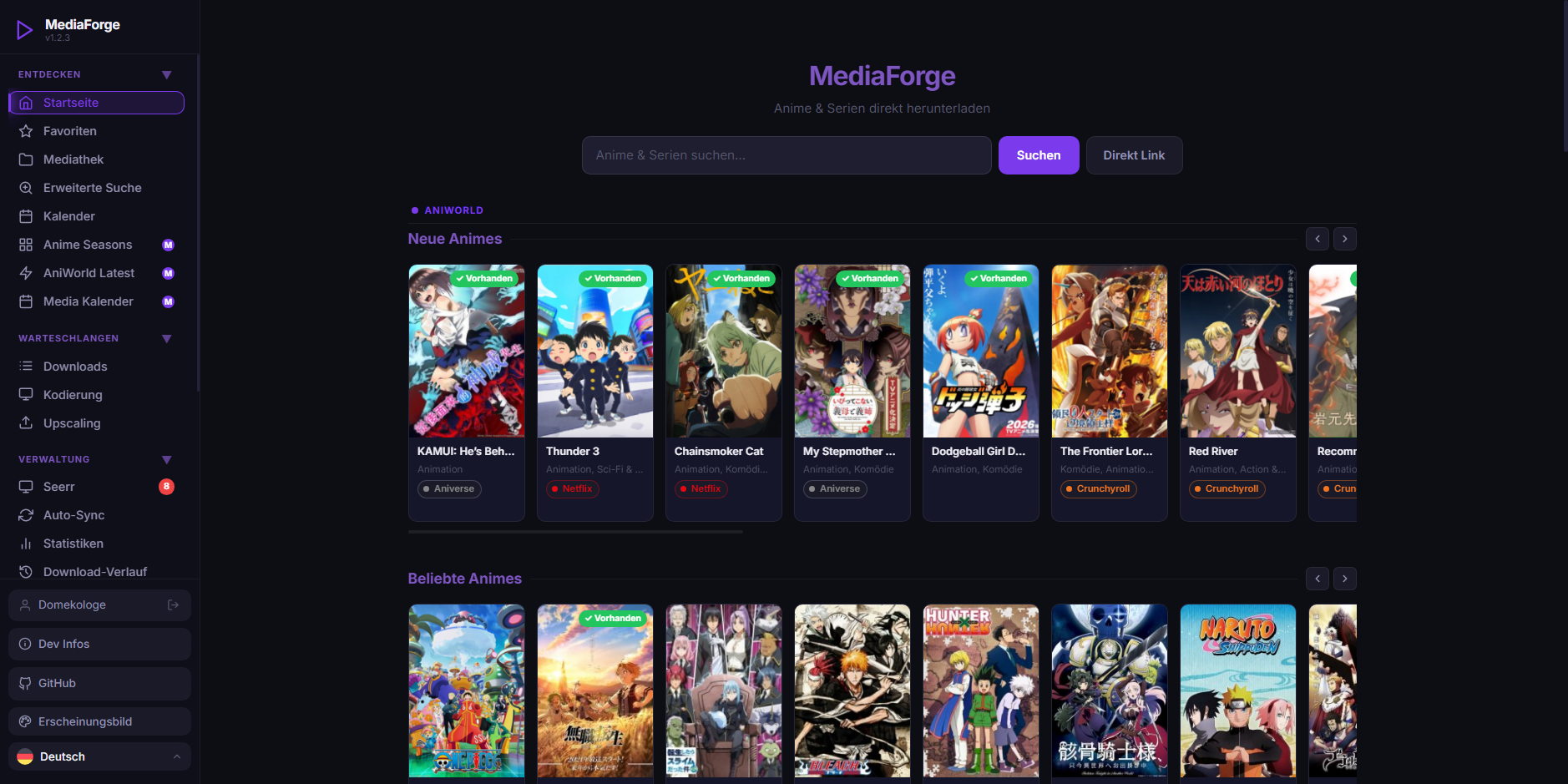 |
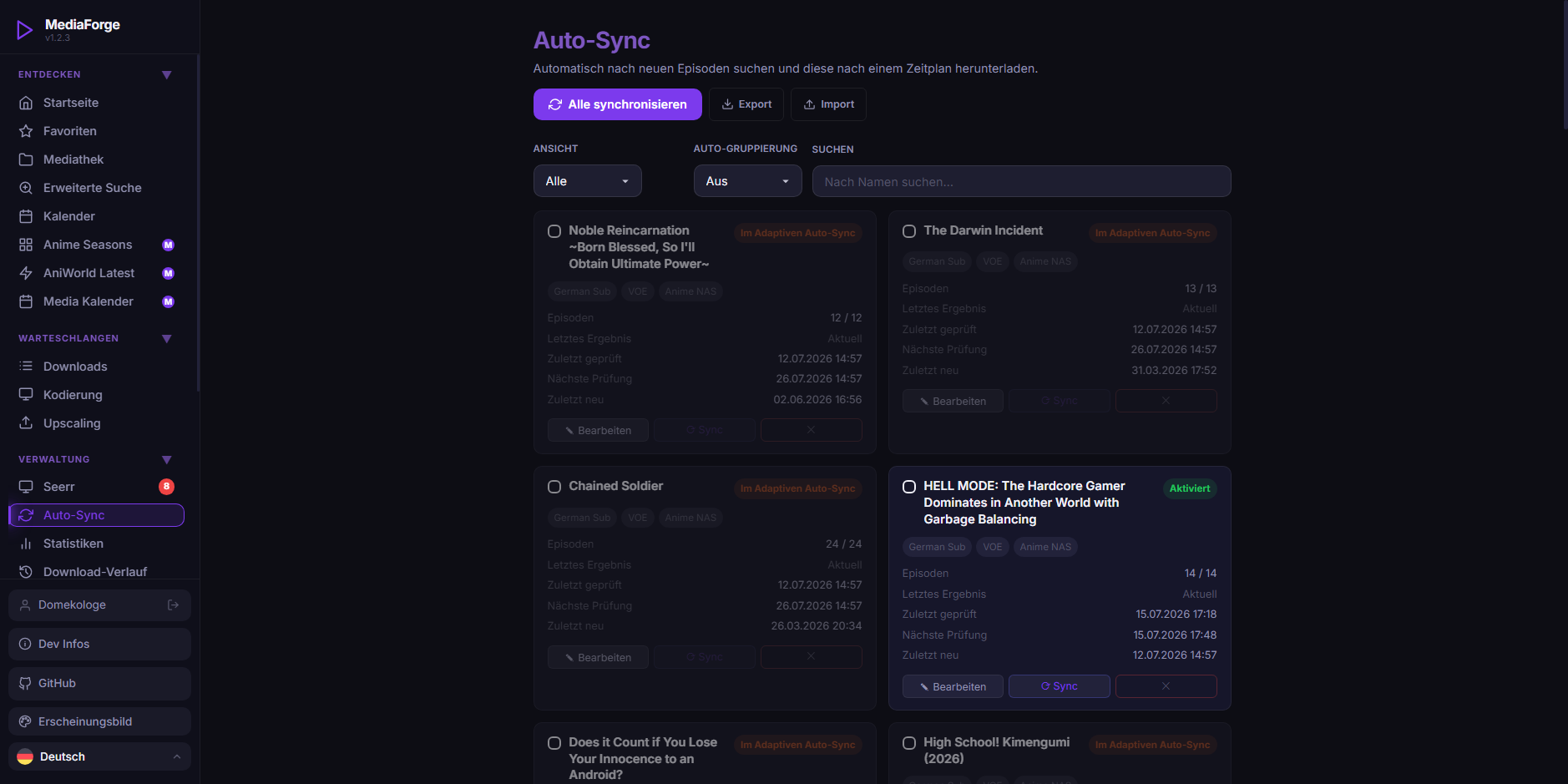 |
Note
This images contains some modules and settings which can be enabled within the settings.
Requirements: Python ≥ 3.10 and ffmpeg available in your
PATH. New to Python? See the Installation wiki for per-OS instructions.
# Install the latest stable release
pip install mediaforge

# Launch — starts the WebUI and opens your browser
mediaforge
Open http://localhost:8080. Authentication is enabled by default and all settings live in the WebUI — no .env file needed.
Useful launch flags: -wP <port> (custom port) · -wH 0.0.0.0 (expose to LAN/Docker/reverse proxy) · -wN (don't open the browser) · -d (debug logging).
📖 Full setup — including how to install Python & ffmpeg, the data directory and first-run steps — is on the Installation and Getting Started wiki pages.
- Browse, search & download full series, seasons or single episodes from aniworld.to, s.to, filmpalast.to, megakino.to and hanime.tv
- Direct Link downloads — paste any raw media URL (
.m3u8, MP4 or anything yt-dlp can read), pick a quality variant and queue it like any other download - AutoSync — keep series up to date automatically on an interval or weekly schedule, with per-job season/episode filters and a separate path for movies/specials
- Download queue & history — a real-time queue plus a searchable, filterable history (failed/cancelled/skipped, retry, bulk delete, export, auto-retention)
- Media library, favourites & statistics built in
- eBooks in the library — EPUB, MOBI, AZW3, AZW and PDF are indexed wherever they sit, and the same book kept in several formats is shown as one entry with a badge per format instead of one card per file (Calibre stores one record per format, so a single novel is routinely four or five of them). Titles, authors, series and covers come from
metadata.opf, a read-only pass over Calibre'smetadata.dband the filename, in that order; nothing is ever written back into your library and nothing is deleted automatically - Built-in eBook reader — PDF, EPUB, MOBI, AZW3 and AZW open in a full-screen overlay instead of a browser tab (Mobipocket formats are converted to EPUB once, on the server, and cached), with light/sepia/dark reading palettes, adjustable typeface, text size, line spacing and page width, a chapter list (worked out from the book's own headings when a converted Kindle file brings no navigation of its own), per-account bookmarks and a choice between paged and scrolling reading. Where you stopped is remembered per book rather than per file, so starting a novel as EPUB and continuing in the PDF keeps your place
- Home page — an opt-in start page that leads with your rows (continue watching with resume-at-the-second, watchlist, newest library additions, what airs in the next two weeks) and then mixes every enabled source into one New / Popular / Movies row each, deduplicated across the whole page; one chip row says which sources are on, off or unreachable and filters at the same time, and the search box remembers your last searches (/ jumps into it). Every row says where it comes from, and Settings → Start Page decides which rows you get, in which order and how many cards each holds — per account, on top of the default the admin sets. A button bar under the search field adds the other half of the picture — queue, activity, library and, for admins, storage and system health — as one panel at a time, so the page stays a page and not a dashboard
- Subtitles — the subtitles a source offers are downloaded and muxed into the finished file as switchable soft-sub tracks that Jellyfin/Plex list by language (on by default), and an optional OpenSubtitles.com lookup fills in whatever languages are still missing afterwards — matched by file hash where possible, asked only for the languages the file doesn't already have
- Duplicate handling — optionally replace an already downloaded episode when the hoster offers better quality, or merge an additional language into the existing file as a new audio track instead of creating a near-duplicate (both off by default)
- Advanced search — TMDB Discover with genres (include/exclude), rating & vote-count thresholds, year and runtime ranges, keywords, original language, series status, networks and streaming providers, grouped in a floating filter menu with quick presets
- CineInfo (TMDB) metadata and a Calendar of upcoming episodes and releases — month, week and agenda views, search and media-type filters, a detail modal on every entry, and an iCal subscription feed you can add to Google/Apple Calendar, Thunderbird or DAVx5
- Jellyfin/Plex and Jellyseerr/Overseerr integration — the Seerr requests page filters, searches and sorts the whole request set server-side and can approve, decline or hide requests in bulk
- Notifications via Web Push, Telegram, Pushover, ntfy, Discord or WhatsApp — plus event hooks and extra channels that installed modules can register
- Web player — overlay controls that fade out of the way, 10 s / 30 s jumps, subtitle, audio-track, quality and speed pickers, chapter marks, seek previews, skip-intro, autoplay of the next episode, picture-in-picture, full touch gestures (double tap to jump, swipe for volume/brightness, hold for 2x) and — when streaming without downloading — a source picker that shows every hoster with its language, resolution and measured response time, and switches without losing your position
- Encoding (Stream Copy / H.264 / H.265, with NVENC, VAAPI, VideoToolbox) and Anime4K upscaling
- Full & Selective Backup — export/import settings and user data as a password-protected file to back up or migrate a MediaForge install (admin only)
- Modules & Theme Packs — extend MediaForge with store-installable modules, and reskin the whole UI (fonts, animations, checkboxes, inputs, calendar, images) with CSS-only theme packs from the same store; the theme, dark/light mode and accent colour are saved per account and follow the user to every browser and device. Anyone can build one: start from the worked examples in
.examples/thirdparties/and.examples/themes/(each with its own README), read the Modules wiki page, and publish the result on the developer portal — the Module Store page links to all three - SyncPlay — watch together in a room: synchronised playback, chat and an invite link guests can use without an account
- Crunchyroll & Fernsehserien.de as metadata sources — availability pills on search results, plus Crunchyroll simulcast/watchlist entries in the calendar
- UpTime monitor & Dev Infos — a dashboard showing whether each source site is reachable (history, response times, per-source tracking), and release notes from the developers right in the UI
- Opt-in telemetry — off by default, staged consent, every data point listed and individually switchable under Settings → Privacy; anything you cancel yourself is never reported as an error, and an unreachable telemetry server stays silent instead of writing to your console
- Automatic library maintenance — a watcher keeps the index in sync with the folders on disk, writes Kodi/Jellyfin-style
.nfometadata next to your files and can lay episodes out in per-language folders - Self-update built in — pip/pipx installs can upgrade themselves from the UI and switch between the stable and dev release channels, no shell required
- Installable as a PWA — add MediaForge to your phone's home screen or your desktop and it runs like an app, offline shell included
- Guided setup wizard, an in-app log viewer, automatic ffmpeg/dependency installation, autostart on boot and mirror-domain handling that keeps working when a source site moves to a new address
- Multi-user auth & OIDC SSO, a full REST API, Docker-ready, and a UI in English, German, Spanish, French and Italian
→ Full feature tour in the Wiki.
Everything is documented in the Wiki — available in English and Deutsch:
| Getting started | Features | Reference |
|---|---|---|
| Installation · Getting Started · Docker | AutoSync · Download History · Library · Integrations · SyncPlay · Encoding | Configuration · Authentication · Supported Sites · API Reference · Architecture |
docker pull ghcr.io/pd-codes/mediaforge:latest

docker run -it --rm -p 8080:8080 \
  -v "${PWD}/Downloads:/app/Downloads" \
  -v mediaforge-data:/home/mediaforge/.mediaforge \
  ghcr.io/pd-codes/mediaforge:latest
Mount your Downloads folder for the files and the mediaforge-data volume for config/database. For Docker Compose, reverse proxy (nginx), LAN access and env-based admin setup, see the Docker wiki page.
Running behind a VPN? A ready-to-use Gluetun setup is in docker-compose.gluetun.yaml — see the Docker wiki for the details.
Warning
NAS devices (UGREEN, Synology): Both are supported, but MediaForge's code is not optimized for these two NAS platforms and will not be — so expect recurring issues. We're happy to help with installation, but we do not optimize MediaForge for UGREEN or Synology. For the smoothest experience, run it via Docker on a standard Linux, Windows or macOS host.
Actively in development — current work in progress:
- Multi-Language Support — UI available in English, German, Spanish, French and Italian
- More Extractors — additional video host support beyond the current providers
- Live Transcode / In-Browser Playback — watch downloaded files directly in the UI
- Discord Rich Presence — show what you're currently watching on your Discord profile
- More Sources — additional anime, series and movie providers (open a feature request)
- AutoSync Episode Filter — configure per job which seasons/episodes to sync, include/skip movies & specials, separate movie download path
- AutoSync Schedule — run on a fixed interval or a weekly plan (weekdays + times)
- Provider Fallback Order — automatically try the next provider if the primary one fails
- Calendar View — show upcoming episode air dates for AutoSync jobs based on TMDB data
- Calendar Subscription (iCal/ICS) — token-authenticated feed for external calendar apps
- Bandwidth Limit / Download Time Window — throttle speed or restrict downloads to specific hours
- Download History — searchable log of all completed downloads with date, size and duration
- Generic Outgoing Webhook — send a configurable POST request on download completion (Home Assistant, n8n, etc.)
- Subtitle Support — subtitles are downloaded and muxed in as switchable soft-sub tracks
- Integrated VPN/Proxy — download through VPN or proxy servers to increase privacy
- Adding Pills to Advanced Search if a Media is already downloaded, and more
- Auto-Sync "Waitlist". If an Auto-Sync Title was not found for X Days, it will be tried again in Y week(s)
Go here for more information: Progress in Work
URLs from aniworld.to, s.to, filmpalast.to, megakino.to and hanime.tv are supported, delivered behind the scenes via hosters such as VOE, Vidoza, Vidmoly, Filemoon, Doodstream, Vidara, Veev, LoadX, Luluvdo, Streamtape, Vidavaca and Hanime. Direct links (.m3u8, MP4 and everything else yt-dlp understands) work without a source site at all, and installed modules can register additional sources and search providers.
→ See Supported Sites for the live status of each site and extractor, and which hosters are prioritized per site.
Contributions are highly appreciated — report bugs, suggest features, submit pull requests, or improve the docs. Please check existing issues first to avoid duplicates, and feel free to discuss ideas on Discord before opening a PR.
Help us translate MediaForge into your language! We use Weblate to manage all localizations. You can easily contribute translations online without any coding knowledge here: Translate MediaForge on Weblate
Builds upon the work of several outstanding open-source projects and individuals:
Original authors — phoenixthrush (creator of AniWorld-Downloader), SiroxCW and Tmaster055.
Libraries & tools — mpv, Flask and Waitress.
- Discord Server — the fastest way to get help and chat with other users.
- GitHub Issues — preferred for installation problems, bug reports and feature requests.
If you find MediaForge useful, please ⭐ the repository — it's greatly appreciated and motivates continued development.
MediaForge is licensed under the GNU General Public License v3.0 or later (GPL-3.0-or-later). See LICENSE and COPYRIGHT.
Important
One component is licensed separately. The MediaForge Captcha Solver
(src/mediaforge/playwright/captcha.py) is not covered by the GPL.
It is proprietary work of the PD-Codes Team, © 2026, All Rights
Reserved, and may be used only as an integral part of an unmodified
MediaForge installation. Extracting it, porting it, or reusing it in any
other project — open source or commercial — requires prior written
permission from the PD-Codes Team. Full terms:
LICENSE-CAPTCHA.
Common questions & use cases (click to expand)
Is there a web UI for AniWorld-Downloader? — Yes. MediaForge is a maintained fork of AniWorld-Downloader with the CLI replaced by a full self-hosted web interface.
How do I download a whole anime series automatically? — AutoSync watches a series and downloads new episodes on an interval or a weekly schedule, with per-season and per-episode filters.
Can I run it in Docker / on a NAS / behind a VPN? — Yes: an official ghcr.io image, Docker Compose examples, a ready-made Gluetun (VPN) compose file, and reverse-proxy notes. UGREEN and Synology work but are not optimized for.
Does it work with Jellyfin, Plex, Jellyseerr or Overseerr? — Yes. It writes Kodi/Jellyfin-compatible .nfo metadata, muxes soft subtitles the way those servers expect, and can approve or decline Seerr requests directly.
Can I watch without downloading? — Yes. The built-in web player streams straight from the hoster with a source picker, subtitle/audio/quality selection, chapters, skip-intro, autoplay and picture-in-picture, plus SyncPlay for watching together.
Can it manage eBooks too? — Yes. EPUB, MOBI, AZW3, AZW and PDF are indexed (including Calibre libraries, read-only) and open in a built-in reader with bookmarks and cross-format reading progress.
Keywords: anime downloader · aniworld downloader · aniworld.to downloader · s.to downloader · serienstream downloader · filmpalast downloader · megakino downloader · self-hosted media downloader · open source stream downloader · web UI downloader · m3u8 downloader · yt-dlp web interface · AutoSync auto download series · Jellyfin companion · Plex companion · Jellyseerr / Overseerr integration · self-hosted media library · web video player · EPUB / MOBI / PDF reader · Calibre library viewer · Docker media downloader · NAS media downloader · Anime4K upscaling · H.264 / H.265 / NVENC encoding · TMDB metadata · episode calendar with iCal feed · SyncPlay watch together · multi-user · OIDC SSO · REST API · PWA · Python Flask self-hosted app
MediaForge is a client-side tool that enables access to content hosted on third-party websites. It does not host, upload, store, or distribute any media itself.
This software is not intended to promote piracy or copyright infringement. You are solely responsible for how you use it and for ensuring that your use complies with applicable laws and the terms of service of the websites you access.
The developer provides this project "as is" and is not responsible for third-party content, external links, or the availability, accuracy, legality or reliability of any third-party service. If you have concerns about specific content, please contact the respective website or rights holder directly.