













DockSec is an OWASP Lab Project that bridges the gap between complex security scan results and actionable developer fixes. It integrates industry-standard scanners (Trivy, Hadolint, Docker Scout) with AI to provide context-aware security analysis.
Instead of overwhelming you with a list of 200+ CVEs, DockSec:
- Prioritizes what actually affects your specific container setup.
- Explains vulnerabilities in plain English, not just security jargon.
- Suggests specific fixes for your Dockerfile.
- Generates professional, interactive security reports for your team.
Everything scans locally; the only thing that ever leaves your machine is the (secret-redacted) file content sent to the AI provider you choose - and with a local model or scan-only mode, nothing leaves at all. See Data flow and privacy.
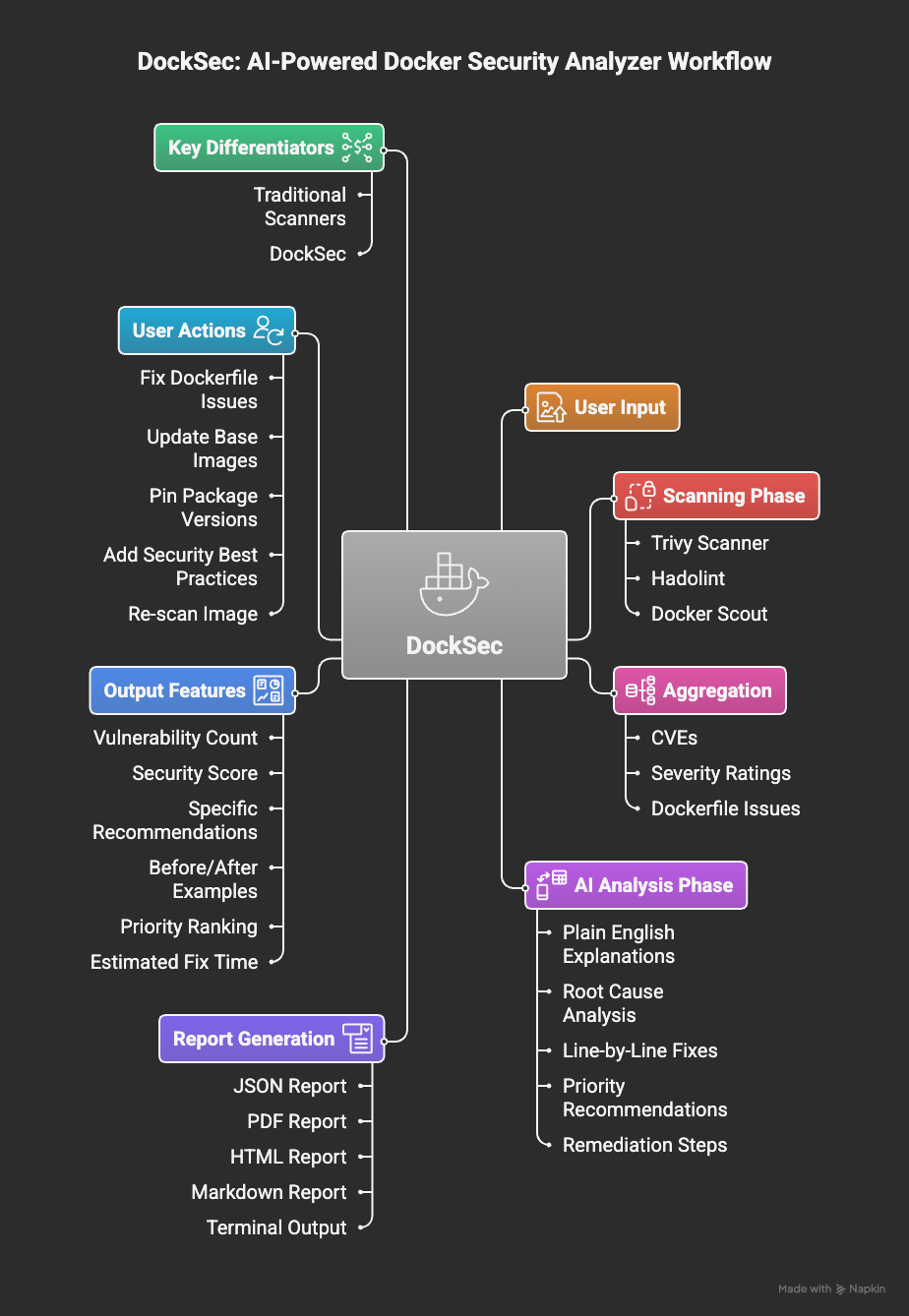
DockSec workflow: from scanning to actionable insights
DockSec follows a four-stage pipeline:
- Scan: Runs Trivy, Hadolint, and Docker Scout locally on your environment.
- Analyze: AI correlates findings across all scanners to remove noise and assess real-world impact.
- Recommend: Generates human-readable explanations and specific remediation steps.
- Report: Exports actionable results as HTML, PDF, JSON, CSV, SARIF, and CycloneDX SBOM.
DockSec orchestrates local scanners, so it needs:
| Requirement | Needed for | Install |
|---|---|---|
| Python 3.12+ | DockSec itself | python.org |
| Trivy | All scans (required) | brew install trivy or Trivy docs |
| Hadolint | Dockerfile linting | brew install hadolint or Hadolint docs |
| Docker | Image scans (-i) |
Docker docs |
Or let DockSec install Trivy and Hadolint for you:
python -m docksec.setup_external_tools# Full install with AI analysis support (recommended)
pip install "docksec[ai]"
# Or the slim, scan-only core (no LLM dependencies, no API key needed)
pip install docksecNo API key needed for local scanning:
docksec Dockerfile --scan-onlyEvery scan ends with a result summary: a severity table, a 0-100 security score with a
rating, a "Quick take" action block, the generated reports (saved to
~/.docksec/results/ by default), and a suggested next command.
AI analysis explains findings and suggests fixes. Pick a provider, set its API key, and run:
# OpenAI (default provider)
export OPENAI_API_KEY="sk-..."
docksec Dockerfile

# Anthropic Claude
export ANTHROPIC_API_KEY="sk-ant-..."
docksec Dockerfile --ai-only --provider anthropic --model claude-sonnet-5

# Google Gemini
export GOOGLE_API_KEY="..."
docksec Dockerfile --ai-only --provider google

# Ollama (fully local, no API key, data never leaves your machine)
docksec Dockerfile --ai-only --provider ollama --model llama3.1
Each provider has a sensible default model (OpenAI: gpt-4o, Anthropic:
claude-haiku-4-5, Google: gemini-1.5-pro, Ollama: llama3.1), so --model is
optional. To avoid repeating flags, set environment variables (or put them in a .env
file in the directory you run from - DockSec loads it automatically):
export LLM_PROVIDER=anthropic
export LLM_MODEL=claude-sonnet-5
docksec Dockerfile
Before any content is sent to an AI provider, secret-looking values (passwords, tokens, API keys, private key blocks) are masked automatically. See Data flow and privacy.
- name: Run DockSec AI Scanner
  uses: OWASP/DockSec@v2026.7.5
  with:
    dockerfile: 'Dockerfile'
openai_api_key: ${{ secrets.OPENAI_API_KEY }}# Scan Dockerfile + Docker image (AI + scanners)
docksec Dockerfile -i myapp:latest
# Scan a Docker Compose file and all its services
docksec --compose docker-compose.yml
# Scan only a Docker image
docksec --image-only -i myapp:latest
# Fast local scan, no AI, no API key
docksec Dockerfile --scan-only
# Choose which severity levels the image scan reports (default: CRITICAL,HIGH)
docksec -i myapp:latest --image-only --severity CRITICAL,HIGH,MEDIUM
# Fail the build (exit 1) if any finding is HIGH or above
docksec -i myapp:latest --image-only --fail-on high
# Write only the report formats you want, to a directory of your choice
docksec Dockerfile --scan-only --format json,html --output-dir ./reports
# Print results as JSON to stdout for scripts and CI pipelines
docksec -i myapp:latest --image-only --json
# Write a SARIF report for GitHub Code Scanning
docksec Dockerfile --scan-only --sarif
# Write a CycloneDX SBOM of an image for supply-chain tooling
docksec --image-only -i myapp:latest --sbom
# Fully offline scan: local Trivy DB, no network, no AI
docksec --image-only -i myapp:latest --offline
# Save today's findings as a baseline, then only gate on new findings later
docksec -i myapp:latest --image-only --baseline .docksec-baseline.json --update-baseline
docksec -i myapp:latest --image-only --baseline .docksec-baseline.json --fail-on high
# Suppress triaged findings with an auditable ignore file
docksec -i myapp:latest --image-only --ignore-file .docksec-ignore.yml
# Force a fresh scan, bypassing the results cache
docksec -i myapp:latest --image-only --no-cache
# Install AI-assistant skill files (Claude Code, Cursor, Copilot, and more)
docksec install-skill
# Output control
docksec Dockerfile --scan-only --quiet # warnings, errors, summary only
docksec Dockerfile --scan-only --verbose # INFO-level diagnostics on stderr
docksec Dockerfile --scan-only --verbose --log-file logs/docksec.log
docksec Dockerfile --no-color # also honors NO_COLORDockSec uses CI-friendly exit codes so builds and shells can react to results:
| Code | Meaning |
|---|---|
0 |
Success, no findings at or above --fail-on |
1 |
Findings at or above the --fail-on threshold |
2 |
Usage or argument error |
3 |
Tool or runtime error (scan failed, image not found, missing tools) |
--fail-on gates on the structured findings (image vulnerabilities and compose
misconfigurations). When --fail-on is below the requested --severity, the scan
severity is widened automatically so the gate can observe those findings.
--json prints a single JSON object to stdout (scan info, vulnerabilities, severity
counts, and any AI findings) instead of the human-readable summary, so it can be piped
straight into other tools:
docksec -i myapp:latest --image-only --json | jq '.severity_counts'With --json alone, no report files are written; combine it with --format to write
files and print JSON in the same run. All human-readable messages move to stderr in
--json mode, so stdout only ever contains the JSON payload.
--sarif writes a SARIF 2.1.0 report alongside the other report formats. Upload it
with the standard github/codeql-action/upload-sarif action to see findings annotated
directly on pull requests and in the Security tab:
- name: Run DockSec
  uses: OWASP/DockSec@v2026.7.5
  with:
    dockerfile: 'Dockerfile'
    sarif: 'true'

- name: Upload SARIF to GitHub Code Scanning
  uses: github/codeql-action/upload-sarif@v3
  if: always()
  with:
    sarif_file: ~/.docksec/results
if: always()is important: without it, the upload step is skipped whenever--fail-oncauses DockSec to exit non-zero, losing the findings exactly when they matter most.
--baseline FILE lets you adopt --fail-on on an existing project without a wall of
pre-existing findings blocking every build. Run once with --update-baseline to snapshot
today's findings, then commit the baseline file; from then on, --fail-on only gates on
findings that aren't already in the baseline:
# Snapshot current findings (does not gate)
docksec -i myapp:latest --image-only --baseline .docksec-baseline.json --update-baseline

# Later runs only fail on NEW findings above the threshold
docksec -i myapp:latest --image-only --baseline .docksec-baseline.json --fail-on high
Findings are matched by vulnerability ID, target, and package name, so the baseline stays
valid as unrelated findings come and go. Re-run with --update-baseline whenever you want
to accept the current state as the new baseline.
--ignore-file FILE suppresses individual findings a team has triaged and accepted.
Unlike the baseline (a point-in-time snapshot), the ignore file is an explicit,
reviewable list where every entry carries a reason and an optional expiry date.
If a .docksec-ignore.yml file exists in the current directory, it is picked up
automatically.
# .docksec-ignore.yml
ignores:
  - id: CVE-2023-45853              # Trivy vulnerability ID or DockSec rule ID
    reason: "zlib CVE; code path not reachable, vendor fix pending"
    expires: 2026-12-31              # optional; entry stops applying after this date
  - id: compose-missing-healthcheck
    reason: "healthchecks are handled by the orchestrator"
Suppressed findings are removed before scoring, reports, --json output, and the
--fail-on gate. Expired entries stop applying automatically (with a warning), and
entries without a reason are flagged so waivers stay auditable. Commit the file to
version control so suppressions are reviewed like any other change.
By default every scan writes four report files; use --format to pick a subset:
- html: An interactive, visually clean web report: severity cards, score rating, full vulnerability table with fixed versions, and the complete AI findings.
- pdf: A portable, presentation-ready document.
- json: Full, machine-readable scan data (same shape as
--jsonstdout output). - csv: A spreadsheet-ready table of individual vulnerabilities.
Note on CSV behavior: with zero vulnerabilities, DockSec still writes a header-only CSV (column names, no rows) so downstream automation never breaks on a missing or empty file. This is intentional.
--sbom writes a CycloneDX software bill of materials (<image>.cdx.json) of the
scanned image, listing every package component plus known vulnerabilities. The BOM is
produced by Trivy's native exporter (so it is spec-compliant) and DockSec stamps itself
into the tool metadata. Feed it into Dependency-Track, GitHub's dependency graph, or any
other SBOM consumer:
docksec --image-only -i myapp:latest --sbom--sbom needs a single image (-i), so it is skipped for compose runs. Like --sarif,
it is independent of --format.
DockSec is designed so you always know what leaves your machine:
- Scanning is fully local. Trivy, Hadolint, and the security score run on your machine. Image contents are never uploaded anywhere by DockSec.
- AI analysis sends only the scanned file. When the AI pass runs, the Dockerfile or compose file content (plus a short summary of vulnerability counts for scoring) is sent to the LLM provider you configured. Nothing else is transmitted.
- Secrets are redacted before they leave. Secret-looking values (passwords,
tokens, API keys, private key blocks) in the file are masked before the content is
sent to the AI provider. Key names stay visible so exposed credentials are still
flagged. Use
--no-redactto opt out. - Fully local AI is supported. Use
--provider ollamato keep the AI analysis on your own hardware, or--scan-only/--offlineto skip AI entirely. - No telemetry. DockSec collects no usage data and phones home to nothing.
--offline runs a scan with no network access. It uses the Trivy vulnerability database
already on disk (no DB update) and skips the AI analysis and the Docker Scout advanced
scan, both of which require network. This is the simplest way to scan in an air-gapped or
locked-down environment:
docksec --image-only -i myapp:latest --offlineMake sure the Trivy DB has been downloaded at least once (any prior online scan does
this) before relying on --offline.
Image scan results are cached (default: 24 hours, override with
DOCKSEC_CACHE_TTL_HOURS) and keyed by the image's content digest, so a rebuilt tag
such as a reused :latest always gets a fresh scan. Use --no-cache (or
DOCKSEC_USE_CACHE=false) to bypass the cache for a run.
docksec install-skill writes DockSec usage instructions into the well-known context
files for popular AI coding assistants, so an assistant working in your repo knows how to
invoke DockSec:
docksec install-skillThis creates or updates:
.claude/commands/docksec.md(Claude Code slash command/docksec).cursor/rules/docksec.mdc(Cursor)AGENTS.md(Codex CLI),GEMINI.md(Gemini CLI).github/copilot-instructions.md(GitHub Copilot)
The files are plain text you can review and commit; nothing is executed. Re-running the command updates the DockSec section in place instead of duplicating it.
- Smart Analysis: AI explains what vulnerabilities mean for your specific setup.
- Multi-LLM Support: OpenAI, Anthropic Claude, Google Gemini, or local models via Ollama.
- Privacy First: Secret values are redacted before any content reaches an AI provider, scanning is fully local, and there is no telemetry.
- Docker Compose Scanning: Detect orchestration-level misconfigurations and scan all services in a compose file.
- Deep Integration: Combines Trivy (vulnerabilities), Hadolint (linting), and Docker Scout.
- Security Scoring: A 0-100 score with a rating to track your security posture over time.
- Rich Formats: HTML (interactive), PDF, JSON, CSV, SARIF, and CycloneDX SBOM.
- CI/CD Ready:
--fail-onexit codes, baseline/ratchet mode, auditable waivers, JSON-to-stdout, and a GitHub Action on the Marketplace. - Offline Mode: Scan fully air-gapped (
--offline) using the local Trivy database. - AI-Assistant Skills:
docksec install-skillteaches Claude Code, Cursor, Copilot, and others how to run DockSec in your repo.
| Capability | DockSec | Trivy (standalone) | Snyk Container | Aikido |
|---|---|---|---|---|
| License and cost | Free, open source (MIT) | Free, open source (Apache 2.0) | Commercial (limited free tier) | Commercial (limited free tier) |
| Governance | OWASP Lab Project, vendor neutral | Open source, maintained by Aqua | Single vendor | Single vendor |
| Detects CVEs and Dockerfile misconfigurations | Yes | Yes | Yes | Yes |
| Explains findings in plain English | Yes (AI-written context and impact) | No (raw CVE data) | Partial (severity and fix hints) | Partial (AI summaries in platform) |
| Contextual Dockerfile remediation | Yes (specific rewrites with explanation) | No (detection only) | Yes (base image upgrade advice, fix PRs) | Yes (AI AutoFix PRs) |
| Docker Compose (multi-service) scanning | Yes (orchestration checks and per-service scan) | Partial (config scan, no per-service fan-out) | Partial | Partial |
| Baseline / ratchet mode (fail only on new findings) | Yes | No | Partial (platform policies) | Partial (platform policies) |
| Auditable per-finding waivers with reasons and expiry | Yes | Partial (.trivyignore, no reasons enforced) | Partial (platform policies) | Partial (platform policies) |
| CI-native output (SARIF for GitHub Code Scanning) | Yes | Yes | Yes | Yes |
| SBOM export (CycloneDX) | Yes (--sbom) |
Yes | Yes | Yes |
| AI-assistant skill install (Claude Code, Cursor, Copilot) | Yes (install-skill) |
No | No | No |
| Runs fully offline / air-gapped | Yes (local LLM via Ollama, scan-only mode, no API key) | Scanning only (no remediation layer) | No (cloud platform) | No (hosted platform) |
| Your image data stays on your network | Yes | Yes | No | No |
| Bring your own LLM / model choice | Yes (OpenAI, Anthropic, Gemini, or local Ollama) | Not applicable | No (proprietary AI) | No (proprietary AI) |
| Self-hostable, no platform deployment | Yes | Yes | No | No |
| Vendor lock-in | None | None | Yes | Yes |
| Security score (0-100) and multi-format reports | Yes | Partial (machine formats, no remediation report) | Partial (dashboard reports) | Partial (dashboard reports) |
DockSec is the only one of these that pairs contextual Dockerfile remediation with a fully open source, OWASP-governed, locally runnable design. Snyk and Aikido offer capable AI remediation, but only as commercial cloud platforms that send your data to their service. Trivy is open source and local but stops at detection and does not help you fix anything. DockSec fills the gap for developers and for regulated or air-gapped teams who need both the fix guidance and full control of their data, at no cost.
See ROADMAP.md for where DockSec is heading: registry scanning without a local Docker daemon, a repo-level policy config file, Jenkins/GitLab/Azure DevOps templates, an official container image, Kubernetes and Helm scanning, and more. Feedback and votes on priorities are welcome in issues and on OWASP Slack.
DockSec thrives on community contributions. Whether you are a developer, designer, or security enthusiast, there are many ways to get involved:
- Code Contributions: Fix bugs or add new features.
- Documentation: Improve guides or create tutorials.
- Issue Reporting: Identify and report bugs.
- Feedback: Share your experience and suggestions.
To get started, check out our Contributing Guidelines, Code of Conduct, and Sponsorship Guide.
DockSec is led by a dedicated team committed to making container security accessible:
- Advait Patel - Project Lead
- Arkadii Yakovets - Project Co-lead
Find us here:
- OWASP Project Page: owasp.org/DockSec/
- OWASP Slack: #project-docksec
- PyPI: pypi.org/project/docksec/
- Issues: Report a bug
- Changelog: CHANGELOG.md
Built by Advait Patel and the OWASP community.