Intelligent PCAP file analysis with AI-powered insights and interactive network visualization
Features • Quick Start • Usage • Documentation


A comprehensive network packet analysis tool that runs entirely self-hosted. Upload PCAP files to visualize network traffic patterns, analyze packet flows, generate intelligent filters, and gain insights through AI-powered analysis. Perfect for network troubleshooting, security analysis, protocol debugging, or educational purposes.
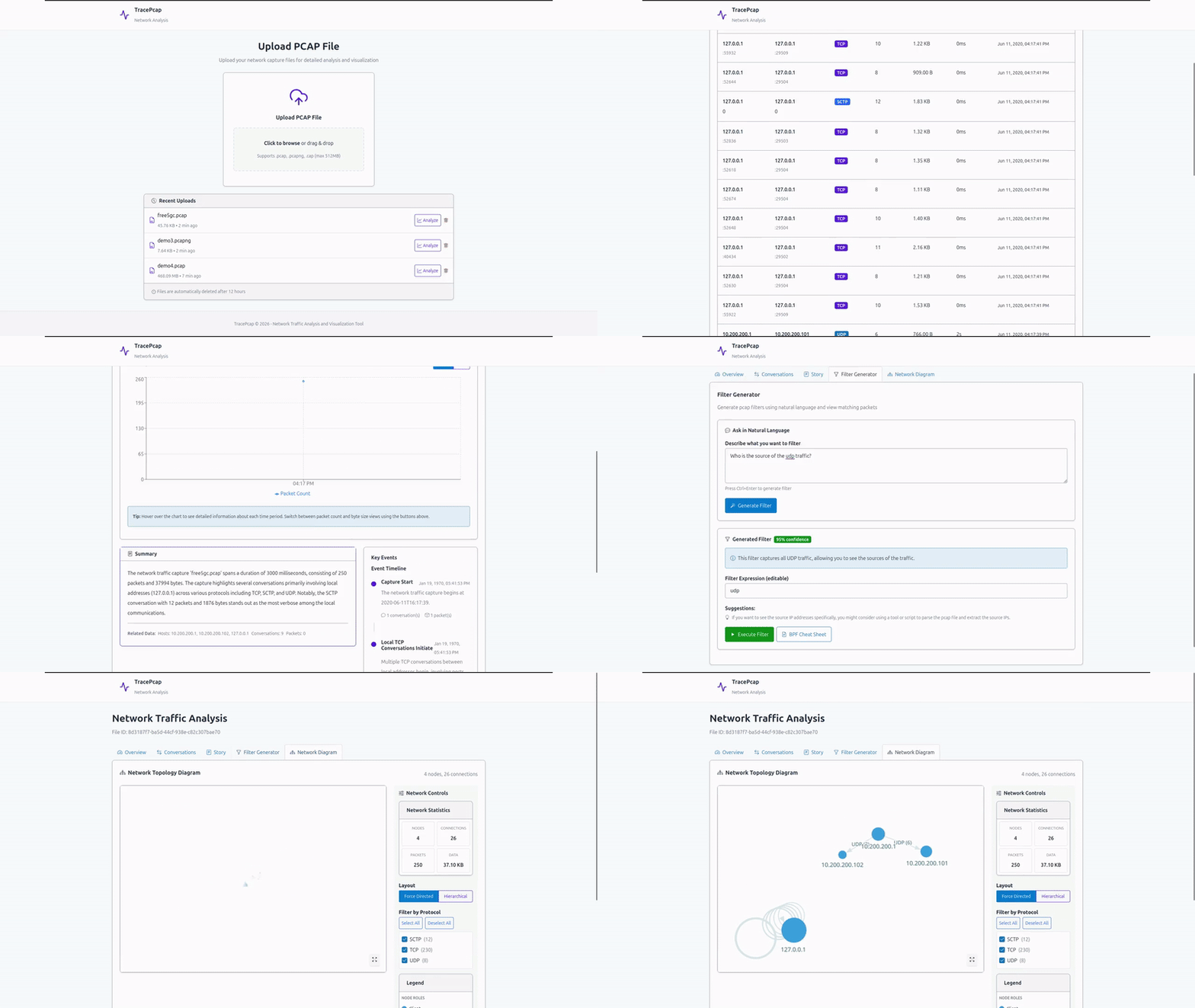
| Feature | Description |
|---|---|
| PCAP Upload & Management | Upload and manage PCAP/PCAPNG/CAP files (max 512MB) with MinIO object storage; duplicate detection and configurable upload limits |
| Network Visualization | Interactive network topology using React Flow + ELK layout with a rich filter panel (IP, port, device type, protocol, risk), fullscreen toggle, layout controls, and clickable node detail panel |
| nDPI Security Detection | Deep packet inspection via nDPI v5: application identification, traffic categories, risk/alert flags, JA3/JA3S TLS fingerprints, SNI extraction, and TLS certificate metadata per conversation |
| Conversation Tracking | Paginated conversation list with advanced filtering (IP, port, protocol, app, risk, custom rules, device type, country, payload pattern), multi-column sorting, column picker, and bulk PCAP export |
| Session Reconstruction | TCP/UDP application-layer payload decoding with a hex+ASCII viewer for inspecting raw packet payloads |
| File Extraction | HTTP object extraction and raw TCP/UDP stream extraction via Aho-Corasick; automatic MIME type detection; bulk download |
| Geolocation & Device Classification | Country/ASN enrichment for external IPs; automatic device-type prediction (Router, Server, IoT, Mobile, Laptop/Desktop) across all views |
| MAC Manufacturer Lookup | Wireshark OUI database integration for vendor identification from MAC addresses |
| Timeline Analysis | Chronological traffic visualization with configurable time granularity (auto or manual) and protocol breakdown |
| AI Filter Generator | LLM-powered Wireshark/tcpdump filter generation from natural language queries with confidence scores and packet-level results |
| Story Mode | AI-generated narrative reconstruction of network activities with an interactive LLM Q&A chat, custom context input, and story timeline |
| Custom Signature Rules | YAML-based detection rules matched against IP, CIDR, port, JA3, hostname, app, and protocol fields; live-reloaded without restart |
| Export Options | PDF report (with live topology capture), per-conversation PCAP, bulk PCAP export, and CSV export |
| Real-time Processing | Asynchronous analysis with detailed progress tracking |
| Multi-protocol Support | TCP, UDP, ICMP, and application-layer protocols including TLS, HTTP, DNS, QUIC, and L2 protocols (ARP, STP, LLDP, CDP) |
| Software | Version | Purpose |
|---|---|---|
| Docker | Latest | Container runtime |
| Docker Compose | Latest | Multi-container orchestration |
| LLM Server | Any OpenAI-compatible API | AI filter generation (e.g., LM Studio, Ollama, OpenAI) |
Minimum Hardware:
- RAM: 4GB (8GB+ recommended)
- Storage: 10GB (for database, PCAP files, and object storage)
1. Clone and setup:
git clone https://github.com/NotYuSheng/TracePcap.git
cd TracePcap
cp .env.example .env
2. Configure .env:
# Upload Configuration
MAX_UPLOAD_SIZE_BYTES=536870912  # 512MB default

# Nginx Port Configuration
NGINX_PORT=80  # Change if port 80 is already in use

# LLM Configuration (Local LLM Server)
LLM_API_BASE_URL=http://localhost:1234/v1
LLM_API_KEY=
LLM_MODEL=Qwen2.5-14B-Coder-Instruct
LLM_TEMPERATURE=0.7
LLM_MAX_TOKENS=2000
3. Start the application:
docker compose up -d4. Access TracePcap:
Open http://localhost:80 in your browser.
Note: The application includes PostgreSQL for metadata storage and MinIO for PCAP file storage. First startup may take a few minutes while containers initialize.
- Upload — Drag-and-drop a PCAP/PCAPNG file; optionally enable nDPI analysis and file extraction before uploading
- Analyze — File is processed asynchronously with a detailed progress view
- Overview — Review detected applications, protocols, risk alerts, and custom signature matches
- Visualize — Explore the interactive network topology with filters, layout controls, and node detail panels
- Conversations — Review flows with advanced filtering, session reconstruction, and payload inspection
- Story Mode — Read the AI-generated narrative and ask follow-up questions via LLM chat
- Extracted Files — Browse and download files recovered from HTTP responses and raw streams
- Generate Filters — Use AI to create Wireshark/tcpdump filters from natural language (e.g., "show all TLS traffic to external IPs")
- Export — Download a PDF report, per-conversation or bulk PCAP, or CSV
PCAP, PCAPNG, CAP (max 512MB default, configurable via MAX_UPLOAD_SIZE_BYTES)
| Component | Technology |
|---|---|
| Backend | Spring Boot 3.2.1, Java 21, Maven, Lombok, MapStruct |
| Architecture | Layered architecture (Controller → Service → Repository → Database) |
| Frontend | React 19, Vite, TypeScript, Lucide Icons, SGDS React |
| Visualization | React Flow + ELK (network topology), Recharts, D3.js |
| Reverse Proxy | Nginx |
| Packet Parsing | tshark / Wireshark, nDPI v5 (deep packet inspection) |
| Database | PostgreSQL 15 with Flyway migrations |
| Object Storage | MinIO (S3-compatible) |
| Containerization | Docker, Docker Compose |
| API Documentation | SpringDoc OpenAPI (Swagger UI) |
Comprehensive documentation is available in the docs/ directory:
| Document | Description |
|---|---|
| API Endpoints | Complete REST API documentation with request/response examples |
| Backend Structure | Backend architecture, package organization, and design patterns |
# All services
docker compose logs -f

# Specific service
docker compose logs -f tracepcap-backend
docker compose logs -f postgres
docker compose logs -f minio# Restart all
docker compose restart
# Restart backend only
docker compose restart tracepcap-backend# Backup database
docker exec tracepcap-postgres pg_dump -U tracepcap_user tracepcap > backup.sql
# Backup MinIO data (PCAP files)
docker exec tracepcap-minio mc mirror minio/tracepcap-files ./backup-pcaps/
# Backup all volumes
sudo tar -czf tracepcap_backup.tar.gz /var/lib/docker/volumes/tracepcap_*docker exec -it tracepcap-postgres psql -U tracepcap_user tracepcapNavigate to http://localhost:9001 and login with:
- Username:
minioadmin - Password:
minioadmin
Navigate to http://localhost:80/swagger-ui.html to explore the API interactively.
TracePcap is designed for self-hosted deployment:
- Development: Use built-in configuration with exposed ports
- Production:
- Change default MinIO credentials in
docker-compose.yml - Update PostgreSQL password
- Configure reverse proxy with SSL/TLS
- Adjust
MAX_UPLOAD_SIZE_BYTESbased on your needs - Set appropriate LLM configuration for your infrastructure
- Change default MinIO credentials in
- Local Processing: PCAP analysis runs entirely on your server
- Data Privacy: Network captures never leave your infrastructure (except LLM filter generation)
- Object Storage: MinIO provides S3-compatible secure file storage
- Database: PostgreSQL not exposed outside Docker network by default
- No Authentication: Add authentication layer for multi-user deployments
- LLM Privacy: Use local LLM servers (LM Studio, Ollama) to keep filter queries private
- Async Processing: File analysis runs asynchronously to prevent blocking
- Object Storage: MinIO provides scalable storage for large PCAP files
- Database Indexing: Optimized queries with proper indexing for fast lookups
- Connection Pooling: Efficient database connection management
- File Size Limits: Configurable upload limits to prevent resource exhaustion
- Layered Architecture: Clean separation of concerns (API → Service → Repository → Database)
- DTO Pattern: MapStruct for efficient object mapping between layers
- Database Migrations: Flyway for version-controlled schema management
- Health Checks: Built-in health checks for all services
- API-First Design: OpenAPI specification with Swagger UI
TracePcap supports user-defined detection rules that are matched against every conversation after nDPI analysis. Matched rule names appear as color-coded badges in the Conversations tab and Overview, alongside nDPI's built-in detections.
Rules live inside a Docker named volume (config_data) at /app/config/signatures.yml inside the backend container. The file is reloaded on every analysis run — no restart required after editing.
Click Custom Detection Rules in the navbar to open the built-in YAML editor. Changes are saved immediately — no restart required.
signatures.sample.ymlin the repo root is a reference template with demo rules covering every match field. Paste it into the browser editor to get started.
signatures:
  - name: rule_name_shown_in_ui   # shown as a badge (use underscores, no spaces)
    description: Human-readable description
    severity: low                  # low | medium | high | critical
    match:
      ip: "203.0.113.42"           # exact match against srcIp OR dstIp
A rule fires when all specified match fields are satisfied. All fields are optional — mix and match as needed.
| Field | Type | Description | Example |
|---|---|---|---|
ip |
string | Exact match against srcIp or dstIp | "203.0.113.42" |
cidr |
string | CIDR range match against srcIp or dstIp | "10.0.0.0/8" |
srcPort |
number | Exact source port | 67 |
dstPort |
number | Exact destination port | 4444 |
ja3 |
string | Exact JA3S fingerprint hash (nDPI 5.x) | "82f0d8a75fa483d1cfe4b7085b784d7e" |
hostname |
string | Exact or wildcard SNI hostname — *.evil.com matches any subdomain at any depth |
"*.evil.com" |
app |
string | Case-insensitive nDPI application name | "Telegram", "TOR", "SIP", "RTP" |
protocol |
string | Case-insensitive transport protocol | "TCP", "UDP", "ICMP" |
| Severity | Color |
|---|---|
critical |
Red |
high |
Orange |
medium |
Yellow |
low |
Purple |
signatures:

  # Flag a known C2 IP
  - name: known_c2_ip
    description: Known command-and-control server
    severity: high
    match:
      ip: "203.0.113.42"

  # Flag all traffic to a suspicious subnet
  - name: flagged_subnet
    severity: medium
    match:
      cidr: "198.51.100.0/24"

  # Detect DNS over TCP (possible zone transfer or tunnelling)
  - name: dns_over_tcp
    severity: medium
    match:
      app: "DNS"
      protocol: TCP

  # Wildcard hostname match
  - name: blocked_domain
    severity: high
    match:
      hostname: "*.malware.example.com"

  # JA3S fingerprint from a threat-intel feed
  - name: suspicious_tls_fingerprint
    severity: critical
    match:
      ja3: "a0e9f5d64349fb13191bc781f81f42e1"
A full set of 12 demo rules covering every match field type is available in signatures.sample.yml. The script sample-files/gen_demo.py generates a PCAP file that triggers all 12 rules at once.
The sample-files/ directory contains example PCAP files:
atm_capture1.cap- ATM network traffic samplefree5gc.pcap- 5G core network traffic sampledemo_all_rules.pcap- Triggers all 12 custom signature demo rules (generated bygen_demo.py)
These files can be used to test the application's analysis capabilities.
This project is licensed under the MIT License. See LICENSE for details.