
ScreenFilter is a lightweight CRT-style screen overlay for videos, browsers, and local media players - directly from your macOS menu bar. ScreenFilter adds an adjustable pixel grid and analog display effects on top of your screen. It is designed to make low-resolution videos feel more intentional by giving them a subtle retro monitor look.
Version 1.0 – developed by Kevin Tobler 🌐 www.kevintobler.ch
- 1.0
- First Release
- Menu bar app with compact controls
- Click-through overlay that does not block mouse interaction
- Adjustable pixel grid from 2 px to 48 px
- Grid opacity control up to 100%
- Scanline intensity control up to 100%
- Color tint overlay with hue and strength sliders
- Pixel flicker with selectable flicker modes
- Phosphor glow for a softer analog display feel
- Horizontal drift with separate speed control
- Rolling band with separate speed control
- Signal dust for subtle analog noise
- Reset button to restore default values
ScreenFilter creates transparent, click-through overlay windows above your displays. The overlay is drawn with SwiftUI and AppKit and can join all Spaces, including fullscreen contexts.
Because it works as a screen overlay, it affects the visible screen area rather than detecting only the video rectangle. This makes it work with browsers and local video players without plugins, but it also means other visible content is filtered while the overlay is enabled.
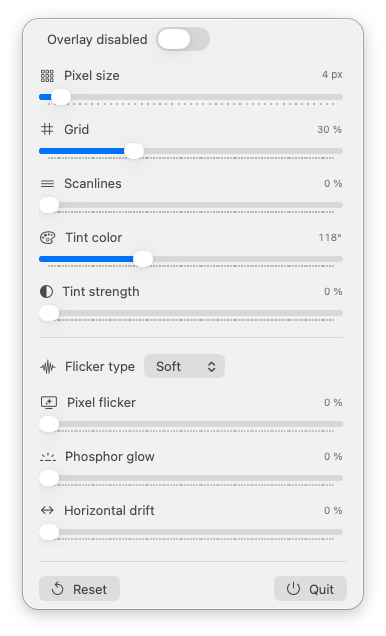
- Overlay: off
- Pixel size: 4 px
- Grid: 30%
- Scanlines: 0%
- Tint: off
- Pixel flicker: off
- Phosphor glow: off
- Horizontal drift: off
- Rolling band: off
- Signal dust: off
- macOS 14.6 Sonoma or newer
- Apple Silicon or Intel Mac
- Download the latest ScreenFilter.app release.
- Move ScreenFilter.app to your Applications folder.
- Launch the app.
- Use the menu bar icon to enable the overlay and adjust the effects.
Kevin Tobler
www.kevintobler.ch
This project is licensed under the MIT License - feel free to use, modify, and distribute.