This project introduces how to implement high-performance deployment of YOLOv8-SAHI with Int8 Engine on embedded devices such as Jetson. The time consumption for testing image slice and batch inference on Jetson Orin Nano (8GB) is only 0.04 seconds, and the 1080p video inference with sahi and bytetrack achieves nearly 15 FPS.
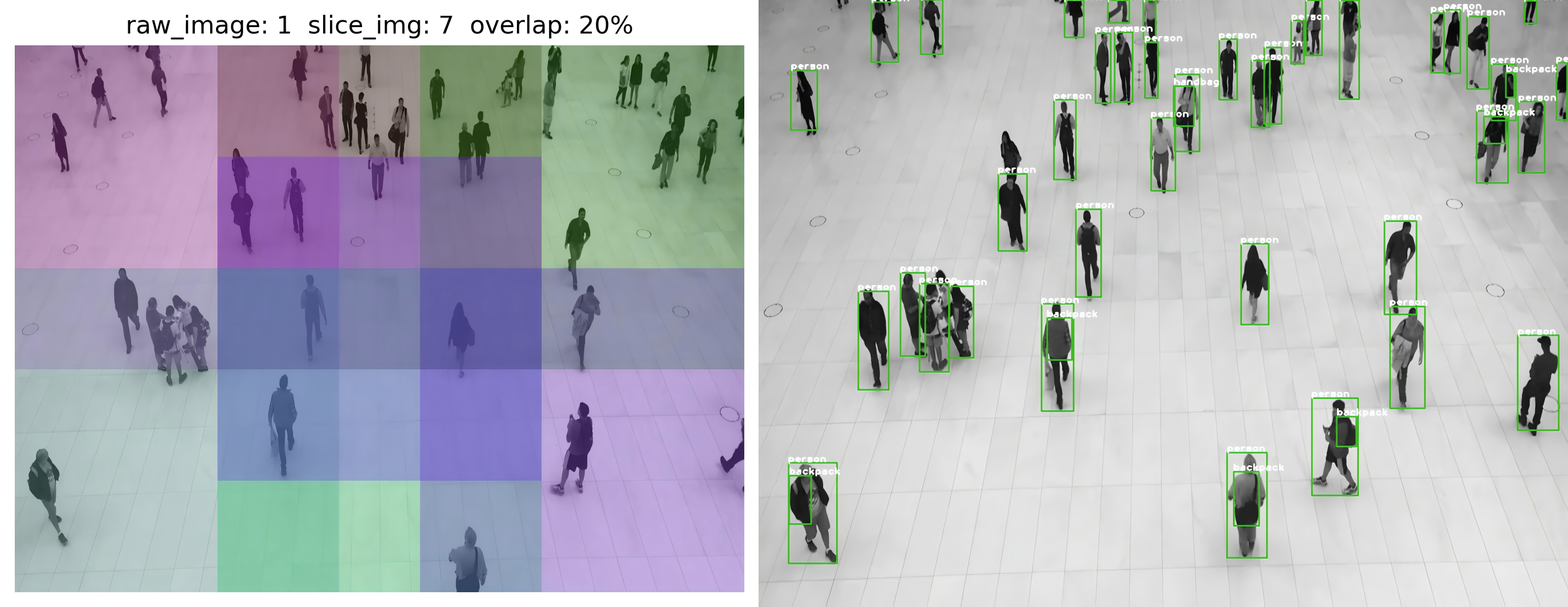
- generate
yolov8s.wtsfrom pytorch withyolov8s.pt
pip install ultralytics
python gen_wts.py
- Export
yolov8s.enginefromyolov8s.wtswithkBatchSize = 8
sudo apt install libeigen3-devrm -fr build
cmake -S . -B build
cmake --build build
cd build
./yolov8_sahi -s ../weights/yolov8s.wts ../weights/yolov8s.engine s- See more configs in
include/config.h
#ifndef CONFIG_H
#define CONFIG_H

// #define USE_FP16
#define USE_INT8

#include <string>
#include <vector>

const static char *kInputTensorName = "images";
const static char *kOutputTensorName = "output";
const static int kNumClass = 80;
const static int kBatchSize = 8;
const static int kGpuId = 0;
const static int kInputH = 640;
const static int kInputW = 640;
const static float kNmsThresh = 0.55f;
const static float kConfThresh = 0.45f;
const static int kMaxInputImageSize = 3000 * 3000;
const static int kMaxNumOutputBbox = 1000;

const std::string trtFile = "../weights/yolov8s.engine";

const std::string cacheFile = "./int8calib.table";
const std::string calibrationDataPath = "../images/";  // 存放用于 int8 量化校准的图像

const std::vector<std::string> vClassNames {
    "person", "bicycle", "car", "motorcycle", "airplane", "bus", "train", "truck", "boat",
    "traffic light",
    "fire hydrant", "stop sign", "parking meter", "bench", "bird", "cat", "dog", "horse", "sheep", "cow",
    "elephant", "bear", "zebra", "giraffe", "backpack", "umbrella", "handbag", "tie", "suitcase",
    "frisbee",
    "skis", "snowboard", "sports ball", "kite", "baseball bat", "baseball glove", "skateboard",
    "surfboard",
    "tennis racket", "bottle", "wine glass", "cup", "fork", "knife", "spoon", "bowl", "banana", "apple",
    "sandwich", "orange", "broccoli", "carrot", "hot dog", "pizza", "donut", "cake", "chair", "couch",
    "potted plant", "bed", "dining table", "toilet", "tv", "laptop", "mouse", "remote", "keyboard",
    "cell phone",
    "microwave", "oven", "toaster", "sink", "refrigerator", "book", "clock", "vase", "scissors",
    "teddy bear",
    "hair drier", "toothbrush"
};

#endif // CONFIG_Hcd build
./yolov8_sahi -d ../weights/yolov8s.engine ../images/The performance of YOLOv8-SAHI with Int8 Engine on Jetson Orin Nano (8GB) is as follows:
sample0102.png YOLOv8-SAHI: 1775ms
sample0206.png YOLOv8-SAHI: 46ms
sample0121.png YOLOv8-SAHI: 44ms
sample0058.png YOLOv8-SAHI: 44ms
sample0070.png YOLOv8-SAHI: 44ms
sample0324.png YOLOv8-SAHI: 43ms
sample0122.png YOLOv8-SAHI: 44ms
sample0086.png YOLOv8-SAHI: 45ms
sample0124.png YOLOv8-SAHI: 45ms
sample0230.png YOLOv8-SAHI: 45ms
...cd build
./yolov8_sahi_track ../media/c3_1080.mp4 The performance of YOLOv8-SAHI-ByteTrack with Int8 Engine on Jetson Orin Nano (8GB) is as follows:
Total frames: 341
Init ByteTrack!
Processing frame 20 (8 fps)
Processing frame 40 (11 fps)
Processing frame 60 (12 fps)
Processing frame 80 (12 fps)
Processing frame 100 (13 fps)
Processing frame 120 (13 fps)
Processing frame 140 (13 fps)
Processing frame 160 (14 fps)
Processing frame 180 (14 fps)
Processing frame 200 (14 fps)
Processing frame 220 (14 fps)
Processing frame 240 (14 fps)
Processing frame 260 (14 fps)
Processing frame 280 (14 fps)
Processing frame 300 (14 fps)
Processing frame 320 (14 fps)
Processing frame 340 (15 fps)
FPS: 15