This is the repo for CROssBARv2 Knowledge Graph (KG) data. CROssBARv2 is a heterogeneous general-purpose biomedical KG-based system.
This repository provides a collection of configurable and reusable adapter scripts designed to collect, process, and harmonize biological data. Each adapter is responsible for handling a specific entity type or data source, making the system flexible and easy to extend.
You can explore the available adapters in the bccb directory.
These adapters employ the pypath for data retrieval and BioCypher for KG creation.
The CROssBARv2 KG comprises approximately 2.7 million nodes spanning 14 distinct node types and around 12.6 million edges representing 51 different edge types, all integrated from 34 biological data sources. We also incorporated several ontologies (e.g., Gene Ontology, Mondo Disease Ontology) along with rich metadata captured as node and edge properties.
Building upon this foundation, we further enhanced the semantic depth of CROssBARv2. This was achieved by generating and storing embeddings for key biological entities, such as proteins, drugs, and Gene Ontology terms. These embeddings are managed using the native vector index feature in Neo4j, enabling powerful semantic similarity searches.
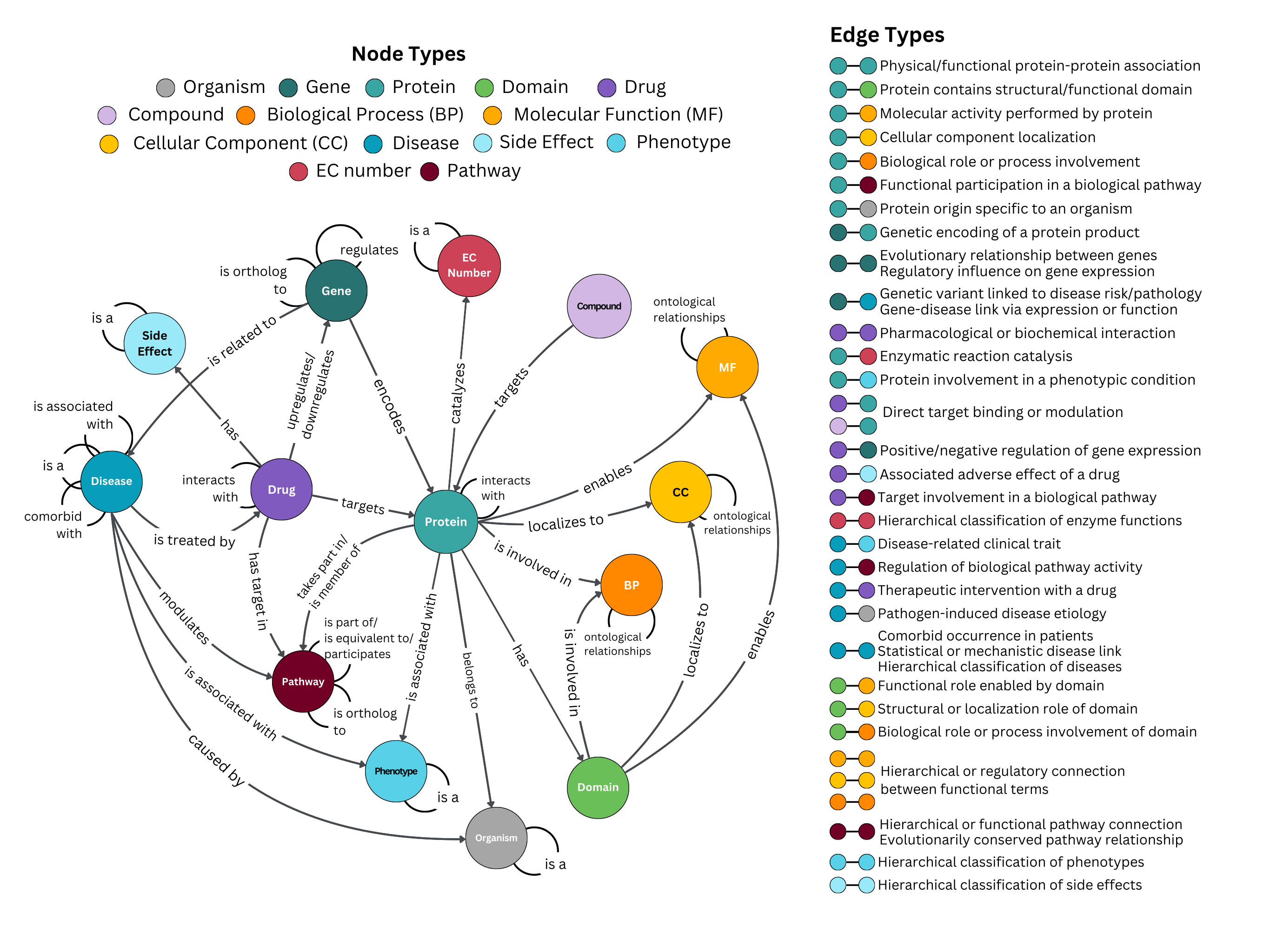
Building on the modular design of the framework, we devised adapters object-oriented manner. We showed how to create nodes and interaction types from adapters with enum classes, what information provided in the data sources can be used as node/edge attributes, and paved the way for highly configurable usage.
To achieve this, we use enum classes to standardize the creation of node and edge types, properties, and labels. With these enums, each adapter can be flexibly configured to determine exactly what data it retrieves and how it is represented. This design offers a structured, modular, and consistent approach to managing different data sources within the KG.
With that being said, if your goal is simply to deploy the KG, we encourage you to use the neo4j-admin import CSV files provided in the Data section. The end-to-end process of generating the KG is quite arduous, time-consuming, and prone to many errors.
You can import any adapter using the following pattern:
from bccb.adapter_name import ADAPTER_CLASS
Example:
from bccb.uniprot_adapter import Uniprot
Almost all adapters follow a standardized lifecycle consisting of four main steps: Initialization, Data Retrieval, Processing, and Extraction.
from bccb.adapter_name import ADAPTER_CLASS

# 1. Initialization: Configure the adapter with necessary arguments
adapter = ADAPTER_CLASS(...)

# 2. Data Retrieval: Download raw data from external sources
adapter.download_data()

# 3. Processing: Harmonize, and filter the data
adapter.process_data()

# 4. Extraction: Retrieve nodes and edges formatted for BioCypher
nodes = adapter.get_nodes()
edges = adapter.get_edges()
Adapters are designed to integrate seamlessly with BioCypher. In addition, you can configure exactly which node properties, edge properties, and edge types the adapter outputs by passing Enum classes during initialization.
Below is a detailed example using the Drug adapter. This demonstrates how to inspect available fields, configure specific outputs, and write the results to Neo4j-importable files using BioCypher.
from bccb.drug_adapter import (
    Drug,
    DrugNodeField,
    DrugDTIEdgeField,
    DrugEdgeType
)

from biocypher import BioCypher

# Initialize BioCypher instance
bc = BioCypher(
    biocypher_config_path=...,
    schema_config_path=...
)

print([edge.name for edge in DrugEdgeType])
# Output: ['DRUG_DRUG_INTERACTION', 'DRUG_TARGET_INTERACTION', 'DRUG_GENE_INTERACTION']

print([field.name for field in DrugNodeField])
# Output: ['SMILES', 'INCHI', 'INCHIKEY', 'CAS', 'NAME', 'GROUPS', 'GENERAL_REFERENCES',
# 'ATC_CODES', 'ZINC', 'CHEMBL', 'BINDINGDB', 'CLINICALTRIALS', 'CHEBI', 'PUBCHEM', 'KEGG_DRUG',
# 'RXCUI', 'PHARMGKB', 'PDB', 'DRUGCENTRAL', 'SELFORMER_EMBEDDING']

print([field.name for field in DrugDTIEdgeField])
# Output: ['SOURCE', 'MECHANISM_OF_ACTION_TYPE', 'MECHANISM_OF_ACTION', 'REFERENCES', 'KNOWN_ACTION',
# 'DGIDB_SCORE', 'ACTIVITY_VALUE', 'ACTIVITY_TYPE', 'PCHEMBL', 'CONFIDENCE_SCORE', 'DISEASE_EFFICACY',
# 'DIRECT_INTERACTION', 'STITCH_COMBINED_SCORE']

# define node fields
node_fields = [DrugNodeField.NAME]

# define dti edge fields
dti_edge_fields = [DrugDTIEdgeField.SOURCE, DrugDTIEdgeField.PCHEMBL, DrugDTIEdgeField.REFERENCES]

# define edge types
edge_types = [DrugEdgeType.DRUG_TARGET_INTERACTION, DrugEdgeType.DRUG_DRUG_INTERACTION]

# initialize Drug adapter
drug_adapter = Drug(
    drugbank_user=...,
    drugbank_password=...,
    edge_types=edge_types,
    node_fields=node_fields,
    dti_edge_fields=dti_edge_fields,
    export_csv=...,
    output_dir=...,
    test_mode=...
)

# download drug data
drug_adapter.download_drug_data(cache=...)

# process drug data
drug_adapter.process_drug_data()

# write Neo4j-importable CSV files via BioCypher
bc.write_nodes(drug_adapter.get_drug_nodes())
bc.write_edges(drug_adapter.get_edges())
bc.write_import_call()
Some adapters also provide additional enums for configuration (for example, you can select organisms in the orthology adapter). If you do not pass any enum values, the adapter will use all available fields in the relevant enum class by default.
Certain adapters require extra information for data retrieval, such as drugbank_user and drugbank_password for the Drug adapter. Besides enum-related arguments, most adapters share a common set of options:
export_csv: whether to export the processed data as structured CSV files (separate from Neo4j importable CSVs).output_dir: directory where these exported CSV files will be written.test_mode: limits the amount of output data for testing or debugging.add_prefix: whether to add a prefix to node identifiers used in the adapter (e.g., addinguniprot:to protein IDs).
In a nutshell, enum classes provide a structured way to configure what each adapter outputs.
Depending on the adapter, you can encounter following enum classes:
Enums ending in ..NodeField control which properties are created for a specific node type. They map the fields from the source data to the node property names in the KG.
Example:
class SideEffectNodeField(Enum):
    NAME = "name"
    SYNONYMS = "synonyms"
By selecting keys from this enum class, you can determine which properties the side effect nodes will have in the KG.
In many cases, you can also change how properties are represented by editing the values of the enum class:
# Default representation
SYNONYMS = "synonyms"

# Custom representation
SYNONYMS = "alternative names"
⚠️ Important Exception: While most adapters support this flexibility, theuniprot_adapteris a notable exception. You can useuniprot_adapter.gene_property_name_mappingsoruniprot_adapter.protein_property_name_mappingsdictionaries for this purpose.
Similarly, Enums ending in ..EdgeField control which properties are created for a specific edge type. They map the fields from the source data to the edge property names in the KG.
Example:
class TFGenEdgeField(Enum):
    SOURCE = "source"
    PUBMED_ID = "pubmed_id"
    TF_EFFECT = "tf_effect"
By selecting keys from this enum class, you can determine which properties the gene regulation edges will have in the KG.
Just like with node fields, you can customize how these edge properties represented in the KG by modifying the enum value.
Enums ending in ..NodeType and ..EdgeType control which specific nodes and edges are generated by the adapter. They act as high-level filters, allowing you to include or exclude particular node or edge types from the adapter’s output depending on your needs.
EdgeType Example:
class DrugEdgeType(Enum):
    DRUG_DRUG_INTERACTION = auto()
    DRUG_TARGET_INTERACTION = auto()
    DRUG_GENE_INTERACTION = auto()
NodeType Example:
class UniprotNodeType(Enum):
    PROTEIN = auto()
    GENE = auto()
    ORGANISM = auto()
    CELLULAR_COMPARTMENT = auto()
ℹ️ Note: Unlike the ..Field enum classes (which allow you to modify how properties are represented), the values in ..EdgeType and ..NodeType enums cannot be changed. These enums are used solely to select which node and edge types the adapter should include in its output.
Enums ending with ..OrganismField are only available in two adapters, namely the orthology adapter and the tfgene adapter. These enums act as filters, controlling which specific taxonomies (organisms) are included in the data retrieval.
Example:
class TFGeneOrganismField(IntEnum):
    TAX_9606 = 9606
    TAX_10090 = 10090
ℹ️ Note: Do not confuse these enum classes with organism-related arguments passed directly to adapter classes. In some cases, the number of supported taxonomies was too large to encode in an enum. For such adapters, organism selection is handled through explicit arguments instead of enum classes.
Beyond the common enum types listed above, some adapters utilize specialized enum classes for the data they integrate. You can explore these by checking the corresponding adapter scripts.
The project uses uv. You can install like this:
Create a virtual environment:
uv venv crossbarv2 --python=3.10.8
Activate the environment:
source crossbarv2/bin/activate
Install dependencies:
uv pip install -r requirements.txt
If you want to create the CROssBARv2 KG from scratch, you should navigate to the scripts/ directory and use the create_crossbar.py script. This script orchestrates the execution of adapter pipelines, processes the data, and produces the final node and edge outputs. Before running the script, you should configure some parameters inside create_crossbar.py.
cd scripts
python create_crossbar.py
- Neo4j-importable CSV files required to reconstruct the KG are publicly available at here.
- Embedding files used by adapters publicly available at here.
- MalaCards data used by disease adapter is available at here.
- Hugging Face Dataset: The raw node and edge datasets are also hosted on Hugging Face.
neo4j-admin import tool, while the Hugging Face dataset contains the raw node/edge lists.
This project is licensed under the GNU Affero General Public License v3.0 (AGPL-3.0).
The AGPL-3.0 is a strong copyleft license that ensures that derivatives of the work, including those modified and offered as a service over a network, remain free and open-source. If you use this software in a network service, you are required to make the source code of your modified version available to the users of that service.
For the full license text, please see the LICENSE file included in this repository.