A macOS like dockbar component made with Web Components
that can be used in any framework.



-
NPM
npm install dockbar --save
-
CDN
ESM(Example)
<head>
  <script type="module" src="https://unpkg.com/dockbar@latest/dockbar.js"></script>
</head>
IIFE(Example)
<head>
  <script src="https://unpkg.com/dockbar@latest/dockbar.iife.js"></script>
</head>
Go to Codepen for a quick try.
<body>
  <dock-wrapper>
    <dock-item>1</dock-item>
    <dock-item>2</dock-item>
    <dock-item>3</dock-item>
    <dock-item>4</dock-item>
  </dock-wrapper>
</body>
It is recommended to use a custom element inside dock-item, so that you can customize the content of dock-item.
<dock-wrapper>
  <dock-item>
    <div class="my-element"></div>
  </dock-item>
</dock-wrapper>
Set width on an individual dock-item when that item should be wider than the shared size.
<dock-wrapper size="40">
  <dock-item>1</dock-item>
  <dock-item width="96">Search</dock-item>
  <dock-item>3</dock-item>
</dock-wrapper>
Use dock-separator to split a dock into blocks. The separator occupies layout space and follows the wrapper direction, but it is not included in the hover scale effect.
<dock-wrapper>
  <dock-item>Finder</dock-item>
  <dock-item>Safari</dock-item>
  <dock-separator></dock-separator>
  <dock-item>Trash</dock-item>
</dock-wrapper>
You may need to look at docs if you are using a framework like Vue.js or React.
Apply class to dock-wrapper and dock-item and customize your own style.
For more, see Configuration.
Set sortable to enable drag reordering. Set allow-drag-delete if dropping an item outside the dock should emit a delete event instead of snapping back.
When a sortable dock contains dock-separator, each separator creates a block. Items can only be dragged within their original block; dragging across a separator is treated as an invalid drop and snaps back.
<dock-wrapper id="dock" sortable allow-drag-delete>
  <dock-item data-id="launchpad">Launchpad</dock-item>
  <dock-item data-id="mail">Mail</dock-item>
  <dock-separator></dock-separator>
  <dock-item data-id="music">Music</dock-item>
</dock-wrapper>

<script>
  const dock = document.querySelector('#dock')

  dock.addEventListener('on-sort', (event) => {
    const { oldIndex, newIndex } = event.detail
    console.log('sort', oldIndex, newIndex)
  })

  dock.addEventListener('on-delete', (event) => {
    const { index, item } = event.detail
    console.log('delete', index, item.dataset.id)
  })
</script>There are some problems yet to be solved:
- SSR compatibility
It does not work will in SSR framework like Nuxt.js. For now you have to render it inside
ClientOnly, and import component asynchronously. - Style asynchronous loading causes a flash on init
If you are not using by
iife, it may cause a flash on init, because the style is loaded asynchronously. For now you could resolve this by applying a style:<head> #dock { visibility: hidden; } #dock:defined { visibility: visible; } </head> <body> <dock-wrapper id="dock"> </dock-wrapper> </body>
| Property | Type | Default | Description |
|---|---|---|---|
size |
number |
40 |
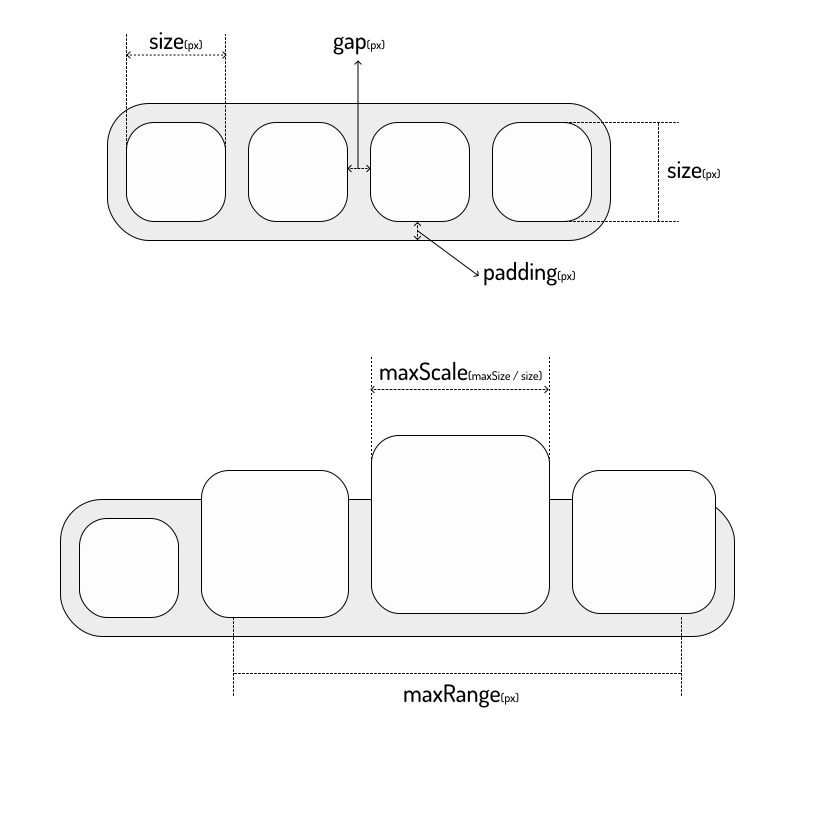
The base height of dock-item and fallback width in px, see Sizes |
width |
number |
size |
Optional per-dock-item base width in px |
padding |
number |
8 |
The padding of dock-wrapper in px, see Sizes |
gap |
number |
8 |
The gap between dock-items in px, see Sizes |
maxScale |
number |
2 |
The max scale of dock-item, see Sizes |
maxRange |
number |
200 |
The max hover range in px that participates in the scale effect |
disabled |
boolean |
false |
Disable the hover scale effect |
direction |
horizontal | vertical |
horizontal |
The layout direction of dock-items |
position |
top | bottom | left | right |
bottom |
The dock position, which affects the scale origin |
easing |
string |
cubic-bezier(0, 0.55, 0.45, 1) |
The easing used by dock-item scale animation |
sortable |
boolean |
false |
Enable drag reordering for dock items |
allow-drag-delete |
boolean |
false |
When sortable is enabled, allow dropping an item outside the dock to emit a delete event |
will-change |
boolean |
false |
Apply will-change hints to dock items for width and height |
| Property | Type | Default | Description |
|---|---|---|---|
thickness |
number |
1 |
The separator thickness in px along the dock's main axis |
dock-wrapper automatically provides size and direction to each dock-separator, so separators match the current dock orientation.
Emitted after a sortable drag ends with a changed order.
type DockSortDetail = {
  item: HTMLElement
  oldIndex: number
  newIndex: number
}Emitted when allow-drag-delete is enabled and an item is released outside the dock.
type DockDeleteDetail = {
  item: HTMLElement
  index: number
}
The component only emits the event. Removing the item from your application state is the responsibility of the parent app.