


Documentation | Cheatsheet | GitHub Discussions | Google Group | GUI Editor
CadQuery is an intuitive, easy-to-use Python module for building parametric 3D CAD models. Using CadQuery, you can write short, simple scripts that produce high quality CAD models. It is easy to make many different objects using a single script that can be customized.
CadQuery was built to be used as a Python library without any GUI. This makes it great for use cases such as integration into servers, or creating scientific and engineering scripts. However, it includes internal visualization capabilities. Additionally, other options for visualization are also available including CQ-Editor and JupyterLab.
For those who are interested, the OCP repository contains the current OCCT wrapper used by CQ.
- Build 3D models with scripts that are as close as possible to how you would describe the object to a human.
- Create parametric models that can be very easily customized by end users.
- Output high quality (loss-less) CAD formats like STEP and DXF in addition to STL, VRML, AMF and 3MF.
- Provide a non-proprietary, plain text model format that can be edited and executed with only a web browser.
- Offer advanced modeling capabilities such as fillets, curvilinear extrudes, parametric curves and lofts.
- Build nested assemblies out of individual parts and other assemblies.
To learn more about designing with CadQuery, visit the documentation, examples, and cheatsheet.
To quickly get started you can use apptainer
apptainer run oras://ghcr.io/cadquery/cadquery-apptainer:master ipython -i -c"from cadquery.func import *; from cadquery.vis import show; show(box(1,1,1))"
or docker/podman.
podman run -i -v /tmp:/tmp -e DISPLAY=$DISPLAY --userns=keep-id --user "$(id -u):$(id -g)" --device /dev/dri -t ghcr.io/cadquery/cadquery-docker:master ipython -i -c"from cadquery.func import *; from cadquery.vis import show; show(box(1,1,1))"
The CadQuery library (with or without CQ-editor) and its dependencies may be installed using conda/mamba/micromamba/pixi, or pip. Note that conda-based installation (or the CQ-editor installer) is the better supported option.
See the documentation for detailed CadQuery installation instructions.
To first install the Conda package manager see Install the Conda Package Manager, and Miniforge for a minimal installer.
mamba install is recommended over conda install for faster and less memory intensive CadQuery installation.
# Set up a new environment
conda create -n cadquery

# Activate the new environment
conda activate cadquery

# Install the latest released version
mamba install -c conda-forge cadquery

# Or install the dev version to get the latest changes
mamba install -c conda-forge -c cadquery cadquery=master
CadQuery has a complex set of dependencies including OCP, which is our set of bindings to the OpenCASCADE CAD kernel. OCP is distributed as binary wheels for Linux, MacOS and Windows. However, there are some limitations. Only Python 3.9 through 3.12 are currently supported, and some older Linux distributions such as Ubuntu 18.04 are not supported. If the pip installation method does not work for your system, you can try the conda installation method.
It is highly recommended that a virtual environment is used when installing CadQuery, although it is not strictly required. Installing CadQuery via pip requires a up-to-date version of pip, which can be obtained with the following command line (or a slight variation thereof).
python3 -m pip install --upgrade pip
Once a current version of pip is installed, CadQuery can be installed using the following command line.
pip install cadquery
It is also possible to install the very latest changes directly from CadQuery's GitHub repository, with the understanding that sometimes breaking changes can occur. To install from the git repository, run the following command line.
pip install git+https://github.com/CadQuery/cadquery.git
CadQuery has built in visualization capabilities using trame and vtk.
from cadquery.func import box, fillet
from cadquery.vis import show

b = box(1,1,1)
show(fillet(b, b.edges("|Z"), 0.1))
For non-blocking and persistent view one can use.
from cadquery.func import box, fillet
from cadquery.fig import show

b = box(1,1,1)
show(fillet(b, b.edges("|Z"), 0.1))
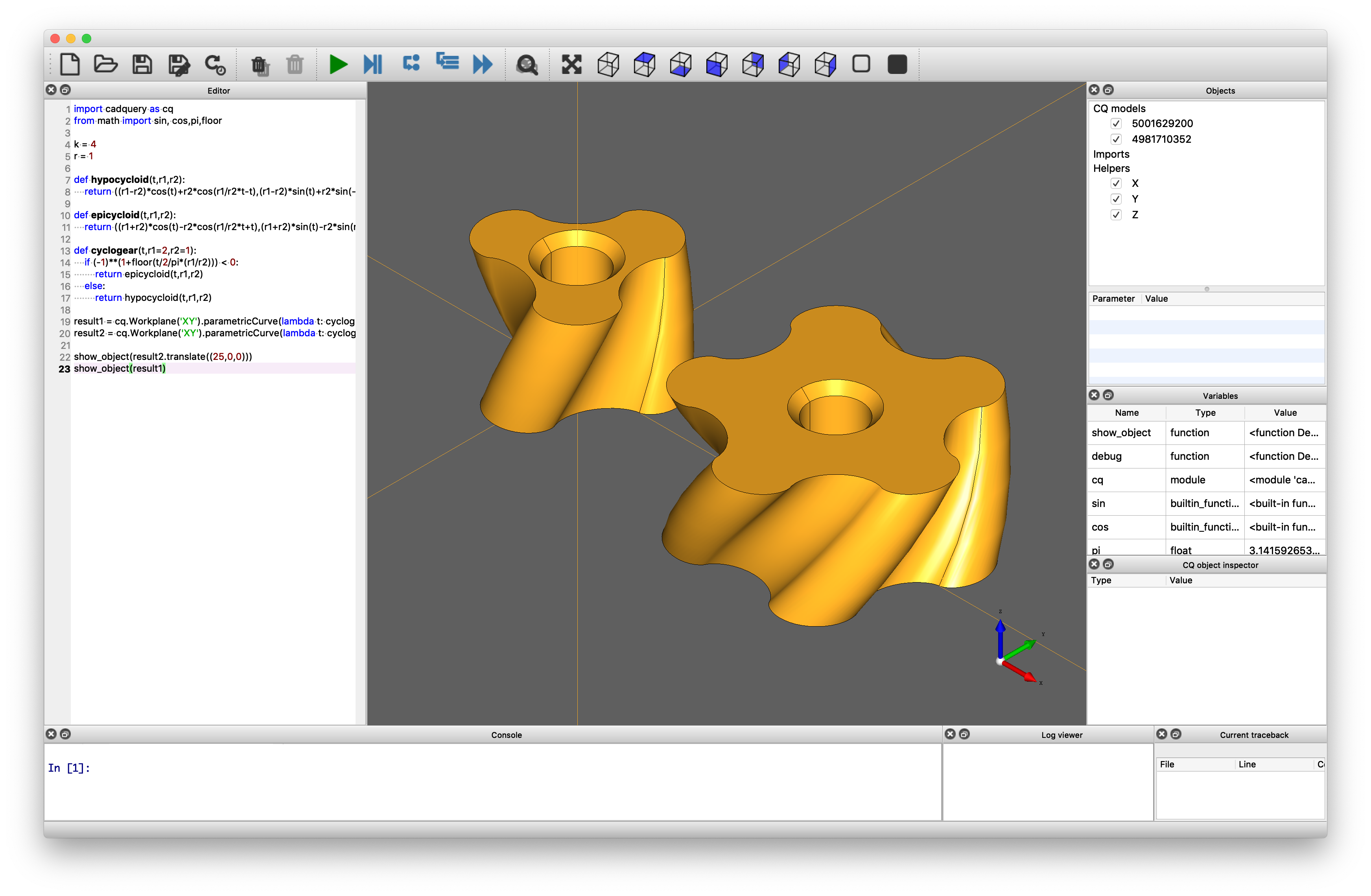
CQ-editor is an IDE that allows users to edit CadQuery model scripts in a GUI environment. It includes features such as:
- A graphical debugger that allows you to step through your scripts.
- A CadQuery stack inspector.
- Export to various formats, including STEP and STL, directly from the menu.
More on CQ-editor:
CadQuery supports Jupyter out-of-the-box. Run your CadQuery code in the notebook and visualize the model by calling display(<CadQuery object>).
You can find the full CadQuery documentation at cadquery.readthedocs.io.
We also have a Google Group to make it easy to get help from other CadQuery users. We want you to feel welcome and encourage you to join the group and introduce yourself. We would also love to hear what you are doing with CadQuery.
GitHub Discussions is a good place to ask general questions that are not tied to a bug report or feature request.
Some of CadQuery's core maintainers are available for consulting engagements involving CadQuery integration, custom feature development, training, code reviews and CAD automation. If you are interested, reach out at info@cadquery.org.
Please use our Zenodo DOI if you use CadQuery for scientific research: https://doi.org/10.5281/zenodo.3955118.
CadQuery is licensed under the terms of the Apache Public License, version 2.0.
Contributions from the community are welcome and appreciated.
You do not need to be a software developer to have a big impact on this project. Contributions can take many forms including, but not limited to, the following:
- Writing and improving documentation
- Triaging bugs
- Submitting bugs and feature requests
- Creating tutorial videos and blog posts
- Helping other users get started and solve problems
- Telling others about this project
- Helping with translations and internationalization
- Helping with accessibility
- Contributing bug fixes and new features
It is asked that all contributions to this project be made in a respectful and considerate way. Please use the Python Community Code of Conduct's guidelines as a reference.
If you are going to contribute code, make sure to follow this steps:
- Consider opening an issue first to discuss what you have in mind
- Try to keep it as short and simple as possible (if you want to change several things, start with just one!)
- Fork the CadQuery repository, clone your fork and create a new branch to start working on your changes
- Create a conda development environment with something like:
mamba env create -n cq-dev -f environment.yml
- Activate the new conda environment:
conda activate cq-dev
- If desired, install the master branch of cq-editor (Note; a release version may not be compatible with the master branch of cadquery):
mamba install -c cadquery -c conda-forge cq-editor=masterInstalling cq-editor adds another instance of cadquery which overrides the clone just added. Fix this by reinstalling cadquery using pip:pip install -e .
- Before making any changes verify that the current tests pass. Run
pytestfrom the root of your cadquery clone, there should be no failures and the output will look similar to this:- ======= 215 passed, 57 warnings in 13.95s =======
- Start with the tests! How should CadQuery behave after your changes? Make sure to add some tests to the test suite to ensure proper behavior
- Make sure your tests have assertions checking all the expected results
- Add a nice docstring to the test indicating what the test is doing; if there is too much to explain, consider splitting the test in two!
- Go ahead and implement the changes
- Add a nice docstring to the functions/methods/classes you implement describing what they do, what the expected parameters are and what it returns (if anything)
- Update the documentation if there is any change to the public API
- Consider adding an example to the documentation showing your cool new feature!
- Make sure nothing is broken (run the complete test suite with
pytest) - Run
blackfrom our fork to autoformat your code and make sure your code style complies with CadQuery's - Push the changes to your fork and open a pull-request upstream
- Keep an eye on the automated feedback you will receive from the CI pipelines; if there is a test failing or some code is not properly formatted, you will be notified without human intervention
- Be prepared for constructive feedback and criticism!
- Be patient and respectful, remember that those reviewing your code are also working hard (sometimes reviewing changes is harder than implementing them!)
When filing a bug report issue, please be sure to answer these questions:
- What version of the software are you running?
- What operating system are you running the software on?
- What are the steps to reproduce the bug?
If you find yourself wishing for a feature that does not exist, you are probably not alone. There are bound to be others out there with similar needs. Open an issue which describes the feature you would like to see, why you need it, and how it should work.