XDebug
Setting up xdebug in docker can be tricky.
Before starting docker-compose stack
ifconfig lo0 alias 10.254.254.254
export XDEBUG_REMOTE_HOST=10.254.254.254(Not tested, somebody with linux please provide feedback)
- Setup network interface alias - https://www.cyberciti.biz/faq/linux-creating-or-adding-new-network-alias-to-a-network-card-nic/
- Set ENV XDEBUG_REMOTE_HOST to alias ip addr
export XDEBUG_REMOTE_HOST=x.x.x.x
If you like to torture yourself, please be so kind, and write here how to do that. 😄
Default port is changed to 9001, because default 9000 coliding with php-fpm and can sometimes do nasty things.
- Change port:
Preferences > Languages & Frameworks > PHP > Debug > Debug port: 9001 - Change server mapping:
- Go to
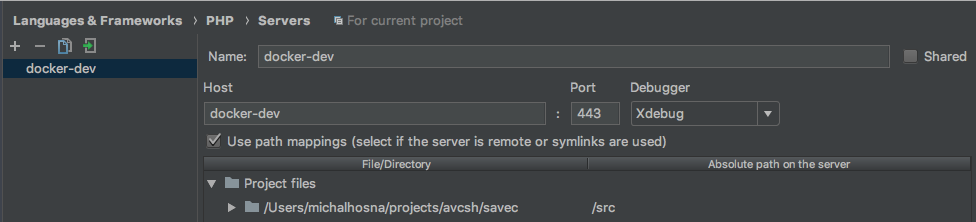
Preferences > Languages & Frameworks > PHP > Servers - Add new server with params:
- Name:
Whatever you like - Host:
docker-dev - Port: doesn't matter actually
- Use path mapping: true
- Name:
- Map project folder to
/srcas Absolute path on the server
- Go to