





- 🇺🇸 🇪🇸 🇮🇩 🇨🇳 🇫🇷 🇧🇷 🇳🇱 🇷🇺 🇩🇪 🇹🇼
- Table of Contents
Please see our website for a newcomer-friendly explanation of Bazzite. This readme will cover everything in-depth.
Bazzite is a custom Fedora Atomic image built with cloud native technology that brings the best of Linux gaming to all of your devices - including your favorite handheld.
Bazzite is built from ublue-os/main using Fedora technology, which means expanded hardware support and built in drivers are included. Additionally, Bazzite adds the following features:
- Uses the bazzite kernel to achieve HDR and expanded hardware support, among numerous other included patches - based off of the fsync kernel.
- HDR available in Game mode.
- NVK available on non-Nvidia builds.
- Full hardware accelerated codec support for H264 decoding.
- Full support for AMD's ROCM OpenCL/HIP run-times.
- xone driver for Xbox controllers.
- Full support for DisplayLink.
- Includes Valve's KDE themes from SteamOS.
- vkBasalt, MangoHud, and OBS VkCapture installed and available by default.
- ROM Properties Page shell extension included.
- Full support for Winesync/Fastsync/NTsync.
- Distrobox preinstalled.
- Simplified Davinci Resolve installation with davincibox (
ujust install-resolve) - Automated
duperemoveservice for reducing the disk space used by wine prefix contents. - Support for HDMI CEC via libCEC.
- Uses Google's BBR TCP congestion control by default.
- Input Remapper preinstalled and enabled. (Available but default-disabled on the Deck variant, may be enabled with
ujust restore-input-remapper) - Bazzite Portal provides an easy way to install numerous applications( and tweaks, including installing LACT and IDEs over Brew. It additionally provides easy buttons to update, rebase and even reset the system image to defaults.
- Waydroid preinstalled for running Android apps. Set it up with this quick guide.
- Manage applications using Flatseal, Warehouse, and Gear Lever.
- OpenRGB i2c-piix4 and i2c-nct6775 drivers for controlling RGB on certain motherboards.
- OpenRazer drivers built in, Select OpenRazer in Bazzite Portal or run
ujust install-openrazerin a terminal to begin using it. - OpenTabletDriver udev rules built in, with the full software suite installable via Bazzite Portal or by running
ujust install-opentabletdriverin a terminal. - Out of the box support for Wooting keyboards.
- Built in support for Southern Islands (HD 7000) and Sea Islands (HD 8000) AMD GPUs under the
amdgpudriver. - Webapp Manager is available for creating applications from websites for a variety of browsers, including Firefox.
Common variant available as bazzite, suitable for desktop computers.
Rebase from an existing upstream Fedora Atomic to this image if you want Open Source GPU Drivers: (Please note: Mesa's Open Source option for NVIDIA GPUs, NVK is still prone to errors at the time of writing, for any issues relating to NVK please submit a report with Mesa, not Ublue/Bazzite)
rpm-ostree rebase ostree-unverified-registry:ghcr.io/ublue-os/bazzite:stableor for devices with Nvidia GPUs wanting the NVIDIA Proprietary Drivers:
rpm-ostree rebase ostree-unverified-registry:ghcr.io/ublue-os/bazzite-nvidia:stableFor users with Secure Boot enabled: Follow our secure boot documentation prior to rebasing.
Variant designed for usage as an alternative to SteamOS on the Steam Deck, and for a console-like experience on HTPCs, available as bazzite-deck:
- Directly boots to Game mode matching SteamOS's behavior.
- Automatic
duperemovegreatly trims the size of compatdata. - Latest version of Mesa creates smaller shader caches and does not require them to prevent stutter.
- Able to be booted even if the drive is full.
- Support for every language supported by upstream Fedora.
- Uses Wayland on the desktop with support for Steam input.
- Includes HHD for expanded input support on non-Valve handhelds.
- Features ported versions of most SteamOS packages, including drivers, firmware updaters, and fan controllers from the evlaV repository.
- Patched Mesa for proper framerate control from Gamescope.
- Comes with patches from SteamOS BTRFS for full BTRFS support for the SD card by default.
- Ships with a ported copy of SDGyroDSU, enabled by default.
- Option to install Decky Loader, EmuDeck, RetroDECK, and ProtonUp-Qt, among numerous other useful packages on installation.
- Custom update system allows for the OS, Flatpaks, and more to be updated directly from the Game mode UI powered by uupd and topgrade.
- Built in support for Windows dual-boot thanks to Fedora's installation of GRUB being left intact.
- Update break something? Easily roll back to the previous version of Bazzite thanks to
rpm-ostree's rollback functionality. You can even select previous images at boot. - Steam and Lutris preinstalled on the image as layered packages.
- Uses ZRAM(4GB) with the LZ4 compression algorithm by default.
- LAVD and BORE CPU Schedulers for smooth and responsive gameplay.
- Kyber I/O scheduler to prevent I/O starvation when installing games or during background
duperemoveprocess. - Applies SteamOS's kernel parameters.
- Color calibrated display profiles for matte and reflective Steam Deck screens included.
- Default-disabled power-user features, including:
- Service for low-risk undervolting of the Steam Deck as well as AMD Framework Laptops via RyzenAdj and Ryzen SMU, see
ryzenadj.serviceand/etc/default/ryzenadj. - Built in support for display overclocking. For example, add
CUSTOM_REFRESH_RATES=30-68to/etc/environment. Minimum and maximum refresh rates differ per handheld! - 32GB RAM mod your Steam Deck? Enjoy double the maximum VRAM amount, automatically applied. (Can you share your soldering skills?)
- Service for low-risk undervolting of the Steam Deck as well as AMD Framework Laptops via RyzenAdj and Ryzen SMU, see
- Steam Deck hardware-specific services can be disabled by running
ujust disable-bios-updatesandujust disable-firmware-updatesin the terminal. These are automatically disabled on non-Deck hardware, and on Decks with DeckHD displays or 32GB RAM mods. - More information can be found here on the Bazzite Steam Deck images.
Rebase from an existing upstream Fedora Atomic to this image:
rpm-ostree rebase ostree-unverified-registry:ghcr.io/ublue-os/bazzite-deck:stablePlease refer to our Handheld Wiki for required setting changes and Decky Loader plugins for Steam Gaming Mode on your specific Handheld.
Be sure to also read the hhd documentation, some handhelds require specific setting changes/tweaks to function properly.
We also ship ujust commands to install various CSS Loader themes that can't be found on the CSS Loader store. These will be automatically updated with Bazzite if installed.
# Install Handheld Controller Theme (https://github.com/victor-borges/handheld-controller-glyphs)
ujust install-hhd-controller-glyph-themeBuilds with the GNOME desktop environment are available in both desktop and deck flavors. These builds come with the following additional features:
- Variable refresh rate support and fractional scaling enabled under Wayland.
- Custom menu in the top bar for returning to game mode, launching Steam, and opening a number of useful utilities.
- GSConnect preinstalled and ready to use.
- Hanabi extension included to offer similar features to Wallpaper Engine in KDE.
- Numerous optional extensions pre-installed, including important user experience fixes.
- Automatic updates for the Firefox GNOME theme and Thunderbird GNOME theme. (If installed)
For local development builds, this repo also supports centos/c10s and rhel/r10s image inputs for reduced GNOME workstation images on CentOS Stream 10 and RHEL 10.
These EL10 paths are intentionally narrower than the Fedora GNOME image:
- Desktop targets only. Deck and NVIDIA targets are rejected.
- No gaming stack. Steam, Lutris, Gamescope, MangoHud, vkBasalt, and related gaming-focused integrations are not included.
- No NVIDIA-specific features or driver layering.
- Reduced post-install customization. The CentOS and RHEL variants skip Homebrew provisioning and the standard Bazzite per-user desktop setup service.
Rebase from an existing upstream Fedora Atomic to this image:
rpm-ostree rebase ostree-unverified-registry:ghcr.io/ublue-os/bazzite-gnome:stableTo rebase an existing ostree system to a Desktop Environment with the Proprietary NVIDIA Drivers release:
rpm-ostree rebase ostree-unverified-registry:ghcr.io/ublue-os/bazzite-gnome-nvidia:stableTo rebase an existing ostree system to the Steam Deck/HTPC release:
rpm-ostree rebase ostree-unverified-registry:ghcr.io/ublue-os/bazzite-deck-gnome:stableFor users with Secure Boot enabled: Follow our secure boot documentation prior to rebasing.
- Proprietary Nvidia drivers pre-installed. (Only for Nvidia images)
- Flathub is enabled by default.
ujustcommands for convenience.- Multi-media codecs out of the box.
- Rollback Bazzite from any build within the last 90 days.
- A rock solid and stable base.
- System packages stay relatively up to date.
- Can layer Fedora packages to the image without losing them between updates.
- Security focused with SELinux preinstalled and configured out of the box.
- The ability to rebase to different Fedora Atomic images, if desired, without losing user data.
- Printing support thanks to CUPS being preinstalled.
Bazzite started as a project to resolve some of the issues that plague SteamOS, mainly out of date packages (despite an Arch base) and the lack of a functional package manager.
Despite this project also being image-based, you are able to install any Fedora package straight from the command line. These packages will persist across updates (So go ahead and install that obscure VPN software you spent an hour trying to get working in SteamOS). Additionally, Bazzite is updated multiple times a week with packages from upstream Fedora, giving you the best possible performance and latest features - all on a stable base.
Bazzite ships with the latest Linux kernel and SELinux enabled by default with full support for secure boot (Run ujust enroll-secure-boot-key and enter the password universalblue if prompted to enroll our key) and disk encryption, making this a sensible solution for general computing. (Yes, you can print from Bazzite)
Read the FAQ for details on what makes Bazzite stand out from other Linux based operating systems.


View additional documentation surrounding the project.
These images are signed with sigstore's cosign. You can verify the signature by downloading the cosign.pub key from this repo and running the following command:
cosign verify --key cosign.pub ghcr.io/ublue-os/bazziteWarning
Steam Deck Users: The Steam Deck does not come with secure boot enabled and does not ship with any keys enrolled by default. Do not enable this unless you absolutely know what you're doing.
Secure boot is supported with our custom key. The pub key can be found in the root of this repository here. If you'd like to enroll this key prior to installation or rebase, download the key and run the following:
sudo mokutil --timeout -1
sudo mokutil --import secure_boot.der
For users already on a Universal Blue image, you may instead run ujust enroll-secure-boot-key.
If asked for a password, use universalblue.
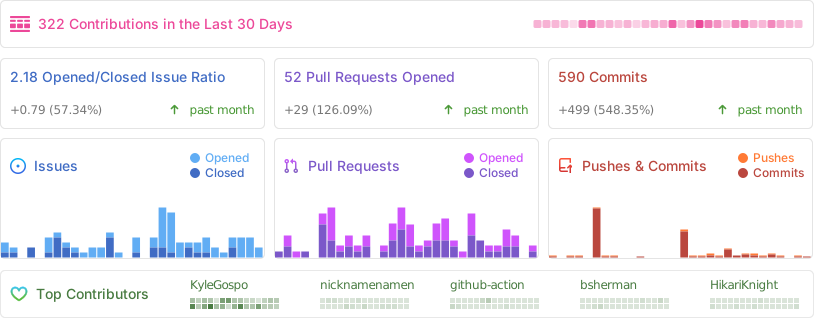
Bazzite is a community effort and wouldn't exist without everyone's support. Below are some of the people who've helped us along the way:
- amelia.svg - For creating our logo and overall branding.
- SuperRiderTH - For creating our Steam game mode startup video.
- evlaV - For making Valve's code available and for being this person.
- ChimeraOS - For gamescope-session and for valuable support along the way.
- Jovian-NixOS - For supporting us with technical issues and for creating a similar project. Seriously, go check it out. It's our Nix-based cousin.
- sentry - For assistance with needed kernel patches and for creating the kernel-fsync repo we now use.
- nicknamenamenick - For being the MVP nearly single-handedly upkeeping our documentation and support literature, and countless cases of helping users.
- Steam Deck Homebrew - For choosing to support distributions other than SteamOS despite the extra work, and a special thanks to PartyWumpus for getting Decky Loader working with SELinux for us.
- cyrv6737 - For the initial inspiration and the base that became bazzite-arch.
Bazzite is built entirely in GitHub and creating your own custom version of it is as easy as forking this repository, adding a private signing key, and enabling GitHub actions.
Familiarize yourself on keeping secrets in github. You'll need to generate a new keypair with cosign. The public key can be in your public repo (Your users need it to check the signatures), and you can paste the private key in Settings -> Secrets -> Actions with the name SIGNING_SECRET.
We also ship a config for the popular pull app if you'd like to keep your fork in sync with upstream. Enable this app on your repo to keep track of Bazzite changes while also making your own modifications.
The Build Bazzite workflow uploads and signs your custom variant automatically on non-PR runs. In your fork, either push your changes to testing or unstable, or open Actions -> Build Bazzite -> Run workflow to publish on demand.
The custom variant images are pushed to GHCR under your fork owner:
ghcr.io/<your-github-owner>/bazzite-custom:<tag>
ghcr.io/<your-github-owner>/bazzite-custom-gnome:<tag>
ghcr.io/<your-github-owner>/bazzite-custom-gnome-c10s:<tag>
These custom variants add tmux, zstd, and gnupg2 on top of the standard bazzite image.
After the workflow finishes, rebase a system to your uploaded image:
rpm-ostree rebase ostree-unverified-registry:ghcr.io/<your-github-owner>/bazzite-custom:stableFor the GNOME variant:
rpm-ostree rebase ostree-unverified-registry:ghcr.io/<your-github-owner>/bazzite-custom-gnome:stableFor the CentOS Stream 10 and RHEL 10 GNOME workstation variants, the compose flow has two parts:
- Build the local EL10-based image with the
centosorrhelimage input. - Publish the resulting OCI image as the rpm-ostree rebase target from the
Build Bazziteworkflow.
The centos, centos-stream-10, c10s, rhel, rhel-10, and r10s image inputs all switch the build to a reduced GNOME workstation compose. This path is intentionally narrower than the Fedora images:
- Only
bazziteandbazzite-customtargets are supported. - Deck and NVIDIA targets are rejected by
just_scripts/get-defaults.sh. - The gaming stack, NVIDIA-specific layering, Homebrew provisioning, and the standard per-user Bazzite desktop setup are skipped.
Both variants now use the same air-gapped build method: point the build at either a downloaded installer ISO or an already extracted install tree. You can still set the variant-specific BAZZITE_*_BASE_IMAGE explicitly, but if you leave it unset the build bootstraps a local bootc base image from those ISO-backed repos first. The main compose then stages the same tree locally and runs an EL10-only dnf5 distro-sync against it before producing the final OCI image, so the later rechunk-local OSTree artifact inherits the same package source.
Using a CentOS ISO file directly:
BAZZITE_CENTOS_INSTALL_ISO=/path/to/CentOS-Stream-10.iso \
just build bazzite-custom centos
Using a previously extracted CentOS install tree:
BAZZITE_CENTOS_INSTALL_ROOT=/path/to/centos-install-root \
just build bazzite-custom centos
If you only want to prepare or refresh the local CentOS base image itself, run:
BAZZITE_CENTOS_INSTALL_ISO=/path/to/CentOS-Stream-10.iso \
just build-centos-base
Using a RHEL ISO file directly:
BAZZITE_RHEL_INSTALL_ISO=/path/to/rhel-10.iso \
just build bazzite-custom rhel
Using a previously extracted RHEL install tree:
BAZZITE_RHEL_INSTALL_ROOT=/path/to/rhel-install-root \
just build bazzite-custom rhel
If you only want to prepare or refresh the local RHEL base image itself, run:
BAZZITE_RHEL_INSTALL_ISO=/path/to/rhel-10.iso \
just build-rhel-base
The build scripts resolve the rest of the variant-specific defaults automatically:
| Variable | Default | Purpose |
|---|---|---|
BAZZITE_CENTOS_BASE_IMAGE |
localhost/bazzite-centos-stream-10-base:stream10 when auto-bootstrapped |
The CentOS Stream 10 bootc/ostree base image passed to Containerfile as BASE_IMAGE. |
BAZZITE_CENTOS_INSTALL_ISO |
required unless BAZZITE_CENTOS_INSTALL_ROOT is set |
Local CentOS installer ISO used to stage BaseOS and AppStream into the build context. |
BAZZITE_CENTOS_INSTALL_ROOT |
required unless BAZZITE_CENTOS_INSTALL_ISO is set |
Path to an extracted CentOS install tree containing BaseOS/repodata and AppStream/repodata. |
BAZZITE_CENTOS_BASE_IMAGE_OUTPUT |
localhost/bazzite-centos-stream-10-base:stream10 |
Override the tag used when just build-centos-base or auto-bootstrap creates the local base image. |
BAZZITE_CENTOS_SOURCE_IMAGE |
centos-stream-10-main |
The source image flavor used for labels and image metadata. |
BAZZITE_CENTOS_VERSION |
10 |
The CentOS build version used in the output tag. |
BAZZITE_CENTOS_FEDORA_VERSION |
43 |
The Fedora content version used for shared package/version wiring in the compose. |
BAZZITE_RHEL_BASE_IMAGE |
localhost/bazzite-rhel-10-base:rhel10 when auto-bootstrapped |
The RHEL 10 bootc/ostree base image passed to Containerfile as BASE_IMAGE. |
BAZZITE_RHEL_INSTALL_ISO |
required unless BAZZITE_RHEL_INSTALL_ROOT is set |
Local RHEL installer ISO used to stage BaseOS and AppStream into the build context. |
BAZZITE_RHEL_INSTALL_ROOT |
required unless BAZZITE_RHEL_INSTALL_ISO is set |
Path to an extracted RHEL install tree containing BaseOS/repodata and AppStream/repodata. |
BAZZITE_RHEL_BASE_IMAGE_OUTPUT |
localhost/bazzite-rhel-10-base:rhel10 |
Override the tag used when just build-rhel-base or auto-bootstrap creates the local base image. |
BAZZITE_RHEL_SOURCE_IMAGE |
rhel-10-main |
The source image flavor used for labels and image metadata. |
BAZZITE_RHEL_VERSION |
10 |
The RHEL build version used in the output tag. |
BAZZITE_RHEL_FEDORA_VERSION |
43 |
The Fedora content version used for shared package/version wiring in the compose. |
By default this creates a local image tagged like:
localhost/bazzite-custom-gnome-c10s-build:10-<your-branch>
localhost/bazzite-custom-gnome-r10s-build:10-<your-branch>
The build also records the ISO/tree identity in both the OCI labels and /usr/share/ublue-os/image-info.json, which makes it possible to verify which CentOS media produced the bootc base image, the OCI image, and the rechunked OSTree output.
The RHEL path records the same source metadata for the matching RHEL ISO or install tree.
The bootstrap step uses host dnf5 with privilege escalation through the existing sudoif helper, so the host needs dnf5 available when you rely on auto-bootstrap or just build-centos-base / just build-rhel-base.
If you want the upstream-flavored desktop image instead of the custom package set, replace bazzite-custom with bazzite.
The repository publishes the rpm-ostree rebase target through the Build Bazzite workflow rather than from just build directly. On non-PR runs, the workflow:
- Builds the image into
raw-img. - Runs
ublue-os/legacy-rechunkto produce the final bootc/rpm-ostree-compatible OCI artifact. - Copies the rechunked image to GHCR under your fork, for example
ghcr.io/<your-github-owner>/bazzite-custom-gnome-c10s:<tag>. - Signs the pushed digest with your
SIGNING_SECRET.
To create that archive in your fork:
- Add a
SIGNING_SECRETrepository secret and enable GitHub Actions for the fork. - Make sure GitHub Packages is enabled for the repository owner that will publish the image.
- Push your changes to
testingorunstable, or openActions -> Build Bazzite -> Run workflowto publish on demand. - Wait for the workflow to finish pushing the image tags to GHCR.
For local iteration, this repository also includes a helper that mirrors the workflow's rechunk step against the already-built local EL10 image:
just rechunk-local bazzite-custom centosBy default this expects the matching local source image created by just build, for example localhost/bazzite-custom-gnome-c10s-build:10-<your-branch> or localhost/bazzite-custom-gnome-r10s-build:10-<your-branch>, and writes the rechunked OCI archive under just_scripts/output/rechunk/. The helper uses rootless Podman with podman unshare for the source mount, skopeo, and the same ghcr.io/ublue-os/legacy-rechunk:v1.0.0-x86_64 image referenced by the workflow.
Useful overrides for local rechunking:
| Variable | Purpose |
|---|---|
BAZZITE_RECHUNK_REF |
Override the local source image reference instead of the default localhost/... tag. |
BAZZITE_RECHUNK_PREV_REF |
Provide a previous image reference to reuse the earlier plan and reduce layer churn. |
BAZZITE_RECHUNK_VERSION |
Set the output version written into the rechunked OCI metadata. |
BAZZITE_RECHUNK_OUTPUT_DIR |
Change where the OCI directory is written. |
BAZZITE_RECHUNK_OVERWRITE=1 |
Replace an existing output directory for the same source ref. |
You can validate the local OCI output without pushing it anywhere by importing it into local container storage and running the same image-level checks used during development:
skopeo copy \
  oci:just_scripts/output/rechunk/bazzite-custom-gnome-c10s-build_10-<your-branch> \
  containers-storage:localhost/bazzite-custom-gnome-c10s-rechunk:10-<your-branch>

skopeo inspect \
  containers-storage:localhost/bazzite-custom-gnome-c10s-rechunk:10-<your-branch>

podman run --rm --pull=never \
  --entrypoint bootc \
  localhost/bazzite-custom-gnome-c10s-rechunk:10-<your-branch> \
  container lint
bootc status can also be run inside the imported image, but in a regular container it will report booted, staged, and rollback as null because the image is not running on a booted ostree host.
After the workflow finishes, rebase a CentOS Stream 10 or RHEL 10 system to the published archive:
rpm-ostree rebase ostree-unverified-registry:ghcr.io/<your-github-owner>/bazzite-custom-gnome-c10s:stableExample kickstarts for deploying those EL10 images are available at installer/kickstarts/centos-stream-10.ks and installer/kickstarts/rhel-10.ks for the ostree-container path, plus installer/kickstarts/centos-stream-10-ostree.ks and installer/kickstarts/rhel-10-ostree.ks for the plain OSTree repository path. Replace the <your-github-owner> placeholder in the container examples before using them.
These EL10 variants are reduced desktop images. They do not publish deck, gaming, or NVIDIA-specific feature sets.
You can also verify the published image with your public cosign key. For the CentOS Stream 10 variant, use the bazzite-custom-gnome-c10s image name, and for the RHEL 10 variant use bazzite-custom-gnome-r10s:
cosign verify --key cosign.pub ghcr.io/<your-github-owner>/bazzite-custom-gnome-c10s:stable
cosign verify --key cosign.pub ghcr.io/<your-github-owner>/bazzite-custom-gnome-r10s:stableYou can find us on the Bazzite Discord View the archive of support threads without an account.