


A high-performance React JSON diff viewer for large, real-world JSON data.
Built to handle tens of thousands of lines without freezing the UI, it uses virtualized rendering to stay fast and responsive even in production-scale scenarios.
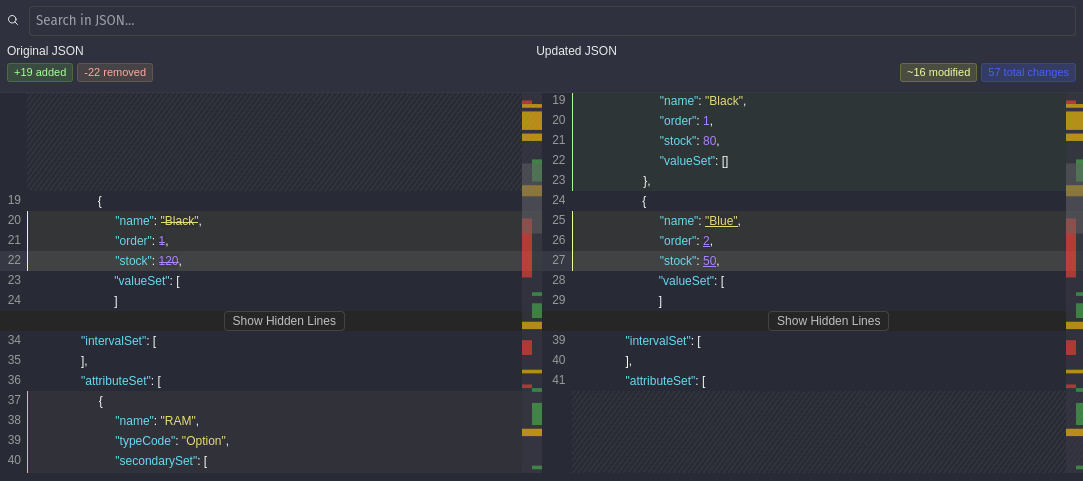
Powered by json-diff-kit, it supports virtual scrolling, advanced comparison options, search, dual minimaps, and customizable theming.
Most JSON diff viewers work well for small examples, but start breaking down in real-world scenarios:
- Large JSON files cause the UI to freeze or crash
- Rendering thousands of DOM nodes makes scrolling unusable
- Array changes are hard to reason about without object-level comparison
- It’s difficult to understand the impact of changes beyond raw diffs
virtual-react-json-diff was built to solve these problems.
It is designed for internal dashboards and developer tools that need to compare large, deeply nested JSON objects efficiently and interactively.
virtual-react-json-diff is designed for scenarios where traditional diff viewers become unusable due to size or complexity.
- Virtualized rendering powered by
react-window - Smooth scrolling and interaction even with very large diffs
- Dual minimap with visual change indicators
- Jump directly to changes using search highlighting
- Optional single minimap for compact layouts
- Line count statistics for added, removed, and modified lines
- Object-level statistics when using compare-key array diffs
- Quickly assess how big or risky a change really is
- Ignore specific keys or paths anywhere in the JSON tree
- Multiple comparison strategies (
strict,loose,type-aware) - Fine-grained control over how values are considered equal
- Custom class names for theming
- Inline diff customization
- Access raw diff data for advanced use cases
👉 Try it now - Interactive demo with live examples
npm install virtual-react-json-diff
# or
yarn add virtual-react-json-diff
# or
pnpm add virtual-react-json-diffimport { VirtualDiffViewer } from "virtual-react-json-diff";
const oldData = { name: "Alice", age: 25 };
const newData = { name: "Alice", age: 26, city: "NYC" };
export default function App() {
return (
<VirtualDiffViewer
oldValue={oldData}
newValue={newData}
height={600}
showLineCount={true}
showObjectCountStats={false}
/>
);
}The viewer exposes two different configuration layers, each serving a distinct purpose.
differOptions→ Controls how the diff is generatedcomparisonOptions→ Controls what is compared and how values are matched
These options are passed directly to the underlying diff engine.
Use them to:
- Choose how arrays are compared (
compare-key, positional, etc.) - Define comparison keys for object arrays
- Control depth, circular detection, and modification behavior
differOptions={{
  arrayDiffMethod: "compare-key",
  compareKey: "id",
  maxDepth: 999
}}These options affect comparison behavior without changing the diff structure.
Use them to:
- Ignore volatile fields (timestamps, metadata)
- Exclude specific paths
- Compare values across types
comparisonOptions={{
  ignoreKeys: ["updatedAt", "__typename"],
  ignorePaths: ["meta.timestamp"],
  compareStrategy: "type-aware"
}}<VirtualDiffViewer
oldValue={oldData}
newValue={newData}
differOptions={{
arrayDiffMethod: "compare-key",
compareKey: "id"
}}
comparisonOptions={{
ignoreKeys: ["updatedAt"],
compareStrategy: "type-aware"
}}
/>This separation keeps the diff engine flexible while allowing precise control over comparison behavior.
| Prop | Type | Description |
|---|---|---|
oldValue |
object |
Original JSON object (left side). |
newValue |
object |
Updated JSON object (right side). |
| Prop | Type | Default | Description |
|---|---|---|---|
height |
number |
— | Height of the diff viewer in pixels. |
leftTitle |
string |
— | Optional title shown above the left panel. |
rightTitle |
string |
— | Optional title shown above the right panel. |
className |
string |
— | Custom CSS class applied to the root container. |
| Prop | Type | Default | Description |
|---|---|---|---|
hideSearch |
boolean |
false |
Hides the search bar when set to true. |
searchTerm |
string |
"" |
Initial search term to highlight in the diff. |
onSearchMatch |
(index: number) => void |
— | Callback fired when a search match is found. |
showSingleMinimap |
boolean |
false |
Show a single minimap instead of dual minimaps. |
miniMapWidth |
number |
40 |
Width of each minimap in pixels. |
| Prop | Type | Default | Description |
|---|---|---|---|
showLineCount |
boolean |
false |
Display added, removed, and modified line counts. |
showObjectCountStats |
boolean |
false |
Display object-level stats (requires compare-key array diffing). |
Note:
showObjectCountStatsonly works whendifferOptions.arrayDiffMethod = "compare-key"andcompareKeyis provided.
| Prop | Type | Default | Description |
|---|---|---|---|
differOptions |
DifferOptions |
Engine defaults | Controls how the diff is generated (arrays, depth, keys). |
comparisonOptions |
DiffComparisonOptions |
— | Controls what is compared and how values match. |
inlineDiffOptions |
InlineDiffOptions |
{ mode: "char" } |
Fine-tune inline diff rendering behavior. |
| Prop | Type | Default | Description |
|---|---|---|---|
getDiffData |
(diffData: [DiffResult[], DiffResult[]]) => void |
— | Access raw diff results for custom processing or analytics. |
The component exposes a root container with class diff-viewer-container. You can pass your own class name via the className prop to apply custom themes.
Built on top of the awesome json-diff-kit.
MIT © Utku Akyüz
Pull requests, suggestions, and issues are welcome!