template: ../media/TB4Template.pptx
- Understand the different ways we can install software.
- Understand ROS and Linux Distros.
- Understand the different versions of ROS
- Select the correct ROS distro and correct installation mechanism for your system
- Finally, setup the TurtleBot 4 and host laptop.

- Generally speaking there are two ways that software can arrive at "your computer" and the way this software arrives dictates how it is installed. Most of this is review, but a refresher is helpful for understanding ROS, and Linux.
- Pre-Compiled Binaries -- often called binaries, are software programs that have be compiled into objects that are ready to run on your computer.
- These binaries have two main types:
- Libraries -- sections of code that are reused over and over, like common math functions.
- Executables -- also called programs are pieces of code that do some task and then end.
- Most executables, or programs, will have a main part that then makes use of multiple libraries.
- Many libraries are already installed on your computer, but some you may need to download and install.
- These binaries have two main types:
- Source Code -- source code, or just code, is written in a human readable language that is compiled (i.e. translated) into executables.
- Open Source Code is code that is freely available and shareable. You'll find it on places like Github or Gitlab.
- Closed Source Code is code that is only shared via binaries, that you must often pay for.
- There are many exceptions to this rule, programming languages like Python sit somewhere in between the two. Languages like C and C++ have a clear distinction between binaries and source code.
- Why does the difference between source and binaries matter?
- Because the difference between the two dictates how you install it on a robot.
- ROS has utilities to:
- Build binaries from source code.
- Install binaries that were compiled somewhere else.
- Mix your source code, with other source code, with binaries. o
- Keep track of everything that is going on!

- An operating system is what makes your computer do what you want, and there are a lot of them.
- A distro, or distribution, is a specific version of software
- Some folks also call a distro a release.
- These are often given both a code name and a number.
- These numbers usually denote either a number in a series or a release date.
- e.g. Jammy Jellyfish 22.04 or ROS 2 Humble Hawksbill

- ROS distributions are released yearly on May 23rd, World Turtle Day.
- Even year releases are considered long term support (LTS) distributions.
- ROS 2 Foxy Fitzroy and Humble Hawksbill are LTS Releases.
- This means they receive regular updates and bug fixes for a set period of time, usually three to five years.
- Most users should use the latest LTS version of ROS.
- Odd year releases are only supported for a short period of time (example: ROS 2 Galactic).
- ROS 2 also has what we call a "rolling" release, called Rolling Ridley
- A rolling release is simply a regular release using the latest ROS code available.
- The regular ROS releases are a well tested clone of the rolling release.

- Each ROS distro is designed to work well on a handful of specific operating systems.
- These specific operating systems are called Tier 1 operating systems.
- A full list of Tier 1 operating systems can be found in REP-2000
- REP-2000 provides other information like:
- How to install ROS on your host machine (i.e. source, binary, or package manager).
- What combinations of OS and architecture (e.g. arm vs amd)are supported
- Specific software libraries that are required.
- REP-2000 provides other information like:
- Tier 2 and Tier 3 operating systems for a particular distro may work but are not regularly tested.
- ROS is FOSS, but that doesn't mean every OS / ROS Distro combo will work well.
- Your life will be significantly easier if you use the correct ROS Distro for your OS

- If your goal is simply to start your TurtleBot, configure it, and run a few programs on the robot you may not need to install ROS on your laptop.
- You can use a secure shell protocol, called
ssh, to connect your robot. - SSH is a simple protocol to connect one computer to another computer, perhaps one running on a robot.
- To connect to the robot you will need to install an SSH client on your laptop or desktop operating system.
- Your TB4 and your laptop will need to be on the same network, and you will need the TurtleBot's IP address.
- Setting up an SSH connection to your TB4 is covered under Tutorial X: How to SSH into a TurtleBot 4.
- Up until now we've been talking about the OS and ROS Distro on a robot, like the TB4.
- When you're using, programming, or debugging a robot you'll need to interact with the robot's code.
- Depending on what you are doing, your laptop may need to run ROS too!
- If you plan to tele-operate (remote control) your robot or visualize its data your laptop will need to run ROS!
- You may also want to visualize data from your robot
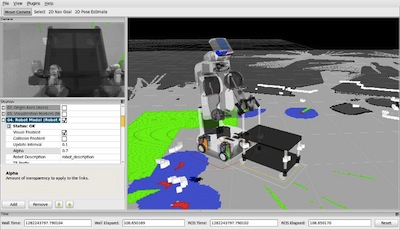
- ROS 2 has a program called RVIZ for visualizing robot data.
- Sometimes computation can be complex! You may want to do those computations not on the robot.
- In these three cases your laptop may need to run ROS too!
- Things to Keep Mind
- If two or more computers are using ROS in robot, then they must use the same ROS Distro!
- You cannot connect two different ROS distros together!
- Your best bet is to have your laptop and robot run the same OS and ROS Version!
- There are work arounds if this isn't feasible.
- Up until now we've been talking about the OS and ROS Distro on a robot, like the TB4.
- When you're using, programming, or debugging a robot you'll need to interact with the robot's code.
- Depending on what you are doing, your laptop may need to run ROS too!
- If you plan to tele-operate (remote control) your robot or visualize its data your laptop will need to run ROS!
- You may also want to visualize data from your robot
- ROS 2 has a program called RVIZ for visualizing robot data.
- Sometimes computation can be complex! You may want to do those computations not on the robot.
- In these three cases your laptop may need to run ROS too!
- If two or more computers are using ROS in robot, then they must use the same ROS Distro
- Ordinarily, you can not connect two different ROS distros together!
- What if I don't want to change my operating system to use ROS?
- There are two ways to get around the requirement that your host OS match the preferred host OS.
- Virtual Machines
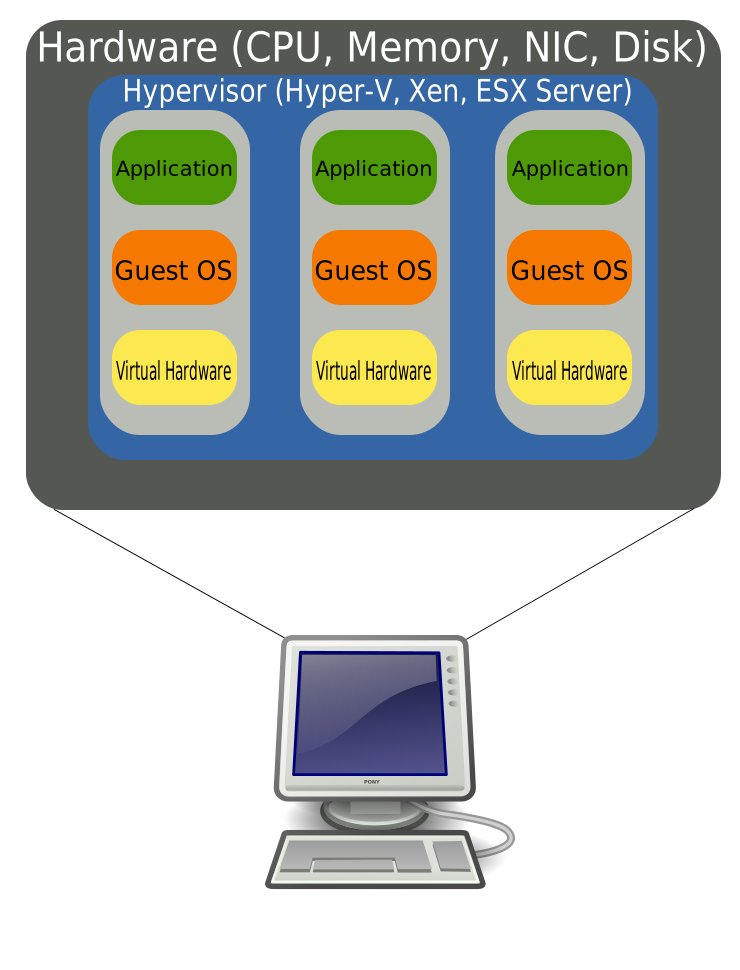
- A virtual machine (VM) emulates a second computer on your host computer.
- There are lots of different VM software providers. Some examples are Virtual Box and VMWare
- Virtual machines can display the full GUI of the desired operating system and are usually easier for those just getting familiar with the technology.
- Installing ROS on a VM is covered in our Virtual Machine Tutorial.
- Containers
- Containers are similar to VMs in that they allow your computer to emulate a different operating system. Containers, however, are "stripped down" versions of VMs that have lower overhead.
- Common containerization software include Docker, Singularity, and Podman, with Docker being the most common.
- Containers are generally easier to share, modify, and distribute than VMs.
- Installing ROS on a Docker container is covered in our Docker Tutorial.
| Use Case | Advantage | Disadvantage | Tutorial |
|---|---|---|---|
| SSH into TB4 | Simple | Limited Features | How to setup SSH |
| Install VM on Laptop | Easy to run graphical applications | VM may be resource constrained | Installing ROS on a VM |
| Install Docker on Laptop | Best for advanced developers | Graphical applications may require rocker | Installing ROS with Docker |
| Full Linux Installation | Best overall experience | (None) | Installing ROS on Linux |
| Laptop OS | Virtual Machine | Docker | Native Support |
|---|---|---|---|
| Ubuntu 20.04 (Focal Fossa) | Possible | Possible | X (BEST CHOICE) |
| Other Ubuntu | Recommended | Possible | Not Recommended |
| macOS | Recommended | Possible | Not Recommended |
| Windows 10 | Recommended | Possible | Possible* |
| Linux Variants | Recommended | Possible | Possible for RHEL 8 and Debian |
- Configurations listed as possible may require additional commands and configuration.
- ROS can be installed on many operating systems from source but is not recommended for new users.
- Take home message: the recommended configuration for most operating systems is to create an Ubuntu 20.04 Virtual Machine
- How do I run software on my TurtleBot4?
- SSH
- Virtual Machines
- Up until now we've been talking about the OS and ROS Distro on a robot, like the TB4.
- When you're using, programming, or debugging a robot you'll need to interact with the robot's code.
- Depending on what you are doing, your laptop may need to run ROS too!
- If you plan to tele-operate (remote control) your robot or visualize its data your laptop will need to run ROS!
- You may also want to visualize data from your robot
- ROS 2 has a program called RVIZ for visualizing robot data.
- Sometimes computation can be complex! You may want to do those computations not on the robot.
- In these three cases your laptop may need to run ROS too!
- If two or more computers are using ROS in robot, then they must use the same ROS Distro
Ordinarily, you can not connect two different ROS distros together!