Before submitting a new issue
Bug summary
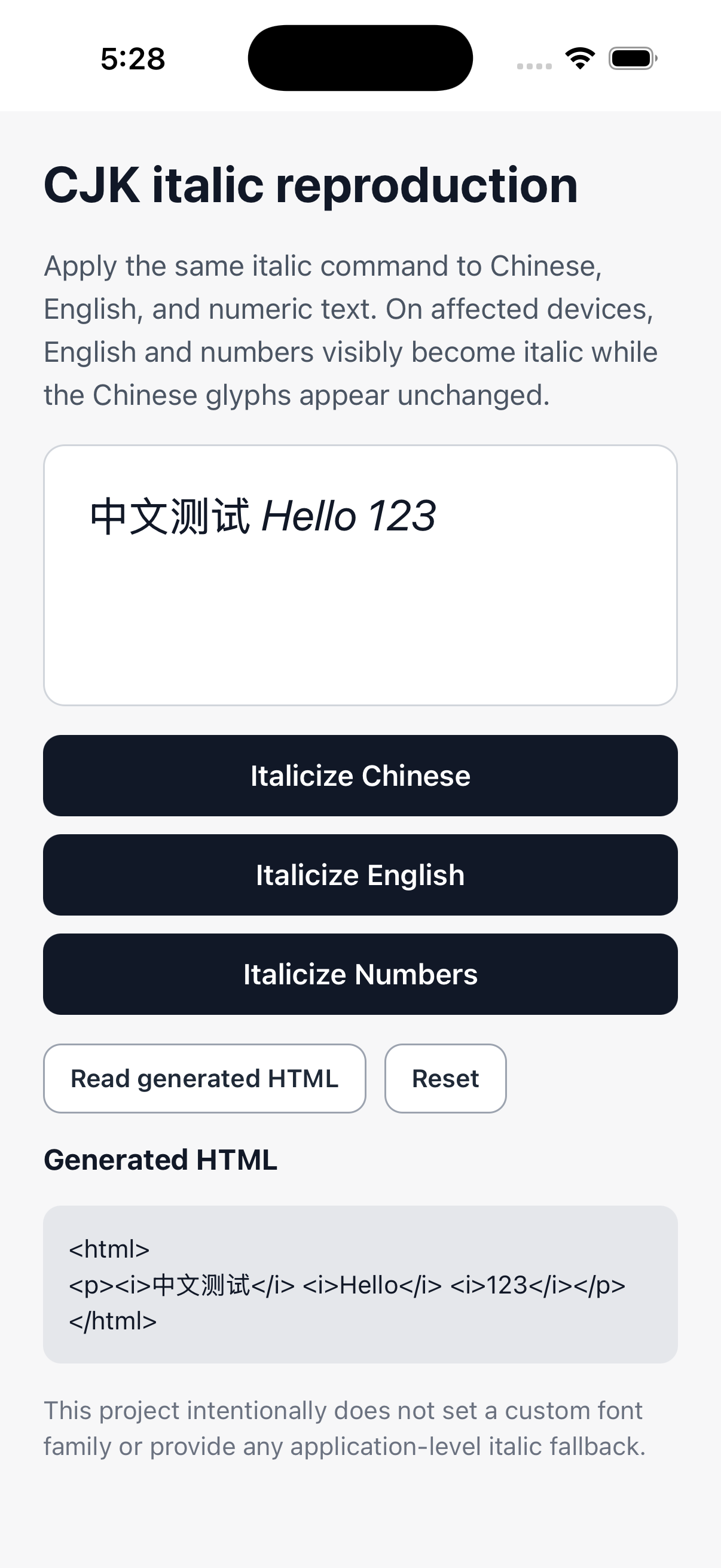
On iOS, EnrichedTextInput.toggleItalic() applies the expected <i> markup to selected Chinese, English, and numeric text, but Chinese glyphs remain visually upright. English letters and numbers in the same editor visibly render in italic.
The reproduction intentionally uses the system font and does not configure a custom font family or application-level faux-italic fallback. I am reporting this to clarify whether this is an expected platform-font limitation that should be documented, or whether the native renderer should provide consistent visual feedback for CJK text.
Library version
react-native-enriched-html@1.1.0
Environment info
System:
  OS: macOS 26.5.2
  CPU: (10) arm64 Apple M4
  Memory: 32.00 GB
Binaries:
  Node: 22.22.2
  npm: 11.18.0
  Watchman: 2026.07.20.00
Managers:
  CocoaPods: 1.17.0
SDKs:
  iOS SDK: iOS 26.5
IDEs:
  Xcode: 26.6/17F113
npmPackages:
  react: 19.2.3
  react-native: 0.86.2
  react-native-enriched-html: 1.1.0
Runtime:
  Expo SDK: 57.0.0
  New Architecture: enabled
Device:
  iPhone 17 simulator
  iOS 26.5
Steps to reproduce
- Clone the reproduction repository.
- Run
npm install.
- Run
npm run ios.
- Tap Italicize Chinese, Italicize English, and Italicize Numbers.
- Tap Read generated HTML.
- Compare the visual rendering with the generated HTML.
Expected behavior
All three selected ranges should have clear italic visual feedback, or the unsupported CJK italic behavior should be documented/exposed so apps can avoid presenting a control that appears ineffective.
Actual behavior
The generated HTML correctly contains:
<html>
<p><i>中文测试</i> <i>Hello</i> <i>123</i></p>
</html>
However, Hello 123 visibly renders in italic while 中文测试 remains visually upright.
Reproducible example repository
https://github.com/zhenyu-hong/react-native-enriched-html-cjk-italic-repro
Screenshot
Additional context
The reproduction uses only the library's public setSelection(), toggleItalic(), and getHTML() APIs. It has no custom toolbar, navigation, state management, or custom font configuration.
Before submitting a new issue
1.1.0).0.86.2).Bug summary
On iOS,
EnrichedTextInput.toggleItalic()applies the expected<i>markup to selected Chinese, English, and numeric text, but Chinese glyphs remain visually upright. English letters and numbers in the same editor visibly render in italic.The reproduction intentionally uses the system font and does not configure a custom font family or application-level faux-italic fallback. I am reporting this to clarify whether this is an expected platform-font limitation that should be documented, or whether the native renderer should provide consistent visual feedback for CJK text.
Library version
react-native-enriched-html@1.1.0Environment info
Steps to reproduce
npm install.npm run ios.Expected behavior
All three selected ranges should have clear italic visual feedback, or the unsupported CJK italic behavior should be documented/exposed so apps can avoid presenting a control that appears ineffective.
Actual behavior
The generated HTML correctly contains:
However,
Hello 123visibly renders in italic while中文测试remains visually upright.Reproducible example repository
https://github.com/zhenyu-hong/react-native-enriched-html-cjk-italic-repro
Screenshot
Additional context
The reproduction uses only the library's public
setSelection(),toggleItalic(), andgetHTML()APIs. It has no custom toolbar, navigation, state management, or custom font configuration.