Missing code actions (editor.codeActionsOnSave) with typescript.experimental.useTsgo in VSCode #2444

Description

Extension Version
0.20260106.1
VS Code Version
1.107.1
Operating system Version
Arch Linux
Steps to reproduce
- Initiate a new project, and install tsgo -
pnpm add -D @typescript/native-preview. - Set
"type": "module"inpackage.json. - Create a tsconfig.json with the recommended settings -
pnpm exec tsgo --init, add thesrcdirectory toincludes. - Install the tsgo extension -
TypeScriptTeam.native-previewand create.vscode/settings.jsonfile with the following config to enable it:
{
    "typescript.experimental.useTsgo": true,
    "editor.codeActionsOnSave": {
    },
}- Create these 2 files in the src directory:
// foo.ts
export const greet() {};

// bar.ts
greet();
Issue
So what is the issue? The documentation for VSCode mentions the following:
With the editor.codeActionsOnSave setting, you can configure a set of Code Actions that are automatically applied when you save a file, for example to organize imports. Based on your workspace files and active extensions, IntelliSense provides a list of available Code Actions.
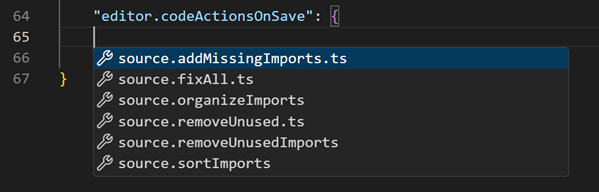
However, when "typescript.experimental.useTsgo": true is enabled, most of the code actions become unavailable so IntelliSense does not provide a list.
TSGO enabled:

TSGO disabled:

So then if we go back to our bar.ts and save the file, normally the source.addMissingImports.ts action would kick in and automatically add the missing import for our greet function imported from foo.ts. But since these code actions are unavailable with useTsgo enabled, nothing happens.
This has become an important part of my workflow, and a huge time-saver as well. I'd really want to give tsgo a shot but this feature is dearly missed at the moment.
Cheers!