Annotated Study Guide - See the Guide
1.1 Designing performant applications and APIs
- IaaS vs Container as a Service vs PaaS (e.g. autoscaling implications)
- IaaS: VMs, managed service groups for autoscaling, can configure for HA, failover
- CaaS: GCE, autoscaling, failover, etc managed
- PaaS: Cloud Functions, all ops managed by platform, infinitely scalable
- Portability vs. platform-specific design: As a rule, the more a solution is 'managed', the less portable it is. VMs move as images across providers fairly well, but Serverless Functions must be rewritten to accommodate the specific CSP. Containers are an interesting case- the container itself is designed to be portable, and K8s should be portable by design. (Not enough exposure to validate)
- Evaluating different services and technologies: Things to look for:
- Level of mgmt: as services are more managed, it decreases ops workload. However, sometimes this sacrifices flexibility for more specialized configuration. (I.e. a managed DB service patches according to the service's schedule, not when the app is ready to support(not a great ex, but that's the idea)
- Cost: TCO, managed services can be more expensive, but can deliver more value.
- HA/DR/Failover options: is the tech regional? Can it support multiregional solutions? How much of that is managed
- Operating system versions and base runtimes of services:
- VMs: Marketplace images support most anything you can imagine, if its not there, roll your own image.
- Containers: GAE Standard supports: Python 2.7/3.7, Java 8, PHP 5.5/7.2, Go 1.9/1.11, and Nodejs (not sure what version). GAE also supports custom containers with flexible runtimes.
- Cloud Functions: Node.js 6/8, Python 3.7, Go 1.11
- Cloud SQL: MySQL 5.5/5.6/5.7, Postgres 9.6
- Geographic distribution of Google Cloud services: GCP has a bunch of regions, adding more all the time. Each region has at least 2 zone, which are separate- but often on a shared campus. VPCs can span regions, subnets can span zones. Different services have different geographic coverage- not everything is available in all regions.
- Microservices: Unlike traditional 'monoliths', microservice architectures involve units of functionality being broken up and managed separately. By loosely coupling systems, app teams can move more quickly, and update services in smaller, tighter release cycles.
- Defining a key structure for high write applications using Cloud Storage, Cloud BigTable, Cloud Spanner, or Cloud SQL: All of these services are managed to different degrees. Ensuring that the key will not result in lots of write activity in a single shard of the database/storage (hotspotting) is essential. The best key will depend on the nature of the data and the application/queries. If a shard is getting 'hot', consider hashing additional information into the key to break up the writes.
- Session management: Managed services like GAE and GKE, as well as google's load balancers, have sticky session as a managed feature so that users will interact with the same container throughout the duration of an interaction, to improve performance.
- Deploying and securing an API with cloud endpoints: Endpoints is an API Gateway style api manager that allows logging, securing, and monitoring of endpoints. It is available in OpenAPI, gRPC, and App Engine standard flavors. See the Docs
- Loosely coupled applications using asynchronous Cloud Pub/Sub events: Having services push to pub/sub allows supports reliable, scalable service designs. Once an events is written to a pub/sub subscription, a worker of whatever flavor will pick it up when able. This prevents data loss if a service is unavailable. Additionally, if an event is not marked as completed before it times out, it will be picked up by another worker. This prevents data loss when workers fail or error out. The default acknowledgement window is 10 sec, but can expand to 10 min.
- Health checks: Managed instance groups and K8s use health checks to ensure availability. If a vm or container fails a health check, those services can spin up another resource to ensure healthy compute resources are always available
- Google-recommended practices and documentation: Google has lots of docs full of lots of opinions. Good luck with that. Most service docs will have a best practices page/section to refer to.
1.2 Designing secure applications
- Applicable regulatory requirements and legislation: Varies depending on location (GDPR), industry (HIPPA), and other stuff. See Docs
- Security mechanisms that protect services and resources: varies from service to service. IAM can be used to limit user access and communication between resources. Ensure that buckets aren't public, firewalls aren't open.
- Storing and rotating secrets: IAM service account keys are automatically rotated. GCP's Secrets Management can be used for other secrets. Rotate your keys/secrets. Third party products like vault also exist- not sure google cares.
- IAM roles for users/groups/service accounts: All IAM entities can be assigned a role at the project level (can also be asigned at the folder or org level). Using roles can limit access to principle of least privilege.
- HTTPS certificates: You can put an SSL cert on a load balancer for HTTPS traffic. GCP will manage certs, or you can bring your own. You can also attach an SSL cert to an App Engine
- Google-recommended practices and documentation: tl;dr: Ensure VPCs are secured (service controls), put HTTPS load balancing in place, use Cloud Armor service, Use Cloud Identity-Aware Proxy service 1.3 Managing application data:
- Defining database schema for Google-managed databases (Datastore, Spanner, BigTable, BigQuery):
- Datastore: objects are called entities, entities have properties. Doesn't need schema upfront. Doc DB will just hold hierarchical info by unique key.
- Spanner: Much like traditional SQL db. Specify schema of table on creation. Data strongly typed. Can define secondary indexes.
- BT: Very similar to RDBMS. Each table has one index- the row key. Rows are sorted lexicographically by row key. All operations are atomic at the row level. Reads and writes should be distributed evenly across table. Keep all info for entity in single row. Related entities should be stored in adjacent rows. BT tables are sparse (create lots of mostly empty columns)
- BQ: specific when you load data into table and when you create empty table. Can auto-generate schema, or retrieve from source.
- Choosing data storage options based on use case considerations:
- Cloud storage signed URLs for user uploaded content: provide user with a URL to get access to a bucket for a set duration without needing to provide a google account. Docs
- Using Cloud Storage to run a static website: Connect bucket to Cloud DNS address to serve static content (usually based on an
index.html). All website content must be publicly accessible for this to work. - Structured vs. Unstructured data: Structured data should go somewhere relational- SQL/Spanner, unstructured should go Datastore or BT (for massive IoT streaming datasets)
- ACID Transactions vs. analytics processing: Spanner offers ACID++, SQL is ACID, Datastore is ACID, BT is not ACID, BQ is ACID
- Data volume: Persistent disk popped into my head, but probably more about quantity of data.
Use
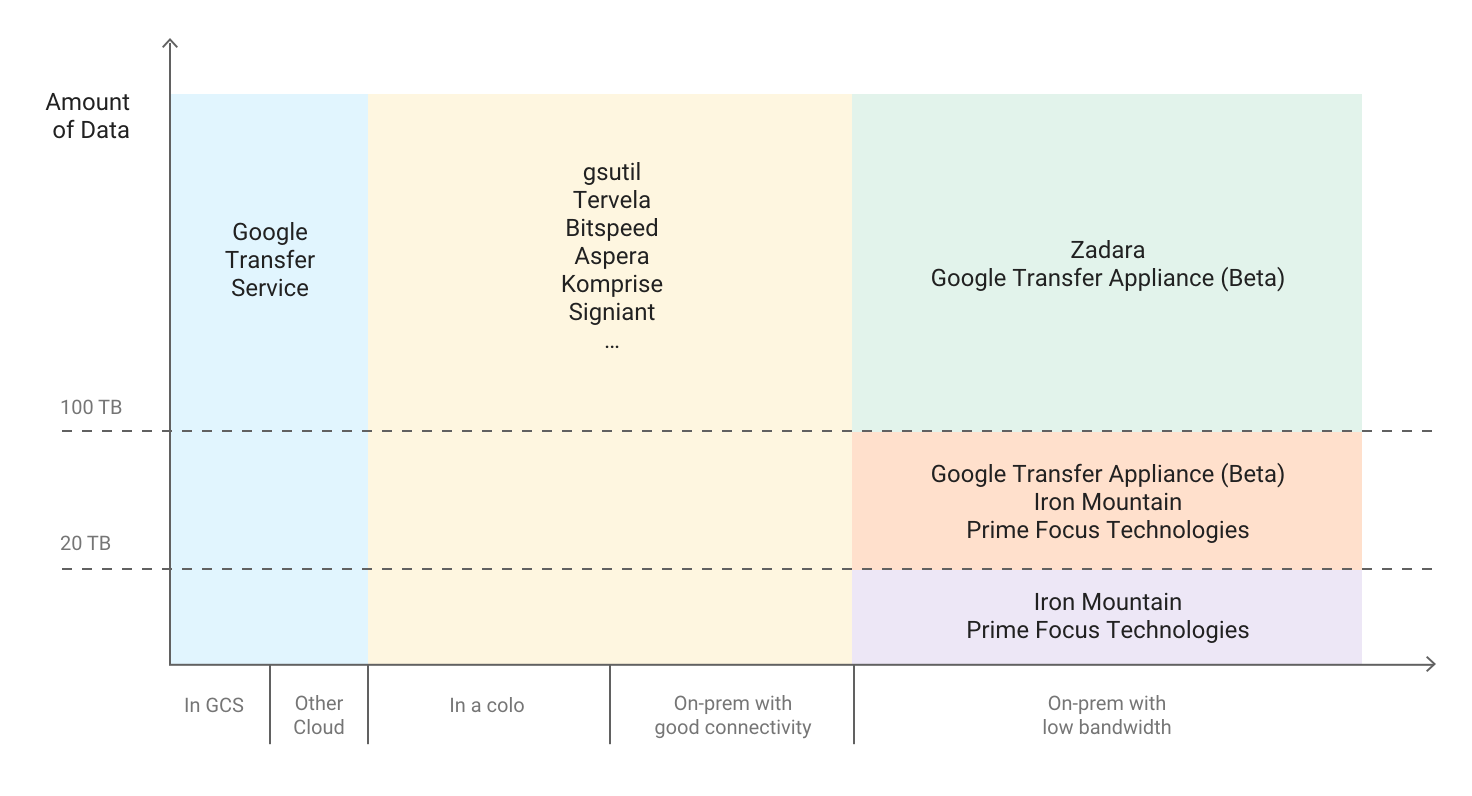
gsutilfor smaller amounts, google transfer service for GCS or other CSP, and get a transfer appliance for large amounts of data in a datacenter - Frequency of data access in Cloud Storage: Multiregional, Regional, Nearline, Coldline
- Working with data ingestion systems (Cloud pub/sub, storage transfer service):
- Pub/Sub: subscription messaging system: Data is published to subscription, picked up, processed, and deleted
- Storage transfer service: Hits http endpoints to sync data with other cloud blob storage solutions (S3)
- Following google-recommended practices and docs: service by service. Cloud Spanner 1.4 Re-Architecting applications from local services to Google Cloud Platform
- Using managed services: Managed services are a gradient (VM->Managed VM group->GKE->GCE->Cloud Functions). Using managed services reduces ops overhead/costs. Managed services are more expensive, usually. Additionally, managed services are not as flexible in some cases.
- Using the strangler pattern for migration: The strangler pattern is where a legacy application is migrated in pieces. A specific unit of functionality is identified, rearchitected, and replaced. Then another piece of functionality is identified, and the pattern repeats until the entire application has been migrated/modernized, and the old system can be decommissioned.
- Google-recommended practices and documentation: Building scalable and resilient applications: docs. There are some whitepapers here
2.1 Setting up your development environment
- Emulating GCP services for local application development: With GCP's scalability, it is possible to have a dev environment where condition mirror production very closely. When that is not feasible, containers are a good way to make sure local dev matches the GCP environment very closely. Infrastructure as Code is a good tool to make sure resources are created the same way each time they are created, so that dev machines function closely matches prod function.
- Creating GCP projects: Projects are entities that contain and constrain resources. Every application should have a project per environment (dev, test, prod, etc). Projects allow for easy management of cost and access.
2.2 Building a continuous integration pipeline:
-
Creating a Cloud Source Repository and committing code to it: You can, but in a world with coca cola (github), why would you drink rite cola (CSR)? Source code repositories are a good thing. Use GCP's if it make sense for your org/project, but I can't find a use case where github wouldn't work just as well, if not better.
-
Creating container images from code: Using docker (because what else would you use?), create a Dockerfile with the configurations needed for the container (base image, ports opened, scripts to run, etc). Use Cloud Build to build the image based on the Dockerfile:
gcloud builds submit --tag gcr.io/[PROJECT_ID]/[IMAGE_NAME] .Run from the directory (cloudshell) where the Dockerfile is located. More in Docs
-
Developing unit tests for all code written: All major coding languages and frameworks have testing associated. Building tests into the build process is a good way to make sure poor quality code doesn't make it to deployment. There are a number of ways to implement testing. All code written should include tests in the PR before the code is merged or a ticket is closed. Code reviews are important to make sure that tests are adequate. There are tools to test test coverage. Once tests are being written and reviewed, the pipeline should run all tests before building new artifacts/deploying new versions.
-
Developing an integration pipeline using services (e.g. Cloud Build, Container Registry) to deploy the application to the target environment (e.g. development, testing, staging): For example, once PRs are merged into github/cloud source repository, a pipeline can build the container image, run all tests against the image, and if it passes, push the image into the container registry of the project associated with the desired environment- once a build in dev passes all tests, the image can be added to the container registry in the test account, for the testing team to vet, before approving to the production account. (Having a dedicated testing team is an anti-pattern in agile, but let's assume that not every team building pipelines in the cloud is perfectly Agile yet)
-
Reviewing test results of a continuous integration pipeline: The goal of a CI pipeline is going to vary depending on context- some orgs will push for completely automated builds where the test results are logged somewhere, perhaps posted to slack, and life moves on. Others are going to need a workflow where once tests have run, they are reviewed by an approving entity before promotion.
2.3 Testing
- Performance testing: Per tutorialspoint, performance testing is testing of system parameters under workload. Tests measure scalability, reliability, and resource usage. Performance testing techniques include Load testing, Stress testing, Soak testing, and Spike testing.
- Integration testing: tests how well independently developed units function in the system, versus unit testing, which tests how the units of code behave.
- Load testing: A subset of peformance testing, this involves simulating high load on the resources and measuring how they respond. Do autoscaling groups scale? Can the load balancer handle all the requests? Is the database keeping up will all the reads and writes? These are things to look for in load testing.
2.4 Writing Code
- Algorithm design: Wow, that's multiple semester's worth of material. When writing code, designing systems using the best algorithms will make systems more performant, decrease latency, and lead to a better user experience. There's a ton of content on that, like this.
- Modern application patterns: In GCP, microservices is the big one. Layer or tiered models are also common- a web tier, a backend, and a database, for a simple example. Monoliths are still around, but in the context of the exam are proabably not considered modern. Most web frameworks support an MVC model- model-view-controller. This is similar to the tiered approach. More here
- Efficiency: One quality of well designed systems is efficient- how much time/compute resources does it take to acheieve the desired output. Slack is a good example of an inefficient app- it can take gigs of ram on the client machine to run.
- Agile methodology: its a thing. Sprints, stand ups, retros, scrum.
3.1 Implementing appropriate deployment strategies based on the target compute environment (Compute, GKE, GAE). Strategies include:
- Blue/green deployments: create a new resource target (VM, managed VM group, K8s service, GAE service) and cut the load balancer/routing to the new version.
- Traffic-splitting deployments: create the two services as above, but instead of a total cutover, split the traffic between the two services. You can use this for A/B testing on UI changes, for example.
- Rolling deployments: This process involves slowly replacing instances running the old version with new ones.
- Canary deployments: A small amount of traffic is sent to the new service. If there are any issues, that traffic can quickly be sent back to the stable version without widespread issues for end users.
As long as service resources are behind a google load balancer, most of these strategies can be supported for most compute services.
3.2 Deploying applications and services on Compute Engine.
- Launching a compute instance using GCP Console and Cloud SDK (gcloud)(e.g., assign disks, availiblity policy, ssh keys):
- In the console
- Using gcloud:
gcloud compute instances create [INSTANCE_NAME] \ --image-family [IMAGE_FAMILY] \ --image-project [IMAGE_PROJECT] \ --subnet [SUBNET_NAME] \ --zone [ZONE_NAME] - Moving a persistant disk to a different VM: Detach the disk from the first VM (ensure the disk was unmounted so no data loss occured), attach the disk to the new VM (you will then need to mount the disk inside the VM). If the target VM is in a differnt zone, use the
gcloud compute disks movecommand. - Creating an autoscaled managed instance group using an instance template: See the Docs. tl;dr, you can create an instance template from an image- public or private. When creating the managed instance group, designate the desired template, and that is the image that will be used to autoscale the group.
- Generating/uploading a custom ssh key for instances: You can use OS Login to manage ssh access to linux instances using IAM roles. If that is not an effective solution (not all users needing SSH access have IAM credentials), you can manage ssh keys in metadata. Run the
gcloud compute project-info add-metadatato add the users' public keys who should have access. - Configuring a VM for Stackdriver monitoring and logging: Install the agent. You can configure to agent, but it will function out of the box. You can access your logs in the console or via the api.
- Creating an instance with a startup script that installs software: Use the following command:
You can store the file locally or in a bucket. More info
gcloud compute instances create example-instance \ --metadata-from-file startup-script=PATH/TO/FILE/install.sh - Creating custom metadata tags: You can attach tags/labels to resources to filter for cost, routing, access, and other funtionality. More in the Docs.
- Creating a loadbalancer for Compute Engine instances: GCP offers a number of different load balancers, per Docs:
- HTTPS: The most robust. Lots of features for routing rules, service based routing, global availiblity, and so on
- SSL: Global, TCP with SSL offload, external
- TCP Proxy: TCP without offload(doesn't preserve client IPs), global, external
- Network TCP/UDP: No ssl offload, preserves client IPs, regional, external
- Internal TCP/UDP: Regional, internal
3.3 Deploying applications and services on Google Kubernetes Engine.
-
Deploying a GKE cluster:
gcloud container clusters create [arguments]. Clusters can be zonal, regional, private (nodes not accessable on internet), and alpha (not recommended for public use) -
Deploying a containerized application to GKE: Create a Deployment. A deployment is a set of identical pods running a set of containers defined in a manifest (YAML) file. Here's a tutorial
-
Configuring GKE application monitoring and logging: StackDriver supports monitoring for GKE. Legacy StackDriver (GA) and SD Kubernetes Monitoring (beta) are offered. There is a Stackdriver K8s Monitoring Console dashboard showing metrics.
-
Creating a load balancer for GKE instances: GKE supports TCP/UDP and HTTP(S) load balancers for public access. TCP load balancers are not aware of individual HTTP(S) requests, and do not feature health checks. HTTP(S) loadbalancers use Ingress, and are sensitive to requests to make context aware decisions. They feature URL maps the TLS termination. GKE automatically configures health checks. More here. Internal load balancers are a service that can be configured like so. The service's
specwill includetype: LoadBalancerin theservice.yaml. See example:apiVersion: v1 kind: Service metadata: name: [SERVICE_NAME] annotations: cloud.google.com/load-balancer-type: "Internal" labels: [KEY]: [VALUE] spec: type: LoadBalancer loadBalancerIP: [IP_ADDRESS] # if omitted, an IP is generated loadBalancerSourceRanges: - [IP_RANGE] # defaults to 0.0.0.0/0 ports: - name: [PORT_NAME] port: 9000 protocol: TCP # default; can also specify UDP selector: [KEY]: [VALUE] # label selector for Pods to target -
Building a container image using Cloud build: Create a build config
.yamlfile, like so. Add steps to the file, will existing images, and arguments with specific instructions. Once the config file looks right, you can use theimagesfield to determine where the build will be stored.
3.4 Deploying an application to App Engine.
- Scaling configuration: You can set scaling to determine the inital number of instances (don't like the overlap of terminology), how instances are created or stopped, and how long an instance has to handle a request. You can use auto scaling for dynamic instances, manual scaling for resident instances, and basic scaling for dynamic instaces. For dynamic instances, the App Engine scheduler decides if a request can be managed by existing instances or if another one must be created. You can use metrics such as target_cpu_utilization, target_throughput_utilization, and max_concurrent_requests to optimize scaling. Each instance has its own queue of requests. Scaling is configured in the
app.yamlfor the version of the service. More here. - Versions: App Engine deployments are versioned. Traffic splitting can be done along versions for canary deployments. This streamlines rollback when issues arise.
- Blue/green deployment: Since deployments are versioned, you can cut 100% of traffic from one version of the deployment to the new one, once it has been approved for prod use.
3.5 Depoloying a Cloud Function
- Cloud Functions that are triggered via an event (e.g., Cloud Pub/Sub events, Cloud Storage object change notification events): When configuring a Cloud Function, it can subscribe to a pub/sub topic, and new writes can trigger the function, passing in information. Changes to objects in a bucket (upload, deletion, etc) can also trigger stuff.
- Cloud Functions that are invoked via HTTP: All Cloud Functions have an HTTP endpoint. Hitting that endpoint can trigger the function, and it will return the output of the function. More here.
3.6 Creating data storage resources
-
Creating a Cloud Repository: Use github, or gitlab, or whatever. I defy you to show a use case where Cloud Repository is the best solution. In that case...
-
Creating a Cloud SQL instance: Can be done via the console, gcloud, or api.
-
Creating composite indexes in Cloud Datastore: Composite indexes index multiple property values per indexed entity- they support complex queries and are defined in the index config file (
index.yaml). These are needed for the following:- Queries with ancestor and inequality filters
- Queries with one or more inequality filters on a property and one or more equality filters on other properties
- Queries with a sort order on keys in descending order
- Queries with multiple sort orders
- Queries with one or more filters and one or more sort orders
Per docs
-
Creating BigQuery datasets: Can be done via the console, command line, or API. When creating a dataset, its location is immutable.
-
Planing and deploying Cloud Spanner: Whitepapers for later. Create an instance, a database within the instance, and schema for tables within the DB and insert data, per Docs. You can query and write to the DB via the gcloud sdk in nodejs, python, and go, per.
-
Creating a Cloud Storage Bucket: Go to cloud storage, click 'create bucket', choose a globally unique name.
-
Creating a Cloud Storage Bucket and selecting appropriate storage class: When creating bucket, select from one of: multiregional, regional, nearline, and coldline. You can set up lifecycle policies to turn older objects to cheaper classes. Not all objects in the bucket must be of the same class, but regional buckets and multi regional buckets cannot support the other class (but both support nearline and coldline).
-
Creating a Pub/Sub topic: create the topic in the UI or programmatically, then create a subscription. You can push messages to the topic and pick them up via the subscription.
3.7 Deploying and implementing networking resources
-
Creating an auto mode VPC with subnets: An auto mode VPC will have a subnet in each region. Custom VPC can be created with subnets only in designated zones.
-
Creating ingress and egress firewall rules for a VPC (e.g., IP subnets, Tags, Service accounts): Firewall rules can target traffic using the following conditions:
- All instances in the network vs subnet (ingress only)
- Instances with a matching network tag (a different entity than labels, a key value pair for grouping related resources)
- Instances with a specific service account
More here
-
Setting up a domain using Cloud DNS: You will need to:
- Get a domain name through a registrar. Google offers this service, but you can get it from others as well.
- Get an IP address to point the A record to.
- Create a managed public zone: a container for DNS records of the name suffix. It has a set of name servers that respond to queries.
- Create a managed private zone: like the public one, but only visible from specified VPCs.
- Create the record for the IP address and the A record.
- Create a CNAME record
- Update domain name servers to push new recoreds.
Find the full version here.
3.8 Automating resource provisioning with Deployment Manager
Personally I prefer cloud agnostic tools (see ongoing github/cloud repo feud). I would look to Jenkins, Terraform, and Chef for this. But...
You define your resources in .yaml files. The file can contain templates, which are similar to terraform modules- boilerplate resources that can be called in the resource file. A template is written in python or jinja2. You deploy resources using gcloud. Once the resource collection has been created, a manifest is created. This file, like terraform state files, holds the desired state configuration. The manifest is updated to reflect updated runs of the the deployment file. You can destroy resources in the file the same way. There is a repository of samples (hosted on github) for various types of resources. See the Docs
3.9 Managing Service accounts
- Creating a service account with a minimum number of scopes required: After creating the service account, it should be added to only the roles with the permissions it will need (principle of least privilege). For example, if a server needs to read data from files in a bucket, it should only have read rights to Cloud Storage, and no other rights. There is a private beta for IAM Conditions. See Docs
- Downloading and using a service account private key file: You can create a public/private key pair associated with a service role like so. Keys generated in the console vs the api will have slightly different structures. Make sure the workflow is standardized to avoid errors. This key can be used for non-GCP resources to authenticate into the environment with that service account's permissions.
4.1 Integrating an application with Data and Storage services
- Enabling BigQuery and setting permissions on a dataset: There are a number of permissions and roles associated with BigQuery. Setting up a service account with the desired rights will allow compute resources to access BigQuery data at the desired level (read, write, delete, etc)
- Writing a SQL query to retrieve data from relational databases: All coding languages and frameworks will have their own tools/libraries for interfacing with SQL databases. Set the database endpoint to the one provided by GCP, and construct queries in SQL. Cloud Spanner allows you to query the db using the SDK.
- Analyzing data using BigQuery: This is a developer exam, not an analyst one. You can construct SQL-like queries in BigQuery, but for robust analysis, you will need an analytics tool, like Datalab.
- Fetching data from various databases: Managed databases have SDKs that can be used for queries in addition to a more conventional interface library in application code.
- Enabling Cloud SQL and configuring an instance: Using this tutorial, you can create an instance using the console (or gcloud or the api). After the instance has been created, use
gcloud sql connect <instance_name> --user=root, provide the root password used when creating the instances, and you will be brought to the MySQL or PostgreSQL prompt. You can create databases and upload data using standard SQL. - Connecting to a Cloud SQL instance: Use the
gcloud sql connectcommand above. - Enabling Cloud Spanner and configuring an instance: You can create an instances and configure the schema etc using the console.
- Creating an application that uses Cloud Spanner: Cloud Spanner has client libraries in most major programming languages. See more on writing code to interface.
- Configuring a Cloud Pub/Sub push subscription to call an endpoint: Pubsub can push messages as HTTP POST requests to webhooks, endpoints, or urls. Subscriptions can be configured with an auth header for endpoints that require it. The message.data field is base64-encoded. The endpoint must return a success code (200, 201, 202, 204, or 102) otherwise pub sub will retry delivery until the message expires. The server pushes messages in the subscription to preconfigured endpoints as HTTPS requests. If the server does not recieve a sucess code from the endpoint, it resends the message. You can create a push subscription (pull by default) using the following command:
gcloud pubsub subscriptions create mySubscription --topic myTopic --push-endpoint="https://myapp.appspot.com/push" - Connecting and running a CloudSQL query: You can connect to the cloudSQL instance via cloudshell, using the mysql client, or via proxy for external app. Once the connection is established and authenticated, queries can be run in standard SQL, like any IaaS RDMS. You can connect to a MySQL instance using the MySQL (or psql client for postgresql) client installed on another server, like so. Additionally, you can use
gcloud sql connect [INSTANCE_ID] --user=rootin the cloudshell to connect. You can run queries using the client. Connecting from different compute resources will have different tools/methods. - Storing and retreiving objects from Google Storage: You can use the console, or the gcloud SDK to read and write objects to buckets. In addition to the GUI, you can use the
gsutilcommand line tool to interact with objects in buckets. Additionally, there are client sdks for the major programming languages. - Pushing and consuming from Data Ingestion sources: There are dozens of combinations of services that do this. How this works best really depends on the use case. You can have batches of data from dataproc, or streaming data coming from dataflow, its probably best to write it to a store, like sql, spanner, or datastore, or use a queue like pub sub to make sure no data is lost. pub/sub is a good multipurpose solution for this use case. Any data source (app, batch, logs) can write to it, and it can be picked up by many different services without data loss.
- Reading and updating an entity in a Cloud Datastore transation from an application: Use the sdk. In Datastore, the entity is whatever object and can have as many key value pairs as needed. Use the gcloud SDK:
get(key, missing=None, deferred=None, **transaction=var**, eventual=False)(Python)put(entity)to add or update
- Using the cli tools: every action in GCP is an api call and the gcloud cli can make those calls. The library is huge, but its generally something like
gcloud <service> <action> <options>. Some services have special cli tools, like Cloud Storage (gsutil) and BigQuery (bq). - Provisioning and configuring networks: Lot to cover here. GCP uses software defined networking, so VPC can be global, and subnets are regional. GCP offers a shared VPC where a host account holds the VPC, but other service projects can deploy resources into that VPC. Useful for enterprise architecture where app teams need their own projects to work in, but security and networking can maintain control over the network. VPCs have firewall rules to control traffic. VPCs can be peered to one another for easy access. They can be connected to hybrid environments using Cloud VPN or Interconnect. TL;DR, when configuring networks, make sure that firewall rules allow communication on ports needed for data solutions.
4.2 Integrating an application with Compute services.
- Implimenting service discovery in gke, gae, and compute engine: GCP includes service discovery in the form of a metadata server. You can configure project metadata with shared environment variables, and query the metadata server endpoint (cURL).This is an older article talking about its use in for VMs. See the Docs. In the context of containers, service discovery refers to the types of containers as services.
- Writing an application that publishes/consumes from cloud pub sub: use the gcloud sdk to publish and consume. You can also hit the https endpoints to access that functionality. In addition to being able to hit the queues with an sdk and a service account, pub sub can also be exposed as an endpoint, complete with authentication for easy, secure access.
- Reading instance metadata to obtain application configuration: Instances (VMs as well as GAE instances) can be assigned labels (as opposed to network tags)- key value pairs that provide information about the instance. By labeling instances, you can use the
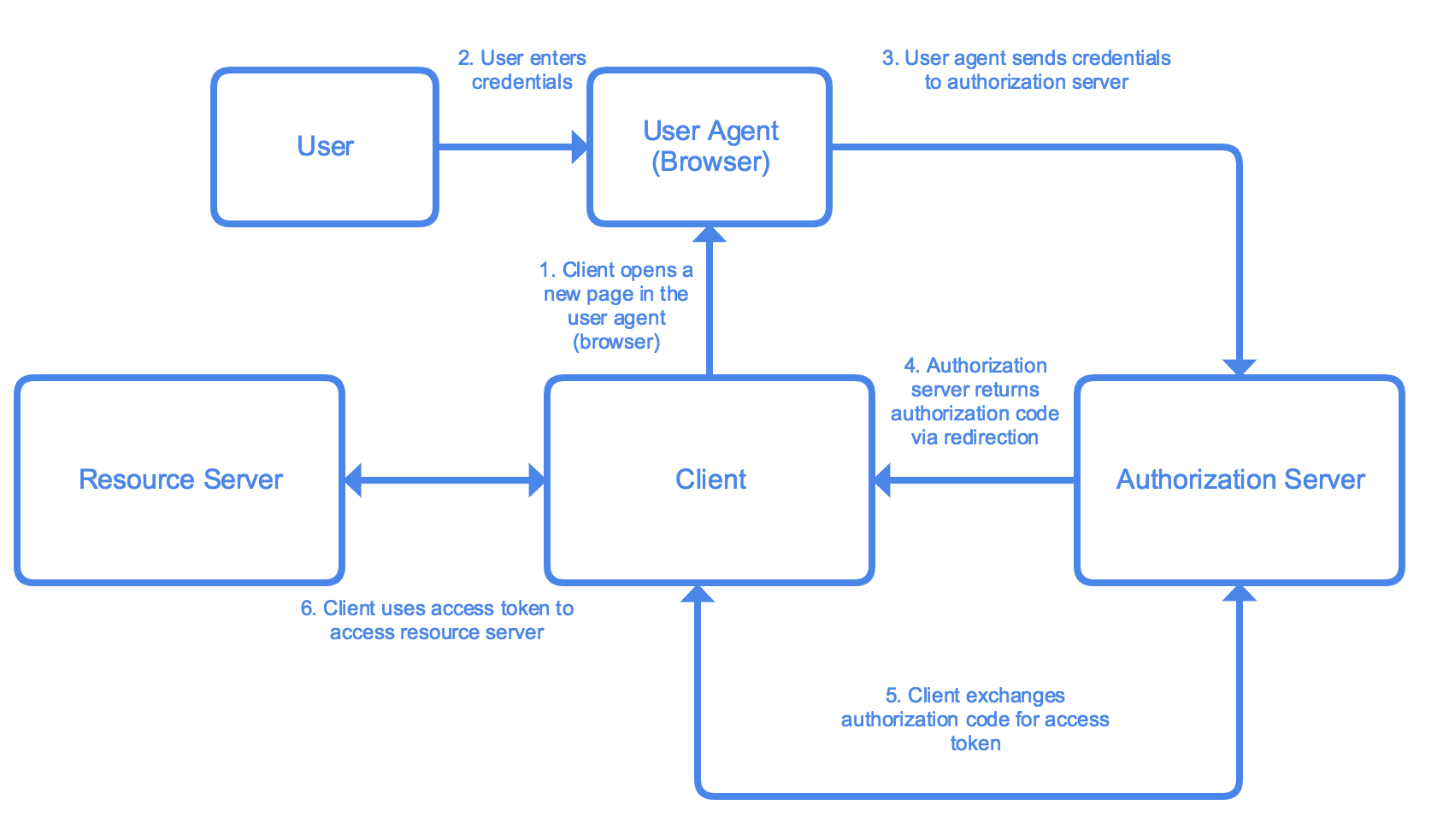
gcloudtool to filter and sort for specific instances. Instance metadata usually includes information about the infrastructure (IP, VM class, applicable service accouts, etc). You can add custom metadata in the form of labels (as opposued to network tags). You can use this to create startup and shutdown scripts. Application configuration would have to be added as custom metadata, which could then be queried for post provisioning, maintanance, governance, and other tasks. (I couldn't find any info on app info in metadata). - Authenticating users by using Oauth2 Web Flow and Identity Aware Proxy:
- Oauth: A widely used auth framework. See more. Here is a detailed walkthrough for configuring OAuth in GCP.
- IAP: is a GCP service that uses identity and context to sign in to apps and vms. See the tutorial. You can allow users access by whitelisting them. You can also add conditions based on location, and add admin rights depending on the URL path. Check the quick demo.
- Oauth: A widely used auth framework. See more. Here is a detailed walkthrough for configuring OAuth in GCP.
- Using the CLI tools: Same info as previous section.
- Configuring Compute services network settings (e.g., subnet, firewall ingress/egress, public/private IPs): subnet and firewall rules have already been answered. All Compute instances have an internal IP that allows resoureces within the network to access them. Public IPs are optional- they can be removed. They allow access from outside the network. Multiple IPs can be added by adding additional virtual NICs.
4.3 Intgrating Google Cloud APIs with applications.
- Enabling a GCP API: APIs must be enabled on a per service basis on each project. You can do so in the GUI or programatically.
- Using pre-trained Google ML APIs: Google provides a set of ML as a service API for NLP, Image recognition, translation, and speech to text. You can use these API via sdk, like so or via endpoints (You can also use the GUI, but that doesn't integrate into an application).
- Making API calls with a Cloud Client Library, the REST API, or the APIs Explorer, taking into consideration:
- batching requests: You can batch api calls to send multiple requests at once. This would be useful for caching offline requests, or for new APIs where there is a lot of data to upload
- restricting return data: When making calls, since there are limits and quotas to the number of calls you can make, they should be carefully constructed. However, calls returning large amounts of data (for instanance, all files in a bucket where logs are stored), can cause performance issues. Ensure that calls contain filters to get only the data needed. When calling for info about resources, filter with tools like labels to return the resources needed. (I couldn't find any specific tools or guides on how to execute on this, defer to the specific guide on the tool you are using).
- paginating results: When a large collection of results needs to be returned, paginiating can be an effecitve way to prevent overload of systems/ Paginiation is the pratice of spliting a list of results into groups (or pages) and returning results a 'page' at a time. I couldn't find any docs indicating how this is implimented for GCP APIs.
- caching results: When designing applications that will poll relativly static information, caching results and holding them for a designated TTL can be a performance improving and cost saving design pattern. Make sure to balance how quickly the data will become stale with how much data would need to be queried and how great the performance impact on the system would be. Caching can also be an effective design choice for applications that need to function with poor internet connections.
- Using service accounts to make Google API calls: Service accounts allow services and applications to call GCP resources. Create the service account, make sure it has rights to make whatever calls the app should. The service account can be assigned to GCP resources within the context of GCP (console/command line). For external services, the service account has a key that can be installed and used to authenticate API calls.
- Using APIs to read/write to data services (BigQuery. Cloud Spanner): For BigQuery you can make GET and POST requests to access datasets. For cloudspanner, the api has an
ExecuteSqlmethod to pass in a query and run it, returning the result. - Using the Cloud SDK to perform basic tasks: basic tasks will vary depending on role. However,
gcloudsyntax is usually something like:gcloud <service> <method> <submethod> --<flags>
5.1 Installing the logging and monitoring agent:
- The agent can be installed with the following:
There must be a workspace/project for stackdriver setup. When using stackdriver for AWS resouces, there must be a GCP connector project. The agent must be authorized (the service account must have correct rights). More
curl -sSO https://dl.google.com/cloudagents/install-monitoring-agent.sh
sudo bash install-monitoring-agent.sh
5.2 Managing VMs:
- Debugging a custom VM image using a serial port: Use the
gcloud compute connect-to-serial-port [INSTANCE_NAME]command to connect. More details. - Analyzing a failed Compute Engine VM startup: First, check the serial port output (above). The BIOS, bootloader, and kernal will print debug messages there. You can enable interactive access to log in to an instance that's not fully booted. Next, verify that the file system on the disk is valid. You can detach the disk (or delete the vm and keep the disk with
gcloud compute instances delete old-instance --keep-disks boot), create a new vm, attach the disk, ssh in, identify the root partition of the disk in question, and run a system check, mount the file system, and check that the disk has kernal files. If this works, verify the disk has a valid master boot record. Adapted from - Sending logs from a vm to stackdriver: Stackdriver is the sink for all GCP infra logs autmatically (start, stop, etc). To send logs from the app or os level, the stackdriver agent must be installed.
5.3 Viewing application performance metrics using Stackdriver.
-
Creating a monitoring dashboard: Stackdriver SLI metrics can be used for moniotring the four 'golden signals' according to the SRE book: Latency, Traffic, Errors, Saturation. Determine what metrics will best show the telemetry for those signals. Once you know what metrics you want, go to the Stackdriver Monitoring UI, select
Dashboard=>Create dashboard. Click theAdd Chartbutton to, well, add a chart. Build a chart for each of the metrics determined to be needed. (Based on) -
Viewing syslogs from a VM: Add the agent to the vm (see above), add the custom fluentd config pointing to the log location. Reload the
google-fluentdservice, and the logs should be sent to stackdriver. Based on -
Writing custom metrics and creating metrics from logs: docs. You can create and import metrics with OpenCensus. When doing it by hand, the metric must be assigned a unique name, it must begin with
custom.googleapis.com/. It can be a string or a path, to organize metrics logically. Provide aMetricDescriptorwith information about the metric: name, project, value/type/units, and what resources will be included in the metrics time series data points. More, and an exampleLog based metrics are metrics that are based on log entries. They can be based on number of a specific log type, or latency information.
-
Graphing metrics: You can view metrics as charts. Charts can be created on any metric, including custom metrics. You can specify the data to appear, and the configuration of the chart. You can also use a 3rd party data viz/log platform like grafana if you want.
-
Using Stackdriver Debugger: This tool allows you to debug production applications. You can insert snapshots, which capture state (local vars and call stack) of an application at a specific line in the code. The snapshot will be taken when that line of code is hit while running. You can also request specific info, like
self.request.environ['HTTP_USER_AGENT']in a snapshot. You can inject a debug logpoint, which lets you inject logging into a running app without restarting it. It can be configured for all GCP compute environments with most runtimes. More -
Streaming logs from GCP console: Viewing logs in the console. Go to the Logs Viewer page in the console. Logs are scoped to the project level in the console. Logs have be filtered with the basic or advanced interface. Use the play arrow icon to stream incoming logs as they are received.
-
Reviewing stack traces for error analysis: Tracing allows users to see what path through various services a call takes, with information about latancy, what functions were invoked, and other details to identify bottlenecks. More
-
Setting up log sinks: You can export logs outside of stackdriver. This allows you to store logs for longer than stackdriver's retention period. You can perform big data analysis of logs. Logs can be exported to other logging tools. If you want to export your logs, you will need a sink to hold the data. Sinks have identifiers, parent resources (usually a project, but can be folder, billing account, or org), a filter to determine which logs are exported to the sink (for example, on errors, or only those related to a specific service), and a destination (bucket, bigquery dataset, or pub/sub topic to stream to another application).
-
Viewing logs in the GCP console: Like streaming logs in the console, navigate to the stackdriver>logging>logs. Logs will be displayed there. They can be search or filtered.
-
Profiling performance of request-response: profiler can show where in the request-response lifecycle the most resources are being used to determine where source code may need to be optimized. There was nothing in the docs that focused on the particular use case so ymmv
-
Profiling services: You can use stackdriver profiler to gather information about cpu and memory allocation from apps, and maps the consumption back to source code to identify intensive operations and other information about the source code.
-
Reviewing application performance using Stackdriver Trace and Stackdriver Logging: Use trace to see the span of https requests in a SOA app. You can see what calls are taking the most time, and where the bottlenecks are (similar to jaeger, the open source network tool). Logging provides a single pane of glass to view platform and application logs. Based on bottlenecks identified in trace, you can filter the logs to view those related to the specific service that is performing poorly to determine what changes would best address issues.
-
Monitoring and profiling a running application: after configuring profiler in an app, you can view the app in the profiler console. It will generate a flame graph for examining the data. Data can be viewed by service, and filtered on a number of catagories. The levels in the graph represent all processes, from the entire executable (100% of all resources used), down through the modules, into the specific funtions. The exact breakout will vary by runtime/language. Using profiler, you can identify specific funtions in an application that are consuming the most resources. These may be candidates for refactoring or other optimization.
5.4 Diagnosing and resolving application performance issues.
- Setting up time checks and other basic alerts: An uptime check is a GET request on a URL at a specificed interval. The results of the check are written into stackdriver logs (and can be ported to another logging platform). You can set up alerting to take action- either sending an email or other notification channels.
- Setting up logging and tracing: Enable logging by installing and configuring the stackdriver agent on the relevant vm/service. See above for details. Trace is enabled by default on app engine standard. It can be configured in other compute resources using: c#, java, go, node.js, php, python, and ruby.
- Setting up resources monitoring: GCP monitors a staggaring number of resource types. Monitoring of GCP resources' default metrics is set up in stackdriver. Custom metrics can be created- see above. AWS resources can be monitored, but must be configured though a connector project.
- Troubleshooting network issues: Trace is the service best suited to identifying network issues from origin to completion, each part of the lifecycle can be viewed to identify latency and other issues.
- Debugging/tracing cloud apps: Use trace to follow calls through your app to identify what calls what, and where bottlenecks occur. If a bottleneck or other issue is identified, use debugger to create a snapshot of the 'state' of the app at that point, to understand what the issue is.
- Troubleshooting issues with the image/OS: If a root drive is not working as intended, detach it, and mount it as a secondary volume on another vm. From there, you can search for corruptued files or configuration issues that may be impacting the vm/image. If the stackdriver agent is installed, the logs may be useful as well.
- GCP docs are pretty good, relevant links to docs, tutorials, blogs, and other resources are peppered in throughout.
- Bigtable not availible in all regions- can be global among availible regions
- Stackdriver:
- Trace: trace to see the span of https requests in a SOA app. You can see what calls are taking the most time, and where the bottlenecks are (similar to jaeger, the open source network tool).
- Debugger: This tool allows you to debug production applications. You can insert snapshots, which capture state (local vars and call stack) of an application at a specific line in the code. The snapshot will be taken when that line of code is hit while running. You can also request specific info, like
self.request.environ['HTTP_USER_AGENT']in a snapshot. You can inject a debug logpoint, which lets you inject logging into a running app without restarting it. It can be configured for all GCP compute environments with most runtimes. - Monitoring: Usage and alerting(uptime checks, cpu usage, etc). Good overview here. Some monitoring needs an agent installed on the GCE vms.
- Profiler: after configuring profiler in an app, you can view the app in the profiler console. It will generate a flame graph for examining the data. Data can be viewed by service, and filtered on a number of catagories. The levels in the graph represent all processes, from the entire executable (100% of all resources used), down through the modules, into the specific funtions. The exact breakout will vary by runtime/language. Using profiler, you can identify specific funtions in an application that are consuming the most resources. These may be candidates for refactoring or other optimization.
- Logging: Logging provides a single pane of glass to view platform and application logs. Based on bottlenecks identified in trace, you can filter the logs to view those related to the specific service that is performing poorly to determine what changes would best address issues.
Based on this
-
Identity Aware Proxy: Sits on a load balancer, app engine, or kubernetes cluster to allow context specific access to resources. Part of a zero-trust network- each request is evaluated and approved or denied independently. Allows for greater access off site, to selected resources, use on mobile devices, and other flexiblity. Some information on setup and context
-
Endpoints: Per docs: An NGINX-based proxy and distributed architecture give unparalleled performance and scalability. Using an Open API Specification or one of our API frameworks, Cloud Endpoints gives you the tools you need for every phase of API development and provides insight with Stackdriver Monitoring, Trace and Logging.
- Services you can use endpoints with:
- Endpoints for OpenAPI: Most compute resources: App Enginestandard environment generation 1, App Engine, standard environment generation 2, App Engine flexible environment, Cloud Functions, Cloud Run, Compute Engine, GKE, Kubernetes, Other non-GCP
- Endpoints for gRPC: Compute Engine, GKE, Kubernetes, Other non-GCP
- Endpoints Frameworks: App Engine standard environment generation 1 Java 8 and Python 2.7 runtimes
- How do you do authentication/authorization:
- You can generate an API key to set a quota for requests- however, this is not a short lived token and is not as secure.
- Firebase Authentication allows users to authenticate.
- Auth0 also allows authentication with a SAML token.
- For google users, the Google ID token authenticates against their google account.
- For automated calls and microservice architectures, a service account can be used.
- It is also possible to write your own custom authentication as long as it produces a valid json web token.
- You can also set up a developer portal to allow developers to interact.
- Services you can use endpoints with:
-
BigQuery:
- reduce latency in queries:
- connect to services:
- load data from various sources:
- validate query:
bqcommands:- ACLs and service accounts:
- dataset is collection of tables
- bq access control: data viewer, metadata viewer, data editor, data owner
Capability dataViewerdataEditordataOwnermetadataVieweruserjobUseradminList/get projects Yes Yes Yes Yes Yes Yes Yes List tables Yes Yes Yes Yes Yes No Yes Get table metadata Yes Yes Yes Yes No No Yes Get table data Yes Yes Yes No No No Yes Create tables No Yes Yes No No No Yes Modify/delete tables No Yes Yes No No No Yes Get dataset metadata Yes Yes Yes Yes Yes No Yes Create new datasets No Yes Yes No Yes No Yes Modify/delete datasets No No Yes No Self-created
datasetsNo Yes Create jobs/queries No No No No Yes Yes Yes Get jobs No No No No No Self-created
jobsAny jobs List jobs No No No No Any jobs (jobs from other users are redacte No Any jobs Cancel jobs No No No No Self-created
jobsSelf-created
jobsAny jobs Get/list saved queries No No No No Yes No Yes Create/update/delete saved queries No No No No No No Yes Create a read session via the BigQuery BigQuery Storage API No No No No Yes No Yes Get transfers No No No No Yes No Yes Create/update/delete transfers No No No No No No Yes - GKE commands:
gcloud container clusters [COMMAND](https://cloud.google.com/sdk/gcloud/reference/container/clusters/):- create- Create a cluster for running containers.
- delete- Delete an existing cluster for running containers.
- describe- Describe an existing cluster for running containers.
- get-credentials- Fetch credentials for a running cluster.
- list- List existing clusters for running containers.
- resize- Resizes an existing cluster for running containers.
- update- Update cluster settings for an existing container cluster.
- upgrade- Upgrade the Kubernetes version of an existing container cluster.
kutectl
perkubectl apply -f ./my-manifest.yaml # create resource(s) kubectl apply -f ./my1.yaml -f ./my2.yaml # create from multiple files kubectl apply -f ./dir # create resource(s) in all manifest files in dir kubectl apply -f https://git.io/vPieo # create resource(s) from url kubectl create deployment nginx --image=nginx # start a single instance of nginx kubectl explain pods,svc # get the documentation for pod and svc manifests # Get commands with basic output kubectl get services # List all services in the namespace kubectl get pods --all-namespaces # List all pods in all namespaces kubectl get pods -o wide # List all pods in the namespace, with more details kubectl get deployment my-dep # List a particular deployment kubectl get pods --include-uninitialized # List all pods in the namespace, including uninitialized ones kubectl get pod my-pod -o yaml # Get a pod's YAML kubectl get pod my-pod -o yaml --export # Get a pod's YAML without cluster specific information # Describe commands with verbose output kubectl describe nodes my-node kubectl describe pods my-pod kubectl get services --sort-by=.metadata.name # List Services Sorted by Name kubectl set image deployment/frontend www=image:v2 # Rolling update "www" containers of "frontend" deployment, updating the image kubectl rollout undo deployment/frontend # Rollback to the previous deployment kubectl rollout status -w deployment/frontend # Watch rolling update status of "frontend" deployment until completion kubectl label pods my-pod new-label=awesome # Add a Label kubectl annotate pods my-pod icon-url=http://goo.gl/XXBTWq # Add an annotation kubectl autoscale deployment foo --min=2 --max=10 # Auto scale a deployment "foo" kubectl delete -f ./pod.json # Delete a pod using the type and name specified in pod.json kubectl delete pod,service baz foo # Delete pods and services with same names "baz" and "foo" kubectl delete pods,services -l name=myLabel # Delete pods and services with label name=myLabel kubectl delete pods,services -l name=myLabel --include-uninitialized # Delete pods and services, including uninitialized ones, with label name=myLabel kubectl -n my-ns delete po,svc --all- start/stop:
gcloud container clusters resize $CLUSTER --size=0 --zone=$ZONE - bring up cluster:
gcloud container clusters create <OPTIONS> - add nodes:
gcloud container clusters resize [CLUSTER_NAME] --node-pool [POOL_NAME] --num-nodes [NUM_NODES] - Error codes:
- 400- Your Compute Engine and/or Kubernetes Engine service account has been deleted or edited. When you enable the Compute Engine or Kubernetes Engine API, a service account is created and given edit permissions on your project. If at any point you edit the permissions, remove the account entirely, or disable the API, cluster creation and all management functionality will fail. per
- 403- Forbidden by RBAC
- pipeline integration
- Cloud SQL
- scale between regions- can't do it... can failover, but
- roles: admin, editor, viewer, client
- connect w/ ssl or w/o ssl
- migrate from on prem (case study)
- csv or sqldump
- Cloud SQL not HA cross regionally
- read replicas in same zone
- failover replicas in same region
- More
- For global reachablity, switch to Spanner
- Cloud Spanner:
- use case: global availiblity, ACID++
- minimize costs:
- configuration: instance configuration defines the geographic placement and replication of the databases in that instance. When you create an instance, you must configure it as either regional (that is, all the resources are contained within a single GCP region) or multi-region
- node count: Each node provides up to 2 TiB of storage. The peak read and write throughput values that nodes can provide depend on the instance configuration, as well as on schema design and dataset characteristics
- More
- IAM:
- customize permissions for hybrid access
- Cloud build: Its Jenkins. ¯\_ (ツ) _/¯
- build steps can be defined in yaml (or json):
steps: - name: 'gcr.io/cloud-builders/docker' args: ['build', '-t', 'gcr.io/my-project/my-image', '.'] timeout: 500s - name: 'gcr.io/cloud-builders/docker' args: ['push', 'gcr.io/my-project/my-image'] - name: 'gcr.io/cloud-builders/kubectl' args: ['set', 'image', 'deployment/my-deployment', 'my-container=gcr.io/my-project/my-image'] env: - 'CLOUDSDK_COMPUTE_ZONE=us-east4-b' - 'CLOUDSDK_CONTAINER_CLUSTER=my-cluster' options: machineType: 'N1_HIGHCPU_8' timeout: 660s tags: ['mytag1', 'mytag2'] images: ['gcr.io/my-project/myimage'] - Deployment manager template
- Cloud Memorystore: managed redis service. Redis is an in-memory data structure store.
- SQL Union operator: The UNION operator combines results of two or more SELECT statements. The statements must have the same number of columns, be of similar data types, and the columns must be in the same order. Use UNION ALL to get all values, not just the distinct ones.
- SQL Cross Join: produces a set that is the number or rons in the first table multiplied by the number of rows in teh section table, aka a Cartesian Product. If a WHERE clause is used, it becomes an inner join. For example, this can combine an inventory table with a store list to create a table for inventory at all stores.
- SQL Unnest:takes an array and returns a table with one row for each element in the array.
SELECT * FROM UNNEST(ARRAY<STRUCT<x INT64, y STRING>>[(1, 'foo'), (3, 'bar')]); +---+-----+ | x | y | +---+-----+ | 3 | bar | | 1 | foo | +---+-----+ - Service Mgmt Api: allows service producers to publish their services on Google Cloud Platform so that they can be discovered and used by service consumers. See more
- Wireshark: a network protocol analyzer.
- Cloud tasks: manage large numbers of async, distributed tasks by setting up queues.
- Cloud Composer
- DataStore Queries
- VPC flow logs
- VPC service controls- Allows user to constrain managed services (buckets, BigTable, BigQuery) within VPC
- Cloud Armor- defense at scale against DDoS attacks
- Cloud Identity-Aware Proxy- Uses identity and context to allow secure auth without VPN. Works for App Engine, Compute and GKE
-
You have a service running on Compute Engine virtual machine instances behind a global load balancer. You need to ensure that when the instance fails, it is recovered. What should you do?
Set up health checks in the managed instance group configuration- the managed instance group health check will recreate instances when they fail. This is the platform native way to do this. Docs
-
You have an application that accepts inputs from users. The application needs to kick off different background tasks based on these inputs. You want to allow for automated asynchronous execution of these tasks as soon as input is submitted by the user. Which product should you use?
Cloud Tasks- "lets an applications perform developer-defined pieces of work, called tasks, outside of a user request". It is asynchronous- there are no strong guarantees on FIFO or timing. Tasks(items of work) are added to queues. Tasks are performed later by workers. Tasks manages issues like user-facing latency costs, crashes, resouce limitations, and reentry mgmt. Typically used to speed user response by pushing database updates to worker/task.
-
As part of their expansion, HipLocal is creating new projects in order to separate resources. They want to build a system to automate enabling of their APIs. What should they do?
Use the service management API to enable the compute API- Case study shows use of VMs, not storage. Don't need to create a new services. Service Mgmt allows service producers to publish their services so they can be discovered/used by service consumers(Docs)
-
Your team is using App Engine to write every Cloud Pub/Sub message to both a Cloud Storage object and a BigQuery table. You want to achieve the greatest resource efficiency. Which architecture should you implement?
One topic, 2 subscriptions, 2 app engines:
              -Pub/Sub Push Subscription - App Engine/Write to BigQuery
Pub/Sub Topic-
              -Pub/Sub Push Subscription - App Engine/Write to Cloud Storage
Because each App Engine can run/fail/retry independently. Using a single stream, if one write fails, it could lead to duplication
-
Your teammate has asked you to review the code below. Its purpose is to query account entities in Cloud Datastore for those with a balance greater than 10000 and an age less than 4. Which improvement should you suggest your teammate make?
Send two queries- one for balances over 10000, and another for ages less than 4- and compute the intersection- two inequality comparisons aren't permitted in a Datastore query and it requires two queries to be merged
-
Your organization has grown, and new teams need access to manage network connectivity within and across projects. You are now seeing intermittent timeout errors in your application. You want to find the cause of the problem. What should you do?
Configure VPC flow logs for each of the subnets in your VPC- uses the substrate specific logging to capture everything
