- A list of words with: an ID, a text and a confidence level
- A container width and height (if not, use a default value)
A word cloud

-
Set the coordinate of the container
-
Sort the words by descending confidence level (biggest in first).
-
Define each word as a rectangle with the centre coordinate, width and height.
- The size of the rectangle is proportional to the confidence level. The larger the confidence, the larger the rectangle
- The front size is define as:
$(a - b) (\frac{1}{1 - b})^{2}(max - min) + min$ , where$a$ is the confidence level and$b$ the cut off.
There are many words with a high confidence level and few with a low confidence level. The aim is to be able to differentiate words with high confidence levels and less differentiate words with lower confidence levels.
-
Place the first word of the list in the centre of the container (so the larger word)
- Define a circle with centre the centre of the container

- If there is already some words placed in the word cloud, the centre of the circle is the center of mass of already placed words.
- We cut the circle in multiple intervals, each of these intervals corresponds to degrees

- We create a weight for each interval in the circle
By creating intervals in this circle, we draw an interval at random and place the word on the circle in the corresponding interval. Because the word will then be moved to the words already placed. This circle then allows us to make a cloud by placing uniformly the words and obtaining the shape of a word cloud.
We then have a weight vector that counts the number of words placed in a certain interval
So that the intervals with the fewest words have the best chance of being drawn, we subtract the maximum weight from all the weights
The cumulative sum is then calculated
A number is drawn at random between 0 and the maximum of the cumulative sum (from 0 to 3 it corresponds to
So intervals with fewer words will have a higher chance of being chosen.
Now that we have placed our words on the circle, we will move it closer to the already placed words.
- We compute the move direction, by summing the differences between the already placed words and the current word.

We move the
$dx = \frac{step}{h}x_{2}$ $dy = \frac{step}{h}y_{2}$ $x_{3} = x_{1} + dx$ $y_{3} = y_{1} + dy$
We move with the previous calculation of our word, but care must be taken to avoid collisions with other words. We calculate whether the move creates a collision on x and y:
To calculate collisions, we check if the distance between the centre of the current word and the centre of already placed words are not smaller than the height and width of each word:
$A_{x} - B_{x} > \frac{A_{w_{1}}}{2} + \frac{B_{w_{2}}}{2}$ $A_{y} - B_{y} > \frac{A_{h_{1}}}{2} + \frac{B_{h_{2}}}{2}$
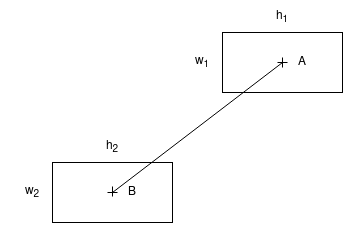
- If not, we move the current word and start again
- If collision on x, we move the y position of the current word and start again
- If collision on y, we move the x position of the current word and start again
- If collision on both sides, the word is placed and we are done!
When we have placed all the words, we calculate the boundary box of our word cloud. Thanks to this box, we can move all the words in our word cloud at once. There is also padding on each word (added when calculating the size of the rectangle), this makes the word cloud more uniform.