Not all of NCBI's databases are searchable by E-utilities or EDirect. The list of available databases' EDirect search names can be found at (https://eutils.ncbi.nlm.nih.gov/entrez/eutils/einfo.fcgi).
Each NCBI database uses specific fields to index records. These fields can be used to search or filter queries. Field names and abbreviations may be the same from one database to another, but the entity in that field is not necessarily the same. For example, "unique ID" [UID] refers to the record identifier for that record, but the UID for a PubMed entry is different from that of an NCBI Gene entry.
Commands use the "-" symbol to give EDirect commands. For example, typing -db tells EDirect to search for a database. The - symbol is followed by the name of the database to search (in this example).
Let's start by seeing what fields are in your NCBI database of choice. The "einfo" command will show you the fields for records in a given NCBI database.
einfo -db gene -fields
Results (screen shot)
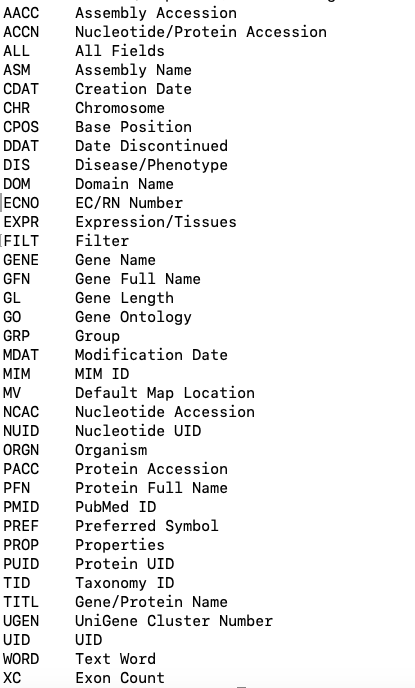
Now write a query to find the field abbreviations in records for the Medical Genetics database. Database name in EDirect is medgen. What is the field abbreviation for clinical features?
Now let's query the NCBI Gene database for amyloid precursor protein using the gene symbol APP. We will do this by adding [GENE] (square brackets) after APP to specify that we want to search the gene name field for APP. Your search query terms must be enclosed in quotation marks. This will give you a count of records that contain your query.
esearch -db gene -query "APP [GENE]"
Results:
<ENTREZ_DIRECT>
  <Db>gene</Db>
  <WebEnv>MCID_6123dc4588fdf404a200442e</WebEnv>
  <QueryKey>1</QueryKey>
  <Count>331</Count>
  <Step>1</Step>
</ENTREZ_DIRECT>
That's a lot of results! Let's get just the human APP gene. You can do this by specifying the organism by using the [ORGN] field tag
esearch -db gene -query "APP [GENE] AND human [ORGN]"
Much better. Just one result.
Now write a query yourself to find all records in MedGen (db name is medgen) with the query term paralysis in the clinical features field (HINT: [CLIN]). How many records do you get?
You can combine multiple queries on a line, sending the results from one query right to the next query using a pipe "|". Let's re-run the gene query and get related protein records for our gene. We can do that with the command elink.
esearch -db gene -query "APP [GENE] AND human [ORGN]" | elink -target protein
Results:
<ENTREZ_DIRECT>
  <Db>protein</Db>
  <WebEnv>MCID_6123dd3418421e5d3154b7cc</WebEnv>
  <QueryKey>4</QueryKey>
  <Count>77</Count>
  <Step>2</Step>
</ENTREZ_DIRECT>
This gives a count of around 70+ records. Let's filter these records so that we only get annotated RefSeq records. Let's add one more pipe to this query, and use efilter to filter by the source refseq.
esearch -db gene -query "APP [GENE] AND human [ORGN]" |elink -target protein | efilter -source refseq
Results:
<ENTREZ_DIRECT>
  <Db>protein</Db>
  <WebEnv>MCID_6123e135b578e16fa434f086</WebEnv>
  <QueryKey>5</QueryKey>
  <Count>12</Count>
  <Step>3</Step>
</ENTREZ_DIRECT>