This directory contains workflows to be used for Lessons using the Carpentries Workbench lesson infrastructure.
The three docker- workflows build lessons and maintain packages.
The workflows run using the workbench-docker container.
This container comprises prebuilt and installed dependencies of the core Workbench packages, i.e. sandpaper, pegboard and varnish.
Two update- workflows handle:
- checking for new renv packages and creating a Pull Request (PR) when a renv.lock file updates (
update-cache.yaml) - checking for updated versions of these workflow files (
update-workflows.yaml)
The rest of the pr- workflows handle pull request management via base GitHub Actions.
For Carpentries Core Curriculum lessons across our lesson programmes, maintenance of these workflows should be minimal. For your own lesson repositories, it is important to understand the different workflows and what they do.
By using prebuilt Docker containers that are managed by the Carpentries core Workbench maintainers, these workflows are designed to be rarely updated.
However, is important to be able to keep them up-to-date when appropriate.
You can do this locally using your own R and Workbench installation, or via the "04 Maintain: Update Workflow Files" (update-workflows.yaml) GitHub Action.
In a terminal/git bash, navigate to the lesson folder where you want to update the workflows.
Then, start an R session and:
# Install/Update sandpaper
options(repos = c(carpentries = "https://carpentries.r-universe.dev/", CRAN = "https://cloud.r-project.org"))
install.packages("sandpaper")

# update the workflows in your lesson
library("sandpaper")
sandpaper::update_github_workflows()
quit()
And then in a bash prompt/git bash terminal:
$ git add .github/workflows
$ git commit -m "Manual update to docker workflows"
$ git push origin main
This will automatically start the "01 Maintain: Build and Deploy Site" workflow.
This will be the extent of requirements for non-renv lessons.
For renv-enabled lessons:
- Cancel the "01 Maintain: Build and Deploy Site" run that automatically started following the push to main
- Run the "02 Maintain: Check for Updated Packages"
- Run the "03 Maintain: Apply Package Cache"
- Run the "01 Maintain: Build and Deploy Site"
This presumes you:
- already have a lesson repository available on GitHub
- have enabled workflows in the lesson repo
- have set up a SANDPAPER_WORKFLOW personal access token (PAT) in the lesson repo
To go through these steps, please follow the Forking a Workbench Lesson documentation.
Once set up, run the "04 Maintain: Update Workflow Files" (update-workflows.yaml) action.
This will raise a PR with any changes to the workflows that are needed. If you are happy with the changes made, you can merge the PR into your lesson repository.
This is the main workflow that you will encounter most often.
It will only act on the main branch of the lesson repository.
This workflow does the following:
- checks out the lesson
- provisions the following resources
- the Workbench Docker container
- lesson dependencies if needed (stored in a cache)
- builds the lesson via
sandpaper:::ci_deploy()
If your lesson contains rendered content using RMarkdown and/or any associated R package dependencies, you will need to generate and apply the renv cache. Please read the Caching section below.
Note
Caching is only relevant for lessons that use Rmd files and renv to manage R packages. If you are building basic markdown documents, caching will not apply to you, and the only workflow that needs to be run is "01 Maintain: Build and Deploy Site".
In summary, generating a reusable package cache is achieved by running the "02 Maintain: Check for Updated Packages" workflow, and then the "03 Maintain: Apply Package Cache" workflow.
These workflows are separated to ensure that once you have a successful build with a working renv cache, this cache is stored within GitHub's infrastructure, and will be reused by the Workbench Docker container. This means that lesson builds will be faster once an renv cache is created and reused by the Docker container.
Another major bonus of this setup is that you can keep using this cache indefinitely to build your lesson. This is important if you need very specific versions of R packages ("pinning").
If and when you want to perform an update to the cache, you can re-run the "02 Maintain: Check for Updated Packages" and verify that your lesson still builds with the new packages. If all looks good, re-run the "03 Maintain: Apply Package Cache" workflow, and this will write a new renv cache file to GitHub.
In any case, the renv cache is invalidated by new versions of the renv.lock file.
This happens:
- if you update your lockfile locally by using the
sandpaper::update_cache()function, and then push it to the lesson repository - when you run the "02 Maintain: Check for Updated Packages" and there are new packages to install
More information on managing local renv caches for lessons can be found in the Sandpaper packages vignettes.
There are times when you may want to go back to a previous renv package cache file:
- if you run "02 Maintain: Check for Updated Packages" and "03 Maintain: Apply Package Cache" and the cache generation fails for some reason
- if there is a new R package that produces incorrect or broken lesson output
To choose a previous cache file version for your builds, go to the Actions tab, and click Caches in the left hand pane.
Cache files should have the following name format:
  OS                                 HASHSUM
[ | ]       [                           |                                  ]
Linux--renv-2e499eb706112971b2cffceb49b55a6efe49f3ed75cd6579b10ff224489daca4
Once you have 2 or more cache files, you can choose which one you want to use.
Copy the hashsum part of the desired cache file you want to use, e.g. 2e499eb706112971b2cffceb49b55a6efe49f3ed75cd6579b10ff224489daca4.
Then either:
- Add a repository variable called CACHE_VERSION, and paste in the hash
- Go to ...
- Run the "01 Maintain: Build and Deploy Site" manually, supplying the CACHE_VERSION input
- Go to ...
If you have no caches listed, make sure to run the "02 Maintain: Check for Updated Packages" and "03 Maintain: Apply Package Cache" to create a new renv cache file.
These workflows run on a mix of schedules, automatic triggers, and at the maintainer's request.
Because they create pull requests that update workflows/require the downstream actions to run,
they need a special repository/organization secret token called
SANDPAPER_WORKFLOW and it must have the public_repo and workflow scope.
This can be an individual user token, OR it can be a trusted bot account. If you have a repository in one of the official Carpentries organisations, then you do not need to worry about this token being present because the Carpentries Core Team will take care of supplying this token.
If you want to use your personal account: you can go to
https://github.com/settings/tokens/new?scopes=public_repo,workflow&description=Sandpaper%20Token
to create a token. Once you have created your token, you should copy it to your
clipboard and then go to your repository's settings > secrets > actions and
create or edit the SANDPAPER_WORKFLOW secret, pasting in the generated token.
If you do not specify your token correctly, the runs will not fail and they will give you instructions to provide the token for your repository.
For lessons that have generated content, we use {renv} to ensure that the output is stable. This is controlled by a single lockfile which documents the packages needed for the lesson and the version numbers. This workflow is skipped in lessons that do not have generated content.
Packages are frequently updated, fixing bugs or introducing new features. It's a good idea to make sure these packages can be both: updated periodically, or; or left static to ensure consistent lesson builds.
The update cache workflow will do this by:
- checking repositories for updates
- updating the renv lockfile
- summarising the updated packages and their versions in a branch called
updates/packages - creating a pull request with only the renv lockfile changed
From here, the markdown documents will be rebuilt and you can inspect what has changed based on how the packages have updated.
If all steps pass in this workflow, you can safely merge the PR that is raised. Once the PR is merged, the "03 Maintain: Apply Package Cache" workflow will run automatically.
This workflow takes the updated lockfile produced in "02 Maintain: Check for Updated Packages" and uses it to produce a cached file stored within GitHub's infrastructure.
This cached file can then be reused repeatedly by the "01 Maintain: Build and Deploy Site" workflow.
This workflow is run automatically when the PR generated by "02 Maintain: Check for Updated Packages" is closed and merged.
You would only ever need to run this workflow manually:
- if your cache gets removed by GitHub due to age or non-use
- if your cache file contains packages that cannot be used by a Workbench Docker container's newer R version
The {sandpaper} repository was designed to do as much as possible to separate the tools from the content. For local builds, this is absolutely true as you can develop and build lessons without any GitHub workflows. When it comes to workflow files on GitHub itself for managed builds online, the workflows must live inside the lesson repository.
This workflow ensures that the workflow files are up-to-date. It downloads the
update-workflows.sh script from GitHub and runs it. The script will do the
following:
- check the recorded version of sandpaper against the current version on GitHub
- update the files if there is a difference in versions
After the files are updated, and if there are any changes, they are pushed to a
branch called update/workflows and a pull request is created. Maintainers are
encouraged to review the changes and accept the pull request if the outputs
are okay.
This update is run weekly or on demand.
Because our lessons execute code, pull requests are a secruity risk for any lesson and thus have security measures associted with them. Do not merge any pull requests that do not pass checks and do not have bots commented on them.
This series of workflows all go together and are described in the following diagram and the below sections:
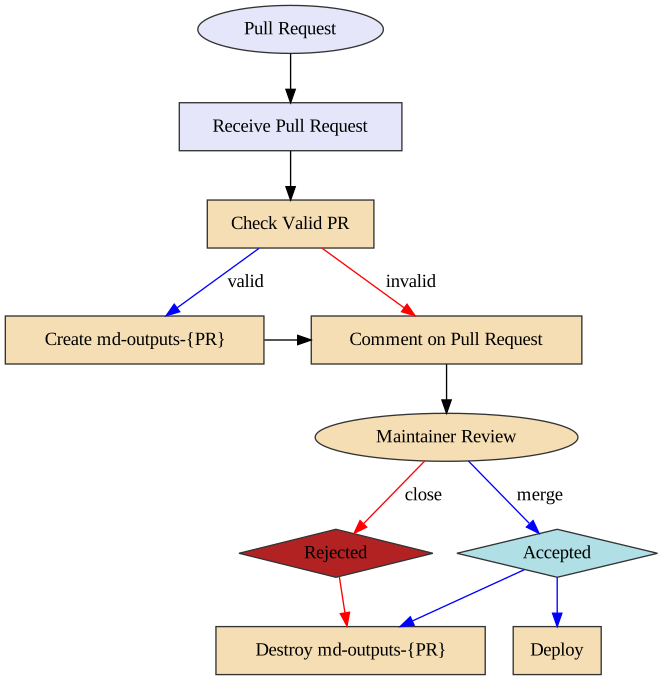
This workflow runs every time a pull request is created and its purpose is to validate that the pull request is okay to run. This means the following things:
- The pull request does not contain modified workflow files
- If the pull request contains modified workflow files, it does not contain modified content files (such as a situation where @carpentries-bot will make an automated pull request)
- The pull request does not contain an invalid commit hash (e.g. from a fork that was made before a lesson was transitioned from styles to use the workbench).
Once the checks are finished, a comment is issued to the pull request, which will allow maintainers to determine if it is safe to run the "Receive Pull Request" workflow from new contributors.
Note of caution: This workflow runs arbitrary code by anyone who creates a pull request. GitHub has safeguarded the token used in this workflow to have no privileges in the repository, but we have taken precautions to protect against spoofing.
This workflow is triggered with every push to a pull request. If this workflow is already running and a new push is sent to the pull request, the workflow running from the previous push will be cancelled and a new workflow run will be started.
The first step of this workflow is to check if it is valid (e.g. that no workflow files have been modified). If there are workflow files that have been modified, a comment is made that indicates that the workflow is not run. If both a workflow file and lesson content is modified, an error will occurr.
The second step (if valid) is to build the generated content from the pull request. This builds the content and uploads three artifacts:
- The pull request number (pr)
- A summary of changes after the rendering process (diff)
- The rendered files (build)
The artifacts produced are used by the "Comment on Pull Request" workflow.
This workflow is triggered if the docker_pr_receive.yaml workflow is successful.
The steps in this workflow are:
- Test if the workflow is valid and comment the validity of the workflow to the pull request.
- If it is valid: create an orphan branch with two commits: the current state of the repository and the proposed changes.
- If it is valid: update the pull request comment with the summary of changes
Importantly: if the pull request is invalid, the branch is not created so any malicious code is not published.
From here, the maintainer can request changes from the author and eventually either merge or reject the PR. When this happens, if the PR was valid, the preview branch needs to be deleted.
Triggered any time a pull request is closed. This emits an artifact that is the pull request number for the next action
Tiggered by pr-close-signal.yaml. This removes the temporary branch associated with
the pull request (if it was created).