The list of field types available for creating:
- Varchar – a single-line text;
- Enum – a selectbox, only one value can be selected;
- Text – a multiline text with markdown support;
- Date – date w/o time;
- Date-Time – date and time;
- Currency – for currency values, a float number and currency code;
- Int – a whole number;
- Float – a number with a decimal part;
- Boolean – a checkbox;
- Multi-Enum – a list of values, multiple values can be selected;
- Checklist – a list of checkboxes;
- Array – a list of values, similar to Multi-Enum field;
- Address – an address with street, city, state, postal code and country;
- Url – for storing links;
- Wysiwyg – similar to Text field, but with HTML support;
- File – for file uploading;
- Image – for image uploading;
- Attachment-Multiple – for multiple file uploading;
- Number – an auto-incrementing number of string type with a possible prefix and specific length;
- Auto-increment – a generated read-only auto-incrementing integer number;
- Barcode – a barcode, can be printed to PDF.
- Foreign - a field of a related record. Read-only.
Field types not available for creating directly:
- Email – a set of email addresses;
- Phone – a set of phone numbers;
- Link – a record related through Belongs-To (many-to-one or one-to-one) relationship;
- Link-Parent – a record related through Belongs-To-Parent relationship; can be of different entity types;
- Link-Multiple – a set of records related through Has-Many relationship.
- Label – a name of a field displayed on UI;
- Required – whether a field is mandatory; user won't be able to save a record w/o filling the field;
- Audited – field changes will be stored in stream;
- Read-only – a field value can't be specified; can be calculated by formula or workflow rule;
- Default – a value pre-filled when creating a new record;
- Disable Inline Edit – useful when using dynamic forms logic;
- Tooltip Text – info about a field for users.
Provides an ability to make forms dynamic. It's possible to define conditions making certain fields visible, required or read-only. Conditions will be checked automatically when data in the form is changed.
For Enum, Array, Multi-Enum, Checklist fields, it's possible to define different sets of options that will be available for the field depending on which condition is met. See more here.
Available items:
- Conditions making field visible
- Conditions making field required
- Conditions making field read-only
- Conditional options – for enum, multi-enum, checklist, array, varchar fields
Any regex can be used in the "Pattern" property of supported fields. By default, EspoCRM includes the following patterns:
$noBadCharacters$noAsciiSpecialCharacters$latinLetters$latinLettersDigits$latinLettersDigitsWhitespace$latinLettersWhitespace$digits
A single-line text.
Parameters:
- Max-length – a max acceptable length of text;
- Options – a pre-defined list of values for an autocomplete;
- Pattern – a regular expression to check a field value against.

??? example "Example Varchar JSON Configuration (entityDefs)"
```
"someVarcharFieldName": {
    "type": "varchar",
    "required": false,
    "maxLength": 150,
    "default": "some test",
    "options": [
        "option 1, option2, option 3",
        "another option"
    ],
    "pattern": "$noBadCharacters",
    "audited": false,
    "readOnly": false,
    "inlineEditDisabled": false,
    "tooltip": false,
    "isCustom": true
}
```
Labels for the options can be updated in the Internationalization files (e.g., `custom/Espo/Custom/Resources/i18n/en_US/TestBaseEntity.json`)
Selectbox, only one value can be selected.
Parameters:
- Options – a list of values (key => label pairs); a color (style) for each value can be specified (applied when param Display as Label is enabled);
- Is Sorted – to sort a list alphabetically;
- Display as Label – a value will be displayed as a label with color; a color for each option can be specified.
- Style - Defines color properties to the options based on theme. Includes "success", "info", "warning", "primary," and "danger."
It's possible to define conditional options with Dynamic Logic.

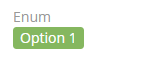
??? example "Example Enum JSON Configuration (entityDefs)"
```
"someEnumFieldName": {
    "type": "enum",
    "options": [
        "Option 1",
        "Option 2",
        "Option 3"
    ],
    "style": {
        "Option 1": null,
        "Option 2": null,
        "Option 3": null
    },
    "isSorted": true,
    "displayAsLabel": false,
    "audited": false,
    "readOnly": false,
    "inlineEditDisabled": false,
    "default": "Option 1",
    "tooltip": false,
    "isCustom": true
}
```
Labels for the options can be updated in the Internationalization files (e.g., `custom/Espo/Custom/Resources/i18n/en_US/TestBaseEntity.json`)
A multiline text with markdown support.
Parameters:
- Max-length – a max acceptable length of a text;
- Disable Text Cut – if not checked, then long texts will be shortened and can be expanded (for the detail view mode);
- Number of rows of textarea – a max number of rows before scroll bar appears (for the edit view mode);
- Cut Height (px) – a max height of a text, if longer, then it will be cut (for the detail view mode);
- Display raw text (no markdown) – to disable markdown support.
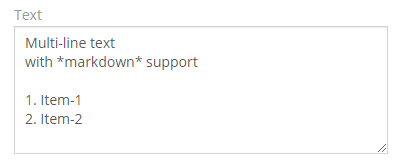
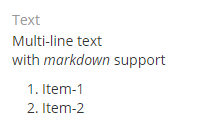
??? example "Example Text JSON Configuration (entityDefs)"
```
"someTextFieldName": {
    "type": "text",
    "required": false,
    "rowsMin": <someInt>,
    "cutHeight": <someInt>,
    "default": "Some default test text",
    "maxLength": 255,
    "seeMoreDisabled": false,
    "rows": <someInt>,
    "displayRawText": false,
    "readOnly": false,
    "audited": false,
    "inlineEditDisabled": false,
    "tooltip": false,
    "isCustom": true
}
```
Date w/o time.
Parameters:
- After (field) – a validation: a date value should be after a date value of a specified field. See example below;
- Before (field) – a validation: a date value should be before a date value of a specified field. See example below;
- Use Numeric Format – if not checked, then words 'today', 'yesterday', 'tomorrow' are in the detail view mode.
- Default - A Javascript function can be provided to this field. See example below.


??? example "Example Date JSON Configuration (entityDefs)"
```
"someDateFieldName": {
    "notNull": false,
    "type": "date",
    "required": false,
    "default": "javascript: return this.dateTime.getDateShiftedFromToday(1, 'days');",
    "after": "createdAt",
    "before": "modifiedAt",
    "useNumericFormat": false,
    "audited": false,
    "readOnly": false,
    "inlineEditDisabled": false,
    "tooltip": false,
    "isCustom": true
}
```
Date and time.
Parameters:
- After (field) – a validation: a date value should be after a date value of a specified field;
- Before (field) – a validation: a date value should be before a date value of a specified field;
- Use Numeric Format – if not checked, then words 'today', 'yesterday', 'tomorrow' are in the detail view mode;
- Minutes Step – defines items displayed in the minutes dropdown (in the edit mode).


??? example "Example Date-Time JSON Configuration (entityDefs)"
```
"someDatetimeFieldName": {
    "notNull": false,
    "type": "datetime",
    "required": false,
    "after": "",
    "before": "",
    "useNumericFormat": false,
    "audited": false,
    "readOnly": false,
    "inlineEditDisabled": false,
    "minuteStep": 30,
    "tooltip": false,
    "isCustom": true
}
```
A currency value. A float number with a currency code.
Parameters:
- Min – a validation: min acceptable value; if empty, then no validation applied;
- Max – a validation: max acceptable value; if empty, then no validation applied;
- Only default currency – only one (default) currency will be available if enabled;
- Disable Conversion – the currency conversion action won't change the currency of the field.


??? example "Example Currency JSON Configuration (entityDefs)"
```
"someCurrencyFieldName": {
    "type": "currency",
    "required": false,
    "onlyDefaultCurrency": false,
    "conversionDisabled": false,
    "min": <someInt>,
    "max": <someInt>,
    "audited": false,
    "readOnly": false,
    "inlineEditDisabled": false,
    "tooltip": false,
    "isCustom": true
}
```
A whole number.
Parameters:
- Min – a validation: min acceptable value; if empty, then no validation applied;
- Max – a validation: max acceptable value; if empty, then no validation applied;
- Disable Formatting – if not checked, then a value is formatted with a thousand separator.
??? example "Example Integer JSON Configuration (entityDefs)"
```
"someIntegerFieldName": {
    "type": "int",
    "required": false,
    "default": <someInt>,
    "min": <someInt>,
    "max": <someInt>,
    "disableFormatting": false,
    "audited": false,
    "readOnly": false,
    "inlineEditDisabled": false,
    "tooltip": false,
    "isCustom": true
}
```
A number with a decimal part.
Parameters:
- Min – a validation: min acceptable value; if empty, then no validation applied;
- Max – a validation: max acceptable value; if empty, then no validation applied;
- Decimal Places – how many numbers of decimal part to display in read mode.
??? example "Example Float JSON Configuration (entityDefs)"
```
"someFloatFieldName": {
    "notNull": false,
    "type": "float",
    "required": false,
    "default": <someFloat>,
    "min": <someFloat>,
    "max": <someFloat>,
    "decimalPlaces": <someInt>,
    "audited": false,
    "readOnly": false,
    "inlineEditDisabled": false,
    "tooltip": false,
    "isCustom": true
}
```
A checkbox. Two possible values: true and false.

??? example "Example Boolean JSON Configuration (entityDefs)"
```
"someBooleanFieldName": {
    "notNull": true,
    "type": "bool",
    "default": false,
    "audited": false,
    "readOnly": false,
    "inlineEditDisabled": false,
    "tooltip": false,
    "isCustom": true
}
```
A list of values, multiple values can be selected. The list is ordered.

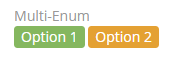
Parameters:
- Options – a list of values (key => label pairs); a color (style) for each value can be specified (applied when param Display as Label is enabled);
- Is Sorted – to sort a list alphabetically;
- Allow Custom Options – if checked, a user can add custom values (not defined by Options parameter) by typing text and pressing the enter key;
- Max Item Count – a validation: how many items can be added;
- Display as Label – values will be displayed as a label with color; a color for each option can be specified;
- Display as List – each value will be displayed in a new line;
- Pattern – a regular expression to check a field value against.
??? example "Example Multi-Enum JSON Configuration (entityDefs)"
```
"someMultiEnumFieldName": {
    "type": "multiEnum",
    "storeArrayValues": false,
    "required": false,
    "options": [
        "Option 1",
        "Option 2",
        "Option 3"
    ],
    "style": {
        "Option 1": null,
        "Option 2": null,
        "Option 3": null
    },
    "isSorted": false,
    "allowCustomOptions": false,
    "maxCount": <someInt>,
    "displayAsLabel": false,
    "displayAsList": false,
    "pattern": "$noBadCharacters",
    "audited": false,
    "readOnly": false,
    "inlineEditDisabled": false,
    "tooltip": false,
    "isCustom": true
}
```
Labels for the options can be updated in the Internationalization files (e.g., `custom/Espo/Custom/Resources/i18n/en_US/TestBaseEntity.json`)
A list of checkboxes.
Parameters:
- Options – a list of values (key => label pairs); a color (style) for each value can be specified (applied when param Display as Label is enabled);
- Is Sorted – to sort a list alphabetically;
- Max Item Count – a validation: how many items can be checked;
??? example "Example Checklist JSON Configuration (entityDefs)"
```
"someChecklistFieldName": {
    "type": "checklist",
    "storeArrayValues": true,
    "required": false,
    "options": [
        "Item 1",
        "Item 2",
        "Item 3",
        "Item 4"
    ],
    "isSorted": false,
    "maxCount": <someInt || null>,
    "audited": false,
    "readOnly": false,
    "inlineEditDisabled": false,
    "tooltip": false,
    "isCustom": true
}
```
Labels for the options can be updated in the Internationalization files (e.g., `custom/Espo/Custom/Resources/i18n/en_US/TestBaseEntity.json`)
A list of values, similar to Multi-Enum field.
Parameters:
- Options – a list of values (key => label pairs); if no options specified, then a user will be able to add any options;
- Empty string value is not allowed – if not checked, a user can add an empty string as an item;
- Max Item Count – a validation: how many items can be added;
- Display as List – each value will be displayed in a new line;
- Pattern – a regular expression to check a field value against.
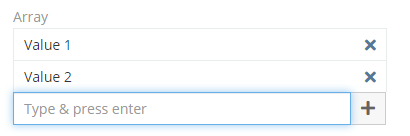
??? example "Example Array JSON Configuration (entityDefs)"
```
"someArrayFieldName": {
    "type": "array",
    "storeArrayValues": true,
    "required": false,
    "noEmptyString": false,
    "options": [
        "Option 1",
        "Option 2",
        "Option 3"
    ],
    "displayAsList": false,
    "maxCount": <someInt>,
    "pattern": "$noBadCharacters",
    "audited": false,
    "readOnly": false,
    "inlineEditDisabled": false,
    "tooltip": false,
    "isCustom": true
}
```
Labels for the options can be updated in the Internationalization files (e.g., `custom/Espo/Custom/Resources/i18n/en_US/TestBaseEntity.json`)
An address with street, city, state, postal code and country.
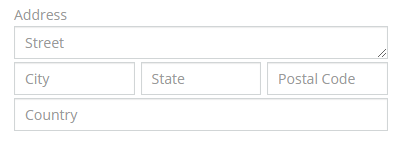
??? example "Example Address JSON Configuration (entityDefs)"
```
"someAddressFieldName": {
    "type": "address",
    "viewMap": true,
    "inlineEditDisabled": true,
    "tooltip": true,
    "isCustom": true
}
```
For storing links.
Parameters:
- Max-length – a max acceptable length of text;
- Strip – if checked, then a protocol part and trailing
/will be stripped.
??? example "Some Example URL Field (entityDefs)"
```
"someUrlFieldName": {
    "type": "url",
    "required": false,
    "default": "https://www.someurl.com",
    "maxLength": 255,
    "strip": false,
    "audited": false,
    "readOnly": false,
    "inlineEditDisabled": false,
    "tooltip": false,
    "isCustom": true
}
```
Similar to Text field, but with HTML support.
Parameters:
- Height (px) – a height of the field (in the edit view mode); if empty – then height is flexible;
- Min Height (px) – a min height of the field (in the edit view mode);
- Use Iframe – if checked, then HTML will be placed into IFRAME element.
??? example "Example Wysiwyg JSON Configuration (entityDefs)"
```
"someWysiwygFieldName": {
    "type": "wysiwyg",
    "required": false,
    "default": "Some default text",
    "height": <someInt>,
    "minHeight": <someInt>,
    "readOnly": false,
    "useIframe": false,
    "maxLength": <someInt>,
    "audited": false,
    "inlineEditDisabled": false,
    "tooltip": false,
    "isCustom": true
}
```
For file uploading.
Parameters:
- Source List – allows a user to get a file from another record (Documents source is available out-of-the-box);
- Max File Size (Mb) – a validation;
- Accept – which file types can be accepted; see info about file types.
??? example "Example File JSON Configuration (entityDefs)"
```
"someFileName": {
    "type": "file",
    "required": false,
    "sourceList": [
        "Document"
    ],
    "maxFileSize": <someInt>,
    "accept": [
        "image/*",
        "audio/*",
        "video/*",
        ".zip",
        ".pdf",
        ".odt",
        ".ods",
        ".odp",
        ".docx",
        ".xlsx",
        ".pptx",
        ".doc",
        ".xls",
        ".ppt",
        ".rtf",
        ".csv",
        ".md",
        ".txt"
    ],
    "audited": false,
    "inlineEditDisabled": false,
    "tooltip": false,
    "isCustom": true
}
```
For image uploading.
Parameters:
- Preview Size – defines a size of an image displayed on the detail/list view;
- Max File Size (Mb) – a validation.
??? example "Example Image JSON Configuration (entityDefs)"
```
"someImageField": {
    "type": "image",
    "required": false,
    "previewSize": "small",
    "maxFileSize": <someInt>,
    "audited": false,
    "inlineEditDisabled": false,
    "tooltip": false,
    "isCustom": true
}
```
Allows to upload multiple files.
Parameters:
- Source List – allows a user to get a file from another record (Documents source is available out-of-the-box);
- Max File Size (Mb) – a validation;
- Accept – which file types can be accepted; see info about file types;
- Preview Size – defines a size of an image displayed on the detail/list view.
??? example "Example Attachment-Multiple JSON Configuration (entityDefs)"
```
"someAttachmentMultipleName": {
    "type": "attachmentMultiple",
    "required": false,
    "previewSize": "medium",
    "sourceList": [],
    "maxFileSize": <someInt>,
    "accept": [],
    "inlineEditDisabled": false,
    "tooltip": false,
    "isCustom": true
}
```
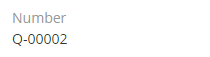
An auto-incrementing number of string type with a possible prefix and specific length.
Parameters:
- Prefex – a text that will be preprended to a number;
- Next Number – a number that will be applied to the next created record;
- Pad Length – a length of the numeric part; if less, then will be padded with zero digits, e.g.
00001.
??? example "Example Auto-Incrementing Number JSON Configuration (entityDefs)"
```
"someAutoIncrementNumberFieldName": {
    "type": "number",
    "len": <someInt>,
    "notNull": false,
    "unique": false,
    "nextNumber": <someInt - default 1>,
    "padLength": <someInt - default 5>,
    "prefix": "Some Prefix",
    "inlineEditDisabled": false,
    "tooltip": false,
    "isCustom": true
}
```
A generated read-only auto-incrementing integer number.
??? example "Example Auto-increment JSON Configuration (entityDefs)"
```
"someAutoIncrementFieldName": {
    "type": "autoincrement",
    "autoincrement": true,
    "unique": true,
    "inlineEditDisabled": false,
    "tooltip": false,
    "isCustom": true
}
```
A barcode. Can be printed to PDF.
Parameters:
- Code Type – a type of barcode; supported types: CODE128, CODE128A, CODE128B, CODE128C, EAN13, EAN8, EAN5, EAN2, UPC, UPCE, ITF14, pharmacode, QRcode;
- Last Character – for EAN13 type, often is
>.
??? example "Example Barcode JSON Configuration (entityDefs)"
```
"someBarcodeFieldName": {
    "type": "barcode",
    "len": 255,
    "required": false,
    "lastChar": ">",
    "readOnly": false,
    "inlineEditDisabled": false,
    "codeType": "CODE128",
    "tooltip": false,
    "isCustom": true
}
```
A field of a related record. Read-only.
Parameters:
- Link – defines where the field will be taken from.
- Field – a field of a related record.
??? example "Example Foreign Field JSON Configuration (entityDefs)"
```
"someForeignFieldName": {
    "readOnly": true,
    "type": "foreign",
    "link": "<someEntity>",
    "field": "<someEntityField>",
    "view": "views/fields/foreign-varchar",
    "tooltip": false,
    "isCustom": true
}
```
??? example "Example iFrame JSON Configuration (entityDefs)"
```
"someTestIframeField": {
    "type": "iframe",
    "dynamicLogicVisible": null,
    "dynamicLogicReadOnly": null,
    "dynamicLogicInvalid": null,
    "name": "someTestIframeField",
    "label": "Some Test Iframe Field",
    "inlineEditDisabled": false,
    "tooltipText": "test",
    "tooltip": false,
    "isCustom": true
}
```
A set of email addresses with their parameters: Opted-out, Invalid, Primary.
A set of phone numbers with their parameters: Type, Opted-out, Invalid, Primary.
Parameters:
- Type List – a list of types available for phone numbers (e.g. Home, Office).
A record related through Belongs-To (many-to-one or one-to-one) relationship.
A record related through Belongs-To-Parent relationship. Can be of different entity types.
Parameters:
- Entity List – a list of entity types available to be related through the field.
A set of records related through Has-Many (many-to-many or one-to-many) relationship. Not all relationships have their link-multiple fields. Only those do, where Link-Multiple parameter(s) is enabled.