Dotkernel Admin follows the PSR-4 standards.
It is considered good practice to standardize the file structure of projects.
When using Dotkernel Admin the following structure is installed by default:
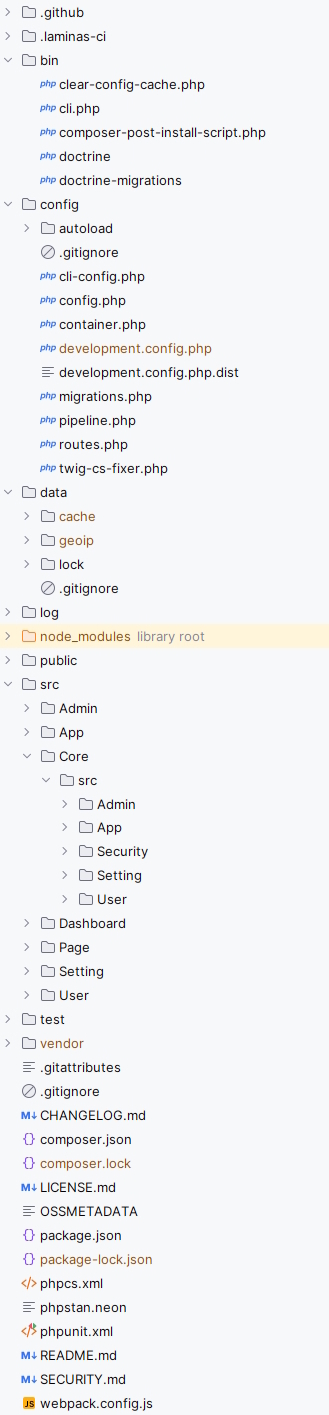
.github- Contains GitHub workflow files.laminas-ci- Contains laminas-ci workflow files
This folder contents are
clear-config-cache.php- Removes the config cache filedata/cache/config-cache.php; available only when development mode is enabledcli.php- Used to build console applications based on laminas-clidoctrine- Used by the doctrine fixtures to populate the database tables
This folder contains all application-related config files:
cli-config.php- Command line interface configuration used by migrations, fixtures, cronsconfig.php- Registers ConfigProviders for installing packagescontainer.php- Main service container that provides access to all registered servicesdevelopment.config.php.dist- Activates debug mode; gets symlinked asdevelopment.config.phpwhen enabling development modemigrations.php- Configuration for database migration, like migration file location and table to save the migration logpipeline.php- Contains a list of middlewares, in the order of their executiontwig-cs-fixer.php- Configuration file for Twig code style checker/fixer
This folder contains all service-related local and global config files:
app.global.php- Configures basic app variablesauthentication.global.php- Defines the Admin identityauthorization.global.php- Configures permissions for user rolesauthorization-guards.global.php- Configures access per route for user rolescli.global.php- Configures clicors.global.php- Configures Cross-Origin Resource Sharing, like call origin, headers, cookiesdependencies.global.php- Config file to set global dependencies that should be accessible by all modulesdevelopment.local.php.dist- Gets symlinked asdevelopment.local.phpwhen enabling development mode; activates error handlerserror-handling.global.php- Configures and activates error logslocal.php.dist- Local config file where you can overwrite application name and URLlocal.test.php.dist- Local configuration for functional testsmail.global.php- Mail configuration; e.g. sendmail vs smtp, message configuration, mail loggingmezzio.global.php- Mezzio core config filenavigation.global.php- Configures the top menusession.global.php- Configures the sessiontemplates.global.php- dotkernel/dot-twigrenderer config file
This folder is a storage for project data files and service caches. It contains these folders:
cache- Twig and Doctrine cache filesgeoip- Holds the GeoLite2 databaseslock- Contains lock files generated bydotkernel/dot-cli
AVOID storing sensitive data on the repository!
This folder stores daily log files.
When you access the application from the browser, (if not already created) a new log file gets created in the format specified in the config/autoload/error-handling.global.php config file under the stream array key.
This folder contains all publicly available assets and serves as the entry point of the application:
cssandjs- Contains the css and js file(s) generated by the webpack (npm) from the assets folderfontsandimages- Contain the font and image file(s) copied by the webpack (npm) from the assets folderuploads- a folder that normally contains admin avatar images.htaccess- server configuration file used by Apache web server; it enables the URL rewrite functionalityindex.php- the application's main entry pointrobots.txt.dist- a sample robots.txt file that allows/denies bot access to certain areas of your application; activate it by duplicating the file asrobots.txtand comment out the lines that don't match your environment
This folder contains a separate folder for each Module.
These are the modules included by default:
Admin- Contains functionality for managing users withadminrole; note these are users save in theadmindatabase tableApp- Contains core functionality, from authentication, to rendering, to error reportingCore– Contains the shared logic and base infrastructure used across multiple modulesDashboard– Contains the structure and rendering logic of the main admin dashboard, including layout, widgets, and default admin landing pagePage- Contains reusable UI components and layout elements such as dropdowns, modal popups, error displays, and tooltips for the admin interfaceSetting- Contains functionality for saving and reading display settingsUser- Contains functionality for managing users; note these are users save in theuserdatabase table
Each Module folder, in turn, should contain the following folders, unless they are empty:
src/Handler- Action classessrc/InputFilter- Validation rules for inputssrc/Service- Service classes
The above example is just some of the folders a project may include, but they should give you an idea about the recommended structure.
Other classes the src folder may include are Adapter, Factory, Form, Delegator etc.
The src folder in each Module folder normally also contains these files:
ConfigProvider.php- Configuration data for the moduleRoutesDelegator.php- Module specific route registrations
This folder contains the template files, used for example to help render e-mail templates.
twigis used as Templating Engine. All template files have the extension.html.twig.
The Core module is a common codebase set up to be used by the applications you added to your project.
These are the submodules included by default:
Admin- Contains logic for the admin submodule featuresApp- Contains shared application-level services and infrastructure utilitiesSecurity- Contains authentication, authorization, and related security mechanismsSetting- Contains configuration and application settings managementUser- Contains user entities, repositories, and services handling user data and logic
Each submodule folder should contain:
src/Entity- Used by database entitiessrc/Repository- Entity repository folderConfigProvider.php- Configuration data for the module
The above example is just some of the folders a project may include, but they should give you an idea about the recommended structure.
Other classes the src folder may include are DBAL, Enum, Command, Factory etc.