ThreadFix REST Interface
Describes the ThreadFix REST interface
The ThreadFix REST interface includes a subset of the full ThreadFix functionality intended to allow scripting of some simple tasks. It uses Jackson serialization to return JSON representations of ThreadFix objects. It does not use HTTP verbs such as PUT and DELETE like some REST interfaces, instead using the URL to communicate the desired action.
The REST methods return either an error message or a JSON representation of a relevant object or array of relevant objects.
The ThreadFix REST interface is available in all versions beginning with ThreadFix 2.1. Any future API changes are guaranteed to be backwards compatible with the ThreadFix 2.1 API; Denim Group will make any future additions or changes of functionality by adding new methods.
We would love to hear any feedback!
All of these paths are meant to be added to your ThreadFix installation path. For instance, with an installation at
[http://localhost:8080/threadfix/] (http://localhost:8080/threadfix/)
the path for the Team index is at
[http://localhost:8080/threadfix/rest/teams/] (http://localhost:8080/threadfix/rest/teams/)
Also, it is important to remember to:
- Add the
Accept=application/jsonheader to each request - Add your API Key as a parameter to every request using apiKey for the name. API Keys are generated in config/API Keys
- Add any files as Multipart files
See also: [CommandLineInterface] (Command-Line-Interface)
The threadfix-cli module contains a developer-friendly API in the class ThreadFixRestClient. We will put this artifact in Maven soon, but for now the only way to get it is to compile from source. Assuming Git and Maven are installed, this can be accomplished with the following steps:
git clone https://github.com/denimgroup/threadfix
cd threadfix
mvn clean install
The resulting JAR will be in the folder threadfix-cli/target. Add the JAR to your classpath and get an instance of the client using the ThreadFixRestClientImpl(String url, String apiKey) constructor. All of the methods return RestResponse<T> objects, which contain:
- A boolean success field
- A String message field containing the error message if there is one
- A
Tobject field containing the target object if the call succeeded. For instance, the search application method would be of typeRestResponse<Application>and the object field would be of type Application.
The JSON returned from these methods can be found at https://github.com/denimgroup/threadfix/wiki/Command-Line-Interface.
| Method Name | Returns |
|---|---|
| Team Index | Array of active Teams |
| New Team | Newly created Team with the supplied name |
| Team Detail | Requested Team |
| New Application | New Application with the supplied Team, Name, and URL |
| Application Detail | Requested Application |
| Upload Scan | Scan generated from parsing the given file in the channel |
| Set WAF | Returns the WAF. Sets the WAF of the specified Application. |
| WAF Index | Array of existing WAFs |
| New WAF | New WAF with the given name and WAF type |
| WAF Detail | Requested WAF |
| Get WAF Rules | Array of WAF Rules for requested WAF |
| Upload WAF Log | List of parsed Security Events from Log |
| Add Manual Finding | JSON for the new Finding |
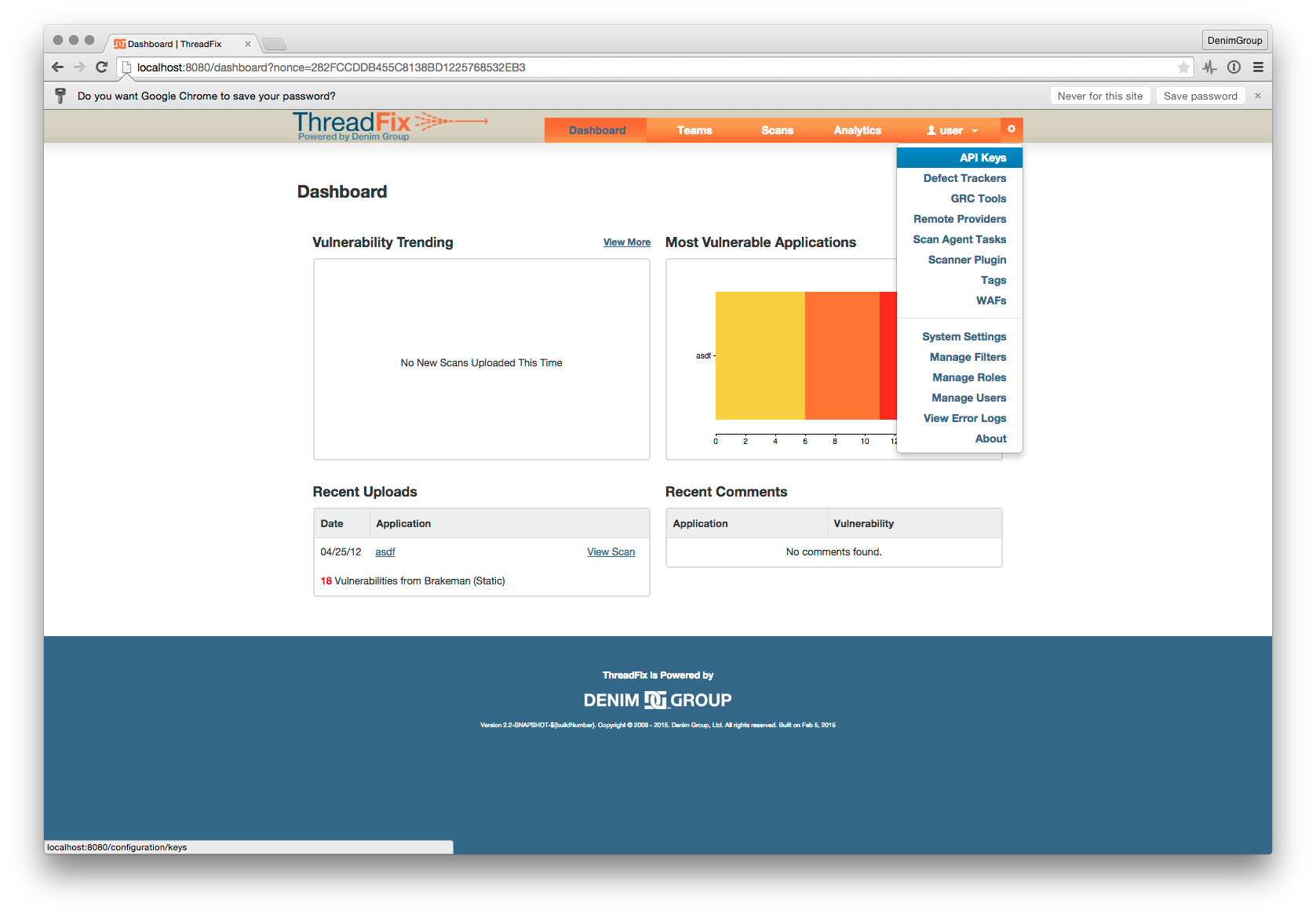
Every request must pass a valid API key as a GET or POST parameter. The API key can be generated on the API Key page. Navigate to the API Key page by expanding your menu and clicking on 'API Keys'. See image below:
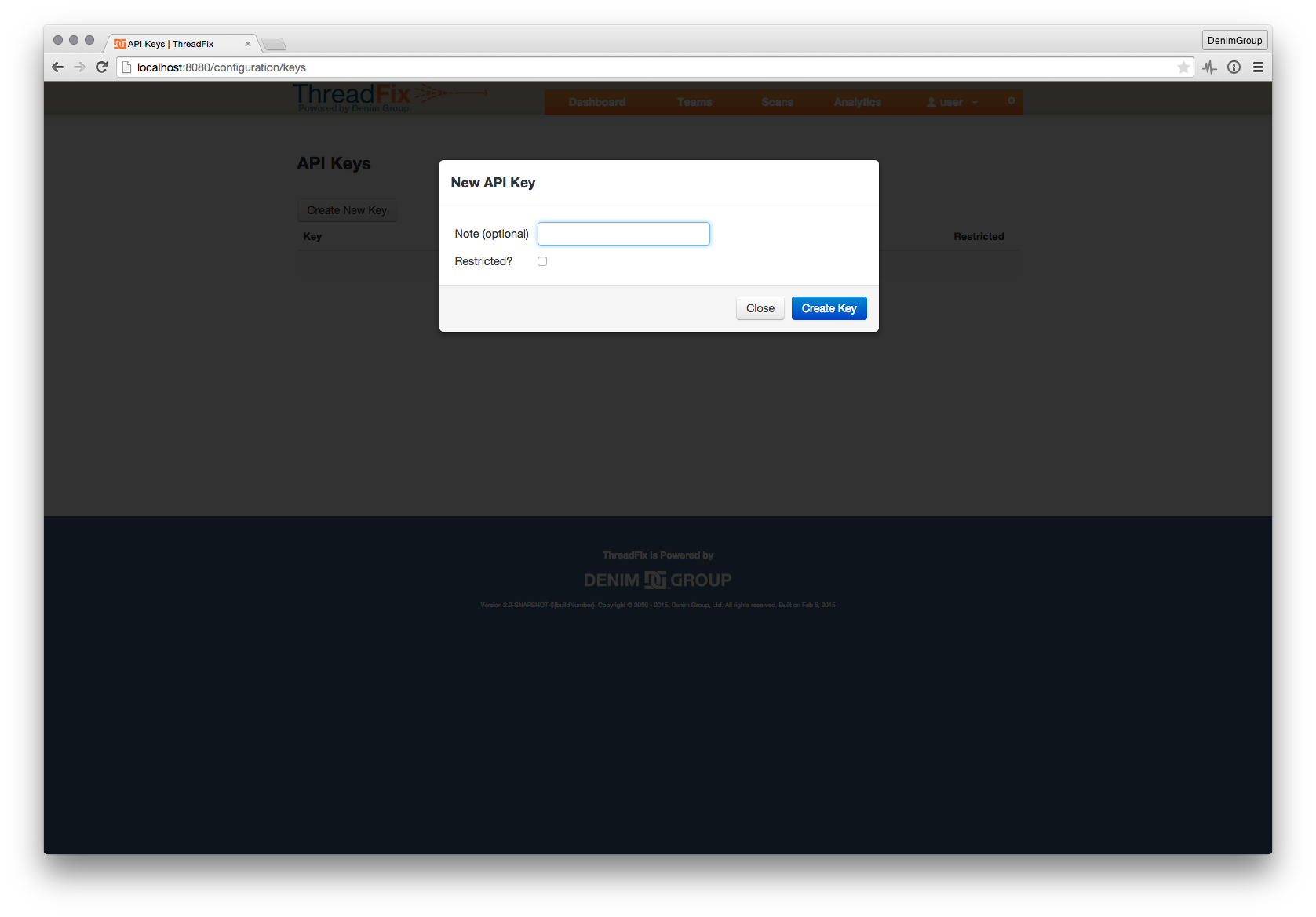
After navigating to the API Keys page simply click the 'Create New Key' button. See image below:
You should get an authentication error like the following for incorrect or missing API keys: API Auth Error
Any of the calls that have the ability to write to the Threadfix database can be restricted by editing the API key accessing those calls to be a 'Restricted' API key. You should get the following error if you make a restricted call to the API with a 'Restricted' API key: Restricted API Call Error
The objects returned by all of these methods are wrapped in ThreadFix's RestResponse class. The code is here: RestResponse.java
Code parsing ThreadFix REST responses can parse this object to know whether the response was successful and then access the object or the error message. The JSON format for this class is:
{
    "message": "",
    "success": true,
    "responseCode": -1,
    "object": {
        "name": "sampleObject"
    }
}These API methods are guaranteed to stay the same between versions. Additions or changes in functionality will be accomplished by adding new methods, ensuring forward compatibility with third-party extensions.
| Descriptor | Value |
|---|---|
| HTTP Method | POST |
| Description | Creates a team with the given name and returns its JSON. |
| Restricted | True |
| Parameter | Value | Required | Description |
|---|---|---|---|
Accept |
String |
yes | A value of application/json must be provided. |
| Parameter | Value | Required | Description |
|---|---|---|---|
name |
String |
yes | The name of the new team that is being created. |
curl --insecure -H 'Accept: application/json' -X POST --data 'name=TEST123' https://host.com:8443/threadfix/rest/teams/new?apiKey={apiKey}| Descriptor | Value |
|---|---|
| HTTP Method | GET |
| Description | Retrieves a team using the given teamId. |
| Restricted | False |
| Parameter | Value | Required | Description |
|---|---|---|---|
Accept |
String |
yes | A value of application/json must be provided. |
curl --insecure -H 'Accept: application/json' https://host.com:8443/threadfix/rest/teams/3?apiKey={apiKey}| Descriptor | Value |
|---|---|
| HTTP Method | GET |
| Description | Retrieves a team using the given name. |
| Restricted | False |
| Parameter | Value | Required | Description |
|---|---|---|---|
Accept |
String |
yes | A value of application/json must be provided. |
| Parameter | Value | Required | Description |
|---|---|---|---|
name |
String |
yes | The name of the team to be retrieved. |
curl --insecure -H 'Accept: application/json' https://host.com:8443/threadfix/rest/teams/lookup?name=TEST%20123&apiKey={apiKey}| Descriptor | Value |
|---|---|
| HTTP Method | GET |
| Description | Retrieves all the teams. |
| Restricted | False |
| Parameter | Value | Required | Description |
|---|---|---|---|
Accept |
String |
yes | A value of application/json must be provided. |
curl --insecure -H 'Accept: application/json' https://host.com:8443/threadfix/rest/teams?apiKey={apiKey}| Descriptor | Value |
|---|---|
| HTTP Method | POST |
| Description | Creates an application under the given team with id of teamId. |
| Restricted | True |
| Parameter | Value | Required | Description |
|---|---|---|---|
Accept |
String |
yes | A value of application/json must be provided. |
| Parameter | Value | Required | Description |
|---|---|---|---|
name |
String |
yes | The name of the new application that is being created. |
url |
String |
no | The url of where the application being assesed lives. |
curl --insecure -H 'Accept: application/json' -X POST --data 'name=Test%20App%201&url=http://example.com' https://host.com:8443/threadfix/rest/teams/1/applications/new?apiKey={apiKey}| Descriptor | Value |
|---|---|
| HTTP Method | GET |
| Description | Retrieves up an application using the given appId. |
| Restricted | False |
| Parameter | Value | Required | Description |
|---|---|---|---|
Accept |
String |
yes | A value of application/json must be provided. |
curl --insecure -H 'Accept: application/json' https://host.com:8443/threadfix/rest/applications/1?apiKey={apiKey}| Descriptor | Value |
|---|---|
| HTTP Method | GET |
| Description | Retrieves an application using the given teamName and appName. |
| Restricted | False |
| Parameter | Value | Required | Description |
|---|---|---|---|
Accept |
String |
yes | A value of application/json must be provided. |
| Parameter | Value | Required | Description |
|---|---|---|---|
name |
String |
yes | The name of the application to be retrieved. |
curl --insecure -H 'Accept: application/json' https://host.com:8443/threadfix/rest/applications/TEST123/lookup?apiKey={apiKey}&name=Example+App| Descriptor | Value |
|---|---|
| HTTP Method | POST |
| Description | Sets parameters for the Hybrid Analysis Mapping ThreadFix functionality. |
| Restricted | False |
| Parameter | Value | Required | Description |
|---|---|---|---|
Accept |
String |
yes | A value of application/json must be provided. |
| Parameter | Value | Required | Description | Values |
|---|---|---|---|---|
frameworkType |
String |
yes | The web framework the app was built on. |
"NONE", "DETECT", "JSP", "SPRING_MVC"
|
repositoryUrl |
String |
yes | The git repository where the source code for the app can be found. | N/A |
curl --insecure -H 'Accept: application/json' -X POST --data 'frameworkType=NONE&repositoryUrl=http://repo.example.com' https://host.com:8443/threadfix/rest/applications/4/setParameters?apiKey={apiKey}The range of possible frameworkType values will increase over time as more frameworks are added to ThreadFix. If you are interested in ThreadFix support for a new framework, please let us know! User feedback can help us to prioritize features. Email us at support@threadfix.com.
| Descriptor | Value |
|---|---|
| HTTP Method | POST |
| Description | Sets the application's WAF to the WAF with the specified ID. |
| Restricted | True |
| Parameter | Value | Required | Description |
|---|---|---|---|
Accept |
String |
yes | A value of application/json must be provided. |
| Parameter | Value | Required | Description |
|---|---|---|---|
wafId |
Integer |
yes | A value of application/json must be provided. |
curl --insecure -H 'Accept: application/json' -X POST --data https://host.com:8443/threadfix/rest/applications/3/setWaf?wafId=1&apiKey={apiKey}| Descriptor | Value |
|---|---|
| HTTP Method | POST |
| Description | Sets the application's URL. |
| Restricted | False |
| Parameter | Value | Required | Description |
|---|---|---|---|
Accept |
String |
yes | A value of application/json must be provided. |
| Parameter | Value | Required | Description |
|---|---|---|---|
url |
String |
yes | The url you want to assign to the application. |
`curl --insecure -H 'Accept: application/json' -X POST --data 'url=http://www.example-url.com'
https://host.com:8443/threadfix/rest/applications/1/addUrl?apiKey={apiKey}`| Descriptor | Value |
|---|---|
| HTTP Method | POST |
| Description | Uploads and processes the scan. |
| Restricted | False |
| Parameter | Value | Required | Description |
|---|---|---|---|
Accept |
String |
yes | A value of application/json must be provided. |
| Parameter | Value | Required | Description |
|---|---|---|---|
file |
File |
yes | The scan you want to upload to the application in Threadfix. |
`curl --insecure -H 'Accept: application/json' -X POST --form file=@path/to/file/www_example-url_com_zap-scan.xml
https://host.com:8443/threadfix/rest/applications/3/upload?apiKey={apiKey}`The methods in this section all return the following format unless otherwise specified.
{
    "message": "",
    "success": true,
    "responseCode": -1,
    "object": {
        "id": 24,
        "name": "Sample WAF",
        "applications": [
            {
                "id": 75,
                "name": "Sample Application"
            }
        ],
        "wafTypeName": "Snort"
    }
}- URL:
/rest/wafs/new - Method: POST
- Parameters:
name(String),type(String, one of"mod_security","Snort","Imperva SecureSphere","F5 BigIP ASM","DenyAll rWeb") - Restricted: true
Creates a WAF with the given type and returns its JSON.
curl example:
curl --insecure -H 'Accept: application/json' -X POST --data 'name=Example-WAF&type=mod_security' https://host.com:8443/threadfix/rest/wafs/new?apiKey=Your-key-here
By ID:
- URL:
/rest/wafs/{wafId}(ex./rest/wafs/3) - Method: GET
- Restricted: false
This method looks up a waf using the given ID. When given an invalid ID, the JSON object's success field will be set to false and an error message will be in the message field.
curl example:
curl --insecure -H 'Accept: application/json' https://host.com:8443/threadfix/rest/wafs/1?apiKey=Your-key-here
By Name:
- URL:
/rest/wafs/lookup?name={name}(ex./rest/wafs/lookup?name=TestWaf1) - Method: GET
- Restricted: false
This method looks up a waf using the given name. When given an invalid name, the JSON object's success field will be set to false and an error message will be in the message field.
curl example:
curl --insecure -H 'Accept: application/json' https://host.com:8443/threadfix/rest/wafs/lookup?name=Example-WAF&apiKey=Your-key-here
- URL:
/rest/wafs - Method: GET
- Restricted: false
This method will retrieve a list of all of the WAFs present in ThreadFix. The format is as follows.
{
    "message": "",
    "success": true,
    "responseCode": -1,
    "object": [
        {
            "id": 24,
            "name": "Sample WAF 1",
            "applications": [
                {
                    "id": 75,
                    "name": "App 2"
                }
            ],
            "wafTypeName": "Snort"
        },
        {
            "id": 25,
            "name": "Sample WAF 2",
            "applications": [
                {
                    "id": 76,
                    "name": "App 6"
                }
            ],
            "wafTypeName": "Snort"
        }
    ]
}
curl example:
curl --insecure -H 'Accept: application/json' https://host.com:8443/threadfix/rest/wafs?apiKey=Your-key-here
- URL:
/rest/wafs/{wafId}/rules/app/{appId}(ex./rest/wafs/3/rules/app/3or/rest/wafs/5/rules/app/-1) - Method: GET
- Restricted: true
This method returns the WAF rule text for one or all of the applications in a
WAF. If the appId is -1, it will get rules for all apps. If the appId is a
valid application ID, rules will be generated for that application. Otherwise,
an error will be returned. The format is as follows:
{
    "message": "",
    "success": true,
    "responseCode": -1,
    "object": "Rules string blob"
}
curl example:
curl --insecure -H 'Accept: application/json' https://host.com:8443/threadfix/rest/wafs/1/rules/app/-1?apiKey=Your-key-here
- URL:
/rest/vulnerabilities - Method: POST
- Parameters: Binds to VulnerabilitySearchParameters
- Restricted: false
The Vulnerability Search feature exposes lots of filtering functionality through the REST interface.
In the backend, ThreadFix binds the POST parameters to the VulnerabilitySearchParameters object using the x-www-url-form-encoded format of paramName=paramValue&nextParam=nextValue&etc. The ThreadFix CLI client provides a Java library to allow easier integration. The relevant code for transforming the various input parameters is here. For a description of the available input parameters, refer to the CLI wiki page.
By default the search returns only 10 results.
Here is the returned Vulnerability format:
{
    "message": "",
    "success": true,
    "responseCode": -1,
    "object": [
        {
            "id": 5360,
            "defect": null,
            "genericVulnerability": {
                "id": 16,
                "name": "Configuration",
                "displayId": 16
            },
            "genericSeverity": {
                "id": 4,
                "intValue": 2
            },
            "active": true,
            "isFalsePositive": false,
            "hidden": false,
            "findings": [
                {
                    "id": 5491,
                    "longDescription": null,
                    "attackString": "",
                    "attackRequest": null,
                    "attackResponse": null,
                    "nativeId": "15883f05b959ce38702bd5492d8709ff",
                    "displayId": null,
                    "surfaceLocation": {
                        "id": 5491,
                        "parameter": null,
                        "path": "/bank/login.aspx"
                    },
                    "sourceFileLocation": null,
                    "dataFlowElements": [

                    ],
                    "calculatedUrlPath": "/bank/login.aspx",
                    "calculatedFilePath": "",
                    "dependency": null,
                    "severity": "1",
                    "vulnerabilityType": "X-Content-Type-Options header missing"
                }
            ],
            "documents": [

            ],
            "path": "/bank/login.aspx",
            "parameter": null,
            "vulnerabilityComments": [

            ],
            "vulnId": "5360",
            "channelNames": [
                "OWASP Zed Attack Proxy"
            ],
            "team": {
                "id": 117,
                "name": "qzrvSkivgE"
            },
            "dependency": null,
            "app": {
                "id": 85,
                "name": "WVkZPFwUrL"
            }
        },
        {
            "id": 5345,
            "defect": null,
            "genericVulnerability": {
                "id": 79,
                "name": "Improper Neutralization of Input During Web Page Generation ('Cross-site Scripting')",
                "displayId": 79
            },
            "genericSeverity": {
                "id": 2,
                "intValue": 4
            },
            "active": true,
            "isFalsePositive": false,
            "hidden": false,
            "findings": [
                {
                    "id": 5476,
                    "longDescription": null,
                    "attackString": "\"><script>alert(1);</script>",
                    "attackRequest": null,
                    "attackResponse": null,
                    "nativeId": "e66d13c89218d65c07a6ae237a4e37ff",
                    "displayId": null,
                    "surfaceLocation": {
                        "id": 5476,
                        "parameter": "uid",
                        "path": "/bank/login.aspx"
                    },
                    "sourceFileLocation": null,
                    "dataFlowElements": [

                    ],
                    "calculatedUrlPath": "/bank/login.aspx",
                    "calculatedFilePath": "",
                    "dependency": null,
                    "severity": "3",
                    "vulnerabilityType": "Cross Site Scripting (Reflected)"
                }
            ],
            "documents": [

            ],
            "path": "/bank/login.aspx",
            "parameter": "uid",
            "vulnerabilityComments": [

            ],
            "vulnId": "5345",
            "channelNames": [
                "OWASP Zed Attack Proxy"
            ],
            "team": {
                "id": 117,
                "name": "qzrvSkivgE"
            },
            "dependency": null,
            "app": {
                "id": 85,
                "name": "WVkZPFwUrL"
            }
        }
    ]
}
curl example requesting all critical, high and medium vulnerabilities with up to 200 returned:
curl --insecure -H 'Accept: application/json' https://host.com:8443/threadfix/rest/vulnerabilities?apiKey=Your-key-here -X POST --data 'genericSeverities%5B0%5D.intValue=3&genericSeverities%5B1%5D.intValue=4&genericSeverities%5B2%5D.intValue=5&numberVulnerabilities=200&showOpen=false&showClosed=false&showFalsePositive=false&showHidden=false'
curl example requesting vulnerabilities for Team id 7 and application id 3:
curl --insecure -H 'Accept: application/json' https://host.com:8443/threadfix/rest/vulnerabilities?apiKey=Your-key-here -X POST --data 'teams%5B0%5D.id=7&applications%5B0%5D.id=3&showOpen=false&showClosed=false&showFalsePositive=false&showHidden=false'