- Iteration
- Slicing
- Basically no
- Only when using step
- [3:10:2]
- repr
- len
- bool
Essential library: django debug toolbar
pip install django-debug-toolbar
settings.py
INSTALLED_APPS = [
    ...
    'debug_toolbar',
]
urls.pyin the root directory
from django.contrib import admin
from django.urls import path, include
from django.conf import settings
from django.conf.urls.static import static

if settings.DEBUG:
    import debug_toolbar
    urlpatterns = [
        path('__debug__/', include(debug_toolbar.urls)),
        path('admin/', admin.site.urls),
        path('posts/', include('posts.urls')),
        path('accounts/', include('accounts.urls')),
    ] + static(settings.MEDIA_URL, document_root=settings.MEDIA_ROOT)
settings.py
MIDDLEWARE = [
 ...
    'debug_toolbar.middleware.DebugToolbarMiddleware',
    ...
]
settings.py
INTERNAL_IPS = [
    ...
    '127.0.0.1',
    ...
]-
: https://docs.djangoproject.com/en/3.0/topics/db/optimization/
-
Understanding QuerySet execution: https://docs.djangoproject.com/en/3.0/topics/db/optimization/#understand-queryset-evaluation
- Lazy, executed when evaluated, and can utilize cache. (check each document)
-
-
- https://docs.djangoproject.com/en/3.0/topics/db/optimization/#don-t-overuse-count-and-exists
- Generally good to use, but in the situation of the example code, you can solve it by getting length based on cached values
-
: https://docs.djangoproject.com/en/3.0/ref/models/querysets/#prefetch-related
N+1 problem
# views.py
posts = Post.objects.order_by('-pk')<p>Comment count: {{ article.comment_set.count }}</p>
# views.py
Post.objects.annotate(comment_set_count=Count('comment')).order_by('-pk')
<!-- Note! Call with comment_set_count -->
<p>Comment count: {{ post.comment_set_count }}</p>
select_relatedfetches data through SQL JOINIn 1:1, 1:N relationships with reference relationship (N -> 1, where foreignkey is defined)
# views.py
posts = Post.objects.order_by('-pk')<h3>{{ article.user.username }}</h3>
# views.py
Post.objects.select_related('user').order_by('-pk')
<!-- No change -->
<h3>{{ article.user.username }}</h3>
prefetch_relatedfetches data through Python joinIn M:N, 1:N relationships with reverse reference relationship (1->N)
# views.py
posts = Post.objects.order_by('-pk')
{% for comment in post.comment_set.all %}
<p>{{ comment.content }}</p>
{% endfor %}
posts = Post.objects.prefetch_related('comment_set').order_by('-pk')<!-- No change -->
{% for comment in article.comment_set.all %}
<p>{{ comment.content }}</p>
{% endfor %}
# views.py
posts = Post.objects.order_by('-pk')
{% for comment in article.comment_set.all %}
<p>{{ comment.user.username }} : {{ comment.content }}</p>
{% endfor %}
# views.py
from django.db.models import Prefetch

posts = Post.objects.prefetch_related(
     Prefetch('comment_set',
  queryset=Comment.objects.select_related('user'))
 ).order_by('-pk')
{% for comment in article.comment_set.all %}
<p>{{ comment.user.username }} : {{ comment.content }}</p>
{% endfor %}
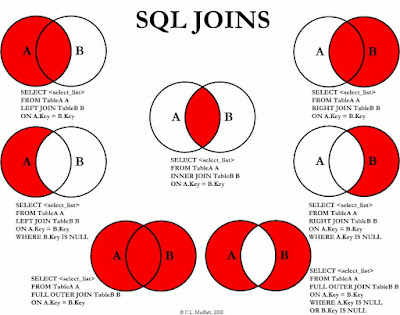
ex)
-- Post(A) + Comment(B)
SELECT * FROM article
LEFT OUTER JOIN comment
ON article.id = comment.article_id;

-- Post(A) + User
SELECT * FROM article
INNER JOIN user
ON article.user_id = user.id;
+
https://en.gravatar.com/site/implement/
accounts > models.py
from django.db import models
from django.conf import settings
from django.contrib.auth.models import AbstractUser
import hashlib

# Create your models here.
# No model needed! Will use User from Django package!

# Creating custom user model
class User(AbstractUser):
    followers = models.ManyToManyField(
        settings.AUTH_USER_MODEL,
        related_name = 'followings'
    )

    @property
    def gravatar_url(self):
return f"https://s.gravatar.com/avatar/{hashlib.md5(self.email.encode('utf-8').strip().lower()).hexdigest()}?s=50&d=mp"accounts > templatetags > gravatar.py
import hashlib
from django import template
from django.template.defaultfilters import stringfilter

register = template.Library()

@register.filter
@stringfilter
def profile_url(email):
return f"https://s.gravatar.com/avatar/{hashlib.md5(email.encode('utf-8').strip().lower()).hexdigest()}?s=50&d=mp"- Must create
__init__.pyinsidetemplatetagsdirectory!
templates > _nav.html
{% load gravatar %}

...
<!--Method 1-->
<img src="{{request.user.email|profile_url}}">

<!--Method 2-->
<img src="{{request.user.gravatar_url}}">

...