




Real-time file system monitoring for Windows
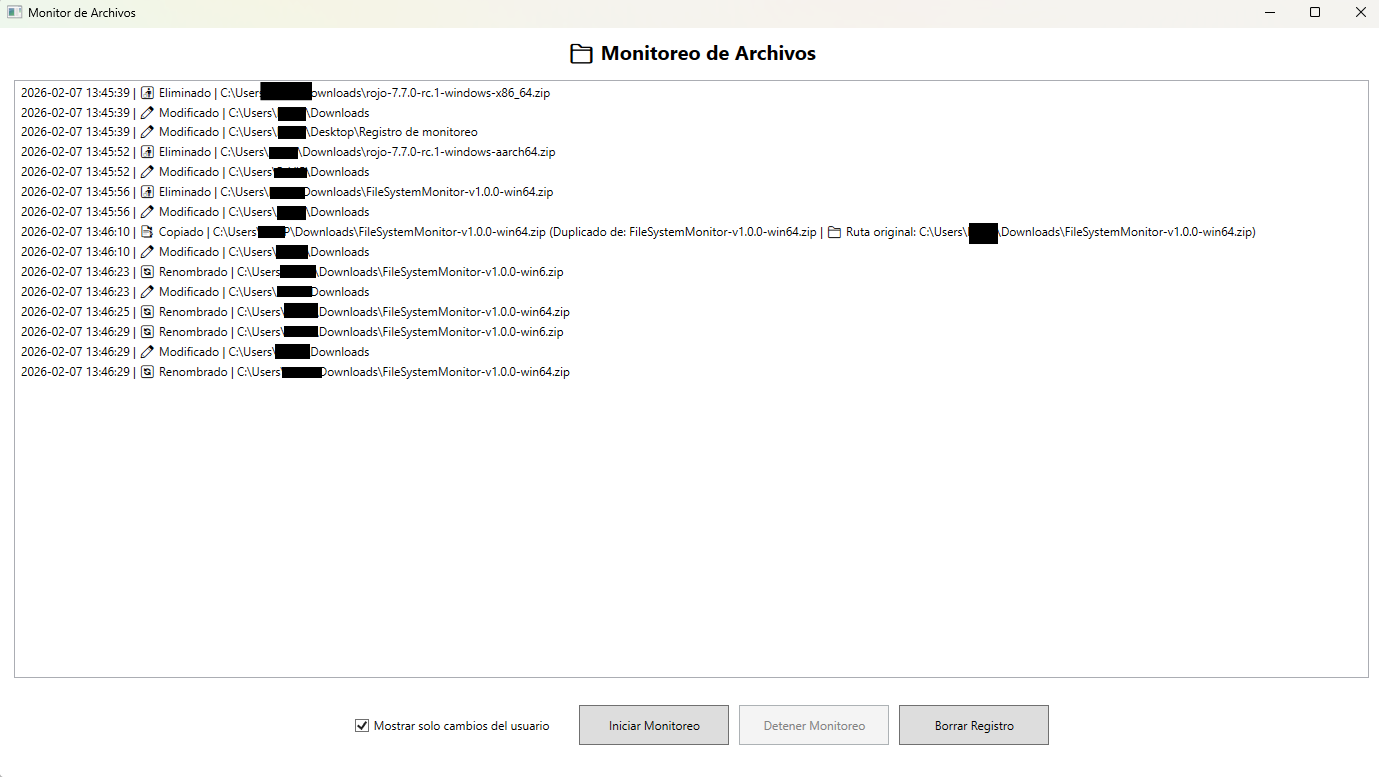
(Free Version have lenght reg limit)
FileSystemMonitor is a lightweight Windows desktop application that monitors file system changes in real-time. Built with WPF and .NET 8, it tracks file and folder creation, modification, deletion, and renaming events with a clean, modern interface.
Perfect for developers, sysadmins, and power users who need to track what's happening on their file system.
| Feature | Description |
|---|---|
| 🔴 Real-time Monitoring | Instant detection of file system changes |
| 📝 Event Types | Created, Modified, Deleted, Renamed |
| 📁 Automatic Logging | Daily log files for audit trails |
| 🚫 Smart Filtering | Ignores system files and Recycle Bin |
| 🌐 Bilingual | English & Spanish (auto-detected) |
| 🎨 Modern UI | Clean WPF interface with dark theme |
| ⚡ Optimized | Debounced events to prevent spam |
| 📦 Portable | Single executable, no installation required |
Click to view screenshots
| Main Window | Event Log |
|---|---|
 |
 |
- Go to Releases
- Download
FileSystemMonitor-vX.X.X-win64.zip - Extract and run
FileSystemMonitor.exe
# Clone
git clone https://github.com/SoftDryzz/FileSystemMonitor.git
cd FileSystemMonitor

# Build
dotnet build -c Release

# Run
dotnet run| Requirement | Version |
|---|---|
| OS | Windows 10/11 |
| .NET Runtime | 8.0+ (included in release) |
FileSystemMonitor/
├── Helpers/           # Utility classes and extensions
├── Models/            # Data models and event types
├── Services/          # Core monitoring service (FileSystemWatcher)
├── Views/             # WPF XAML views and windows
├── App.xaml           # Application entry point
└── FileSystemMonitor.csproj
┌─────────────────┐     ┌──────────────────┐     ┌─────────────────┐
│  FileSystem     │────▶│  FileWatcher     │────▶│  UI Display     │
│  (Windows API)  │     │  Service         │     │  + Log File     │
└─────────────────┘     └──────────────────┘     └─────────────────┘
- FileSystemWatcher monitors specified directories
- Events are filtered (ignoring system/temp files)
- Debouncing prevents duplicate event spam
- UI updates in real-time via WPF data binding
- Log files saved daily in
logs/folder
Contributions welcome! Feel free to:
- 🐛 Report bugs
- 💡 Suggest features
- 🔧 Submit pull requests
MIT License - See LICENSE
FileSystemMonitor es una aplicación de escritorio ligera para Windows que monitorea cambios en el sistema de archivos en tiempo real. Desarrollada con WPF y .NET 8, rastrea eventos de creación, modificación, eliminación y renombrado de archivos y carpetas con una interfaz limpia y moderna.
Perfecta para desarrolladores, administradores de sistemas y usuarios avanzados que necesitan saber qué está pasando en su sistema de archivos.
| Característica | Descripción |
|---|---|
| 🔴 Monitoreo en Tiempo Real | Detección instantánea de cambios |
| 📝 Tipos de Eventos | Creado, Modificado, Eliminado, Renombrado |
| 📁 Registro Automático | Archivos log diarios para auditoría |
| 🚫 Filtrado Inteligente | Ignora archivos del sistema y Papelera |
| 🌐 Bilingüe | Español e Inglés (auto-detectado) |
| 🎨 UI Moderna | Interfaz WPF limpia con tema oscuro |
| ⚡ Optimizado | Eventos con debounce para evitar spam |
| 📦 Portable | Ejecutable único, sin instalación |
- Ve a Releases
- Descarga
FileSystemMonitor-vX.X.X-win64.zip - Extrae y ejecuta
FileSystemMonitor.exe
# Clonar
git clone https://github.com/SoftDryzz/FileSystemMonitor.git
cd FileSystemMonitor

# Compilar
dotnet build -c Release

# Ejecutar
dotnet run| Requisito | Versión |
|---|---|
| SO | Windows 10/11 |
| .NET Runtime | 8.0+ (incluido en release) |
FileSystemMonitor/
├── Helpers/           # Clases de utilidad y extensiones
├── Models/            # Modelos de datos y tipos de eventos
├── Services/          # Servicio principal (FileSystemWatcher)
├── Views/             # Vistas XAML y ventanas WPF
├── App.xaml           # Punto de entrada de la aplicación
└── FileSystemMonitor.csproj
┌─────────────────┐     ┌──────────────────┐     ┌─────────────────┐
│  Sistema de     │────▶│  Servicio        │────▶│  Interfaz       │
│  Archivos       │     │  FileWatcher     │     │  + Archivo Log  │
└─────────────────┘     └──────────────────┘     └─────────────────┘
- FileSystemWatcher monitorea los directorios especificados
- Eventos se filtran (ignorando archivos del sistema/temporales)
- Debouncing previene spam de eventos duplicados
- UI se actualiza en tiempo real via WPF data binding
- Archivos log guardados diariamente en carpeta
logs/
¡Las contribuciones son bienvenidas! Puedes:
- 🐛 Reportar bugs
- 💡 Sugerir características
- 🔧 Enviar pull requests
Licencia MIT - Ver LICENSE
Made with ❤️ by SoftDryzz

