TestCafe now takes screenshots using browsers' debug protocols (#2492)
fetchrequests are now correctly proxied in a specific case (testcafe-hammerhead/#1613)- Resources responding with
304HTTP status code and with the 'content-length: ' header are proxied correctly now (testcafe-hammerhead/#1602) - The
transferargument ofwindow.postMessageis passed correctly now (testcafe-hammerhead/#1535) - Incorrect focus events order in IE has been fixed (#2072)
⚙️ Add TS definitions to the Docker image (#2481)
- Selection in a
contenteditabledivnow works properly in a specific scenario (#2365) - A collision related to several
moment-duration-formatpackage versions is now fixed (#1750) - TestCafe now reports a warning when saving several screenshots at the same path (#2213)
- A regression related to wrongly processed
document.writein IE11 is now fixed (#2469) - An out of memory crash on calling console methods is now fixed (testcafe-hammerhead/#1546)
Clickaction for an element with 1px height or width works properly now (#2020)- Touch emulation for the latest Google Chrome was fixed (#2448)
- Enabled the screenshot and window resizing functionalities in the concurrency mode for Firefox and Chrome on macOS #2095
⚙️ Typescript definitions for new features from v0.20.0 have been added (#2428)
- Now sites with the overridden
Element.prototype.matchesmethod work properly #2241 window.Blobnow returns a correct result when Array ofArrayBufferis passed as a parameter (testcafe-hammerhead/#1599)- Firefox Shield popup is not shown during test execution now (#2421)
Request Hooks: Intercepting HTTP requests (#1341)
TestCafe now allows you to record HTTP request data or mock responses. You can also create a custom HTTP request hook to emulate authentications like Kerberos or Client Certificate Authentication.
See Intercepting HTTP Requests for more information.
⚙️ Specifying resources accessed by bypassing a proxy server (#1791)
TestCafe now allows you to bypass the proxy server when accessing specific resources.
To specify resources that require direct access, use the --proxy-bypass flag in the command line or the useProxy API method's parameters.
testcafe chrome my-tests/**/*.js --proxy proxy.corp.mycompany.com --proxy-bypass localhost:8080,internal-resource.corp.mycompany.comrunner.useProxy('172.0.10.10:8080', ['localhost:8080', 'internal-resource.corp.mycompany.com']);⚙️ Specifying testing metadata (#2242)
TestCafe allows you to specify additional information for tests in the form of key-value metadata and use it in reports.
You can define metadata for a fixture or a test using the meta method:
fixture `My Fixture`
    .meta('fixtureID', 'f-0001')
    .meta({ author: 'John', creationDate: '05/03/2018' });
test
.meta('testID', 't-0005')
.meta({ severity: 'critical', testedAPIVersion: '1.0' })
('MyTest', async t => { /* ... */});To include testing metadata to reports, use the custom reporter methods.
⚙️ Passing a regular promise to t.expect is deprecated now (#2207)
TestCafe now throws an error if you pass a regular promise to the assertion's expect method.
If you need to assert a regular promise, set the allowUnawaitedPromise option to true.
await t.expect(doSomethingAsync()).ok('check that a promise is returned', { allowUnawaitedPromise: true });- The session recovery bubble in Firefox is disabled (#2341)
- TestCafe works properly if a
bodyelement has thepointer-events: none;css style rule (#2251) - Resizing Chrome in the emulation mode works correctly (#2154)
- The location port is used for service messages (#2308)
- A browser instance shuts down correctly on Unix systems (#2226)
- An
Integrityattribute is removed fromscriptandlinktags (testcafe-hammerhead/#235) - The
event.preventDefault()method call changes theevent.defaultPreventedproperty value (testcafe-hammerhead/#1588) - It is possible to set the
metaelement'scontentattribute (testcafe-hammerhead/#1586) - TestCafe no longer overrides attributes used in a non-standard way with
null(testcafe-hammerhead/#1583) - The
Changeevent fires correctly if thetarget.valuechanges (#2319) MouseEvent.screenXandMouseEvent.screenYare added to the emulated events (#2325)- Cookies on
localhostare processed correctly (testcafe-hammerhead/#1491) - Setting the
//url for an image works correctly (#2312) shadowUIinternal elements are no longer processed (#2281)typeInputevent is raised correctly (#1956)- Selecting text in contenteditable elements works properly (#2301)
Added support for browser providers from private repositories (#2221)
- Restored the screenshot functionality in legacy tests (#2235)
- Updated the list of emulation devices in Google Chrome (#2257)
- Fixed touch events emulation (#2268)
- The
event.relatedTargetproperty is set correctly for the emulated focus and drag events (#2197) - The
event.detailproperty is set correctly for the emulated mouse events (#2232) - The
Element.innerHTMLproperty is processed correctly in certain cases (testcafe-hammerhead/#1538) - The iframe location has the correct value when it is not initialized (testcafe-hammerhead/#1531)
- A trailing slash is added to test page URL when necessary (#2005)
- The
focusevent is not called for a disabled input (#2123)
Backward compatibility with the legacy test syntax has been restored (#2210)
- The
document.allproperty is overridden (testcafe-hammerhead/#1046) - Proxying properties in
asyncclass methods are supported (testcafe-hammerhead/#1510) - Fixed wrongly proxying a
localStoragecheck-in WebWorkers (testcafe-hammerhead/#1496)
TestCafe Live: See instant feedback when working on tests (#1624)
We have prepared a new tool for rapid test development.
TestCafe Live provides a service that keeps the TestCafe process and browsers opened while you are working on tests. Changes you make in code immediately restart the tests. That is, TestCafe Live allows you to see test results instantly.
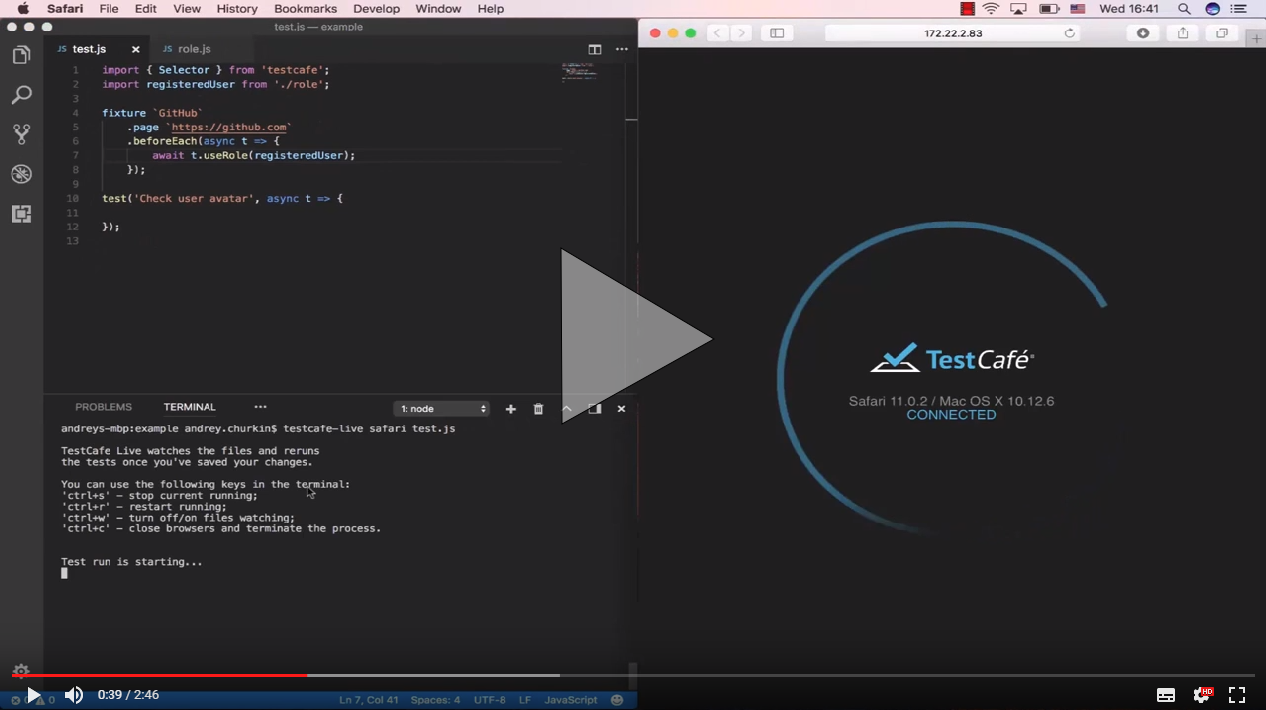
See TestCafe Live for more information.
⚙️ Taking Screenshots of Individual Page Elements (#1496)
We have added the t.takeElementScreenshot action that allows you to take a screenshot of an individual page element.
import { Selector } from 'testcafe';

fixture `My fixture`
    .page `http://devexpress.github.io/testcafe/example/`;

test('Take a screenshot of a fieldset', async t => {
    await t
        .click('#reusing-js-code')
        .click('#continuous-integration-embedding')
        .takeElementScreenshot(Selector('fieldset').nth(1), 'my-fixture/important-features.png');
});
This action provides additional customization that allows you to adjust the screenshot's center or crop it. Refer to the documentation for more information.
Note that if the screenshot directory is not specified in the runner.screenshots API method or screenshots command line option, the t.takeElementScreenshot action is ignored.
⚙️ Filtering Elements by Their Visibility (#1018)
You can now filter the selector's matching set to display only visible or hidden elements using the filterVisible and filterHidden methods.
import { Selector } from 'testcafe';

fixture `My fixture`
    .page `http://devexpress.github.io/testcafe/example/`;

test('Filter visible and hidden elements', async t => {
    const inputs        = Selector('input');
    const hiddenInput   = inputs.filterHidden();
    const visibleInputs = inputs.filterVisible();

    await t
        .expect(hiddenInput.count).eql(1)
        .expect(visibleInputs.count).eql(11);
});
⚙️ Finding Elements by the Exact Matching Text (#1292)
The current selector's withText method looks for elements whose text content contains the specified string. With this release, we have added the withExactText method that searches by strict match.
import { Selector } from 'testcafe';

fixture `My fixture`
    .page `http://devexpress.github.io/testcafe/example/`;

test('Search by exact text', async t => {
    const labels       = Selector('label');
    const winLabel     = labels.withExactText('Windows');
    const reusingLabel = labels.withText('JavaScript');

    await t
        .expect(winLabel.exists).ok()
        .expect(reusingLabel.exists).ok();
});
⚙️ Using Decorators in TypeScript Code (#2117) by @pietrovich
TestCafe now allows you to use decorators when writing tests in TypeScript.
Note that decorators are still an experimental feature in TypeScript.
- TestCafe can scroll a webpage when the
bodyhas a scroll bar (#1940) - Firefox no longer hangs with a dialog asking to set it as the default browser (#1926)
- Legacy APIs no longer freeze because of an unexpected error (#1790)
- Clicking an element that was hidden and then recreated on timeout works correctly (#1994)
- TestCafe finds browsers in headless mode on macOS when tests are executing concurrently (#2035)
- The local storage is restored correctly (#2015) when roles are switched using the
preserverUrlflag - TestCafe progress bar is no longer visible on screenshots (#2076)
- Window manipulations wait for pages to load (#2000)
- All toolbars are hidden when taking screenshots (#1445)
- TestCafe works with the latest CucumberJS version (#2107)
- Fixed an error connected to file permissions on Ubuntu (#2144)
- Browser manipulations can be executed step-by-step (#2150)
- Fixed a bug where a page does not load because of an error in
generateCallExpression(testcafe-hammerhead/#1389) - The overridden Blob constructor does not process data unnecessarily (testcafe-hammerhead/#1359)
- The
targetattribute is not set for a button after clicking on it (testcafe-hammerhead/#1437) - The
sandbox,targetandstyleattributes are cleaned up (testcafe-hammerhead/#1448) - A
RangeErrorwith the messageMaximum call stack size exceededis no longer raised (testcafe-hammerhead/#1452) - A script error is no longer raised on pages that contain a
beforeunloadhandler (testcafe-hammerhead/#1419) - Fixed wrongly overridding an event object (testcafe-hammerhead/#1445)
- An illegal invocation error is no longer raised when calling the
FileListWrapper.itemmethod (testcafe-hammerhead/#1446) by @javiercbk - A script error is no longer raised when
Node.nextSiblingisnull(testcafe-hammerhead/#1469) - The
isShadowUIElementcheck is performed forNode.nextSiblingwhen a node is not an element (testcafe-hammerhead/#1465) - The
toStringfunction is overridden for anchor elements (testcafe-hammerhead/#1483)
Chrome DevTools are opened in a separate window during test execution (#1964)
- In Chrome, disabled showing the 'Save password' prompt after typing text in the
passwordinput (#1913) - TestCafe correctly scrolls a page to an element when this page has scrollbars (#1955)
- Fixed the 'Cannot redefine property %testCafeCore%' script error (#1996)
- TestCafe rounds off dimension values when it calculates scrolling (#2004)
- In Chrome, the 'Download multiple files' dialog no longer prevents the test execution process (#2017)
- TestCafe closes a connection to the specified resource if the destination server hangs (testcafe-hammerhead/#1384)
- Proxying the
location'shrefproperty works correctly (testcafe-hammerhead/#1362) - The proxy supports
httpsrequests for node 8.6 and higher (testcafe-hammerhead/#1401) - Added support for pages with the
superkeyword (testcafe-hammerhead/#1390) - The proxy emulates native browser behavior for non-success status codes (testcafe-hammerhead/#1397)
- The proxied
ServiceWorker.registermethod returns a rejected Promise for unsecure URLs (testcafe-hammerhead/#1411) - Added support for
javascriptprotocol expressions applied to the location's properties (testcafe-hammerhead/#1274)
Vulnerability Fix (testcafe-legacy-api/#26)
We have fixed a vulnerability related to the dependency on uglify-js v1.x. We used it in our testcafe-legacy-api module that provides backward compatibility with older APIs from the paid TestCafe version.
This vulnerability affected only those who run tests created with the commercial version of TestCafe in the new open-source TestCafe.
⚙️ WebSockets support (testcafe-hammerhead/#911)
TestCafe provides full-featured WebSocket support (wss and ws protocols, request authentication, etc.).
- You can click on elements under the Status bar and specify the
transitioncss property (#1934) - Added support for pages with the
restanddefault parameterinstructions (testcafe-hammerhead/#1336) - Pages with several
basetags are supported (testcafe-hammerhead/#1349) - Redirects from cross-domain to same-domain pages are processed (#1922)
- Contenteditable custom elements are correctly recognized (testcafe-hammerhead/#1366)
- Internal headers for
fetchrequests are set correctly (testcafe-hammerhead/#1360)
- Readonly instrumented DOM properties are now set correctly for plain objects (testcafe-hammerhead/#1351).
- The
HTMLElement.styleproperty is proxied on the client side now (testcafe-hammerhead/#1348). - The
Refreshresponse header is proxied now (testcafe-hammerhead/#1354).
- Screenshots are captured correctly when using High DPI monitor configurations on Windows (#1896)
- Fixed the
Cannot read property 'getItem' of nullerror which is raised when a console message was printed in an iframe before it is completely loaded (#1875) - Fixed the
Content iframe did not loaderror which is raised if an iframe reloaded during theswitchToIframecommand execution (#1842) - Selector options are passed to all derivative selectors (#1907)
- Fixed a memory leak in IE related to live node collection proxying (testcafe-hammerhead/#1262)
DocumentFragmentnodes are correctly processed (testcafe-hammerhead/#1334)
--reporter flag name fixed (#1881)
In v0.18.0, we accidentally changed the --reporter CLI flag to --reporters. In this recovery release, we roll back to the previous flag name.
Compatibility with RequireJS restored (#1874)
Changes in v0.18.0 made TestCafe incompatible with RequireJS. It is fixed in this recovery release.
We apologize for any inconvenience.
We have added support for headless testing in Firefox (version 56+) and Chrome.
testcafe firefox:headless tests/sample-fixture.jsrunner
.src('tests/sample-fixture.js')
.browsers('firefox:headless')
.run()
.then(failedCount => {
// ...
});⚙️ Outputting test results to multiple channels (#1412)
You can now print a report in the console and saved it to a .json file by specifying multiple reporters when running tests.
testcafe all tests/sample-fixture.js -r spec,json:report.jsonconst stream = fs.createWriteStream('report.json');
runner
.src('tests/sample-fixture.js')
.browsers('chrome')
.reporter('spec')
.reporter('json', stream)
.run()
.then(failedCount => {
stream.end();
});⚙️ Entering the debug mode when a test fails (#1608)
TestCafe can now automatically switch to the debug mode when a test fails. Test execution is paused so that you can explore the tested page to determine the failure's cause.
To enable this behavior, use the --debug-on-fail flag in the command line or the debugOnFail option in the API.
testcafe chrome tests/fixture.js --debug-on-failrunner.run({ debugOnFail: true });⚙️ Interacting with the tested page in debug mode (#1848)
When debugging your tests, you can now interact with the tested page. Click the Unlock page button in the page footer to enable interaction.

Click Resume to continue running the test or click Next Step to skip to the next step.
⚙️ Chrome and Firefox are opened with clean profiles by default (#1623)
TestCafe now opens Chrome and Firefox with empty profiles to eliminate profile settings' and extensions' influence on tests.
However, you can return to the previous behavior using the :userProfile browser option.
testcafe firefox:userProfile tests/test.jsrunner
.src('tests/fixture1.js')
.browsers('firefox:userProfile')
.run();⚙️ Customizable timeout to wait for the window.load event (#1645)
Previously, TestCafe started a test when the DOMContentLoaded event was raised. However, there are many pages that execute initialization code on the window.load event (which is raised after DOMContentLoaded because it waits for all stylesheets, images and subframes to load). In this case, you need to wait for the window.load event to fire before running tests.
With this release, TestCafe waits 3 seconds for the window.load event.
We have also added a pageLoadTimeout setting that allows you to customize this interval.
You can set it to 0 to skip waiting for window.load.
The following examples show how to use the pageLoadTimeout setting from the command line and API:
testcafe chrome test.js --page-load-timeout 0runner.run({
pageLoadTimeout: 0
});You can also use the setPageLoadTimeout method in the test API to set the timeout for an individual test.
fixture `Page load timeout`
    .page `http://devexpress.github.io/testcafe/example/`;

test(`Page load timeout`, async t => {
    await t
        .setPageLoadTimeout(0)
        .navigateTo('http://devexpress.github.io/testcafe/');
});
⚙️ Access messages output by the tested app to the browser console (#1738)
You can now obtain messages that the tested app outputs to the browser console. This is useful if your application or the framework it uses posts errors, warnings or other informative messages to the console.
Use the t.getBrowserConsoleMessages method that returns the following object:
{
    error: ["Cannot access the 'db' database. Wrong credentials.", '...'], // error messages
    warn: ['The setTimeout property is deprecated', '...'],                // warning messages
    log: ['[09:12:08] Logged in', '[09:25:43] Changes saved', '...'],      // log messages
    info: ['The application was updated since your last visit.', '...']    // info messages
}
Note that this method returns only messages posted via the console.error, console.warn, console.log and console.info methods. Messages the browser outputs (like when an unhandled exception occurs on the page) are not returned.
For instance, you can use React's typechecking feature, PropTypes, to check that you assigned valid values to the component's props. If a PropTypes rule is violated, React posts an error to the JavaScript console.
The following example shows how to check the React prop types for errors using the t.getBrowserConsoleMessages method:
// check-prop-types.js
import { t } from 'testcafe';

export default async function () {
    const { error } = await t.getBrowserConsoleMessages();

    await t.expect(error[0]).notOk();
}

// test.js
import { Selector } from 'testcafe';
import checkPropTypes from './check-prop-types';

fixture `react example`
    .page `http://localhost:8080/`  // https://github.com/mzabriskie/react-example
    .afterEach(() => checkPropTypes());

test('test', async t => {
    await t
        .typeText(Selector('.form-control'), 'devexpress')
        .click(Selector('button').withText('Go'))
        .click(Selector('h4').withText('Organizations'));
});
⚙️ Defining drag end point on the destination element (#982)
The t.dragToElement action can now drop a dragged element at any point inside the destination element.
You can specify the target point using the destinationOffsetX and destinationOffsetY options.
import { Selector } from 'testcafe';

const fileIcon      = Selector('.file-icon');
const directoryPane = Selector('.directory');

fixture `My Fixture`
    .page `https://example.com/`;

test('My Test', async t => {
    await t
        .dragToElement(fileIcon, directoryPane, {
            offsetX: 10,
            offsetY: 10,
            destinationOffsetX: 100,
            destinationOffsetY: 50,
            modifiers: {
                shift: true
            }
        });
});
⚙️ TestCafe exits gracefully when the process is interrupted (#1378)
Previously, TestCafe left browsers open when you exited the process by pressing Ctrl+C in the terminal.
Now TestCafe exits gracefully closing all browsers opened for testing.
- Tests no longer hang in Nightmare (#1493)
- The
focusevent is raised when clicking links withtabIndex="0"(#1803) - Headless Chrome processes no longer hang after test runs (#1826)
setFilesToUploadno longer throws aRangeErroron websites that use Angular (#1731)- Fixed a bug where an
iframegot a wrong origin (#1753) document.opendoes not throw an error ifdocument.defaultViewisnull(testcafe-hammerhead/#1272)- No error is thrown when the handler passed to
addEventListenerisundefined(testcafe-hammerhead/#1251) - An error is no longer raised if the processed element is not extendible (testcafe-hammerhead/#1300)
- Fixed a bug where an
onclickhandler did not work after click on aSubmitbutton (testcafe-hammerhead/#1291) - Images with
style = background-image: url("img.png");are loaded correctly (testcafe-hammerhead/#1212) - Documents can contain two
ShadowUIroots (testcafe-hammerhead/#1246) - HTML in an overridden
document.writefunction is processed correctly (testcafe-hammerhead/#1311) - Elements processing works for a
documentFragmentas it is added to the DOM (testcafe-hammerhead/#1334)
- Taking a screenshot on teamcity agent works correctly (#1625)
- It is possible to run tests on remote devices from a docker container (#1728)
- TestCafe compiles TypeScript tests correctly if Mocha or Jest typedefs are included in the project (#1537)
- Running on remote devices works correctly on MacOS (#1732)
- A target directory is checked before creating a screenshot (#1551)
- TypeScript definitions allow you to send any objects as
dependenciesforClientFunctions(#1713) - The second
MutationObservercallback argument is not missed (testcafe-hammerhead/#1268) - Link's
hrefproperty with an unsupported protocol is set correctly (testcafe-hammerhead/#1276) - The
document.documentURIproperty is processed correctly in IE (testcafe-hammerhead/#1270) JSON.stringifyandObject.keysfunctions work properly for aMessageEventinstance (testcafe-hammerhead/#1277)
- The
hoveraction no longer fails for elements that hide on mouseover (#1679) - SelectText and SelectTextAreaContent TypeScript definitions match the documentation (#1697)
- TestCafe finds browsers installed for the current user on Windows (#1688)
- TestCafe can resize MS Edge 15 window (#1517)
- Google Chrome Canary has a dedicated
chrome-canaryalias (#1711) - Test no longer hangs when
takeScreenshotis called in headless Chrome Canary on Windows (#1685) - Tests fail if the
uncaughtRejectionexception is raised (#1473) - TypeScript tests run on macOS with no errors (#1696)
- The test duration is reported accurately (#1674)
- XHR requests with an overridden
setRequestHeaderfunction returned by theXhrSandbox.openNativeXhrmethod are now handled properly (testcafe-hammerhead/#1252) - HTML in an overridden
document.writefunction is now processed correctly (testcafe-hammerhead/#1218) Object.assignis overridden (testcafe-hammerhead/#1208)- Scripts with
asyncfunctions are processed correctly (testcafe-hammerhead/#1260)
⚙️ Testing Electron applications (testcafe-browser-provider-electron)
We have created a browser provider that allows you to test Electron applications with TestCafe.
To do this, install the browser provider plugin from npm:
npm install testcafe-browser-provider-electronCreate a .testcafe-electron-rc file that contains the Electron plugin's configurations.
The only required setting here is mainWindowUrl. It is a URL (or path) to the main window page that relates to the application's directory.
{
    "mainWindowUrl": "./index.html"
}
Place this file in the application root directory.
Next, install the Electron module.
npm install electron@latestYou can now run tests. Specify the electron browser name and the application path
when the test launches.
testcafe "electron:/home/user/electron-app" "path/to/test/file.js"testCafe
.createRunner()
.src('path/to/test/file.js')
.browsers('electron:/home/user/electron-app')
.run();Nota that you can also test the Electron app's executable files. See the plugin readme to learn more about the Electron browser provider.
⚙️ Concurrent test execution (#1165)
We have added concurrent test launch. This makes a test batch complete faster.
TestCafe launches one instance of each specified browser by default. Tests are run one by one in each of them.
Enable concurrency and TestCafe launches multiple instances of each browser. It distributes the test batch among them. The tests are run in parallel.
To enable concurrency, add -cin the command line or use the runner.concurrency() API method.
Specify the number of instances for each browser.
testcafe -c 3 chrome tests/test.jsvar testRunPromise = runner
.src('tests/test.js')
.browsers('chrome')
.concurrency(3)
.run();See Concurrent Test Execution for more details.
⚙️ Further improvements in automatic waiting mechanism (#1521)
We have enhanced the waiting mechanism behavior in certain scenarios which required wait actions.
⚙️ User roles preserve the local storage (#1454)
TestCafe now saves the local storage state when switching between roles. You get the same local storage content you left when you switch back.
This is useful for testing websites that perform authentication via local storage instead of cookies.
- Selector's
withAttributemethod supports searching by strict match (#1548) - Description for the
pathparameter of thet.takeScreenshotaction has been corrected (#1515) - Local storage is now cleaned appropriately after the test run.(#1546)
- TestCafe now checks element visibility with a timeout when the target element's
style.topis negative (#1185) - Fetching an absolute CORS URL now works correctly. (#1629)
- Add partial support for proxying live node collections (the
GetElementsByTagNamemethod) (#1442) - TypeScript performance has been enhanced. (#1591)
- The right port is now applied to a cross-domain iframe location after redirect. (testcafe-hammerhead/#1191)
- All internal properties are marked as non-enumerable. (testcafe-hammerhead/#1182)
- Support proxying pages with defined referrer policy. (testcafe-hammerhead/#1195)
- WebWorker content is now correctly proxied in FireFox 54. (testcafe-hammerhead/#1216)
- Code instrumentation for the
document.activeElementproperty works properly if it isnull. (testcafe-hammerhead/#1226) length,itemandnamedItemare no longer own properties ofLiveNodeListWrapper. (testcafe-hammerhead/#1222)- The
scopeoption in theserviceWorker.registerfunction is processed correctly. (testcafe-hammerhead/#1233) - Promises from a fetch request are now processed correctly. (testcafe-hammerhead/#1234)
- Fix transpiling for the
for..ofloop to support browsers withoutwindow.Iterator. (testcafe-hammerhead/#1231)
- Typing text now raises the
onChangeevent in latest React versions. (#1558) - Screenshots can now be taken when TestCafe runs from the Docker image. (#1540)
- The native
valueproperty setters ofHTMLInputElementandHTMLTextAreaElementprototypes are now saved. (testcafe-hammerhead/#1185) - The
nameandnamedItemmethods of anHTMLCollectionare now marked as non-enumerable. (testcafe-hammerhead/#1172) - Code instrumentation of the
lengthproperty runs faster. (testcafe-hammerhead/#979)
- A typo in RoleOptions typedefs was fixed (#1541)
- TestCafe no longer crashes on node 4 with an unmet dependency (#1547)
- Markup imported via
meta[rel="import"]is now processed. (testcafe-hammerhead/#1161) - The correct context is passed to
MutationObserver. (testcafe-hammerhead/#1178) - The
innerHtmlproperty is no longer processed for elements that don't have this property. (testcafe-hammerhead/#1164)
TypeScript support, seamless testing in headless Chrome and device emulator, and numerous bug fixes.
⚙️ TypeScript support (#408)
In this release, we have added the capability to write tests in TypeScript. By using TypeScript to write your TestCafe tests, you get the advantages of strongly-typed languages such as: rich coding assistance, painless scalability, check-as-you-type code verification, and much more.
TestCafe bundles TypeScript declaration file with the npm package, so you have no need to install any additional packages.
Just create a .ts file with the
import { Selector } from 'testcafe';and write your test.
For details, see TypeScript Support
⚙️ Support running in Chrome in headless mode and in device emulator (#1417)
Now TestCafe allows you to run your tests in Google Chrome in headless and device emulation modes.
Headless mode allows you to run tests in Chrome without any visible UI shell. To run tests in headless mode, use the :headless postfix:
testcafe "chrome:headless" tests/sample-fixture.jsDevice emulation mode allows you to check how your tests works on mobile devices via Chrome's built-in device emulator. To run tests in device emulation mode, specify emulation: and device parameters:
testcafe "chrome:emulation:device=iphone 6" tests/sample-fixture.jsFor details, see Using Chrome-specific Features.
⚙️ Support HTML5 Drag and Drop (#897)
Starting with this release, TestCafe supports HTML5 drag and drop, so you can test elements with the draggable attribute.
⚙️ Fixed URL for opening remote browsers (#1476)
We have simplified the format of links that TestCafe generates when you run tests on remote browsers.
Now, you have no need to type a unique link for each test run, all the links became constant. So, it is easier now to run tests on a remote device repeatedly: you can run them by navigating a link from your browser history.
- No TestCafe UI on screenshots created during testing (#1357)
mouseenterandmouseleaveevents are not triggered during cursor moving (#1426)- The runner's speed option affects the speed of
doubleClickaction (#1486) - Press action shortcuts work wrong if input's value ends with '.' or starts with '-.' (#1499)
- A test report has too small line length on Travis (#1469)
- Service messages with cookies do not have enough time to come to server before a new page is loaded (testcafe-hammerhead/#1086)
- The
window.history.replaceStatefunction is overridden incorrectly (testcafe-hammerhead/#1146) - Hammerhead crashes if a script file contains a sourcemap comment (testcafe-hammerhead/#1052)
- The proxy should override the
DOMParser.parseFromStringmethod (testcafe-hammerhead/#1133) - The
fetchmethod should emulate the native behaviour on merging headers (testcafe-hammerhead/#1116) - The
EventSourcerequests are broken when used via proxy (testcafe-hammerhead/#1106) - The code processing may cause syntax errors in some cases because of wrong
locationproperty wrapping (testcafe-hammerhead/#1101) - When calling the
fetchfunction without parameters, we should return its native result instead ofwindow.Promise.reject(testcafe-hammerhead/#1099) - The
querySelectorfunction is overridden incorrectly (testcafe-hammerhead/#1131)
Plugins for React and Vue.js, TestCafe Docker image, support for Internet access proxies and lots of bug fixes.
We have changed the way the withText method behaves when it is called in a chain.
const el = Selector('div').withText('This is').withText('my element');In previous versions, this selector searched for a div with text my element because the second call to withText overrode the first one.
Now this code returns an element whose text contains both This is and my element as the second call compounds with the first one.
In this release cycle, we have created a plugin for testing React applications. This plugin allows you to select React components by their names.
import ReactSelector from 'testcafe-react-selector';

const TodoList         = ReactSelector('TodoApp TodoList');
const itemsCountStatus = ReactSelector('TodoApp div');
const itemsCount       = ReactSelector('TodoApp div span');
And it enables you to get React component's state and props.
import ReactSelector from 'testcafe-react-selector';

fixture `TODO list test`
    .page('http://localhost:1337');

test('Check list item', async t => {
    const el = ReactSelector('TodoList');

    await t.expect(el.getReact().props.priority).eql('High');
    await t.expect(el.getReact().state.isActive).eql(false);
});
To learn more, see the testcafe-react-selectors repository.
In addition to the React plugin, we have released a plugin that facilitates testing Vue.js applications.
In the same manner, it allows you to select Vue.js components with VueSelector selectors.
import VueSelector from 'testcafe-vue-selectors';

const rootVue   = VueSelector();
const todoInput = VueSelector('todo-input');
const todoItem  = VueSelector('todo-list todo-item');
These selectors allow you to get Vue component's props, state and computed properties.
import VueSelector from 'testcafe-vue-selector';

fixture `TODO list test`
    .page('http://localhost:1337');

test('Check list item', async t => {
    const todoItem = VueSelector('todo-item');

    await t
        .expect(todoItem.getVue().props.priority).eql('High')
        .expect(todoItem.getVue().state.isActive).eql(false)
        .expect(todoItem.getVue().computed.text).eql('Item 1');
});
To learn more, see the testcafe-vue-selectors repository.
⚙️ TestCafe Docker image (#1141)
We have created a Docker image with TestCafe, Chromium and Firefox preinstalled.
You no longer need to manually install browsers or the testing framework on your server. Pull the Docker image from the repository and run TestCafe immediately.
docker pull testcafe/testcafe
docker run -v //user/tests:/tests -it testcafe/testcafe firefox tests/**/*.js
To learn more, see Using TestCafe Docker Image
⚙️ Support for Internet access proxies (#1206)
If your local network uses a proxy server to access the Internet, TestCafe can use it reach the external webpages.
To specify the proxy server, use a command line option
testcafe chrome my-tests/**/*.js --proxy 172.0.10.10:8080or a method in the API.
runner.useProxy('username:password@proxy.mycorp.com');Note that you can pass the credentials with the proxy server host.
⚙️ Debugging mode option (#1347)
As an alternative to calling the t.debug method
in test code, you can now specify the --debug-mode command line option to pause the test before the first action or assertion.
When the test is paused, you can debug in the browser developer tools as well as continue test execution step by step.
testcafe chrome my-tests/**/*.js --debug-modeIf you use TestCafe API, provide the debugMode option to the runner.run method.
runner.run({ debugMode: true });⚙️ Filtering selector's matching set by attribute (#1346)
You can now use the withAttribute method to select elements that have a particular attribute set to a specific value.
You can omit the attribute value to select elements that simply have the specified attribute.
const el = Selector('div').withAttribute('attributeName', 'value').nth(2);⚙️ hasAttribute method added to DOM node state (#1045)
For you convenience, the DOM node state object now provides the hasAttribute method that allows you to determine if an element has a particular attribute.
const el = Selector('div.button');

t.expect(el.hasAttribute('disabled')).ok();
⚙️ Redirection when switching between roles (#1339)
User roles now provide a preserveUrl option
that allows you to save the webpage URL to which the browser was redirected after logging in. If you enable this option when creating a role,
the browser will be redirected to the saved URL every time you switch to this role.
const regularUser = Role(url, async t => {
    /* authentication code */
}, { preserveUrl: true })- Fixed a bug where incorrect call site and callstack were generated for an assertion that failed in a class method (#1267)
- Incorrect validation result no longer appears when a test controller is used inside an async function (#1285)
- Click on the status panel no longer affects the page state (#1389)
- The
inputevent is now raised with a correct selection value when input value was changed (#1388) - Inline source maps are now placed in transpiled files so that breakpoints work correctly (#1375)
valueandselectedIndexin theinputevent handler for the dropdown element are now valid (#1366)- A
presskey('enter')call now raises theclickevent on a button element (#1424) - The cursor position in Monaco editor is now set correctly on the click action (#1385)
hasScrollnow works correctly if thebodyhas absolute positioning (#1353)- Text can now be typed into HTML5 input elements (#1327)
focusinandfocusoutevents are now raised when the browser window is in the background (testcafe-hammerhead/#1044)caretPositionFromPointandcaretRangeFromPointnow ignore TestCafe UI elements on the page (testcafe-hammerhead/#1084)- Images created with the
Imageconstructor are now loaded through the proxy (testcafe-hammerhead/#1087) - The
innerTextreturn value is now clear of script and style code (testcafe-hammerhead/#1079) - Non-string values for element's text properties are now converted to
String(testcafe-hammerhead/#1091) - SVG elements are now processed correctly in IE (testcafe-hammerhead/#1083)
Authentication via user roles, client-side debugging and numerous bug fixes.
⚙️ Authentication via user roles (#243)
Many test scenarios involve the activity of more than one user. TestCafe addresses these scenarios by providing a convenient way to isolate authentication test actions and apply them easily whenever you need to switch the user account.
A piece of logic that logs in a particular user is called a role. It is a good practice to create a role for each user account participating in your test.
Create roles via the Role constructor. You can keep them in a separate helper file.
helper.js
import { Role } from 'testcafe';

export var regularAccUser = Role('http://example.com/login', async t => {
    await t
        .typeText('#login', 'TestUser')
        .typeText('#password', 'testpass')
        .click('#sign-in');
});

export var facebookAccUser = Role('http://example.com/login', async t => {
    await t
        .click('#sign-in-with-facebook')
        .typeText('#email', 'testuser@mycompany.com')
        .typeText('#pass', 'testpass')
        .click('#submit');
});

export var admin = Role('http://example.com/login', async t => {
    await t
        .typeText('#login', 'Admin')
        .typeText('#password', 'adminpass')
        .click('#sign-in');
});
In test code, use the t.useRole method to switch between roles.
test.js
import { regularAccUser, admin } from './helper';
import { Selector } from 'testcafe';

const entry        = Selector('#entry');
const removeButton = Selector('#remove-entry');

fixture `My Fixture`
    .page `http://example.com`;

test('test that involves two users', async t => {
    await t
        .useRole(regularAccUser)
        .expect(entry.exists).ok()
        .expect(removeButton.visible).notOk()
        .useRole(admin)
        .expect(removeButton.visible).ok()
        .click(removeButton)
        .expect(entry.exists).notOk()
});
To learn more, see User Roles.
We have released the BrowserStack browser provider plugin.
Install this plugin from npm.
npm install testcafe-browser-provider-browserstackAnd save the BrowserStack username and access key to environment variables BROWSERSTACK_USERNAME and BROWSERSTACK_ACCESS_KEY.
Now you can run tests on any virtual machine available on BrowserStack.
testcafe "browserstack:Chrome@53.0:Windows 10" "path/to/test/file.js"⚙️ Client-side debugging (#918)
We have added a new t.debug method to debug test behavior on the client.
When test execution reaches t.debug, it pauses so that you can open browser's developer tools
and check the web page state, DOM elements location, their CSS styles.
fixture `My fixture`
    .page `https://devexpress.github.io/testcafe/example`;

test('My test', async t => {
    await t
        .debug()
        .setNativeDialogHandler(() => true)
        .click('#populate')
        .click('#submit-button');
});
In the footer, you'll find buttons that allow you to continue test execution or step to the next test action.

TestCafe logs points in code where the debugger stopped.

⚙️ Testing local webpages (#1286)
You can now run tests against local webpages. To do this, specify a URL with the file:// scheme or a relative path when calling the page function.
fixture `MyFixture`
    .page `file:///user/my-website/index.html`;
fixture `MyFixture`
.page `../my-project/index.html`;You can also navigate to local pages with the t.navigateTo action.
fixture `My fixture`
    .page `http://www.example.com/`;

test('Navigate to local pages', async t => {
    await t
        .navigateTo('file:///user/my-website/index.html')
        .navigateTo('../my-project/index.html');
});
⚙️ Adding custom methods to the selector (#1212)
You can now extend selectors with custom methods executed on the client. Use the addCustomMethods method to provide custom methods.
const myTable = Selector('.my-table').addCustomMethods({
    getCellText: (table, rowIndex, columnIndex) =>
        table.rows[rowIndex].cells[columnIndex].innerText
});

await t.expect(myTable.getCellText(1, 1)).contains('hey!');
Use this feature to build selectors that reflect the specifics of your web app.
⚙️ Removing the native dialog handler (#243)
We have added the capability to remove a native dialog handler by passing null to the t.setNativeDialogHandler method.
fixture `My fixture`
    .page `https://devexpress.github.io/testcafe/example`;

test('My test', async t => {
    await t
        .setNativeDialogHandler(() => true)
        .click('#populate')
        .setNativeDialogHandler(null)
        .click('#submit-button');
});- Fixed a bug that led to an incorrect callstack in test run report (#1226)
- Cursor is now hidden on screenshots created using the
t.takeScreenshotaction (#1245) - Error no longer appears when selecting a non-existent child by index (#1240)
- The blur event is now raised on time when an input is hidden in IE (#1275)
- TestCafe no longer fails if a client function argument contains ES6 class method syntax (#1279)
- TestCafe now reports errors that occur during browser provider initialization (#1282)
- Click on the debugger panel no longer affects the tested page (#1200)
- An unhandled error no longer occurs when running a fixture without tests (#1302)
- The
inputevent is now raised when the value of aselectelement is changed (#1311) - You can now perform actions with ShadowDOM elements (#1312)
- Server no longer responds with status 222 when window.fetch() is called in Chrome (#1134)
- The JSON reporter no longer returns
screenshotPath: nullif a screenshot path is not specified (#1269) - The
navigateToaction no longer fails silently with schemes likehttp*string*://(#965) - The SVG
usetag is no longer broken when the parent page has afile://URL (testcafe-hammerhead/#1051) - Fixed a bug where
toStringwas used instead ofinstanceToStringfrom DOM utils (testcafe-hammerhead/#1055) - File download is no longer raised if the resource is fetched by setting the script src (testcafe-hammerhead/#1062)
- Fixed wrong CORS emulation for
fetchrequests (testcafe-hammerhead/#1059) Navigator.sendBeaconfunction is now overridden (testcafe-hammerhead/#1035)
IDE plugins, fixture hooks, speed option for test actions, a couple of API enhancements and lots of bug fixes.
With this release, we have prepared test runner plugins for VSCode and SublimeText. These plugins allow you to
- Run a particular test, fixture, all tests in a file or directory via the context menu or built-in commands,
- Automatically detect browsers installed on the local machine,
- Repeat last test run,
- Debug tests,
- View test results in the
Debug Consolepanel.
⚙️ Fixture hooks (#903)
You can now specify fixture hooks that will be executed before the first test in a fixture is started and after the last test is finished.
fixture `My fixture`
    .page `http://example.com`
    .before( async ctx => {
        /* fixture initialization code */
    })
    .after( async ctx => {
        /* fixture finalization code */
    });
Unlike test hooks, fixture hooks are executed between test runs and do not have access to the tested page. Use them to perform server-side operations like preparing the server that hosts the tested app.
Use the ctx parameter passed to fixture.before and fixture.after methods (fixture context) to share values and objects with test code.
You can assign to ctx parameter's properties or add new properties.
In test code, use the t.fixtureCtx property to access the fixture context.
fixture `Fixture1`
    .before(async ctx  => {
        ctx.someProp = 123;
    })
    .after(async ctx  => {
        console.log(ctx.newProp); // > abc
    });

test('Test1', async t => {
    console.log(t.fixtureCtx.someProp); // > 123
});

test('Test2', async t => {
    t.fixtureCtx.newProp = 'abc';
});
⚙️ Speed option for test actions (#865)
You can now specify speed for individual test actions using the speed option.
import { Selector } from 'testcafe';

const nameInput = Selector('#developer-name');

fixture `My Fixture`
    .page `http://devexpress.github.io/testcafe/example/`

test('My Test', async t => {
    await t
        .typeText(nameInput, 'Peter')
        .typeText(nameInput, ' Parker', { speed: 0.1 });
});
If speed is also specified for the whole test, the action speed setting overrides test speed.
⚙️ Setting test speed from test code (#865)
You can now specify test speed from code using the t.setTestSpeed method.
import { Selector } from 'testcafe';

fixture `Test Speed`
    .page `http://devexpress.github.io/testcafe/example/`;

const nameInput = Selector('#developer-name');

test(`Test Speed`, async t => {
    await t
        .typeText(nameInput, 'Peter')
        .setTestSpeed(0.1)
        .typeText(nameInput, ' Parker');
});
⚙️ Using test controller outside of test code (#1166)
You may sometimes need to call test API from outside of test code. For instance, your page model can contain methods that perform common operations used in many tests, like authentication.
import { Selector } from 'testcafe';

export default class Page {
    constructor () {
        this.loginInput    = Selector('#login');
        this.passwordInput = Selector('#password');
        this.signInButton  = Selector('#sign-in-button');
    }
    async login (t) {
        await t
            .typeText(this.loginInput, 'MyLogin')
            .typeText(this.passwordInput, 'Pa$$word')
            .click(this.signInButton);
    }
}
In this instance, you need to access the test controller from the page model's login method.
TestCafe allows you to avoid passing the test controller to the method explicitly.
Instead, you can simply import t to the page model file.
import { Selector, t } from 'testcafe';

export default class Page {
    constructor () {
        this.loginInput    = Selector('#login');
        this.passwordInput = Selector('#password');
        this.signInButton  = Selector('#sign-in-button');
    }
    async login () {
        await t
            .typeText(this.loginInput, 'MyLogin')
            .typeText(this.passwordInput, 'Pa$$word')
            .click(this.signInButton);
    }
}
TestCafe will implicitly resolve test context and provide the right test controller.
The new paste option allows you to insert a portion of text with one keystroke, similar to the paste operation.
import { Selector } from 'testcafe';

fixture `My fixture`
    .page `http://devexpress.github.io/testcafe/example/`;

const nameInput = Selector('#developer-name');

test(`My test`, async t => {
    await t
        .typeText(nameInput, 'Peter')
        .typeText(nameInput, ' Parker', { paste: true });
});
⚙️ prevSibling and nextSibling selector's DOM search methods (#1218)
The new prevSibling and nextSibling methods allow you to search among sibling elements that reside before and after the selector's matching elements in the DOM tree.
Selector('li .active').prevSibling(2);
Selector('li').nextSibling('.checked');
⚙️ Deprecated functionality removed (#1167)
The following deprecated members have been removed from the API.
t.selectmethod - useSelectorinstead:
const id = await t.select('.someClass').id;

// can be replaced with

const id = await Selector('.someClass').id;selectorOptions.index- use selector.nth() instead.selectorOptions.text- use selector.withText() instead.selectorOptions.dependencies- use filtering and hierarchical methods to build combined selectors instead.
- Fixed a bug where tests failed with a script error (#1188)
- Text can now be typed to an input field with type "email" in Firefox (#1187)
npm installno longer displays warnings (#769)- Dev Tools can now be opened with a keyboard shortcut or right click on macOS (#1193)
- A warning no longer appears when using ClientFunction with dependencies (#1168)
- Tests can now run against React Storybook (#1147)
- Script error is no longer thrown in iOS webviews (Firefox, Chrome of iOS) (#1189)
- XhrSandbox.createNativeXHR now works correctly (testcafe-hammerhead/#1042)
- Window.prototype is no longer used for NativeMethods initialization (testcafe-hammerhead/#1040)
- Functions from the 'vm' module are now overridden on the client (testcafe-hammerhead/#1029)
- Input type is now changed while setting the selection range in Firefox (testcafe-hammerhead/#1025)
- An iframe with the
about:blanksrc can now sendpostMessage(testcafe-hammerhead/#1026) - The
formactionattribute is now overridden correctly after it is appended in DOM (testcafe-hammerhead/#1021) - Fixed a bug where the Authorization Header was wrongly removed (testcafe-hammerhead/#1016)
- The
file://protocol is now supported (testcafe-hammerhead/#908)
🏎️ A recovery release following v0.12.0 with an important fix. 🏎️
- Fixed a bug when the cursor was not visible while running tests (#1156).
HTTP authentication support, a CI-friendly way to start and stop the tested app and lots of API enhancements.
TestCafe now supports testing webpages protected with HTTP Basic and NTLM authentication.
Use the httpAuth function in fixture or test declaration to specify the credentials.
fixture `My fixture`
    .page `http://example.com`
    .httpAuth({
        username: 'username',
        password: 'Pa$$word',

        // Optional parameters, can be required for the NTLM authentication.
        domain:      'CORP-DOMAIN',
        workstation: 'machine-win10'
    });

test('Test1', async t => {});          // Logs in as username

test                                   // Logs in as differentUserName
    .httpAuth({
        username: 'differentUserName',
        password: 'differentPa$$word'
    })
    ('Test2', async t => {});
⚙️ Built-in CI-friendly way to start and stop the tested web app (#1047)
When launching tests, you can now specify a command that starts the tested application. TestCafe will automatically execute this command before running tests and stop the process when tests are finished.
testcafe chrome tests/ --app "node server.js"runner
.startApp('node server.js')
.run();You can also specify how long TestCafe should wait until the tested application initializes (the default is 1 sec).
testcafe chrome tests/ --app "node server.js" --app-init-delay 4000runner
.startApp('node server.js', 4000)
.run();⚙️ Screenshot and window resize actions now work on Linux (#1117)
The t.takeScreenshot, t.resizeWindow, t.resizeWindowToFitDevice and t.maximizeWindow actions can now be executed on Linux machines.
⚙️ Adding custom properties to the element state (#749)
The state of webpage elements can now be extended with custom properties.
We have added the addCustomDOMProperties method to the selector, so that you can add properties to the element state like in the following example.
import { Selector } from 'testcafe'

fixture `My fixture`
    .page `https://devexpress.github.io/testcafe/example/`;

test('Check Label HTML', async t => {
    const label = Selector('label').addCustomDOMProperties({
        innerHTML: el => el.innerHTML
    });

    await t.expect(label.innerHTML).contains('input type="checkbox" name="remote"');
});
⚙️ Skipping tests (#246)
TestCafe now allows you to specify that a particular test or fixture should be skipped when running tests.
Use the fixture.skip and test.skip methods for this.
fixture.skip `Fixture1`; // All tests in this fixture will be skipped

test('Fixture1Test1', () => {});
test('Fixture1Test2', () => {});

fixture `Fixture2`;

test('Fixture2Test1', () => {});
test.skip('Fixture2Test2', () => {}); // This test will be skipped
test('Fixture2Test3', () => {});
You can also use the only method to specify that only a particular test or fixture should run while all others should be skipped.
fixture.only `Fixture1`;
test('Fixture1Test1', () => {});
test('Fixture1Test2', () => {});

fixture `Fixture2`;
test('Fixture2Test1', () => {});
test.only('Fixture2Test2', () => {});
test('Fixture2Test3', () => {});

// Only tests in Fixture1 and the Fixture2Test2 test will run
⚙️ Specifying the start webpage for a test (#501)
An individual test can now override the fixture's page setting and start on a different page.
fixture `MyFixture`
    .page `http://devexpress.github.io/testcafe/example`;

test('Test1', async t => {
    // Starts at http://devexpress.github.io/testcafe/example
});

test
    .page `http://devexpress.github.io/testcafe/blog/`
    ('Test2', async t => {
        // Starts at http://devexpress.github.io/testcafe/blog/
    });
⚙️ Initialization and finalization methods for a test (#1108)
We have added the before and after methods to the test declaration. Use them to provide code that will be executed before a test is started and after it is finished.
test
    .before( async t => {
        /* test initialization code */
    })
    ('My Test', async t => {
        /* test code */
    })
    .after( async t => {
        /* test finalization code */
    });
⚙️ Sharing variables between hooks and test code (#841)
You can now share variables between fixture.beforeEach, fixture.afterEach, test.before, test.after functions and test code
by using the test context object.
Test context is available through the t.ctx property.
Instead of using a global variable, assign the object you want to share directly to t.ctx or create a property like in the following example.
fixture `Fixture1`
    .beforeEach(async t  => {
        t.ctx.someProp = 123;
    });

test
    ('Test1', async t => {
        console.log(t.ctx.someProp); // > 123
    })
    .after(async t => {
        console.log(t.ctx.someProp); // > 123
    });
⚙️ Assertion methods to check for regexp match (#1038)
We have added match and notMatch methods to check if a string matches a particular regular expression.
await t.expect('foobar').match(/^f/, 'this assertion passes');await t.expect('foobar').notMatch(/^b/, 'this assertion passes');Selector's filter predicates now receive more information about the current node, which enables you to implement more advanced filtering logic.
The filter, find, parent, child and sibling methods now pass the node's index to the predicate.
The find, parent, child and sibling methods now also pass a node from the preceding selector.
Selector('ul').find((node, idx, originNode) => {
    // node === the <ul>'s descendant node
    // idx === index of the current <ul>'s descendant node
    // originNode === the <ul> element
});
In addition, all these methods now allow you to pass objects to the predicate's scope on the client. To this end, we have added
an optional dependencies parameter.
const isNodeOk = ClientFunction(node => { /*...*/ });
const flag = getFlag();

Selector('ul').child(node => {
    return isNodeOk(node) && flag;
}, { isNodeOk, flag });
⚙️ Filtering by negative index in selectors (#738)
You can now pass negative index values to selector methods. In this instance, index is counted from the end of the matching set.
const lastChild = Selector('.someClass').child(-1);⚙️ Improved cursor positioning in test actions (#981)
In action options, X and Y offsets that define the point where action is performed can now be negative. In this instance, the cursor position is calculated from the bottom-right corner of the target element.
await t.click('#element', { offsetX: -10, offsetY: -30 });⚙️ Client functions as an assertion's actual value (#1009)
You can now pass client functions to assertion's expect method. In this instance, the
Smart Assertion Query Mechanism
will run this client function and use the return value as the assertion's actual value.
import { ClientFunction } from 'testcafe';

const windowLocation = ClientFunction(() => window.location.toString());

fixture `My Fixture`
    .page `http://www.example.com`;

test('My Test', async t => {
    await t.expect(windowLocation()).eql('http://www.example.com');
});
⚙️ Automatic waiting for scripts added during a test action (#1072)
If a test action adds scripts on a page, TestCafe now automatically waits for them to finish before proceeding to the next test action.
⚙️ New ESLint plugin (#1083)
We have prepared an ESLint plugin. Get it to ensure that ESLint does not fail on TestCafe test code.
- Remote browser connection timeout has been increased (#1078)
- You can now run tests located in directories with a large number of files (#1090)
- Key identifiers for all keys are now passed to key events (#1079)
- Touch events are no longer emulated for touch monitors (#984)
- v8 flags can now be passed to Node.js when using TestCafe from the command line (#1006)
- ShadowUI root is now hidden for
elementFromPointin an iframe in IE (#1029) - Preventing the form submit event no longer leads to additional delay between actions (#1115)
- TestCafe no longer hangs when a cursor is moved out of a reloading iframe (#1140)
- Onclick event handler is now executed correctly during click automation in specific cases (#1138)
- The
application/pdfmime type is no longer recognized as a page (testcafe-hammerhead#1014) - Limited support for the
framesettag is implemented (testcafe-hammerhead#1009) Function.prototype.toStringis now proxied correctly when it is overriden in a user script (testcafe-hammerhead#999)- Script processing no longer hangs on chained assignments (testcafe-hammerhead#866)
formactionattribute is now processed (testcafe-hammerhead#988)document.styleSheetsis now overrided (testcafe-hammerhead#1000)hrefattribute is now processed correctly in an iframe without src when it is set from the main window (testcafe-hammerhead#620)- Cookies without a key are now set correctly (testcafe-hammerhead#899)
- The
noscripttag is now processed correctly when it was added viainnerHTML(testcafe-hammerhead#987) Element.insertAdjacentHTMLfunction is now overrided in IE (testcafe-hammerhead#954)- Browser behaviour is now emulated correctly when the cookie size is bigger than the browser limit (testcafe-hammerhead#767)
🏎️ A quick follow-up for the v0.11.0 with important fix for Firefox users. 🏎️
- Firefox now launches successfully if TestCafe installation directory contains whitespaces (#1042).
⚙️ Redesigned selector system. (#798)
Multiple filtering and hierarchical methods were introduced for selectors. Now you can build flexible, lazily-evaluated functional-style selector chains.
Here are some examples:
Selector('ul').find('label').parent('div.someClass')Finds all ul elements on page. Then, in each found ul element finds label elements.
Then, for each label element finds a parent that matches the div.someClass selector.
Like in jQuery, if you request a property of the matching set or try evaluate a snapshot, the selector returns values for the first element in the set.
// Returns id of the first element in the set
const id = await Selector('ul').find('label').parent('div.someClass').id;

// Returns snapshot for the first element in the set
const snapshot = await Selector('ul').find('label').parent('div.someClass')();
However, you can obtain data for any element in the set by using nth filter.
// Returns id of the third element in the set
const id = await Selector('ul').find('label').parent('div.someClass').nth(2).id;

// Returns snapshot for the fourth element in the set
const snapshot = await Selector('ul').find('label').parent('div.someClass').nth(4)();
Note that you can add text and index filters in the selector chain.
Selector('.container').parent(1).nth(0).find('.content').withText('yo!').child('span');In this example the selector:
- finds the second parent (parent of parent) of
.containerelements; - peeks the first element in the matching set;
- in that element, finds elements that match the
.contentselector; - filters them by text
yo!; - in each filtered element, searches for a child with tag name
span.
Also, now you can get selector matching set length and check matching elements existence by using selector count and exists properties.
Previously selector call outside of text context thrown an error:
const selector = Selector(arg => /* selector code */);

selector('someArg'); // <-- throws

test ('Some test', async t=> {
...
});
Now it's not a case if selector is not awaited. It's useful when you need to build a page model outside the test context:
const selector = Selector(arg => /* selector code */);
const selector2 = selector('someArg').find('span'); // <-- doesn't throw anymore

test ('Some test', async t=> {
...
});
However, once you'll try to obtain element property outside of test context it will throw:
const selector = Selector(arg => /* selector code */);

async getId() {
  return await selector('someArg').id; // throws
}

getId();

test ('Some test', async t=> {
...
});Previously if selector returned single node index was ignored:
Selector('#someId', { index: 2 } ); // index is ignored and selector returns element with id `someId`however it's not a case now:
Selector('#someId').nth(2); // returns `null`, since there is only one element in matching set with id `someId`t.selectmethod - useSelectorinstead:
const id = await t.select('.someClass').id;

// can be replaced with

const id = await Selector('.someClass').id;- selectorOptions.index - use selector.nth() instead.
- selectorOptions.text - use selector.withText() instead.
- selectorOptions.dependencies - use filtering and hierarchical methods to build combined selectors instead.
⚙️ Built-in assertions. (#998)
TestCafe now ships with numerous built-in BDD-style assertions. If the TestCafe assertion receives a Selector's property as an actual value, TestCafe uses the smart assertion query mechanism: if an assertion did not passed, the test does not fail immediately. The assertion retries to pass multiple times and each time it re-requests the actual shorthand value. The test fails if the assertion could not complete successfully within a timeout. This approach allows you to create stable tests that lack random errors and decrease the amount of time required to run all your tests due to the lack of extra waitings.
Example page markup:
<div id="btn"></div>
<script>
var btn = document.getElementById('btn');

btn.addEventListener(function() {
    window.setTimeout(function() {
        btn.innerText = 'Loading...';
    }, 100);
});
</script>
Example test code:
test('Button click', async t => {
    const btn = Selector('#btn');

    await t
        .click(btn)
        // Regular assertion will fail immediately, but TestCafe retries to run DOM state
        // assertions many times until this assertion pass successfully within the timeout.
        // The default timeout is 3000 ms.
        .expect(btn.textContent).contains('Loading...');
});
⚙️ It's now possible to start browser with arguments. (#905)
If you need to pass arguments for the specified browser, write them right after browser alias. Surround the browser call and its arguments with quotation marks:
testcafe "chrome --start-fullscreen",firefox tests/test.jsSee Starting browser with arguments.
- Action keyboard events now have
event.keyandevent.keyIdentifierproperties set (#993). document.body.nextSibling, that was broken is some cases previously, now operates properly (#958).- Now it's possible to use
t.setFilesToUploadandt.clearUploadmethods with the hidden inputs (#963). - Now test not hangs if object
toStringmethod usesthis.locationgetter (#953). - Touch events now correctly dispatched in latest Chrome versions with touch monitor (#944).
- Now test compilation doesn't fail if imported helper contains module re-export (e.g.
export * from './mod') (#969). - Actions now scroll to element to make it completely visible (there possible) (#987, #973).
- Dispatched key events now successfully pass
instanceofcheck (#964). - Ember elements doesn't throw
Uncaught TypeError: e.getAttribute is not a functionanymore (#966). - First run wizards now automatically disabled in Chrome in Firefox (testcafe-browser-tools#102).
<td>now correctly focused on actions (testcafe-hammerhead#901).document.baseURInow returns correct value (testcafe-hammerhead#920).Function.constructornow returns correct value (testcafe-hammerhead#913).- Setting
locationto the URL hash value doesn't lead to JavaScript error anymore (testcafe-hammerhead#917). - Fixed corruption of
<template>content (testcafe-hammerhead#912). - Fixed
querySelectorforhrefattribute if value contains URL hash (testcafe-hammerhead#922). - HTTP responses with Brotli encoding now processed correctly (testcafe-hammerhead#900).
Element.attributesnow behaves as a live collection (testcafe-hammerhead#924).- TestCafe doesn't fail with
Error: Can't set headers after they are sent.error on network errors (testcafe-hammerhead#937). - Element property value setters now return correct value (testcafe-hammerhead#907).
window.fetchwithout parameters now returns rejected promise as expected (testcafe-hammerhead#939).- Hyperlinks created in iframe and added to the top window now have correct URL (testcafe-hammerhead#564).
autocompleteattribute now not forced on all elements (testcafe-hammerhead#955).- Cookies set via XHR response now available from client code (testcafe-hammerhead#905).
- Fixed client rendering problems caused by incorrect DOM element determination (testcafe-hammerhead#953).
⚙️ Snapshot API shorthands. (#771)
Previously, if you needed to use a single property from the snapshot, you had to introduce two assignments
const snapshot = await selector();
const nodeType = snapshot.nodeType;
or additional parentheses.
const nodeType = (await selector()).nodeType;Now snapshot methods and property getters are exposed by selectors (and selector promises as well) so that you can write more compact code.
const nodeType = await selector.nodeType;

// or

const nodeType = await selector('someParam').nodeType;
However, shorthand properties do not allow you to omit parentheses when working with dictionary properties
like style, attributes or boundingClientRect.
const width = (await selector.style)['width'];That is why we have also introduced shorthand methods for these dictionaries: getStyleProperty, getAttribute and getBoundingClientRectProperty.
const width = await selector.getStyleProperty('width');
const id    = await selector.getAttribute('id');
const left  = await selector.getBoundingClientRectProperty('left');
Finally, we have added the hasClass method.
if (await selector.hasClass('foo')) {
    //...
}⚙️ Improved automatic wait mechanism. (#245)
We got rid of unnecessary waiting so that tests now run almost two times faster.

⚙️ Test execution speed control. (#938)
We have introduced an option that allows you to specify how fast tests run.
By default, tests run at the maximum speed. However, if you need to watch a test running to understand what happens in it,
this speed may seem too fast. In this instance, use the new speed option to slow the test down.
This option is available from the command line
testcafe chrome my-tests --speed 0.1and from the API.
await runner.run({
    speed: 0.1
})
You can use factor values between 1 (the fastest, used by default) and 0.01 (the slowest).
⚙️ t.maximizeWindow test action. (#812)
We have added a test action that maximizes the browser window.
import { expect } from 'chai';
import { Selector } from 'testcafe';

const menu = Selector('#side-menu');

fixture `My fixture`
    .page `http://www.example.com/`;

test('Side menu is displayed in full screen', async t => {
    await t.maximizeWindow();

    expect(await menu.visible).to.be.ok;
});- The
t.resizeWindowandt.resizeWindowToFitDeviceactions now work correctly on macOS (#816) - Browser aliases are now case insensitive in the command line (#890)
- Tests no longer hang if target scrolling coordinates are fractional (#882)
- The 'Element is not visible' error is no longer raised when scrolling a document in Quirks mode (#883)
<table>child elements are now focused correctly (#889)- The page is no longer scrolled to the parent element when focusing on a non-focusable child during click automation (#913)
- Browser auto-detection now works with all the Linux distributions (#104, #915)
🎉 Initial release 🎉