CI/CD stands for Continuous Integration and Continuous Deployment (or Continuous Delivery). It's a set of practices and tools designed to improve the software development process by automating builds, testing, and deployment, enabling you to ship code changes faster and reliably.
- Continuous integration (CI): Automatically builds, tests, and integrates code changes within a shared repository
- Continuous delivery (CD): automatically delivers code changes to production-ready environments for approval
- Continuous deployment (CD): automatically deploys code changes to customers directly
CI/CD comprises of continuous integration and continuous delivery or continuous deployment. Put together, they form a “CI/CD pipeline”—a series of automated workflows that help DevOps teams cut down on manual tasks.
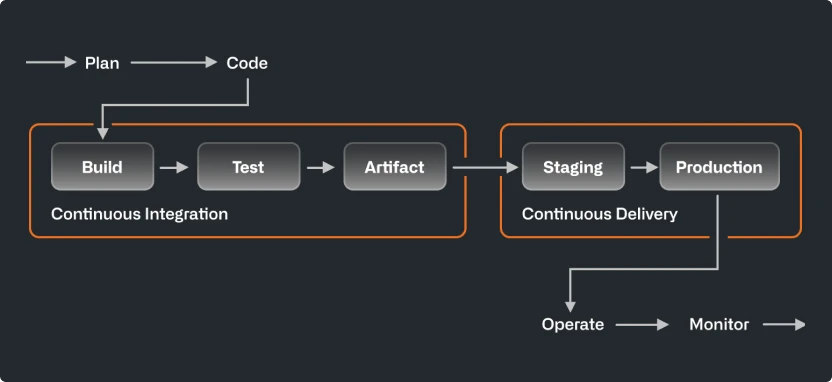
When someone says CI/CD, the “CD” they’re referring to is usually continuous delivery, not continuous deployment. What’s the difference? In a CI/CD pipeline that uses continuous delivery, automation pauses when developers push to production. A human—your operations, security, or compliance team—still needs to manually sign off before final release, adding more delays. On the other hand, continuous deployment automates the entire release process. Code changes are deployed to customers as soon as they pass all the required tests.
Continuous deployment is the ultimate example of DevOps automation. That doesn’t mean it’s the only way to do CI/CD, or the “right” way. Since continuous deployment relies on rigorous testing tools and a mature testing culture, most software teams start with continuous delivery and integrate more automated testing over time
The short answer: Speed. The State of DevOps report found organizations that have “mastered” CI/CD deploy 208 times more often and have a lead time that is 106 times faster than the rest. While faster development is the most well-known benefit of CI/CD, a continuous integration and continuous delivery pipeline enables much more.
- Development velocity: Ongoing feedback allows developers to commit smaller changes more often, versus waiting for one release.
- Stability and reliability: Automated, continuous testing ensures that codebases remain stable and release-ready at any time.
- Business growth: Freed up from manual tasks, organizations can focus resources on innovation, customer satisfaction, and paying down technical debt.
Teams make CI/CD part of their development workflow with a combination of automated process, steps, and tools.
-
Version control:: CI begins in shared repositories, where teams collaborate on code using version control systems (VCS) like Git. A VCS tracks code changes, simplifies reversions, and supports config as code for managing testing and infrastructure. Learn more about version control
-
Builds: CI build tools automatically package up files and components into release artifacts and run tests for quality, performance, and other requirements. After clearing required checks, CD tools send builds off to the operations team for further testing and staging. Learn more about CI testing
-
Reviews and approvals: Treating code review as a best practice improves code quality, encourages collaboration, and helps even the most experienced developers make better commits. In a CI/CD workflow, teams review and approve code or leverage integrated development environments for pair programming. Learn more about code review
-
Environments: CI/CD tests and deploys code in environments, from where developers build code to where operations teams make applications publicly available. Environments often have their own specific variables and protection rules to meet security and compliance requirements. Learn more about protected environments
You can find a practical introduction to GitHub Actions here.