morgan bergen jan 24 2023
contents
- software's life cycle
- development life cycle
- major development activities
- a program's maintenance life cycle
- what about a program's internal life cycle?
- the "hello world" program
- the "hello world" program in ASCII
- the "hello world" program in binary
- compiling the "hello world" program
- a simplified compilation process
- running the executable object code
- how the "running" happens
- the program output displayed
- summary
- development life cycle
- maintenance life cycle
- runtime life cycle
- in software engineering, we emphasize the development life cycle
- the development life cycle is the process of creating a software system
- the development life cycle is a series of steps that a software engineer follows to create a software system
from the idea ---> ? ---> to the code #include ... main() { }
-
requirements engineering: to identify, model, analyze, document, and validate the requirements of a software system
-
software design: to develop a software solution that addresses the requirements of a software system
-
software construction: to convert the deign (solution) into code
-
software testing: to conduct various testing techniques to identify and remove defects
-
different development models define the specific steps and ordering of the above activites
- in software engineering, we emphasize the maintenance or evolution life cycle
- types of maintenance
- corrective: to remove defects
- perfective: to add new features
- adaptive: to adapt to changes
- preventative (refactoring): to improve the design of the software system
user ----problem-report----> site analyst ---->change-req-form----> configuration board ----validated-change----> developer ---implemented-changes----> new version #include main(){}
- but what happens to a program at run-time?
#include... main() {...} ----> ? ----> hello world
from the classic K&R C book
#include <stdio.h>

int main() {
    printf("hello, world\n");
}- most modern systems represent character using the ascii standard
#include <stdio.h> int main() { printf("hello, world\n"); }
35 105 110 99 108 117 100 101 32 60 115 116 100 105 111 46 104 62 32 105 110 116 32 109 97 105 110 32 40 41 32 123 112 114 105 110 116 102 40 34 72 101 108 108 111 44 32 119 111 114 108 100 33 92 110 34 41 59 125
#include <stdio.h> int main() { printf("hello, world\n"); }
00100011 01101001 01101110 01100101 00100000 00111100 01101111 00101110 01101000 01110100 00100000 01101101 00101000 00101001 00100000 01101110 01110100 01100110 01101100 01101100 01101111 01110010 01101100 01100100 00101001 00111011 01111101 01100011 01101100 01110101 01100100 01110011 01110100 01100100 01101001 00111110 00100000 01101001 01101110 01100001 01101001 01101110 00100000 01111011 01110000 01110010 01101001 00101000 00100010 01001000 01100101 00101100 00100000 01110111 01101111 00100001 01011100 01101110 00100010
- let's suppose we name our program
hello-pgm.c - to compile the program on a linus system we enter the following
unix> gcc -o hello-pgm.exe hello-pgm.c
where gcc is the C compiler

hello-pgm.exe will be executable code
Unix Executable File
-
the preprocessor (cpp) handles directives such as
#include(e.g. servertsstdio.hinto the program) -
the compiler (cc1) translates to assembler code
-
the assembler (as) translates into machine instructions
-
the linker (ld) merges into other programs or library executables needed for the final functionality
-
to run at command line, we enter
unix> hello-pgm.exe -
we will get the following output
hello, world -
how does this happen inside our computer system?
- user enters
hello-pgm.exe; each character is read from the keyboard, stored into a register, then stored into memory, the system will look for the program to execute
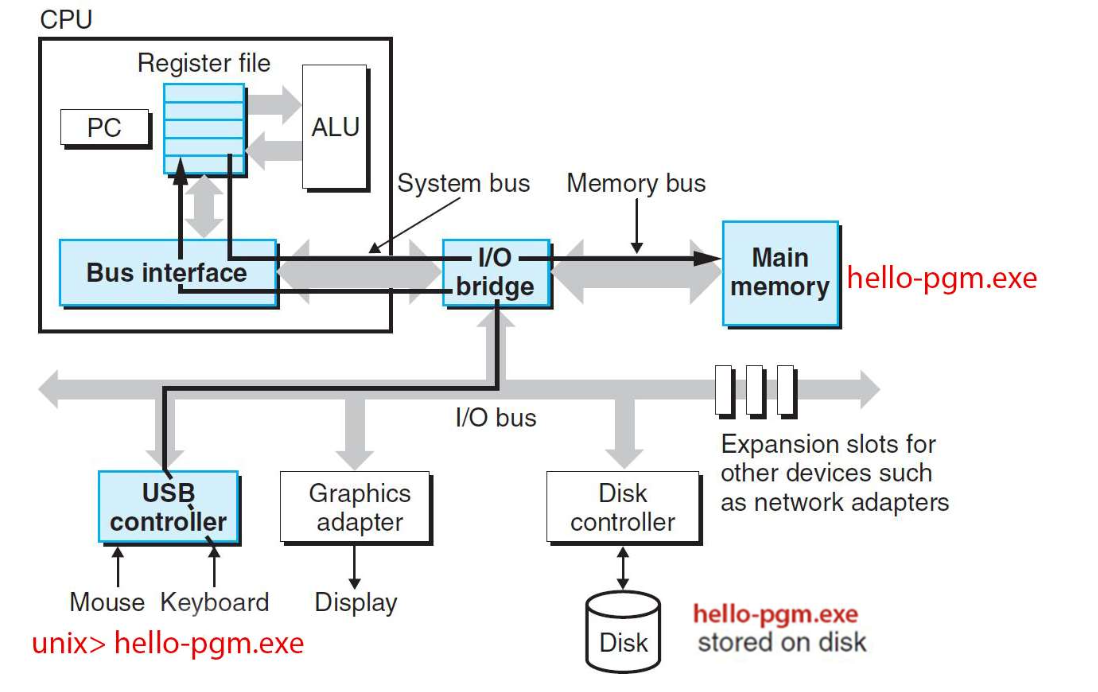
- once the program instructions are executed, the results (output) are moved from the register to the display device
-
it's important that we understand a program's various life cycles
-
we very briefly looked at three life cycles
-
development (focus of the course)
-
maintenance
-
internal (in a computer system)
-
it is important to note that many individuals, processes, and computer components are involved