HashSet is a collection of unique elements.
We have a bag, which has some numbers inside it.
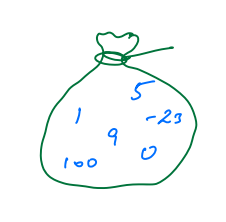
This bag has unique elements, which means every number appears once only.
If we want to add 9 in a bag, then it will be not inserted as the bag already has 9.
Some other examples which contain unique elements are:
- Email-id
- username
- Fingerprints
Let us assume we have an array arr = [1, 3, -2, 7, 1, 1, -2]
Now if we want to create a HashSet of it then it contains unique elements.
HS = [1, 7, -2, 3]
Here we can see that hashset does not have any sequence of elements.
HashSet<Type> hs = new HashSet<Type>();Here Type can be any class
We can perform the following operations on HashSet.
- Add: Used to add element in HashSet.
- Contains Used to check whether HashSet contains a certain element or not.
- Size
- Remove
- Print: We use each loop for printing the elements of HashSet
For the given HashSet hs, what will be the size after the following operations?
HashSet<Integer> hs = new HashSet<Integer>();

hs.add(3);
hs.add(-2);
hs.add(10);
hs.add(3);
hs.add(10);
hs.add(0);
Choices
- 2
- 3
- 5
- 4
Explanation
The unique elements added to the HashSet are: 3, -2, 10, 0.
So, the size of the HashSet is 4.
Example
import java.util.*;
import java.lang.*;
class Main{
    public static void main(String args[]){
        HashSet<Integer> hs = new HashSet<Integer>();

        //printing HashSet
        System.out.println(hs);

        // add
        hs.add(3);
        hs.add(-2);
        hs.add(10);
        hs.add(3);
        hs.add(10);
        hs.add(0);


        System.out.println(hs);


        // Contains
        System.out.println(hs.contains(3));
        System.out.println(hs.contains(-1));


        // Size
        System.out.println("Size is: " + hs.size());


        // Remove
        hs.remove(3);
        System.out.println(hs);


        // print
        for(Integer i : hs){ // for each loop
            System.out.println(i);
        }
    }
}
Output:
[]
[0, -2, 3, 10]
true
false
Size is: 4
[0, -2, 10]
- Sequential order.
- Duplicates allowed
- Sequence not maintained
- Unique element present only.
Given an integer array as input, add its elements to a HashSet and return the HashSet.
import java.util.*;
import java.lang.*;
class Main{
    public static HashSet<Integer> convertToHashset(int[] arr){
        HashSet<Integer> ans = new HashSet<Integer>();
        for(int i = 0; i < arr.length; i++){
            ans.add(arr[i]);
        }
        return ans;
    }
    public static void main(String args[]){
        int arr[] = {1, 4, 3, -2, 1, 1, 4, 5, 3};
        System.out.println(convertToHashset(arr));
    }
}
Output:
[1, -2, 3, 4, 5]
Given 2 HashSet as input, print their common elements.
Input: HS1: {0, -2, 4, 10} HS2: {1, -2, 3, 4, 5}
Output: -2 3
We have to print the elements that are present in both the HashSet.
import java.util.*;
import java.lang.*;
class Main{
    public static void intersect(HashSet<Integer> hs1, HashSet<Integer> hs2){
        for(Integer i : hs1){
            if(hs2.contains(i)){
                System.out.print(i + " ");
            }
        }
    }
    public static HashSet<Integer> convertToHashset(int[] arr){
        HashSet<Integer> ans = new HashSet<Integer>();
        for(int i = 0; i < arr.length; i++){
            ans.add(arr[i]);
        }
        return ans;
    }
    public static void main(String args[]){
        int arr[] = {1, 4, 3, -2, 1, 1, 4, 5, 3};
        HashSet<Integer> hs1 = convertToHashset(arr);
        System.out.println(hs1);

        int arr2[] = {0, -2, 3, 10};
        HashSet<Integer> hs2 = convertToHashset(arr2);
        System.out.println(hs2);

        intersect(hs1, hs2);
    }
}
Output:
[1, -2, 3, 4, 5]
[0, -2, 3, 10]
-2 3
What operation is used to remove an element from a HashSet?
Choices
- Add
- Size
- Remove
- Contain
Explanation
The `Remove` operation is used to remove an element from a HashSet.
HashMap is a data structure which contains key-value pairs.
Let us suppose we have states and its population.
| States | Population |
|---|---|
| Punjab | 15 |
| Haryana | 18 |
| UP | 20 |
| Delhi | 18 |
Now if we have the above data, and our question is to tell the population of UP, then we can simply tell the value next to UP(20). Here we can say UP->20 is a pair, where UP is a key, corresponding to which some values are stored, and by this key, we access the data.
Here states are key and population are values.
| States(key) | Population(value) |
|---|---|
| Punjab | 15 |
| Haryana | 18 |
| UP | 20 |
| Delhi | 18 |
Some other examples are:
- User id -> password
- Word -> Meaning (dictionary)
- Duplicate values are allowed
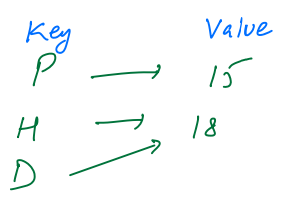
- Duplicate keys are not allowed.
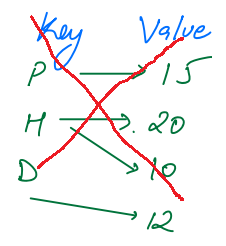
- No order of data, key-value pairs are in random order.
HashMap<keyType, valueType> hm = new HashMap<keyType, valueType>();We can perform the following operations on HashMap.
- Put
- Contains
- Get
- Update
- Size
- Remove
import java.util.*;
import java.lang.*;
class Main{
    public static void main(String args[]){

        HashMap<String, Integer> hm = new HashMap<String, Integer>();


        // add
        hm.put("Delhi", 18);
        hm.put("Punjab", 20);
        hm.put("Haryana", 18);
        hm.put("Goa", 5);


        System.out.println(hm);


        // Contains
        System.out.println(hm.containsKey("Gujarat"));
        System.out.println(hm.containsKey("Goa"));

        // Get
        System.out.println(hm.get("Gujarat"));
        System.out.println(hm.get("Goa"));


        // Update
        hm.put("Goa", 6);
        System.out.println(hm);

        // Size
        System.out.println("Size is: " + hm.size());


        // Remove
        hm.remove("Goa");
        System.out.println(hm);


        // print
        // 1. get all keys
        // hm.keySet()-> returns a set of keys of HashMap
        // 2. Use keys to iterate over the map
        for(String state : hm.keySet()){
            System.out.println(state + " -> " + hm.get(state));
        }
    }
}
Output:
{Delhi = 18, Haryana = 18, Goa = 5, Punjab = 20}
false
true
null
5
{Delhi = 18, Haryana = 18, Goa = 6, Punjab = 20}
Size is: 4
{Delhi = 18, Haryana = 18, Punjab = 20}
Delhi -> 18
Haryana -> 18
Punjab -> 20
In a HashMap, what is the purpose of the get operation?
Choices
- Add a key-value pair
- Retrieve the value associated with a key
- Check if a key is present
- Remove a key-value pair
Explanation
The `get` operation in HashMap is used to retrieve the value associated with a given key.
| Method | Description | Example |
|---|---|---|
put(K key, V value) |
Inserts or updates a key-value pair. | map.put("Apple", 3); |
get(Object key) |
Retrieves the value for the specified key. | map.get("Apple"); |
remove(Object key) |
Removes the mapping for the key. | map.remove("Apple"); |
containsKey(Object key) |
Returns true if the key exists. |
map.containsKey("Banana"); |
containsValue(Object value) |
Returns true if the value exists. |
map.containsValue(5); |
keySet() |
Returns a set of all keys. | Set<String> keys = map.keySet(); |
values() |
Returns a collection of all values. | Collection<Integer> values = map.values(); |
entrySet() |
Returns a set of all key-value pairs. | Set<Map.Entry<String, Integer>> entries = map.entrySet(); |
size() |
Returns the number of key-value pairs. | map.size(); |
isEmpty() |
Returns true if the map is empty. |
map.isEmpty(); |
clear() |
Removes all mappings from the map. | map.clear(); |
putAll(Map<? extends K, ? extends V> m) |
Copies all mappings from another map. | map.putAll(anotherMap); |
getOrDefault(Object key, V defaultValue) |
Returns value if key exists, else default. | map.getOrDefault("Grapes", 0); |
replace(K key, V value) |
Replaces value for key if key exists. | map.replace("Banana", 7); |
replace(K key, V oldValue, V newValue) |
Replaces value if key exists and matches old value. | map.replace("Banana", 5, 8); |
compute(K key, BiFunction<? super K, ? super V, ? extends V> remappingFunction) |
Computes new value for the key. | map.compute("Banana", (k, v) -> v + 2); |
computeIfAbsent(K key, Function<? super K, ? extends V> mappingFunction) |
Computes value if key is absent. | map.computeIfAbsent("Mango", k -> 5); |
computeIfPresent(K key, BiFunction<? super K, ? super V, ? extends V> remappingFunction) |
Computes if key exists. | map.computeIfPresent("Apple", (k, v) -> v + 1); |
merge(K key, V value, BiFunction<? super V, ? super V, ? extends V> remappingFunction) |
Merges value for key. | map.merge("Banana", 3, Integer::sum); |
Given an integer array as input, return the corresponding frequency map.
Input: arr = [1, 4, 3, -2, 1, 1, 4, 5, 3]
Output:
hm = {
    1: 3,
    4: 2,
    3: 2,
    -2: 1,
    5: 1
}
In this, we iterate over every element of an array, for every element we have two possibilities.
- Current element is not in the hashmap(
hm.containsKey(arr[i]) == false). then add the current element into HashMap with frequency 1. - The current element is already present in the HashMap as a key and has some value. then simply increase the previously stored frequency of the current element by 1.
import java.util.*;
import java.lang.*;
class Main{
    public static HashMap<Integer, Integer> freqMap(int arr[]){
        HashMap<Integer, Integer> hm = new HashMap<Integer, Integer>();
        for(int i = 0; i < arr.length; i++){
            // case 1 - arr[i] not present in hashmap
            if(hm.containsKey(arr[i]) == false){
                hm.put(arr[i],1);
            }
            // case - arr[i] already present in hashmap
            // before current element, hm -> {2: 3}
            // current -> 2
            // hm -> {2: 3}
            else{
                int beforeValue = hm.get(arr[i]);
                int newValue = beforeValue + 1;
                hm.put(arr[i], newValue);
            }
        }
        return hm;
    }
    public static void main(String args[]){
        int arr[] = {1, 4, 3, -2, 1, 1, 4, 5, 3};
        System.out.println(freqMap(arr));
    }
}
Output:
{1 = 3, -2 = 1, 3 = 2, 4 = 2, 5 = 1}
Input: arr[] = {1, 4, 3, -2, 1, 1, 4, 5, 3}
Solution:
- Initially our hashmap is empty,
hm = {}, - Now we start iterating array elements, first element is 1, it is not in HashMap so if the condition becomes true, then we will simply put this element in the map with frequency 1.
hm = {1: 1}. - Next element is 4, it is also not in HashMap so if the condition becomes true, then we will simply put this element in the map with frequency 1.
hm = {1: 1, 4: 1}. - Next element is 3, it is also not in HashMap so if the condition becomes true, then we will simply put this element in the map with frequency 1.
hm = {1: 1, 4: 1, 3: 1}. - Next element is -2, it is also not in HashMap so if the condition becomes true, then we will simply put this element in the map with frequency 1.
hm = {1: 1, 4: 1, 3: 1, -2: 1}. - The next element is 1, it is available in HashMap, so if the condition becomes false, we will go to the else part.
beforeValue = hm.get(1) = 1
newValue = beforeValue + 1 = 1 + 1 = 2
hm.put(1, 2)
then hashmap becomes, hm = {1: 2, 4: 1, 3: 1, -2: 1}.
7. The next element is again 1, it is available in HashMap, so if the condition becomes false, we will go to the else part.
beforeValue = hm.get(1) = 2
newValue = beforeValue + 1 = 2 + 1 = 3
hm.put(1, 3)
then hashmap becomes, hm = {1: 3, 4: 1, 3: 1, -2: 1}.
8. The next element is 4, it is available in HashMap, so if the condition becomes false, we will go to the else part.
beforeValue = hm.get(4) = 1
newValue = beforeValue + 1 = 1 + 1 = 2
hm.put(4, 2)
then hashmap becomes, hm = {1: 3, 4: 2, 3: 1, -2: 1}.
9. Next element is 5, it is also not in HashMap so if the condition becomes true, then we will simply put this element in the map with frequency 1. hm = {1: 3, 4: 2, 3: 1, -2: 1, 5: 1}.
10. The next element is 3, it is available in HashMap, so if the condition becomes false, we will go to the else part.
beforeValue = hm.get(3) = 1
newValue = beforeValue + 1 = 1 + 1 = 2
hm.put(3, 2)
then hashmap becomes, hm = {1: 3, 4: 2, 3: 2, -2: 1, 5: 1}.