Hi @EdoFro
As promised, I'm trying to get back to you.
Currently I have a folder that is synced with Nextcloud on my LINUX computer and my WINDOWS computer. The folder structure is obviously the same, the root folder node is the same and the synchronization is not a problem.
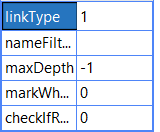
MDI works perfectly well under linux. On the other hand, when I switch to windows the command does not seem to work but does not return any error message. Here my root node MDI config
-- linkType:
   Define if you want to use Absolute or Relative
   links for files and folders.
set to: 0: to use Absolute links
1: to use Relative links
==========================================
================ MDI =====================
The import of files and folders can be adapted by providing various options in the attributes of the BaseFolder node:

-- nameFilter:

   A filter to perform on the name of traversed files. If set, only files which match are brought.
    This option allowes four types of inputs:
       1. nothing (empty) means no filtering (default)
       2. regex                   - example:       ~/.*\.mp3/
       3. 'simplified' regex    - example:       ~.*\.mp3
       4. string with *          - example:       *.mp3    (equivalent to regex      ~/(?i).*\.mp3/  )
       5. list of strings with * and ;         - example:       *.mp3;*.png   (equivalent to regex      ~/(?i)(.*\.mp3|.*\.png)/  )

-- maxDepth:
   The maximum number of directory levels when recursing
    (default is -1 which means no limit, set to 0 for no recursion)

-- markWhenMoved:
   change styles to moved/renamed file Nodes
set to: 0 : to change style only if node hasn't a previous one (default),
1 : to allways change the style,
-1 : to never change the style


-- checkIfReallyBroken:
   Check if existing nodes pointing to filtered files still exist.
   This option is only useful if you defined a nameFilter before
   but in the map there are also some files that doesn't match
   this filter definition
   (for example if you brought them manually or import them
   before the actual namefilter setting)

- default is 0 which means don't check --> Mark node as missing also if it doesn't match the current filter,

- set to 1 to extra check if a not matching file still exists in drive
==========================================
What information do you need? I still have both computers in front of me for less than 2 hours

Hi @EdoFro
As promised, I'm trying to get back to you.
Currently I have a folder that is synced with Nextcloud on my LINUX computer and my WINDOWS computer. The folder structure is obviously the same, the root folder node is the same and the synchronization is not a problem.
MDI works perfectly well under linux. On the other hand, when I switch to windows the command does not seem to work but does not return any error message. Here my root node MDI config
What information do you need? I still have both computers in front of me for less than 2 hours