Spacetime Meta Map Actual Official Link: ---- (will update on public mint)
The map is still in heavy developement! Please be aware that there will be constant updates to this documentation and you might have to update your app/chunk to keep up with the latest methods
As of 2022-02-03, the easy way to update your chunk is by using the Nami wallet.
To connect a website to the metaverse, you will need the following 5 things:
-
IPFS hash of your 3D icon
This part is optional, if you dont put anything, the loader will generate a default planet for your location. If you want to customize the appearance of your icon/planet, you will need a 3D model in the .gltf/.glb file format.
Once loaded in the map, you model will be scaled down to 1mx1mx1m so it is recomemded you keep that in mind to avoid weird scaling. -
Link to your project logo
This should be a square image, idealy 64x64. -
Link to your banner image
This should be a 1920x1080 image. -
Link to your app
This is the link people will follow when entering your planet. -
Name to display
This is the short text that appears when users mouse hover your planet.
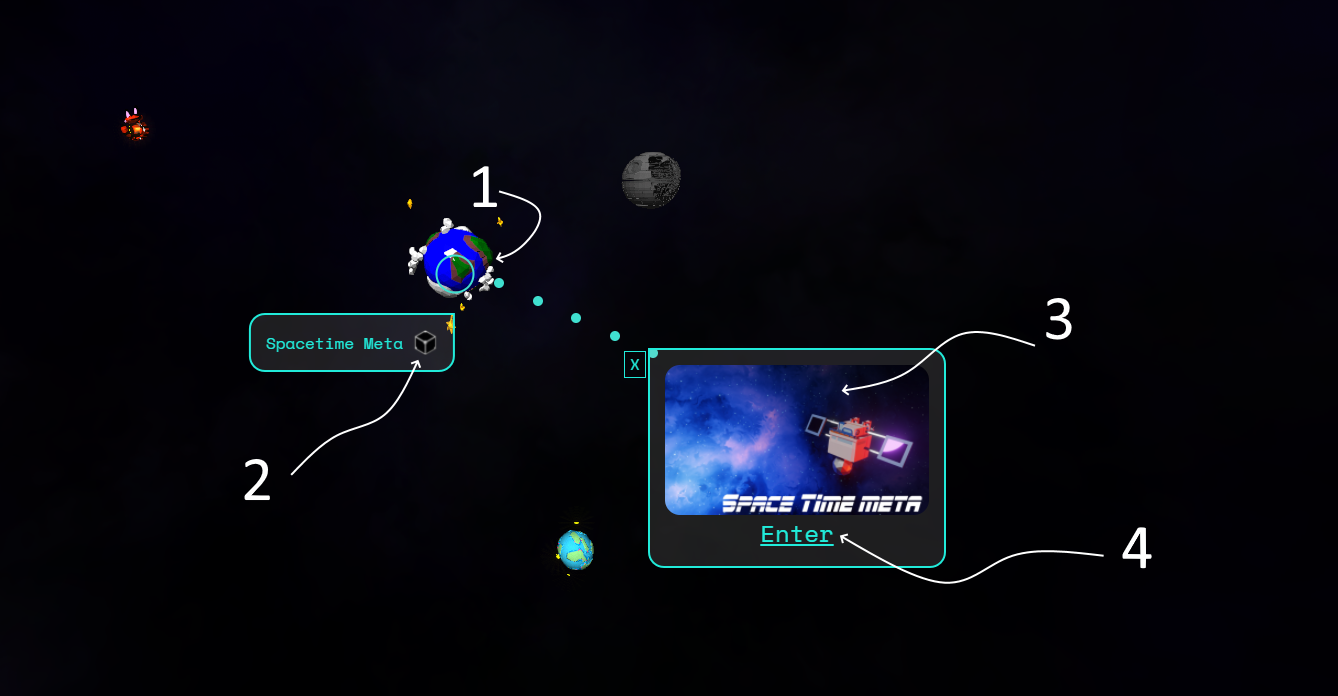
Once you have all 5 items, go to the icon tester at https://www.stmdev.netlify.app/tester.html. You will see a form and need to fill it with the information you gathered earlier.
Have difficulty updating your planet?
Join our Official Discord and ask question. Someone will help you.